Bring connectivity, context, and control to Microsoft AI agents

Connect AI powers agents that can securely read, write, and act on real-time data across 350+ enterprise systems.

Get Started Free

Trending sources for Copilot:

Drive
Netsuite
Snowflake
Popular Copilot integrations
CData + Copilot

The enterprise data layer for Microsoft's AI ecosystem

Copilot logo

Copilot Studio

Extend your agents to 350+ enterprise systems through one managed MCP connection. Access SAP, Salesforce, Oracle, ServiceNow, and more in real-time while your existing topics gain semantic understanding of each system.

Azure AI Foundry

Azure AI Foundry

Build AI applications that reason across the entire data landscape. Enterprise teams get tools for complex multi-source analysis, while software providers can offer instant connectivity to customer systems without building integrations. All on a neutral infrastructure layer that future-proofs your AI investments.

Agent 365

Agent 365

The perfect governance complement to Connect AI. Agent 365 controls what agents can do, while Connect AI manages secure data access. Inherit source system RBAC permissions with additional AI-specific controls, comprehensive logging, and complete security team oversight through Agent 365's framework

Trusted by Microsoft to provide MCP connectivity for leading enterprises

Sabin Nair
“By integrating with CData's Connect AI, we empower customers to build agents in Copilot Studio that seamlessly connect to hundreds of enterprise data sources. These agents leverage the semantic intelligence of underlying systems to deliver richer context and actionable insights with greater accuracy and efficiency. Meanwhile, IT retains full visibility and control through Agent 365's governance framework, ensuring secure and compliant use of CData's universal MCP toolset.”

Sabin Nair, Group Product Manager, Microsoft

Microsoft

Watch the Microsoft announcement and demo

Deploy a full agent stack with Microsoft and CData

Build, connect, and deploy agents with complete visibility and control
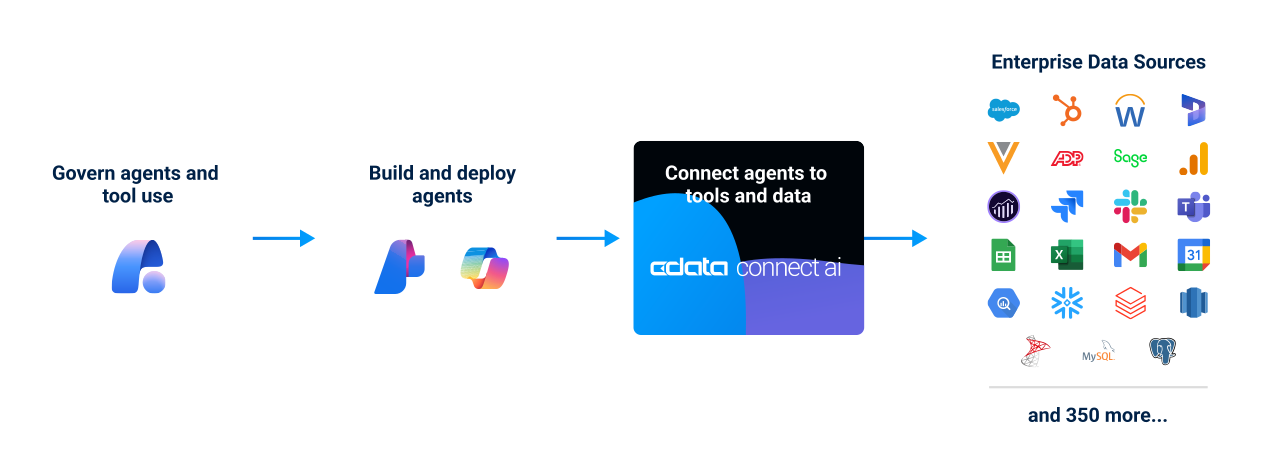
Connect AI Agent Diagram

Try it yourself: Start connecting data to agents in Copilot in minutes

MCP connectivity that goes beyond the Microsoft ecosystem

Managed MCP with Connect AI
Individual user MCP connections
One governed MCP connection for Copilot to 350+ enterprise systems—CRMs, ERPs, databases, analytics, and more—under a single governed layer.
Each data source requires a separate MCP server with its own tools, authentication and policies.
A unified response format model that returns data in a standardized semantic interface Copilot can interpret reliably, increasing token efficiency by pushing computation to the query engine instead of LLM
Copilot must filter, join, and group datasets logically through code, consuming up to 10X more tokens and ballooning costs in some cases
Universal MCP tools built for Copilot—plus the ability to define custom MCP tools for specialized workflows.
Varied based on each individual API, adding to MCP context bloat and overwhelming Copilot thinking windows
Centralized governance control plane for IT to monitor usage, enforce permissions, and audit all data access across agents and users.
Connections are configured ad hoc by users, with limited visibility or centralized access governance.
Guide

Build a sales support agent in Copilot with sample data

  • Step-by-step guide to build a new agent with sample test prompts
  • Set up with sample data in minutes
  • How to build and scale connected data for other custom agents in Copilot
Start the tutorial
Watch the demo video
Connect AI + Copilot

Be an AI data hero!

Want connected data for Microsoft Copilot at work? Send our free template email ask and pitch deck to your leadership or IT and be the data hero that brings data-connected agents in Copilot to your company.


Start querying data from Microsoft Copilot within minutes

Start a 14-day free trial and see the difference connected data makes for agents in Copilot yourself