CData offers a trusted solution for fast and dependable SQL Server data integration, helping enterprises move operational data into Snowflake without fragile custom scripts or unexpected costs. As organizations modernize their data infrastructure, the need to build ETL pipelines from SQL Server to Snowflake using real-time integration tools becomes critical, especially as legacy SSIS jobs drag down performance and unpredictable row-based billing inflates costs.
Unlike traditional approaches that rely on scripting or platform-specific tooling, CData employs a connector architecture that supports high-speed ingestion, push-down optimization, and automated incremental syncs without compromising on control or governance.
The result is faster analytics, lower Snowflake spend, and pipelines you can deploy and scale without a DevOps team.
In this blog, we’ll explore five best practices to streamline your SQL Server to Snowflake pipelines for performance, efficiency, and long-term scalability.
Why SQL Server teams are embracing Snowflake for analytics
Snowflake delivers the scalability and cost efficiency SQL Server teams need for cloud-native, flexible analytics, avoiding overprovisioning with pay-per-second pricing. With 56% YoY growth in product usage, Snowflake is leading the shift to cloud-native platforms.
Backed by more than 10 years of modernization expertise, CData helps teams streamline infrastructure, reduce latency, and unlock more value by migrating from SQL Server to Snowflake.
Common use cases driving the shift
360-degree customer analytics by joining operational SQL Server data with CRM, marketing, and support systems
IoT log aggregation for powering near-live dashboards and anomaly detection
Financial forecasting using years of transactional and historical performance data
All benefit from live SQL Server changes landing in Snowflake within minutes.
Challenges that make integration complex
SQL Server and Snowflake use different data type systems, and fields like DATETIMEOFFSET can cause compatibility issues during migration.
Snowflake stores primary and foreign keys as metadata only, making it harder to enforce referential integrity at the database level.
Rewriting complex T-SQL logic to work with Snowflake’s SQL syntax can be time-consuming and prone to errors.
Misconfigured change data capture (CDC) pipelines or SQL Server triggers can impact production performance or lead to data loss.
Each of these challenges introduces risk, delay, or cost, but with the right strategy, they can all be addressed through targeted best practices.
1. Choose a connector-based ETL platform like CData Sync
Connector-based ETL platforms offer a modern alternative to brittle, hardcoded data pipelines. With more than 350 prebuilt connectors, SQL push-down, and secure, agentless connectivity that works without opening firewall ports, CData Sync delivers speed and control. For regulated SQL Server environments, it also offers SOC 2 compliance and self-hosted deployment to meet governance needs.
No-code connectors vs DIY scripting & SSIS
Manual scripting and SSIS packages often require weeks of development, intensive debugging, and constant updates. In contrast, connector-based platforms deliver instant connectivity and reduce operational friction with no-code deployment, built-in change tracking, and enterprise-ready security.
Feature | No-Code Connectors | DIY/SSIS |
Time to Deploy | Hours | Days to weeks |
Ongoing Maintenance | Minimal – automatic schema handling | High – frequent breakage and patching |
Real-Time CDC Support | Built-in, with point-and-click enablement | Requires custom coding or third-party plugins |
Security Reviews | SOC 2 compliant, self-hosted, or cloud-deployable | Manual review of scripts, varied security levels |
According to the 2023 Stack Overflow Developer Survey, 42% of data engineers report spending over 10 hours per week fixing broken data pipelines, highlighting the operational burden of DIY approaches.
Case study: Recordati unifies SAP and SQL Server
A pharmaceutical company, Recordati, adopted CData Sync alongside existing SSIS workflows to enable real-time data replication across SAP and SQL Server environments, reducing latency and operational overhead while maintaining legacy compatibility.
Read the case study
Predictable connection-based pricing and deployment flexibility
CData Sync uses a simple connection-based pricing model, avoiding the unpredictable costs of row or volume-based fees; your cost stays the same whether syncing 10 million or 10 billion rows. You can deploy on-premises, in AWS, Azure, or containers with no feature gaps, no egress charges, and full control over data residency and security.
2. Use change data capture to enable real-time analytics
CDC is a lightweight SQL Server feature that tracks row-level INSERT, UPDATE, and DELETE operations for downstream replication. As real-time analytics becomes standard, CDC offers a way to keep Snowflake synced with fresh operational data without disrupting production data.
How to enable CDC with minimal overhead
Ensure you're running SQL Server Enterprise or Standard Edition 2016 or later.
Use the sys.sp_cdc_enable_table command to turn on CDC for each source table.
Run the capture job every 30–60 seconds for most workloads.
Note: CData Sync reads from CDC log tables, not the transaction log, so there’s zero impact on production and there's no risk of changing the database since the underlying connector only needs read access, never sysadmin permissions.
Landing changes in Snowflake with CData Sync and CDC
Below is the replication process flow followed by CData Sync:
CData Sync creates a temporary (staging) table in Snowflake to hold incoming change data.
It creates or reuses an internal stage associated with the staging table.
Sync writes each batch of change records to a local file (e.g., CSV or Parquet), rather than combining all records into one file.
Sync uploads each file to the internal stage using Snowflake’s native APIs.
It loads the file into the staging table using the COPY INTO command.
CData Sync merges the data from the staging table into the final target table using a MERGE statement, applying inserts, updates, and deletes as needed.
CData generates Snowflake-optimized COPY INTO commands with the right file_format settings, minimizing manual tuning and maximizing throughput.
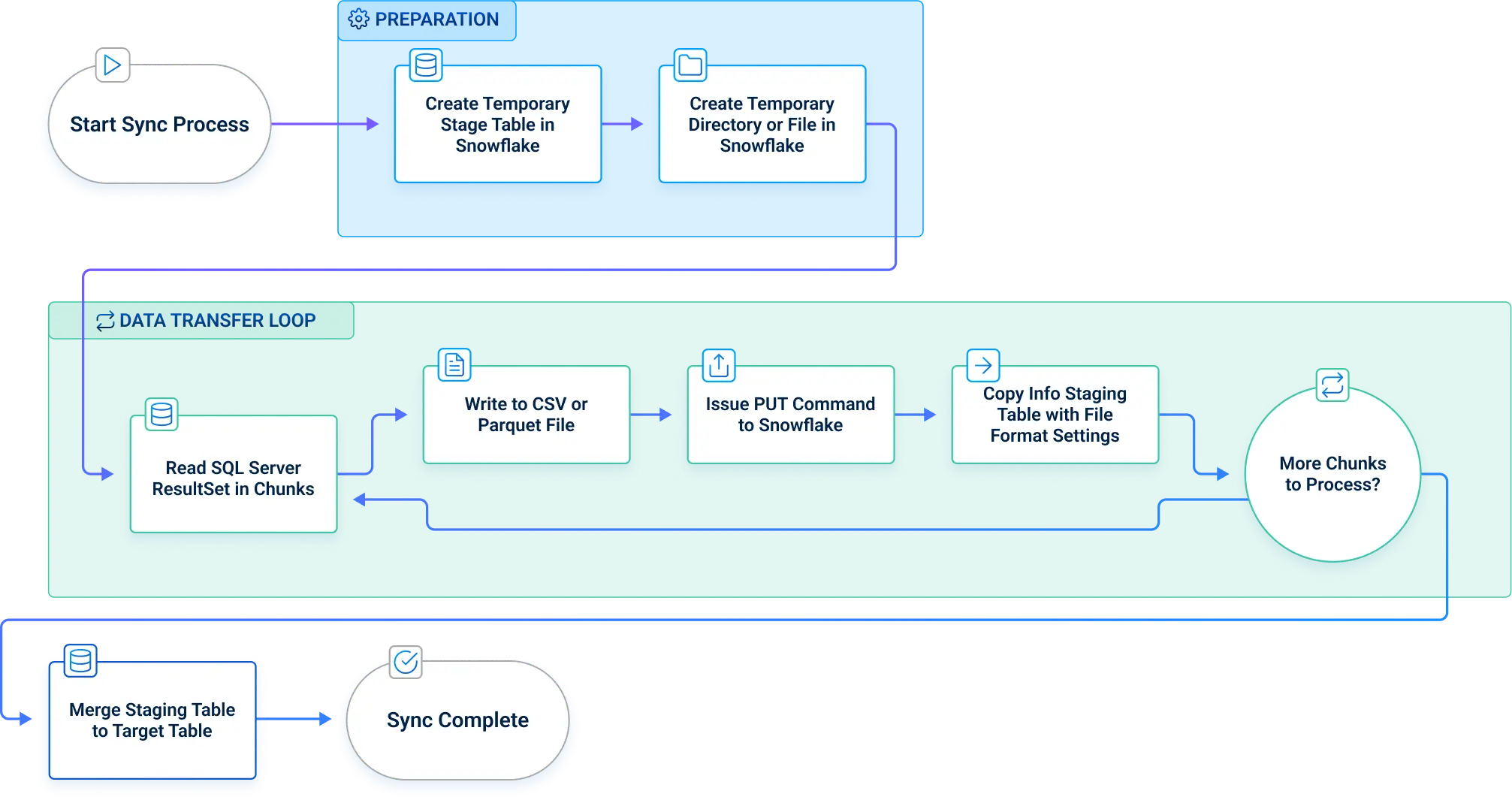
This approach allows CData to support parallel uploads (up to 5 threads), chunked file batching, and fully automated staging/merging; all while adhering to Snowflake's loading and performance best practices.
3. Standardize schema and data types before cutover
Aligning schemas between SQL Server and Snowflake is critical to prevent query errors, data type mismatches, and transformation failures during or after migration.
Mapping SQL Server datetime, money, and hierarchical columns
Snowflake handles data types differently from SQL Server, so it's essential to apply the correct mappings up front:
CData Sync simplifies this process with auto-mapping for the most common types and allows manual overrides directly in the UI for custom use cases.
Preserving primary and foreign keys as Snowflake metadata
Snowflake stores primary and foreign key constraints as informational metadata only; they are not enforced at runtime. For example, CData generates DDL like:
CONSTRAINT FK_Customer_Order FOREIGN KEY (CustomerID) REFERENCES Customers(CustomerID) NOT ENFORCED
To ensure relational integrity, we recommend enabling CData Sync’s pre-load validation step to catch orphaned rows or key violations early.
Benefit: This prevents costly delete/insert operations later and ensures smoother downstream querying.
4. Optimize load patterns for performance and cost
Based on internal benchmarks, as much as 80% of Snowflake spend often ties directly to warehouse size and data load strategy, making optimization essential for long-term cost control.
Choosing between batch, micro-batch, and streaming loads
Each load pattern fits different operational needs:
Batch loads move large data volumes on a fixed schedule (e.g., nightly).
Micro-batch loads small changes at regular short intervals (e.g., every 5 minutes).
Streaming loads deliver data continuously as it's generated.
Use case examples:
Batch: Nightly financial or compliance reports
Micro-batch: Inventory or order status updates every 5 minutes
Streaming: Clickstream tracking or IoT sensor ingestion
Recommendation: Most enterprise BI use cases benefit from starting with 5-minute micro-batch intervals as a practical balance between freshness and cost.
Right-sizing warehouses and using auto-suspend to control spend
Snowflake virtual warehouses range from X-Small, signal node instances to 6X-Large, 512-node instances, with compute power scaling linearly. To avoid runaway compute spending:
CData further supports cost management by tagging its username on each load job, making it easy to track and attribute spend in Snowflake Account Usage views.
This smart alignment of load strategy, warehouse sizing, and pipeline tagging ensures optimal performance without unnecessary cost.
5. Build in monitoring, alerting, and iterative improvement
A pipeline is never done—measure, alert, refine.
Tracking pipeline health and data freshness
Reliable data delivery depends on continuous visibility into performance. Key metrics to track include:
Lag seconds between source and target
Rows per second
Time of last successful run
Retry count for failed loads
CData Sync supports API-based monitoring for job history and performance tracking.
Example API call:
GET http:///api.rsc/history?JobName=OrdersToSnowflake
This endpoint returns a structured history of job runs, allowing integration with external observability tools for alerts, dashboards, and trend analysis.
Auditing usage and spend with Snowflake Account Usage views
Snowflake’s ACCOUNT_USAGE schema provides built-in telemetry to help monitor warehouse consumption and query behavior. Two key views:
QUERY_HISTORY: Analyze query execution time, errors, and performance
WAREHOUSE_METERING_HISTORY: Track credit usage per warehouse over time
Example: Sum of Snowflake credits by warehouse and user
SELECT
warehouse_name,
user_name,
SUM(credits_used) AS total_credits
FROM SNOWFLAKE.ACCOUNT_USAGE.WAREHOUSE_METERING_HISTORY
GROUP BY warehouse_name, user_name
ORDER BY total_credits DESC;
When CData Sync tags each load job with a distinct username, it becomes easy to trace specific jobs, assign costs, and optimize warehouse usage over time.
Together, observability and cost-awareness turn your SQL Server to Snowflake pipeline into a living system, one that evolves and improves with your business.
Read a full guide: Automated SQL Server Replication to Snowflake
Frequently asked questions
Does CData Sync support on-premise SQL Server instances?
Yes. Deploy Sync inside your firewall or VNet and connect over standard ports, keeping SQL Server data on your network.
How does CData handle schema changes or new tables automatically?
Sync's incremental schema detection picks up new or altered tables at each job run and auto-generates matching Snowflake DDL.
Can I perform reverse ETL from Snowflake back to SQL Server?
Absolutely. Define Snowflake as the source and SQL Server as the destination in Sync to push cleaned data back for operational use.
What latency can I expect with near real-time replication?
Typical end-to-end lag is 30–120 seconds, depending on CDC polling and Snowpipe file-load intervals.
Is CDC supported without elevated database privileges?
Yes. Grant the database role db_datareader and explicit access to CDC tables; Sync never requires sysadmin rights.
Start your SQL Server to Snowflake integration journey with CData
To modernize your SQL Server to Snowflake pipeline, focus on real-time data movement, schema alignment, and continuous optimization. CData Sync makes it easy with a no-code platform built for performance and every architecture: on-premises, cloud, or hybrid.




