






Google Contacts JDBC Driver
Easily connect live Google Contacts data with Java-based BI, ETL, Reporting, AI/ML & Custom Apps.
Other Google Drivers
-

-

Google Calendar
learn more » -

Google Sheets
learn more » -

Google Drive
learn more » -

Google Directory
learn more » -

Google Campaign Manager 360
learn more » -

Google Ad Manager
learn more » -

Gmail
learn more » -

Google BigQuery
learn more » -

Google Spanner
learn more » -

Google Data Catalog
learn more » -

Google Cloud Storage
learn more » -

Google Ads
learn more » -

Google AlloyDB
learn more » -

Google Search
learn more » -

YouTube Analytics
learn more »
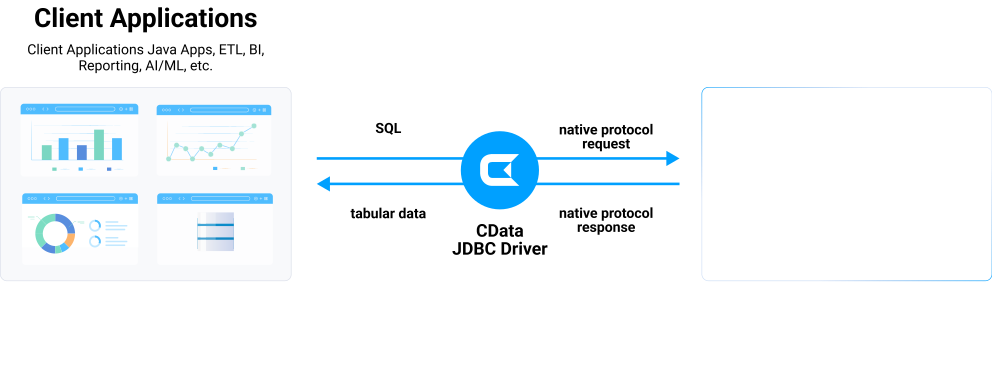
The Google Contacts JDBC Driver enables users to connect with live Google Contacts data, directly from any applications that support JDBC connectivity. An easy-to-use database-like interface for Java based applications and reporting tools access to live Google Contacts data (Contacts, Groups, etc).
Google Contacts
Google Contacts JDBC Connectivity Features
- Connect to live Google Contacts data, for real-time data access with the Google Contacts ODBC Driver
- Full support for data aggregation and complex JOINs in SQL queries
- Secure connectivity through modern cryptography, including TLS 1.2, SHA-256, ECC, etc.
- Seamless integration with leading BI, reporting, and ETL tools and with custom applications via the Google Contacts Connector.
Target Service, API
The driver connects to Google People API. Provides access to contacts and contact groups.
Schema, Data Model
Models contacts and groups as relational tables. Supports all contact fields and custom fields.
Key Objects
Contacts, Contact Groups, and Other Contacts. Full access to Google Contacts data.
Operations
CRUD operations on contacts. Query capabilities with search and filtering. Batch operations supported.
Authentication
OAuth 2.0 authentication with Google. Requires Contacts scope permissions.
Start a 30-day Free Trial Today
JDBC Access to Google Contacts
Full-featured and consistent SQL access to any supported data source through JDBC
-
Certified Compatibility*
Our drivers undergo extensive testing and are certified to be compatible with leading analytics and reporting applications like SAP Crystal Reports, Pentaho, Business Objects, Crystal Reports and many more.
-
Metadata Discovery
Full support for JDBC DatabaseMetaData provides extensive schema discovery capabilities. Explore tables, columns, keys, and other data constructs based on user identity.
-
Developer Friendly
Design-time support for all major Java IDEs, including Eclipse, IntelliJ, and NetBeans.
-
JDBC Remoting
Our exclusive remoting feature allows hosting the JDBC connection on a server to enable connections from various clients on any platform (Java, .NET, C++, PHP, Python), using any standards-based technology (ODBC, JDBC, etc.). JDBC Remoting is enabled using the popular MySQL wire protocol server.
-
Replication and Caching
Our replication and caching commands make it easy to copy data to local and cloud data stores such as Oracle, SQL Server, Google Cloud SQL, etc. The replication commands include many features that allow for intelligent incremental updates to cached data.
-
String, Date, Numeric SQL Functions
The driver includes a library of over 50 functions that can manipulate column values into the desired result. Popular examples include Regex, JSON, and XML processing functions.
-
Collaborative Query Processing
Our drivers enhance the data source's capabilities by additional client-side processing, when needed, to enable analytic summaries of data such as SUM, AVG, MAX, MIN, etc.
-
Easily Customizable and Configurable
The data model exposed by our JDBC Drivers can easily be customized to add or remove tables/columns, change data types, etc. without requiring a new build. These customizations are supported at runtime using human-readable schema files that are easy to edit.
-
Secure Connectivity
Includes standard Enterprise-class security features such as TLS/ SSL data encryption for all client-server communications.
See what you can do with Google Contacts JDBC Driver

Integrate Google Contacts into your systems and data warehouses through popular Java-based ETL/EAI tools. Supports both self-hosted environments and cloud service deployment.

Connect to Google Contacts from any JDBC-compatible BI, reporting, and data virtualization platform. Provides seamless integration using SQL as the standard query interface across all tools.

Use the Google Contacts JDBC Driver to rapidly deliver Java-based applications that connect with Google Contacts. Universal SQL-based interactivity simplifies integration and speeds time to market.
Connect to Google Contacts — empower every team
- CData JDBC Drivers for Google Contacts will act as if it is a native connector for you ETL, BI, Data Virtualization tool.
- Organizations can connect to the new services to capture full view of business, or migrate to modern data technology while maintaining the connection to existing sytems.
- Speed up your AI initiative with CData. Connect your data with the AI / ML platform of your choice.
Need to integrate your internal systems with Google Contacts? CData JDBC Drivers let you do it easily. Java based applications can easily connect to Google Contacts with SQL/JDBC — any ETL, EAI (Enterprise Application Integration), ESB (Enterpriese Service Bus) can connect to Google Contacts.
- Embed CData JDBC Drivers for Google Contacts to your product and differentiate with your connectivity
- Standard SQL access. Stop researching on different authentication, data model and query methods.
- Utilize your resource to build your product, CData takes care of your connectivity

AI-Assisted Development with CData Code Assist MCP
Build Google Contacts integrations faster with AI that understands your schema
Supported AI Coding Tools




Schema-Aware AI
Code Assist MCP gives AI coding tools direct access to your Google Contacts schema. No more guessing table names or column types—AI sees the same metadata as your JDBC Driver.
Same Schema, Same SQL
Table names, column names, and SQL syntax in Code Assist MCP are identical to this JDBC Driver. Queries you validate with AI work directly in your production code.
From Prototype to Production
Stop guessing. Start shipping. Prototype queries in conversation, validate against live data, then deploy with CData JDBC Drivers—no rewriting required.
Download Code Assist MCP
Free for development. No trial period. No credit card required.
Frequently Asked Google Contacts JDBC Driver Questions
Learn more about Google Contacts JDBC drivers for data and analytics integration
Can Google Contacts be used with Java?
Yes, Google Contacts can be used with Java . CData provides a JDBC type 4/5 driver for Google Contacts that allows Java applications to connect to Google Contacts using standard JDBC APIs. This driver enables you to execute SQL queries, manage connections, and process data stored in Google Contacts from Java, or any Java-based application that supports JDBC.
Does Google Contacts support JDBC?
Not natively. However, CData offers a JDBC driver for Google Contacts that allows you to connect to Google Contacts data from any Java-based application that supports JDBC, just like you would access a traditional database. This can be useful for tasks like:
- Accessing Google Contacts from applications: Connect to Google Contacts data in popular tools and applications including Informatica, Talend, Apache Spark, Apache NiFi, and many others.
- Real-time data: You can work with live Google Contacts data within these applications, enabling tasks like reporting and analysis.
- Connecting systems: Build data integrations between Google Contacts and other systems.
The Google Contacts JDBC driver is a pure Java type 4/5 driver with comprehensive ANSI SQL-92 support. This means that virtually any application that can connect to data via JDBC, can use the CData JDBC driver for real-time integration. Download a fully functional free trial of the Google Contacts JDBC driver today to get started.
Is there a JDBC driver for Google Contacts?
Yes, the CData JDBC driver for Google Contacts provides universal JDBC data connectivity for Google Contacts. The Google Contacts JDBC driver offers a simple SQL-based layer of abstraction that simplifies real-time data access for users and applications, enabling them to communicate with Google Contacts using a standardized set of functions. Virtually any application on any platform can use the CData JDBC driver for real-time integration.
How do I connect to Google Contacts via JDBC?
Connectivity to Google Contacts via JDBC is easy. First, download and install the Google Contacts JDBC driver.
Once the installation is complete, navigate to the JDBC driver documentation page. Here, you'll find a wealth of information about the installed driver. The step-by-step instructions for creating a DSN and using it to connect to Google Contacts via JDBC are just the beginning. The documentation also provides extensive configuration details for using the Google Contacts JDBC driver with all your favorite applications and development tools, ensuring you have all the support you need.
Where can I download a JDBC driver for Google Contacts?
All of the CData JDBC drivers, including the Google Contacts JDBC driver are available for download online. To get started, download a fully functional free trial of the Google Contacts JDBC driver today.
How do I install the JDBC driver for Google Contacts?
To install the Google Contacts driver, simply download one of the Google Contacts JDBC driver installers available online. The installers are comprehensive setup utilities that will install all the components required to use the Google Contacts JDBC driver on your system.
Popular JDBC Videos:
