
The SurveyMonkey ADO.NET Data Provider enables user to easily connect to SurveyMonkey data from .NET applications. Rapidly create and deploy powerful .NET applications that integrate with SurveyMonkey data including Rollups, Surveys, Questions, and more!
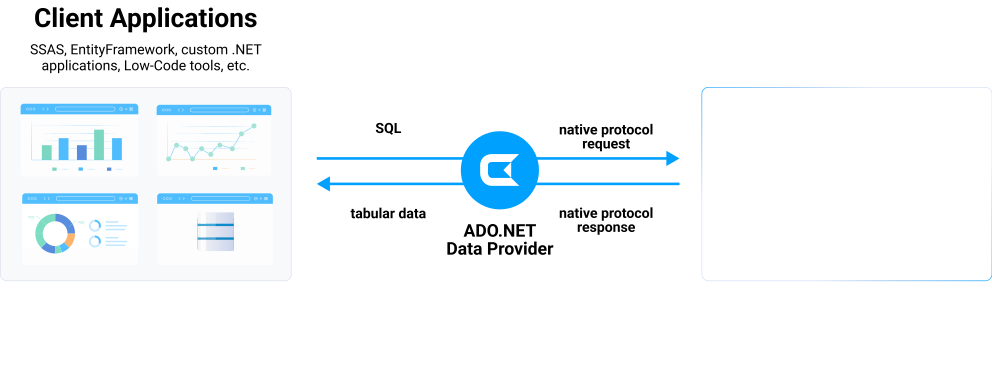

SurveyMonkey .NET Connectivity Features
- Connect to live SurveyMonkey data, for real-time data access with the SurveyMonkey JDBC Driver
- Full support for data aggregation and complex JOINs in SQL queries
- Secure connectivity through modern cryptography, including TLS 1.2, SHA-256, ECC, etc.
- Seamless integration with leading BI, reporting, and ETL tools and with custom applications via the SurveyMonkey Connector.
Target Service, API
The driver connects to SurveyMonkey API. Survey platform access.
Schema, Data Model
Models surveys and responses as tables. Question and collector structure.
Key Objects
Surveys, Collectors, Responses, and Questions. Survey data model.
Operations
Read operations on survey data. Create surveys. Response analysis.
Authentication
OAuth 2.0 authentication. API access in paid plans only.
Start a 30-day Free Trial Today
See what you can do with SurveyMonkey ADO.NET provider

Use SurveyMonkey from SQL Server Analysis Service (SSAS) multi-dimensional cubes. Keep your analytical data modeling and access to any source including cloud and on-premises.
The SurveyMonkey ADO.NET Provider allows developers to build applications that connect to SurveyMonkey using familiar SQL and Entity Framework. Integrate SurveyMonkey to your mission -critical applications or create easy side-by-side applications.

You can connect from ADO.NET compliant low-code development tools:

You can connect SurveyMonkey from .NET-based reporting and analytics tools:
Standard ADO.NET Access to SurveyMonkey
The SurveyMonkey ADO.NET Provider offers the most natural way to access SurveyMonkey data from any .NET application. Simply use SurveyMonkey Data Provider objects to connect and access data just as you would access any traditional database. You will be able to use the SurveyMonkey Data Provider through Visual Studio Server Explorer, in code through familiar classes, and in data controls like DataGridView, GridView, DataSet, etc.
The CData ADO.NET Provider for SurveyMonkey hides the complexity of accessing data and provides additional powerful security features, smart caching, batching, socket management, and more.
Working with DataAdapters, DataSets, DataTables, etc.
The SurveyMonkey Data Provider has the same ADO.NET architecture as the native .NET data providers for SQL Server and OLEDB, including: SurveyMonkeyConnection, SurveyMonkeyCommand, SurveyMonkeyDataAdapter, SurveyMonkeyDataReader, SurveyMonkeyDataSource, SurveyMonkeyParameter, etc. Because of this you can now access SurveyMonkey data in an easy, familiar way.
For example:
using (SurveyMonkeyConnection conn = new SurveyMonkeyConnection("...")) {
	string select = "SELECT * FROM Rollups";
	SurveyMonkeyCommand cmd = new SurveyMonkeyCommand(select, conn);
	SurveyMonkeyDataAdapter adapter = new SurveyMonkeyDataAdapter(cmd);
	using (adapter) {
		DataTable table = new DataTable();
		adapter.Fill(table);
		...
	}
}
ADO.NET Provider Performance
With traditional approaches to remote access, performance bottlenecks can spell disaster for applications. Regardless if an application is created for internal use, a commercial project, web, or mobile application, slow performance can rapidly lead to project failure. Accessing data from any remote source has the potential to create these problems. Common issues include:
- Network Connections - Slow network connections and latency issues are common in mobile applications.
- Service Delays - Delays due to service interruptions, resulting in server hardware or software updates.
- Large Data - Intentional or unintentional requests for large amounts of data.
- Disconnects - Complete loss of network connectivity.
The CData ADO.NET Provider for SurveyMonkey solves these issues by supporting powerful smart caching technology that can greatly improve the performance and dramatically reduce application bottlenecks.
Smart Caching
Smart caching is a configurable option that works by storing queried data into a local database. Enabling smart caching creates a persistent local cache database that contains a replica of data retrieved from the remote source. The cache database is small, lightweight, blazing-fast, and it can be shared by multiple connections as persistent storage.
Caching with our ADO.NET Providers is highly configurable, including options for:
- Auto Cache - Maintain an automatic local cache of data on all requests. The provider will automatically load data into the cache database each time you execute a SELECT query. Each row returned by the query will be inserted or updated as necessary into the corresponding table in the cache database.
- Explicit Cache - Cache only on demand. Developers decide exactly what data gets stored in the cache and when it is updated. Explicit caching provides full control over the cache contents by using explicit execution of CACHE statements.
- No Cache - All requests access only live data and no local cache file is created.
This powerful caching functionality increases application performance and allows applications to disconnect and continue limited functioning without writing code for additional local storage and/or data serialization/deserialization.
More information about ADO.NET Provider caching and best caching practices is available in the included help files.
Visual Studio Integration & Server Explorer
Working with the new SurveyMonkey ADO.NET Provider is easy. As a fully-managed .NET Data Provider, the SurveyMonkey Data Provider integrates seamlessly with the Visual Studio development environment as well as any .NET application.
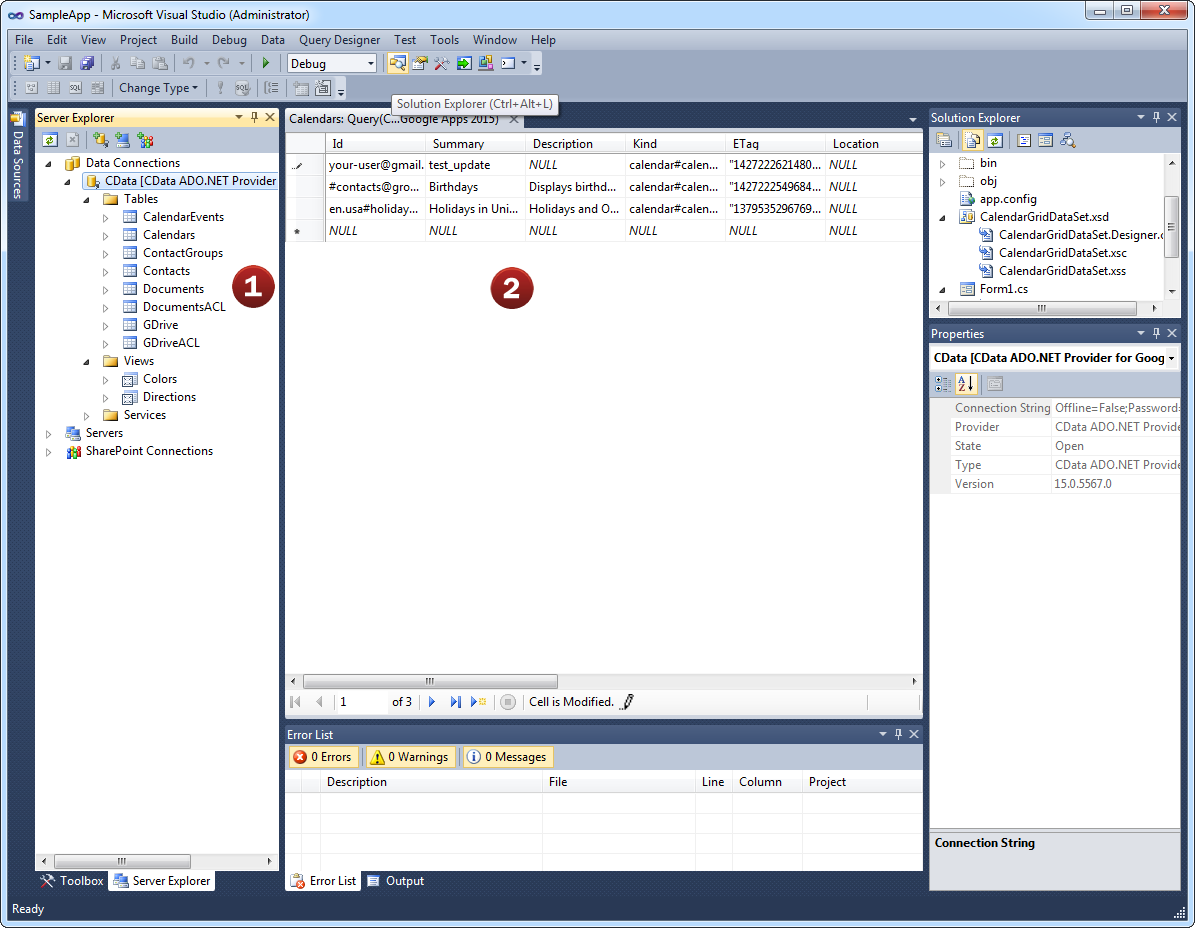
As an ADO.NET Data Provider, SurveyMonkey ADO.NET Provider can be used to access and explore SurveyMonkey data directly from the Visual Studio Server Explorer.
It's easy. As a standard ADO.NET adapter, developers can connect the Server Explorer to SurveyMonkey ADO.NET Provider just like connecting to any standard database.
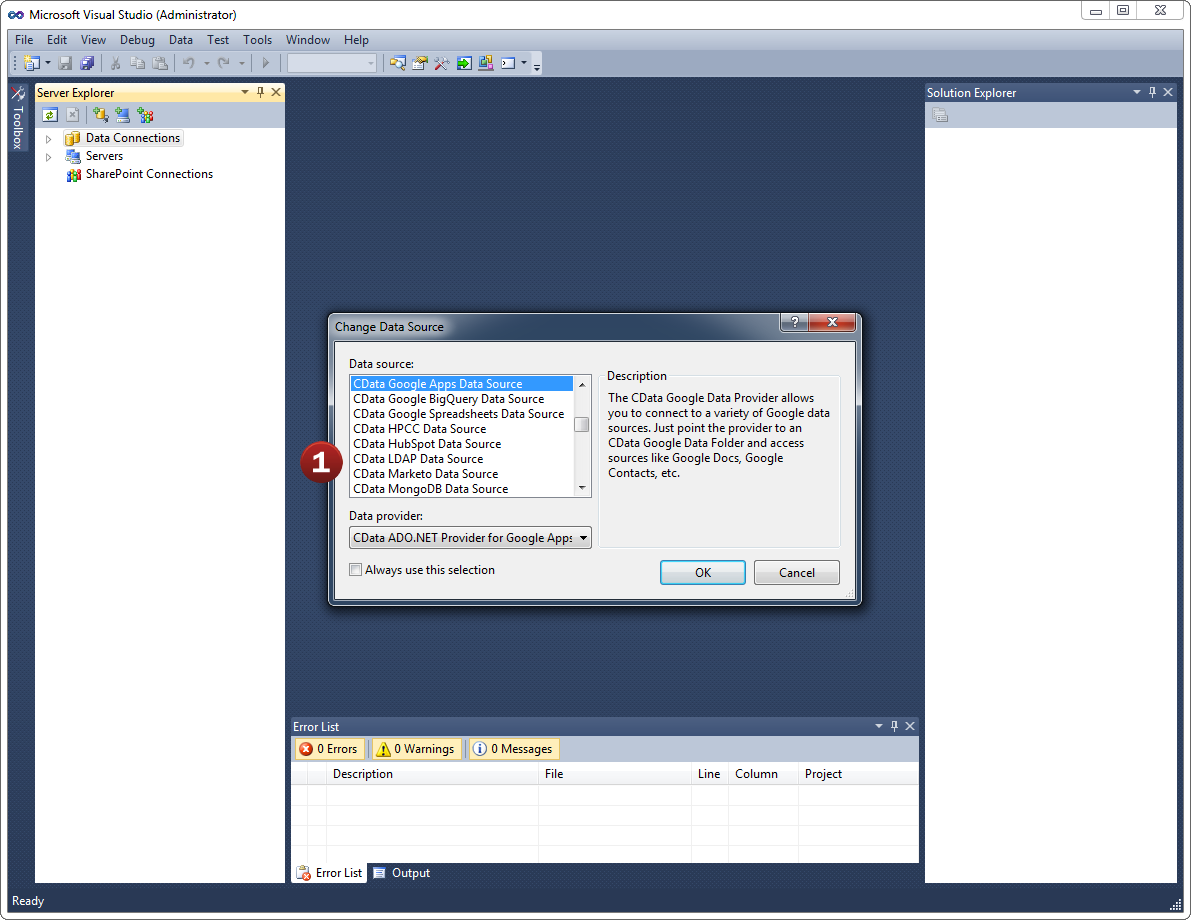
- Add a new Data Connection from the Server Explorer and select the SurveyMonkey Data Source
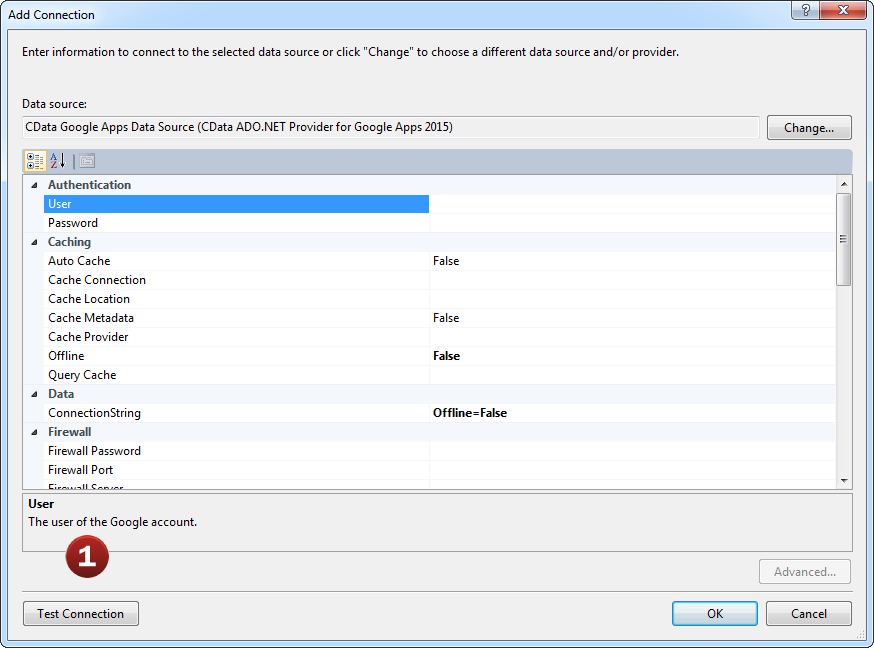
- Configure the basic connection properties to access your SurveyMonkey account data.
Explore all of the data available! SurveyMonkey ADO.NET Provider makes it easy to access live SurveyMonkey data from Visual Studio.
- After configuring the connection, explore the feeds, views, and services provided by the SurveyMonkey Data Source.
- These constructs return live SurveyMonkey data that developers can work with directly from within Visual Studio!
Developer Integration: Databind to SurveyMonkey
Connecting Web, Desktop, and Mobile .NET applications with SurveyMonkey is just like working with SQL Server. It is even possible to integrate SurveyMonkey ADO.NET Provider into applications without writing code.
Developers are free to access the SurveyMonkey ADO.NET Provider in whatever way they like best. Either visually through the Visual Studio Winforms or Webforms designers, or directly through code.
- Developers can connect the SurveyMonkey Data Source directly to form components by configuring the object's smart
tags.
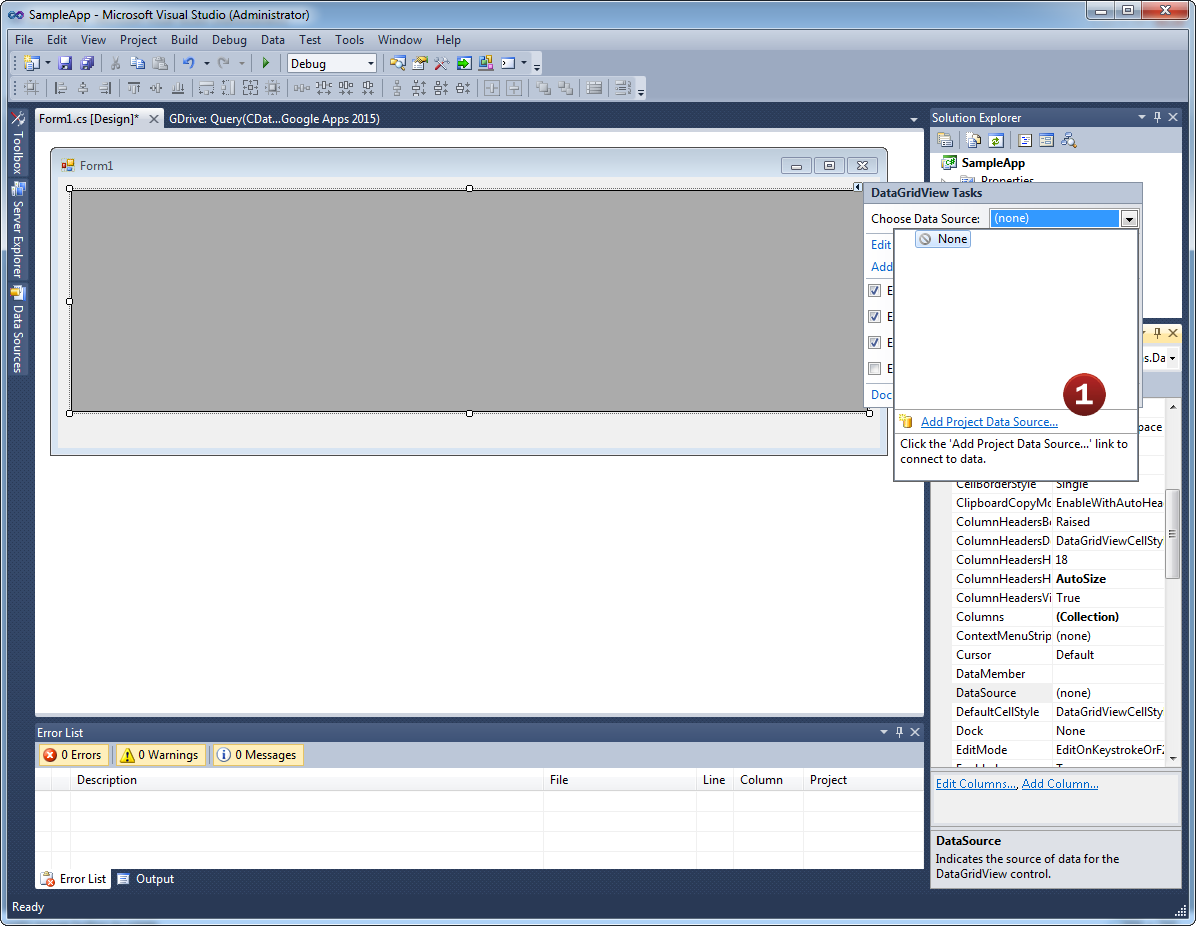
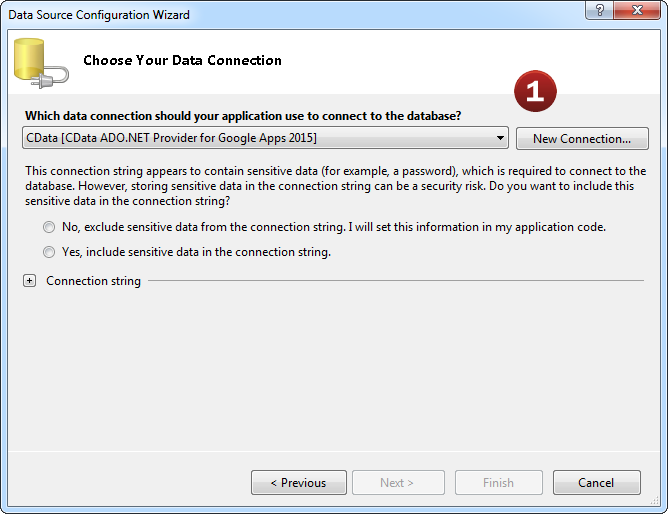
- Add a new Data Connection from the Server Explorer and select the SurveyMonkey Data Source. Then, select the
feed, view, or services you would like to connect the object to.
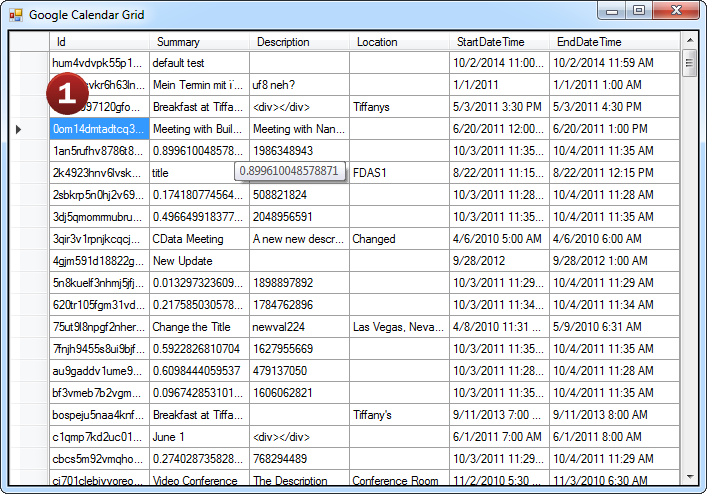
Done! It's just like connecting to SQL Server.
- Once the object is bound to the data source, applications can easily interact with SurveyMonkey data with full
read/write (CRUD) support.
AI-Assisted Development with CData Code Assist MCP
Build SurveyMonkey integrations faster with AI that understands your schema
Supported AI Coding Tools




Code Assist MCP gives AI coding tools direct access to your SurveyMonkey schema. No more guessing table names or column types—AI sees the same metadata as your ADO.NET Driver.
Table names, column names, and SQL syntax in Code Assist MCP are identical to this ADO.NET Driver. Queries you validate with AI work directly in your production code.
Stop guessing. Start shipping. Prototype queries in conversation, validate against live data, then deploy with CData ADO.NET Drivers—no rewriting required.
Free for development. No trial period. No credit card required.
Popular ADO Videos: