





Ask Your Pipelines Why: Apache Airflow Data for AI Agents With the New CData API Profile
Every data team knows the message: "The revenue report didn't update. What happened?" Answering it means opening Apache Airflow, finding the directed acyclic graph (DAG) that feeds the report, clicking through runs and task instances, working out what failed upstream, and checking whether it has happened before. The information is all in Airflow's metadata. Getting to it is slow, manual work, often done at the worst possible time.
That kind of investigation is a natural job for an AI agent, as long as the agent can read Airflow's metadata safely and in a form it can reason about. The new Apache Airflow API Profile for the CData API Driver provides exactly that. It exposes Airflow 3's DAGs, runs, task instances, assets, and audit log as read-only SQL tables, available to any agent, business intelligence (BI) tool, or application that can run a query.
Why give AI agents access to pipeline metadata
Airflow is a standard tool for orchestrating data pipelines, and it records a detailed history of everything it does: which DAGs ran, when, how long they took, which tasks failed or retried, and which data assets each run produced. That history answers the questions data teams field every day:
- Why didn't a report, dashboard, or downstream job update?
- Did a failure start today, or has it been happening for a while?
- Which pipelines are retrying constantly or getting slower?
- Which data assets are stale, and who owns the pipeline that produces them?
Airflow's UI is built for looking at one DAG and one run at a time. Its REST API exposes everything, but turning it into answers means writing code: authentication, pagination, and walking from DAGs to runs to task instances with the right IDs at each step. An agent can call a REST API, but it does far better with a small set of well-described tables and a query language it already knows.
A SQL interface to Airflow covers this: one consistent way to ask questions and understand the relationships an agent needs to follow a failure upstream.
Introducing the CData API Driver and the Apache Airflow API Profile
The CData API Driver
The CData API Driver provides SQL access to an extensive catalog of APIs and services through API Profiles: small files that define a service's tables and columns, how to authenticate, and how to page through its API. You point the driver's Profile property at a profile and set its connection properties. The driver then handles authentication, paging, and query pushdown, and supports SQL-92 queries with joins, subqueries, and aggregates.
The API Driver is available in the same editions as other CData drivers: Java Database Connectivity (JDBC), Open Database Connectivity (ODBC), ADO.NET, and Python, plus BI and extract, transform, load (ETL) integrations. For this article we used the CData JDBC Driver for API.
Connecting to Airflow
The Apache Airflow profile targets Airflow 3.x and its /api/v2 REST API. (The legacy /api/v1 API used by Airflow 2.x isn't supported.) Airflow 3 authenticates API calls with a JSON Web Token (JWT) bearer token, which you can request from your deployment's /auth/token endpoint or generate from the Airflow UI:
Profile=C:\profiles\ApacheAirflow.apip;AuthScheme=APIKey;ProfileSettings='APIKey=<airflow jwt token>;Server=https://airflow.example.com';
| Property | What it does |
|---|---|
| AuthScheme | APIKey |
| APIKey (in ProfileSettings) | Your Airflow JWT bearer token |
| Server (in ProfileSettings) | The base URL of your Airflow deployment |
The connection sees what the token's Airflow user is allowed to see, so an account with read access to the relevant DAGs is all an agent needs.
The data model
The profile exposes 19 tables:
| Area | Tables |
|---|---|
| DAGs and runs | Dags, DagDetails, DagVersions, DagRuns, Backfills |
| Tasks | Tasks, TaskInstances, XComEntries |
| Assets | Assets, AssetAliases, AssetEvents, AssetQueuedEvents |
| Platform | Jobs, Pools, Connections, Variables, Providers, Plugins |
| Audit | EventLogs |
The tables most investigations start from:
- Dags: every DAG with its owners, tags, schedule (TimetableSummary), paused state, and next scheduled run.
- DagRuns: each run with its state, run type (scheduled, manual, backfill, or asset-triggered), duration, data interval, and who or what triggered it.
- TaskInstances: each task attempt with its state, try number, maximum tries, duration, operator, pool, and host.
- Assets and AssetEvents: Airflow 3's data-aware scheduling. Each asset event records which DAG, run, and task updated an asset, and which downstream runs that update triggered.
- EventLogs: the audit trail of user and system actions, such as triggering, clearing, or pausing.
For example, this query counts attempts and the highest try number for each task:
SELECT [DagId], [TaskId], COUNT(*) AS attempts, MAX([TryNumber]) AS maxTry
FROM [TaskInstances]
WHERE [DagId] IN (SELECT [DagId] FROM [Dags])
  AND [DagRunId] IN (SELECT [DagRunId] FROM [DagRuns] WHERE [DagId] IN (SELECT [DagId] FROM [Dags]))
GROUP BY [DagId], [TaskId]
Putting it to work: an agent and a dashboard
To show the profile in action, we stood up Airflow 3.1 locally with a mock data platform for an online retailer. It has four DAGs and a few realistic problems:
| DAG | What it does | What goes wrong |
|---|---|---|
| orders_ingest | Extracts orders, validates them, and loads them to the warehouse, publishing the warehouse.orders asset | Validation periodically fails on schema drift |
| customer_sync | Syncs customer profiles from the CRM | The CRM API rate-limits the first attempt; every run needs a retry |
| daily_revenue_report | Builds the daily revenue report, triggered by updates to warehouse.orders | Silently doesn't run when ingest fails |
| marketing_attribution | Runs the attribution model | Runtime creeps up every day |
The scheduler worked through 19 days of history. We then connected through the CData JDBC Driver for API with the Airflow profile.
Part 1: An AI agent investigates
We gave an AI agent (working through the CData CLI) the stakeholder's question and nothing else:
"The daily revenue report for October 5 never showed up. Why, has this happened before, and what should we do?"
It worked through the problem the way an experienced engineer would, in 10 commands and about a minute and a half:
- Read the DAG list (SELECT * FROM [Dags]) and noticed that daily_revenue_report has no time-based schedule. Its timetable is Asset.
- Followed the asset. Assets showed that warehouse.orders is produced by orders_ingest.load_orders_warehouse and consumed by daily_revenue_report, with 15 asset events.
- Compared run histories. DagRuns for both DAGs showed 19 orders_ingest runs, 15 successful and 4 failed, and exactly 15 asset-triggered report runs, none for the failed dates.
- Drilled into the failures. TaskInstances for the four failed runs showed the same pattern each time: extract_orders succeeded, validate_orders failed on its first and only try, and load_orders_warehouse was skipped as upstream_failed.
- Checked for human intervention. EventLogs had no clears or retries for the failing task.
Its answer:
The Oct 5 daily revenue report never ran because its upstream data load failed. daily_revenue_report isn't scheduled. It's triggered when orders_ingest updates the warehouse.orders asset. In the Oct 5 orders_ingest run, validate_orders failed on its first and only try (no retries are configured), so the warehouse load was skipped, the asset was never updated, and the report never started.
This isn't a one-off. It's the 4th failure in 19 runs (Sep 20, Sep 25, Sep 30 and Oct 5), exactly every five days, which points to a recurring data or validation problem rather than chance.
Next steps: check the validate_orders log for the Oct 5 run, fix the data or the check, then clear and re-run orders_ingest for that run, and the report will trigger automatically. Separately, investigate the five-day pattern and add failure alerting, because a report that never starts raises no alarm. Expect a repeat on Oct 10 if nothing changes.
The agent was also clear about what it couldn't see. The profile exposes Airflow's metadata, not its task logs, so the exception text itself is one click away in the Airflow UI. The agent named the exact DAG, run, and task to open. In our mock platform, the log reads "Schema drift: column 'discount_code' missing from storefront extract." The agent had narrowed a vague "the report is missing" down to that one log line, and spotted the five-day pattern a human might have missed.
Part 2: A pipeline health dashboard on the same data
The queries an agent uses to investigate one incident also describe the health of the whole platform. We built a Pipeline Health dashboard on the same JDBC connection.
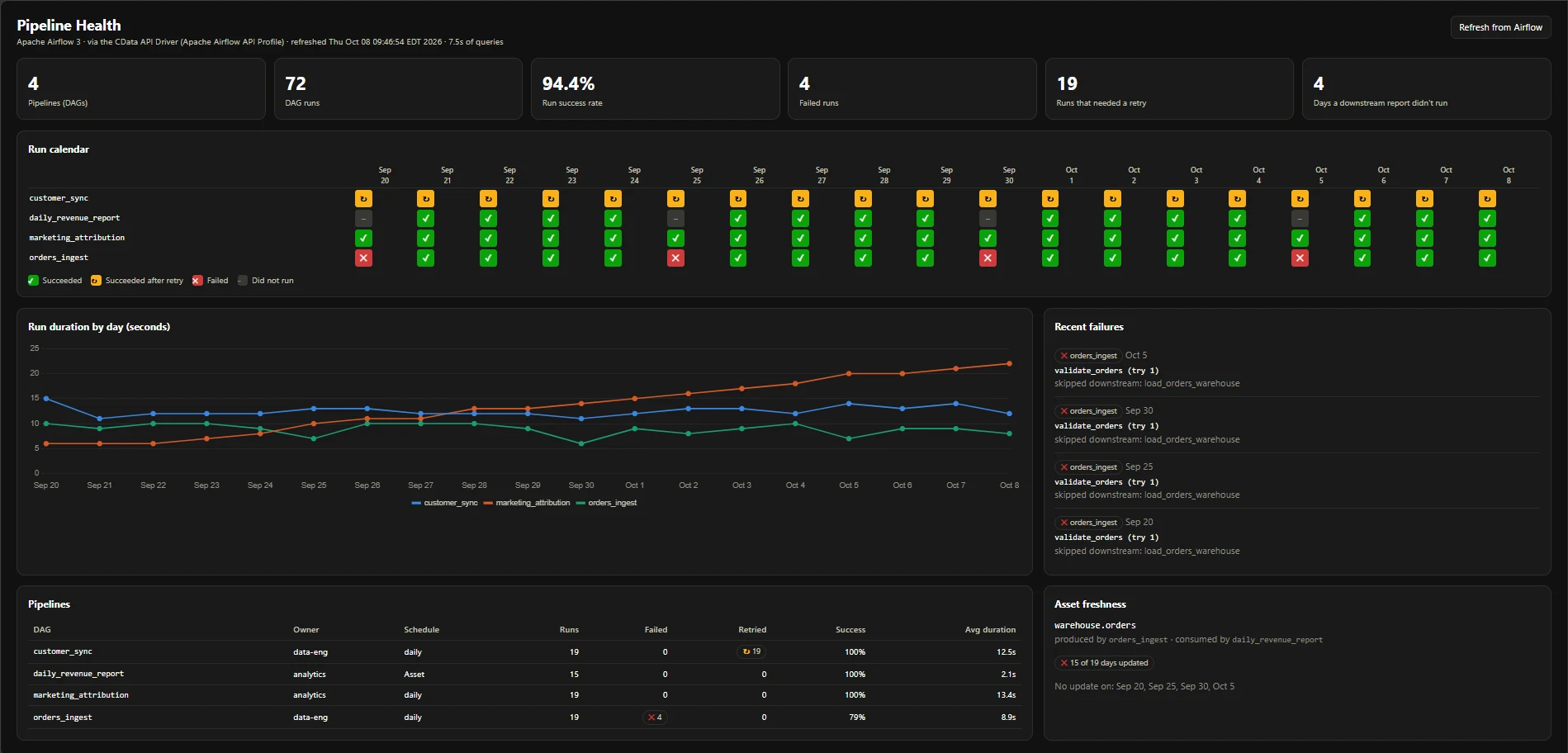
The dashboard has the following panels:
- Headline numbers: 4 pipelines, 72 runs, a 94.4% run success rate, 4 failed runs, 19 runs that needed a retry, and 4 days on which a downstream report didn't run.
- Run calendar: one row per DAG and one column per day, marking each run as succeeded, succeeded after retry, failed, or didn't run. The pattern the agent found is visible at a glance: every fifth orders_ingest cell is a failure, and the daily_revenue_report cell below it is empty. The asset-triggered report is placed on the calendar by following AssetEvents back to the ingest run that triggered it.
- Run duration by day: daily runtime for each scheduled DAG. marketing_attribution climbs from 6 to 22 seconds over the period, the kind of slow drift that rarely trips an alert.
- Recent failures: each failed run with the task that failed, its try number, and the downstream tasks that were skipped.
- Pipelines: one row per DAG with owner, schedule, runs, failures, retries, success rate, and average duration. customer_sync stands out with a retry on all 19 of its runs.
- Asset freshness: warehouse.orders was updated on 15 of 19 days, with the four missing days listed.
The backend is a single Java file using the built-in HTTP server in the Java Development Kit (JDK). It queries Dags and AssetEvents once, and DagRuns and TaskInstances for each DAG, through the driver and caches the results. A full refresh of the platform took about 7.5 seconds.
The tech stack, in plain terms
| Piece | What it does |
|---|---|
| Apache Airflow 3.1 | Runs the mock retail data platform locally (four DAGs, 19 days of runs) |
| CData JDBC Driver for API | Runs the Apache Airflow API Profile, handling the token, requests, and paging |
| Apache Airflow API Profile | Exposes DAGs, runs, task instances, assets, and the audit log as SQL tables |
| CData CLI | Gives the AI agent command-line access to the same JDBC driver |
| Claude | The AI agent that investigated the missing report |
| Java 17 + Chart.js | The Pipeline Health dashboard: a single-file Java backend and a browser front end |
Query Airflow metadata with the CData API Driver
Airflow already knows why most data problems happen. Its metadata records every run, task attempt, and asset update. The Apache Airflow API Profile makes that metadata available as SQL tables on the CData API Driver, so the tools around your pipelines can use it: BI dashboards, CData Sync jobs that keep pipeline history beyond Airflow's own retention, and AI agents that do the first round of investigation for you.
In our example, the same connection served two audiences. An AI agent turned "the report is missing" into a specific failed task, a recurring pattern, and a next step. A dashboard turned the same tables into a view of reliability, retries, slowdowns, and asset freshness across every pipeline. We used the JDBC edition, and the profile works the same way in CData's other editions.
Get started: download the CData API Driver, add the Apache Airflow profile, connect it to your Airflow 3 deployment with an API token, and run your first query against Dags.