




Less work for the model. Better results for you.
The gateway does the heavy lifting across CData-built, custom, and third-party MCP servers, so models reason over precise answers instead of raw data.







Exactly the tools each agent and individual needs
Bring CData-built, custom, and third-party MCP servers into workspaces that scope each agent's or person's tools to their team and use case.
 Salesforce
 SAP
SAP Snowflake
 NetSuite
 Databricks
 Jira
Jira Office 365
 Workday
 PostgreSQL
 HubSpot
 Stripe
 MongoDB


 Salesforce
signed in with
j.chen’s credentials
Salesforce
signed in with
j.chen’s credentials
A tool structure built for versatility and efficiency
Because CData owns the connectivity and data layer underneath, we have a unique tool structure that spans the range of exploratory to deterministic actions.
Universal tools
Only CData offers one tool set that works identically across every source: agents explore the full data model of any system and find what they need without source-specific tooling.
A conversational assistant asks: "Which accounts renew this quarter?"
query_data(accounts, renewal_qtr = Q4) → 17 rowsSource tools
Deterministic reads and writes for each source, out of the box across hundreds of sources, all governed by the same policies.
An automation executes:
update_ticket(id, status="resolved")Custom tools
Only CData offers custom tools that can join and aggregate across sources, exposed as one named tool. The heavy lifting the happens in the data layer, not the model.
A finance bot gets one trusted number:
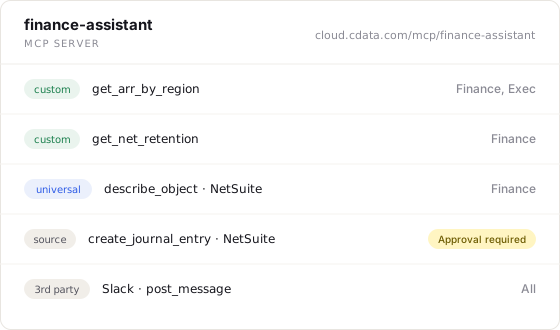
get_arr_by_region() → 4 numbersCompose your own MCP tool servers
Package a curated set of tools—universal, source, custom, and any third-party MCP servers you've connected—into a purpose-built server for one team or one agent. Then decide exactly who and what can call each tool.
Manager, Software Development, Adobe
Enterprise-grade control, built in from day one
Field-level access control, gateway-side masking and auditing, and enterprise identity—every scheme from OAuth to SCIM—governed from one control plane.
Control who can access what data
Role- and team-based access down to the tool, the object and the field.
Agents inherit the permissions of the people and teams they act for—never more.
Query-level logs capture who initiated the request, what ran, which agent was involved, and what data was returned.
Why security teams sleep at night
Masking and PII controls run at the gateway before a response is returned. Credentials stay bound to the gateway rather than handed to agents.
Policy is evaluated on every request, and there’s no shadow copy of your data anywhere in the path.
Audit logs stream to your SIEM. Access is scoped to workspaces so one team’s tools never leak into another’s.
One door for people, one for agents
Humans self-serve through a Consent URL—sign in with corporate SSO, authorize sources once, done. Automated agents get a stable Agent URL that never changes, even as admins change what’s behind it.
Handle OAuth, SAML, Kerberos, Basic Auth, and dynamic client registration out of the box, or register as your own OAuth application so connections appear as your organization’s own vetted app.
SCIM 2.0 provisioning connects to Okta, Azure AD, and Ping Identity so users are provisioned and deprovisioned automatically as roles change, ready to scale from a small pilot to organization-wide rollout.
Every system your agents can reach in real-time
Hundreds of connectors built and maintained by CData, powering the three-tier tool structure and pushing joins, filters, and aggregations down into the data layer instead of the prompt.
Hundreds of CData-built connectors with live, read and write access
SalesforceNetSuiteSnowflakeSAPJiraOffice 365WorkdayHubSpotPostgreSQLAny HTTPS server speaking MCP—added by your admin, governed like your own.
 GitHubSlackStripeZendesk
 Confluence
 Asana
Asana Trello
 Monday.com
 Airtable
Watch one tool call cross the gateway
From the agent’s OAuth handshake to the audited record—every step governed, nothing requested by the client.
More than an MCP gateway
The complete package for AI deployment
The MCP Gateway is built on a foundation of controls and security, a context engine, and a live data layer—everything an AI deployment needs, in one platform, instead of assembled from parts.
Explore the AI gateway Copilot
 Claude
 ChatGPT
 Perplexity
 Agentforce
 LangChain
 CrewAI
 n8n
n8n
Model, MCP, and Agent gateways—routing, guardrails, cost controls
Identity, policy, and guardrails enforced at every step
Company knowledge, semantics, and schema on every request
Real-time read/write to hundreds of enterprise sources
 Salesforce
 SAP
SAP
 Snowflake
 NetSuite
 Databricks
 HubSpot
Sonnet
HubSpot
Sonnet
 GPT-5
GPT-5
 Gemini
 Grok
Grok
 DeepSeek
Put the gateway to work
One platform, two teams: IT teams that run AI safely, and business teams that get more productive with AI.
FAQ
Questions teams ask
- Can an agent request access to something outside its Tool Server?
- What third-party MCP servers can we add?
- Do agents ever see upstream credentials?
- What happens when a tool call exceeds its trust level?
- Does updating a Tool Server break agent configurations?
- Do we have to migrate our existing MCP setup?
- Can the same connections run without a model in the loop?
Make every system agent-ready.
Point your first agent at one governed address and see what your connections, toolkits, and one audited record look like in action.