





Implementing the CData JDBC Driver ITokenStore Interface
Overview
The CData JDBC drivers provide support for retrieving, refreshing, and storing authentication tokens. Depending on the data source, these may be OAuth tokens or a credential file. Support for this is configured via the AuthScheme, InitiateOAuth and associated connection properties (more information can be found in the driver's help file). By default, the driver will store the OAuth token and credential file in a local file. There are many scenarios (e.g. clustered environments, cloud implementations, etc.) where a local file will not meet the needs of an application. For such cases, the JDBC driver exposes an ITokenStore interface that separates the logic of retrieving tokens from how they are stored. This interface allows for a custom token store implementation to be created.
The Interface
ITokenStore
public interface ITokenStore {
    public String readToken(String tokenName) throws Exception;
    public void writeToken(String tokenName, String token) throws Exception;
    public void acquireLock(String tokenName, int maxWaitMs) throws Exception;
    public void releaseLock(String tokenName) throws Exception;
}
ITokenStoreFactory
public interface ITokenStoreFactory {
    public ITokenStore getStore(String context) throws Exception;
}
Implementation
ITokenStore Flow
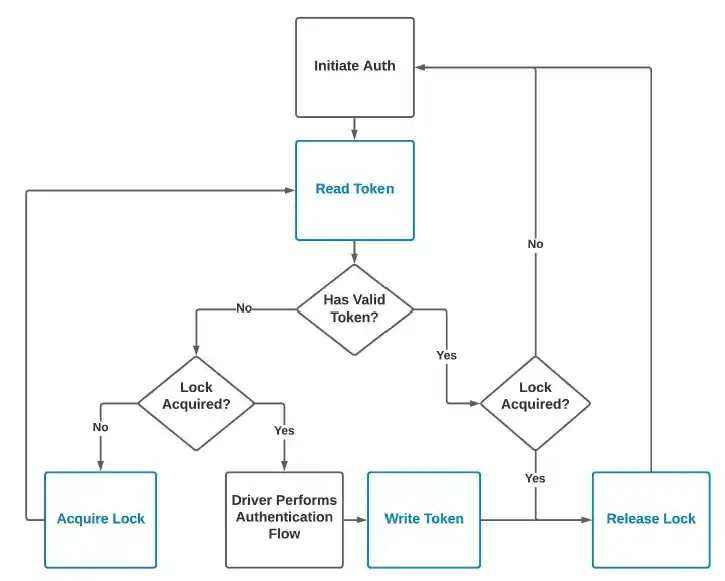
The above chart outlines the ITokenStore flow and the order in which the methods are called.
Prior to the driver making a request to the data source (requests include the initial connection, metadata, query, and each page that is requested to read the results), the readToken method will be called to retrieve the latest token value. If a token does not currently exist, then NULL should be returned. If a token is NULL or it is invalid (e.g. expired), the acquireLock method will be called to acquire a write lock.
The readToken method will be called again to ensure that a token was not received by a separate connection while trying to acquire the lock. If a valid token was found after acquiring a lock, the releaseLock method will be fired to release the previously acquired lock. If the token is NULL or invalid, the driver will perform the authentication flow to retrieve a new token. Once the authentication flow is complete, the writeToken method will be fired containing the encrypted token value. Next the releaseLock method will be fired to release the previously acquired lock. At this point, the driver has a valid token and it will issue the request to the data source.
Guidelines
The ITokenStore process only performs a lock for each write instead of a lock for each read and write. The reason for this is that writeToken is assumed to be atomic (that is, readToken can only see the old token or the new token; it cannot see a half-written token while writeToken is running). This flow works because:
- If readToken sees the old token then it will try to acquire the lock and wait until the first writer completes. Then it will call readToken again, see that a new token was obtained and use the updated token.
- If readToken sees the new token it will use it without acquiring a lock.
If the storage mechanism used by the token store is not atomic then the token store will need to implement a way to avoid:
- readToken method logic from executing while writeToken is running (to avoid reading a partially written token)
- writeToken method logic from running while readToken is running (to avoid corrupting data currently being read)
The same ITokenStore and ITokenStoreFactory implementations can be re-used across multiple drivers. This works as the driver uses reflection to invoke the appropriate methods on the custom factory class. For instance, you can implement ITokenStore using GoogleBigQuery and then re-use the code for another driver (such as Salesforce).
The context parameter of the ITokenStoreFactory.getStore method allows you to identify specific information about the context of the connection. The context is specified via the OAuthSettingsLocation (for OAuth based drivers) or CredentialsLocation (for Credential File based drivers) connection property in the form: externalToken://custom_data_here. The externalToken:// prefix tells the driver that a custom ITokenStore implementation is being used. Beyond the prefix, any context data required for properly storing the data can be entered. This property is useful for identifying users, data sources (if re-using the ITokenStore code), and any other information required to keep the OAuth tokens organized.
The tokenName parameter for each of the ITokenStore methods will return either a value of oauth (OAuth token) or credentials (Credential File token). This will be the same value across all the drivers that utilize OAuth or Credential File authentication. In the future, if there are other authentication mechanisms in use that require a token to be stored, the tokenName value will reflect that. Currently oauth and credentials are the only values.
The token parameter value of writeToken will contain the encrypted token information (including refresh token, timestamp, expires in time, etc.). This information should be stored as-is. The driver will be able to decrypt the token, identify if the token is valid, and continue with the authentication flow, as necessary.
If unencrypted token information is desired, the EncryptOAuthSettings configuration can be set to false via the Other connection property (e.g. Other='EncryptOAuthSettings=False').
If using an external method to retrieve OAuth tokens (rather than using the driver to manage this process), the readToken method must return a string of name-value pairs separated by a newline (e.g. LF or CRLF). The name-value pairs will be the OAuth connection properties that are required to connect, for example:
return "oauthrefreshtoken=5Aep1d1G_LVSxTq0ZAdb.Aczvi_sg897Zkx3WyKeJWd1MkmeOH7TkfHrsUoUxkV\n" +
       "oauthexpiresin=28800\n" +
       "oauthaccesstoken=00D4W000008Jd3M!ARAAQFBXQlR1Sk6takyK5e.tbqxwuQ7CD7ovXN.fAt_iWf5t27tyn\n" +
       "oauthtokentimestamp=1637802294133\n";
Code Sample
Below is minimal sample code which comments on the basic functionality that each method should handle. This is just a general overview as each implementation will vary based on the token store being used and application needs.
ITokenStore
public class OAuthTokenStore implements cdata.jdbc.googlebigquery.ITokenStore {
    private Connection connection; // Stub connection variable that would hold a database
                                   // connection where the OAuth tokens are stored.
    private String user = null;

    public OAuthTokenStore(String context) throws Exception {
        // This method initializes your token store which can be a file, database,
        // cloud resource, or any other storage location you find fit.
        // The 'context' parameter value can be used to identify user specific data and
        // perform custom operations.
        // If applicable, the information in 'context' will need to be stored in a variable
        // so it can be used in the Token and Lock methods.

        // Assume context format is 'externalToken://user=foo'
        if (context.startsWith("externalToken://")) context = context.substring(16);
        String[] contextParts = context.split("=");
        if (contextParts.length == 2 && contextParts[0].trim().toLowerCase().equals("user"))
        {
            user = contextParts[1].trim();
        }
        else {
            throw new Exception("Incorrect OAuthSettingsLocation format. Must be in the form: externalToken://user=[username_without_brackets]");
        }
    }

    // The 'tokenName' parameter in the below methods will be 'oauth' for drivers that
    // utilize the OAuth authentication scheme.

    @Override
    public String readToken(String tokenName) throws Exception {
        // Here you will read the token from your token store for the defined 'context'.
        // If no token exists, then NULL should be returned.
        // Depending on the token store used, you may need to ensure that a lock is not
        // currently in place before reading.

        // if (user has token in database) {
        //     Query the database for the user's token and return value
        //
        //     The format of this value will either be the encrypted value returned by the driver
        //     (when using the driver initiated OAuth flow) or an unencrypted string of OAuth
        //     specific connection string properties separated by a newline (LF or CRLF).
        // }
        // else {
        return null;
        // }
    }

    @Override
    public void writeToken(String tokenName, String token) throws Exception {
        // The value stored in 'token' will be the full encrypted OAuth information which
        // may include Access Token, Refresh Token, Timestamp, Expires In Time, etc.
        // This value needs to be stored as-is.
        // The driver will handle validating the token, refreshing the token, etc.

        // Insert 'token' into the database for 'user'
    }

    @Override
    public void acquireLock(String tokenName, int maxWaitMs) throws Exception {
        // This method is fired prior to a token being written.
        // A lock can be any method that you see fit to ensure the integrity of the data
        // (e.g. avoid race conditions)
        // The 'maxWaitMs' parameter identifies the maximum number of milliseconds to wait
        // before identifying a lock as being stale.
        // If a lock is stale, it can be forcefully deleted so a new lock can be acquired.
        // The 'maxWaitMs' value comes from the 'Timeout' connection property.

        // Once a lock is acquired, the readToken method will be fired again to identify if
        // a new token was obtained while trying to acquire the lock
        // If a new token was not obtained, the driver will perform the OAuth flow, fire
        // the writeToken method, then fire the releaseLock method.
        // If a new token was obtained, the driver will fire the releaseLock method.

        // Sample pseudocode to demonstrate a possible solution for handling acquiring a lock
        String lockFile = getLockFile();
        long startTime = System.currentTimeMillis();
        long endTime = System.currentTimeMillis() + maxWaitMs;
        boolean lockFileCreated = false;

        if (lockFile does not exist){
            lockFileCreated = createLockFile();
        }
        else {
            if (getFileLastModified(lockFile) < startTime - maxWaitMs) {
                // The lock file was left over from a previous run,
                // not anything contending with us right now
                deleteLockFile(lockFile);
            }
        }

        while (not lockFileCreated) {
            syncObject.wait(50); // wait 50 milliseconds
            long now = System.currentTimeMillis();
            if (getFileLastModified(lockFile) > startTime) {
                // *Something* made progress at this point, but it wasn't us.
                // Reset the timeout so we can
                // get another attempt at acquiring the lock.
                startTime = now;
                endTime = System.currentTimeMillis() + maxWaitMs;
            } else if (now > endTime) {
                // Assume the lock is stale by now and get rid of it.
                // Either something else will grab it or we will.
                deleteLockFile(lockFile);
                startTime = now;
                endTime = System.currentTimeMillis() + maxWaitMs;
            } else {
                lockFileCreated = createLockFile();
            }
        }
    }

    @Override
    public void releaseLock(String tokenName) throws Exception {
        // This method is fired after a token was successfully obtained and allows you to
        // release the lock previously acquired via the acquireLock method
    }
}
ITokenStoreFactory
public class OAuthTokenStoreFactory implements cdata.jdbc.googlebigquery.ITokenStoreFactory {
    // The 'context' parameter value is what is defined in the OAuthSettingsLocation
    // connection property using the 'externalToken://' prefix.
    // For example: OAuthSettingsLocation='externalToken://user=foo' will result in
    // 'context' being 'externalToken://user=foo'
    // Thus 'context' can be customized for your applications needs and allows for
    // connection specific values to be specified.

    @Override
    public ITokenStore getStore(String context) throws Exception {
        return new OAuthTokenStore(context);
    }
}
To set the ITokenStoreFactory on the driver, the setTokenStoreFactory method can be called. This is a static method that only needs to be called once and should be done prior to the connection being opened (e.g. it does not need to be called for each connection).
GoogleBigQueryDriver.setTokenStoreFactory(new OAuthTokenStoreFactory());