






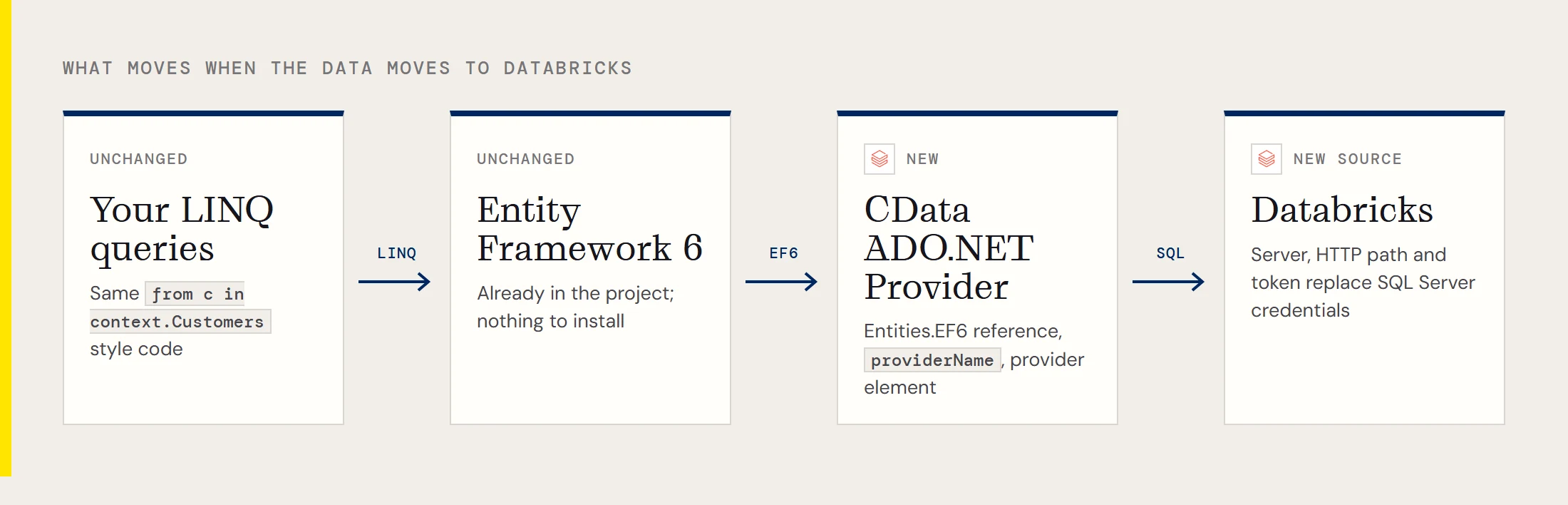
You have an Entity Framework 6 application that reads from SQL Server, and the data it needs now lives in a Databricks lakehouse. Rewriting the data layer would be a lot of work for a change of location, so the practical question is how little has to move. With the CData ADO.NET Provider for Databricks, you change the configuration, the context's setup and the entity mappings. Your LINQ stays as it is.
What actually changes
| Piece | With SQL Server | With Databricks |
|---|---|---|
| Provider reference | Built into Entity Framework | System.Data.CData.Databricks.Entities.EF6.dll |
| providerName | SQL Server's | System.Data.CData.Databricks |
| Connection | Server, database, credentials | Server hostname, HTTP path, token |
| Provider registration | Not needed in your config | A provider element in entityFramework |
| Migrations | Often in use | Switched off with a null initializer |
| Entities | Mapped to your tables | Mapped to Databricks tables with Table |
Before you start, install the provider on the development machine and add a reference to the Entities assembly. It's in the lib folder, 4.0 subfolder, of the installation directory. Entity Framework 6 itself is already in your project, so nothing needs to be installed there.
Find the three connection values
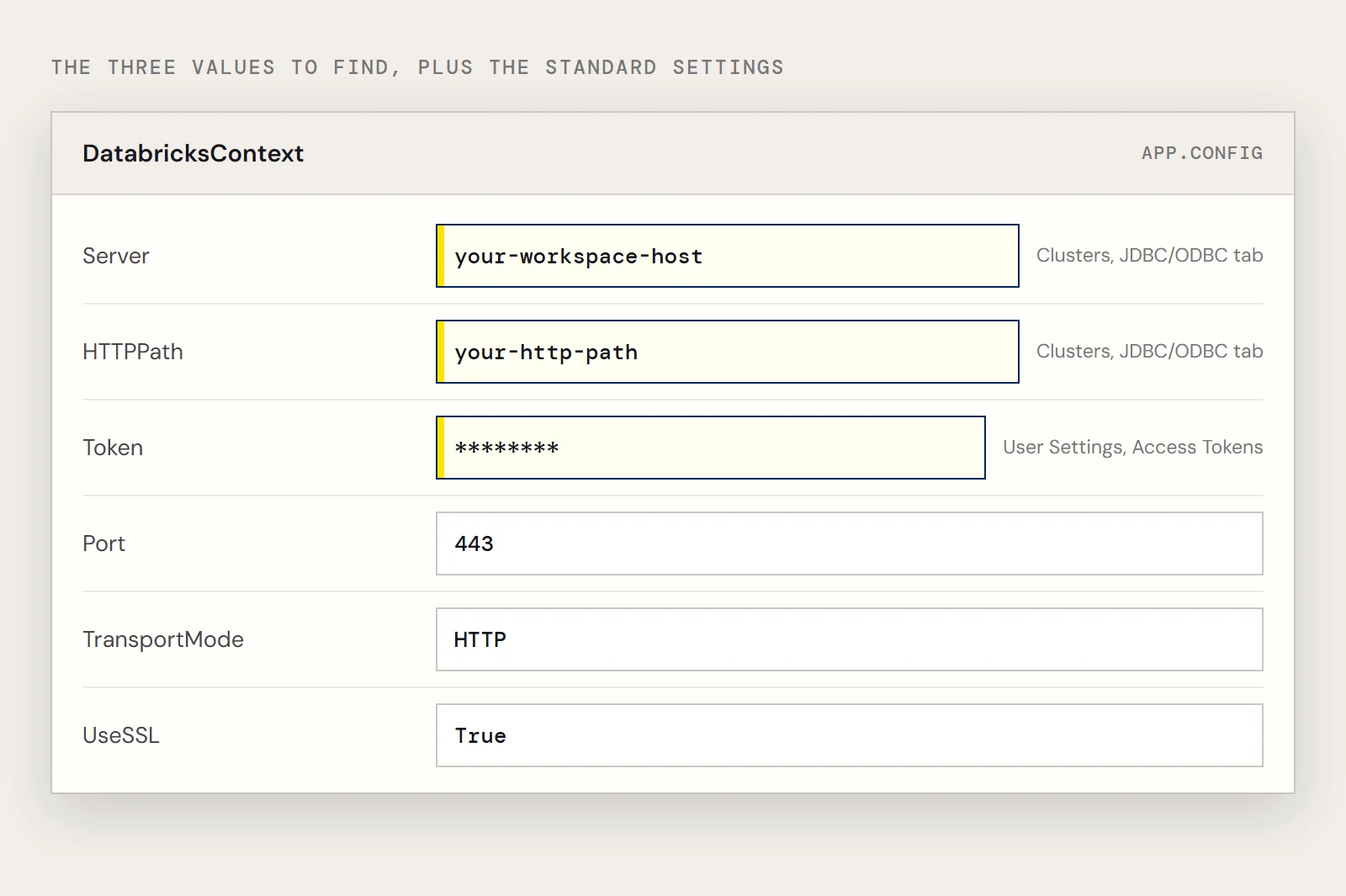
Databricks identifies a cluster by its hostname and HTTP path, and you authenticate with a personal access token. In the Databricks workspace open Clusters, select the cluster, and look under Advanced Options on the JDBC/ODBC tab for the server hostname and HTTP path. The token comes from the Access Tokens tab on your User Settings page.
Replace the connection and register the provider
In App.config, keep the context name your code already uses if you can, or use the provider's convention of DatabricksContext, and swap the string and the provider name:
<connectionStrings>
  <add name="DatabricksContext"
       connectionString="Offline=False;Server=your-workspace-host;Port=443;TransportMode=HTTP;HTTPPath=your-http-path;UseSSL=True;Token=your-token;"
       providerName="System.Data.CData.Databricks" />
</connectionStrings>
<entityFramework>
  <providers>
    <provider invariantName="System.Data.CData.Databricks"
              type="System.Data.CData.Databricks.DatabricksProviderServices, System.Data.CData.Databricks.Entities.EF6" />
  </providers>
</entityFramework>
The Port, TransportMode and UseSSL values come from the standard example string for this provider. The page this article replaces showed User and Password in that string while its notes describe Token, so if the token form is rejected, check the provider's help for the authentication properties your version expects. The provider also lists Azure Service Principal and Azure AD among its authentication options if a personal token isn't acceptable in your environment.
Adjust the context
A context built for SQL Server may rely on migrations. The provider's setup turns the migration history requests off, so set the initializer to null and remove pluralization so Entity Framework asks for table names as you wrote them:
using System.Data.Entity;
using System.Data.Entity.Infrastructure;
using System.Data.Entity.ModelConfiguration.Conventions;
class DatabricksContext : DbContext {
  public DatabricksContext() { }
  protected override void OnModelCreating(DbModelBuilder modelBuilder)
  {
    Database.SetInitializer<DatabricksContext>(null);
    modelBuilder.Conventions.Remove<PluralizingTableNameConvention>();
  }
  public DbSet<Customers> Customers { set; get; }
}
Re-map the entities
Each entity gets a Table attribute naming the Databricks table and a Key. The example uses Customers with City and CompanyName:
[System.ComponentModel.DataAnnotations.Schema.Table("Customers")]
public class Customers {
  [System.ComponentModel.DataAnnotations.Key]
  public System.String City { get; set; }
  public System.String CompanyName { get; set; }
}
All columns are typed as System.String in the example. That's only a starting point, so for your own tables compare each property against the column's type before you rely on it. Choose a key property that really identifies a row, since City here is just the first column.
Run the same kind of query
DatabricksContext context = new DatabricksContext();
context.Configuration.UseDatabaseNullSemantics = true;
var query = from c in context.Customers
            where c.City != null
            select c;
Run a few of your existing queries against the new context and compare the rows with what SQL Server returned. If rows differ, look at column types and key choices first.
If you'd rather not touch the app
Some teams leave the application on SQL Server and bring Databricks to it, using a linked server or PolyBase through CData's connectivity. That keeps the Entity Framework code as it is, and whether it suits you depends on how much of the logic you'd like to keep inside SQL Server.
To test the swap with your own queries, download a free trial of the ADO.NET Provider for Databricks.
Ready to get started?
Download a free trial of the Databricks Data Provider to get started:
Download NowLearn more:
 Databricks ADO.NET Provider
Rapidly create and deploy powerful .NET applications that integrate with Databricks data including Cluster, Jobs, Workspace, and more!