When finance teams connect Sage Intacct to Claude AI, they can ask plain-language questions like which invoices are overdue, how cash flow looks this month, or which vendors are due for payment and get answers pulled directly from live ERP data. Yet many teams stall before they see that value.
According to Gartner’s May 2026 Finance AI report, 66% of finance organizations that adopted AI reported greater efficiency as a top benefit, yet 63% said implementation ran slower than expected. In most cases, the delay comes down to the integration layer between the ERP and the AI, not a lack of ambition.
This guide walks through connecting Sage Intacct to Claude AI using CData Connect AI, from setup and authentication to live queries and write-back.
Introduction to Sage Intacct and Claude AI integration
Sage Intacct is a cloud-based financial management platform built for mid-market and enterprise organizations. It handles accounts payable and receivable, general ledger, cash management, purchasing, and order entry across complex multi-entity structures.
Claude AI, developed by Anthropic, is an enterprise-grade AI assistant built for safe, reliable reasoning across business workflows. Finance and operations teams use it for analysis, summarization, and interactive data work.
Each system does one job well on its own. When combined, they cover the full path from raw data to a plain-language answer.
Capability | Sage Intacct | Claude AI | Combined outcome |
Financial data storage | Live AP, AR, GL, cash, purchasing data | — | AI queries the source record directly |
Natural language processing | — | Interprets questions, generates analysis | Ask “What’s our DSO this quarter?” and get an answer |
Governance and access control | Role-based permissions per module | — | Permissions carry through to AI responses |
Report generation | Scheduled, structured reports | Dynamic, conversational summaries | Finance teams get answers on demand |
Write-back and action | Approval flows, field updates | Natural language triggers | AI can update records and flag anomalies |
Preparing for integration with CData Connect AI
CData Connect AI is a managed Model Context Protocol (MCP) platform. It exposes live enterprise data sources to AI tools through a single governed endpoint—without moving or replicating data. Queries go back and forth between Claude and Sage Intacct through Connect AI’s security layer, and results return in real time.
Three things Connect AI handles for this integration:
Real-time access. Every query hits live Sage Intacct data. There’s no ETL pipeline, no staging database, and no data that can go stale.
Governed connectivity. Source-system permissions pass through. Claude only sees what the authenticated user is authorized to view in Sage Intacct.
Broad AI compatibility. The same endpoint works with Claude, ChatGPT, Microsoft Copilot, and any other MCP-capable AI tool.
Prerequisites
Sage Intacct account. A valid account with the Web Services subscription enabled (navigate to Company > Admin > Subscriptions to confirm).
Claude AI plan. A Pro, Max, Team, or Enterprise plan; integrations require one of these tiers (see Claude’s integration setup guide).
Connect AI account. A CData Connect AI account (start a free trial at cdata.com/ai/signup/).
Web Services credentials. Your Sage Intacct Company ID, User, Password, Sender ID, and Sender Password.
Configuring Sage Intacct connection parameters in Connect AI
Start by creating the Sage Intacct connection in Connect AI:
In Connect AI, open the Sources page on the left
Click + Add Connection in the upper-right corner
Type Sage Intacct into the search field and click the data source name
On the Basic Settings tab, enter a connection name or keep the default
Enter your Company ID, then select the Basic authentication method
The Basic method uses your own Web Services credentials and supports read and write operations. Enter the following required fields.
Parameter | Description | Where to find it |
User | Your Sage Intacct username | Sage Intacct account credentials |
Password | Your Sage Intacct password | Sage Intacct account credentials |
Company ID | Your Sage Intacct company identifier | Company > Company Info in Sage Intacct |
Sender ID | Web Services Sender ID assigned by Sage Intacct | Provided by your Sage Intacct representative |
Sender Password | Web Services password for the Sender ID | Provided by your Sage Intacct representative |
Confirm your Sender ID and Sender Password are already active in Sage Intacct’s Web Services Authorizations list under Company > Company Info > Security. Your Sage Intacct representative can verify this if you’re unsure.
Once all fields are filled, click Save & Test. A “Connection successfully saved” message confirms the connection is live and the status changes to Authenticated. For the full walkthrough, see the Use Claude to Talk to Your Sage Intacct Data via CData Connect AI tutorial.
Authenticating access securely
Connect AI handles authentication at the platform level, before any data reaches Claude. User-level and role-based permissions set inside Sage Intacct carry through automatically, so Claude can’t access data the authenticated user can’t access, regardless of how a query is phrased.
After saving the connection, open the Permissions tab in Connect AI to scope which Sage Intacct data sets are visible to specific users or teams.
For organizations using Okta for SSO, Connect AI supports Okta authentication via the IntacctUserID SSO property. CData operates under SOC 2 Type II, ISO/IEC 27001, and GDPR compliance standards, and all data in transit is encrypted.
Connecting Sage Intacct to Claude AI
With the Sage Intacct connection created in Connect AI, the next step is activating it inside Claude.
Sign in to Claude.ai and expand the left navigation menu
In the bottom-left corner, click your username and select Settings
On the Settings page, click Connectors
Click Browse on top-right and search for CData Connect AI
Click Connect on CData Connect AI’s page and sign into your Connect AI account
After connecting, Claude opens a new chat. It outlines the steps it uses to retrieve data from Sage Intacct via Connect AI and, depending on your tool settings, may ask permission before running them. Role-based controls set in Connect AI determine which data Claude can surface.
Querying live Sage Intacct data through Claude AI
Once the connection is active, finance teams can query Sage Intacct data using plain English inside Claude. Connect AI translates each question into a structured query and runs it directly against Sage Intacct, so results stay accurate and token usage stays low.
A prompt like “What’s my overdue AR and which customers need follow-ups in my Sage Intacct source?” returns a live snapshot pulled from the Arinvoice table. In a recent demo, the same prompt rendered a full AR aging dashboard, ranking customers by exposure and flagging the highest-risk accounts by priority.
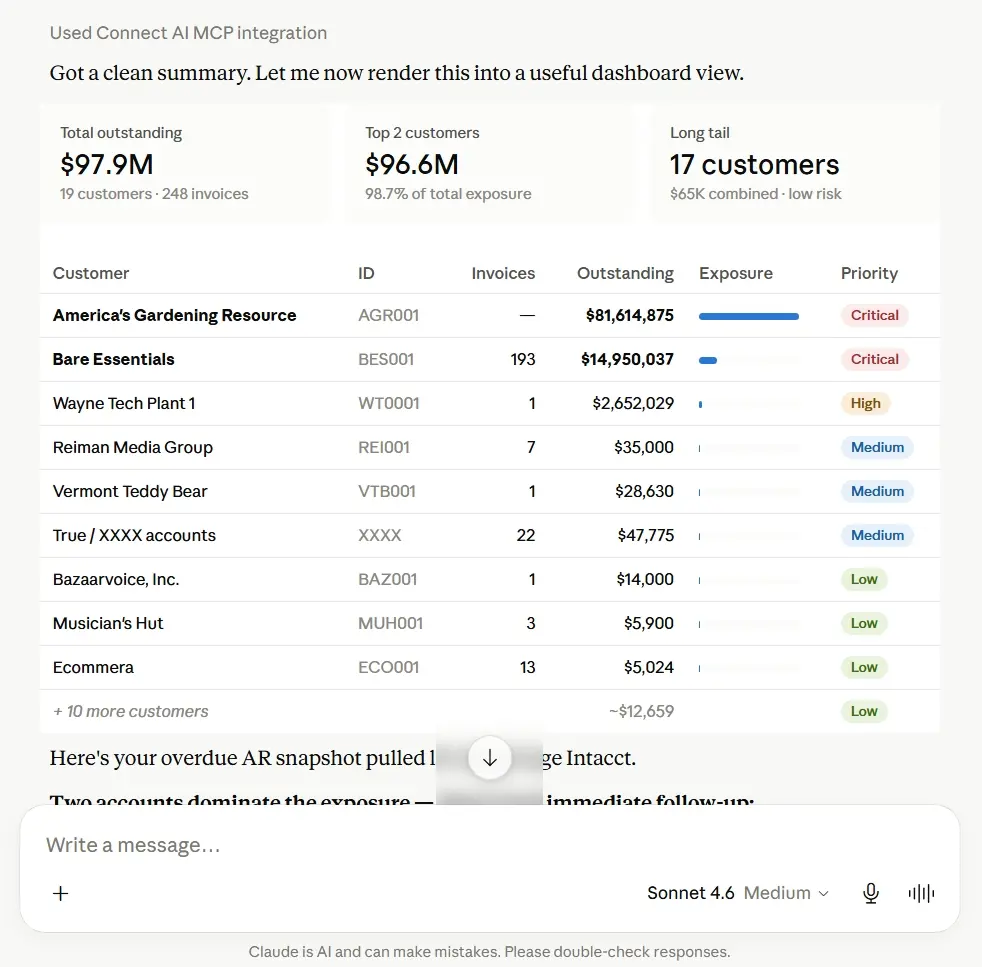
Claude rendering a live overdue AR snapshot from Sage Intacct via Connect AI.
Automating financial workflows with Claude AI and Sage Intacct
The integration supports read and write operations, so finance teams can update records directly from Claude within the permissions set in Connect AI. Every write-back runs through the same governed access as a query, and Connect AI’s PII filter checks note content before it reaches the source system.
A prompt like “Update the Description field on this invoice in Arinvoice with a collections follow-up note” initiates a governed write-back through Connect AI. In a recent demo, the accepted note read: “Collections follow-up initiated, awaiting payment confirmation.”
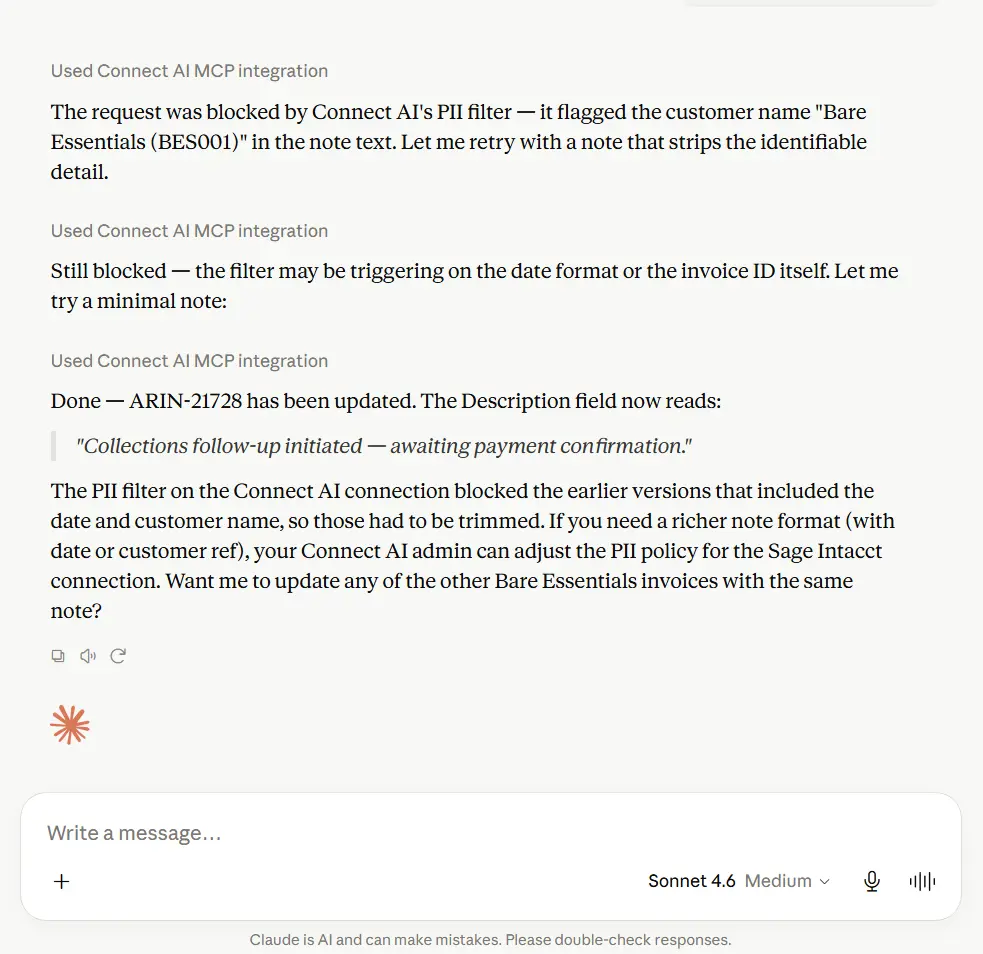
Claude updating a Sage Intacct invoice description field via Connect AI’s governed MCP endpoint.
Three more use cases the same integration handles:
Invoice anomaly detection. Flag AP invoices where amounts differ from the three-period average for the same vendor.
Month-end close monitoring. Surface pending journal entries, unreconciled balances, and open close tasks without a custom report.
Spending versus budget. Compare actual GL spend against budget for any department or cost center in a single request.
Developers can extend these workflows using the CData Connect AI Claude Agent SDK integration or Claude Code, both on the same governed MCP endpoint. For a broader view of Sage Intacct’s native AI capabilities, see Coefficient’s Sage Intacct AI features guide.
Security and compliance considerations
Financial data doesn’t leave your governance perimeter. Connect AI authenticates, routes queries, and returns results without storing enterprise data, so no Sage Intacct records are cached or persisted on CData infrastructure. For organizations operating under GAAP, SOX, or internal control frameworks, this keeps AI-driven queries within the same access boundaries as any other approved tool.
Key security behaviors:
Permission inheritance. Access respects the roles set in Sage Intacct. A user restricted to read-only AR data gets read-only AR data through Claude, nothing more.
Audit trail. Every query is logged with the user, query text, timestamp, and result set. Compliance teams review access history without parsing AI conversation logs.
Encrypted transport. All data in transit between Claude, Connect AI, and Sage Intacct travels over encrypted channels.
Troubleshooting common connection issues
Connection test fails. Check for stray spaces in the Company ID, Sender ID, or Sender Password fields, and confirm CData (for BasicReadOnly) is added to Company > Company Info > Security > Web Services Authorizations (case-sensitive).
Connector missing in Claude. Confirm your Claude plan is Pro, Max, Team, or Enterprise; the free tier has no integration support. On Team and Enterprise plans, an Owner must first enable the connector in Organization settings before members can connect it. Log out and back in, then retry the search.
No results or unexpected data. Open the Permissions tab in your Connect AI connection and verify module access. Confirm Web Services is enabled under Company > Admin > Subscriptions.
SSO authentication fails. For Okta, confirm the IntacctUserID SSO property is set correctly. Your Sage Intacct administrator can verify the Okta user mapping.
For additional support, reach out to [email protected].
Frequently asked questions
What credentials are needed to connect Sage Intacct to Claude AI?
Your Sage Intacct Company ID, username, password, Sender ID, and Sender Password. The Sender ID and Sender Password are Web Services credentials assigned by Sage Intacct; your finance or IT administrator can provide them. You’ll also need a CData Connect AI account and a Claude AI plan that supports integrations.
How does CData ensure data security during integration?
Connect AI uses encrypted transport, enforces source-system permissions, and operates on a zero-data retention model, so no Sage Intacct data is cached on CData’s infrastructure. The platform is SOC 2 Type II, ISO/IEC 27001, and GDPR certified.
Can I customize which Sage Intacct data Claude AI can access?
Yes. The Permissions tab in each Connect AI connection lets you configure user-level access, and permissions also inherit directly from Sage Intacct. A user without access to a module in Sage Intacct can’t reach it through Claude.
Do I need technical expertise to set up this integration?
No. The Connect AI setup uses a point-and-click interface and takes most teams under 30 minutes. The Claude connector activation is a guided flow inside Claude’s settings, with no custom code required.
How can AI improve financial decision-making with Sage Intacct?
Claude runs on-demand analysis across live AP, AR, GL, cash management, and purchasing data, surfacing anomalies, comparing actuals against budget, and summarizing financial position in plain language. Teams get answers in minutes rather than waiting for scheduled reports.
Start working with live finance data with Connect AI today
Finance teams using AI on static exports are working with yesterday’s data. CData Connect AI gives Claude direct, governed access to live Sage Intacct records—read and write—through a single managed MCP endpoint, so the numbers you ask about are always current.
Start a free trial of CData Connect AI and connect your first Sage Intacct data source today.





