Finance teams want AI that can read a live aging report, draft a variance summary, and queue a vendor approval. But they need AI to access all this sensitive data without exposing any of it to agents or people who don’t have access. The real constraint on AI in Sage Intacct is secure, auditable access to sensitive financial data, and that’s where most projects stall.
This guide covers how CData Connect AI gives an AI assistant governed, real-time access to live Intacct data through the Model Context Protocol (MCP), so finance teams can automate reporting and analysis while security and IT keep oversight of every query and write.
Why secure connectivity is the foundation for AI in finance
Sage Intacct is a cloud-based financial management and enterprise resource planning (ERP) system that holds the ledger, receivables, payables, and reporting most finance teams run on. AI integration means connecting an AI assistant or AI agent to that system so it can read live records and, where you allow it, take actions such as flagging an overdue account or proposing a journal entry.
The moment that connection touches real financial data, it carries some significant risk. An agent with broad and ungoverned access can read data it shouldn’t, act on stale numbers, or take a write action no one reviewed. That’s why governance, auditability, and least privilege access come first, because they’re the conditions that make finance automation safe enough to trust.
How CData Connect AI connects AI to Sage Intacct
Connecting an agent to Sage Intacct shouldn't mean opening a connection and trusting the agent to behave. CData Connect AI is the Model Context Protocol (MCP) layer between your AI tools and live systems like Intacct, and it resolves access, structure, and meaning before a query ever reaches your data. The agent works from governed inputs, not a raw schema that it has to interpret on its own every prompt.
Connect AI enhances and enforces this control through two features:
Workspaces define what an agent can see: the specific Intacct entities in scope, and nothing outside them.
Toolkits define what an agent can do: read-only queries, or the exact write operations you've approved.
That scoping is what makes writing back safe to turn on in a production environment. A write or an update is where a careless agent does real damage, such as a duplicate vendor, a bad journal entry, or a number that quietly flows into the close. Scoping is what lets you allow writes into Intacct without inviting that risk: an agent only touches the operations they’re approved to on the entities you've exposed.
Plan the integration before you connect
A secure integration starts with knowing what you’re connecting to and why. Before you enable a single connection for AI, take an inventory of your Intacct datasets and classify them by sensitivity. That classification tells you which entities an agent should have access to and which to stay off-limits.
Next, define the business use cases you’re solving for, and match the depth of access to your organization’s AI maturity. Some common starting points might include:
Accounts receivable collections, where an agent surfaces overdue invoices and drafts follow-ups
Variance analysis, where it compares actuals to budget and explains the drivers
Reporting acceleration, where it assembles a first draft of a recurring financial report
For each use case, document the expected outcome and the level of auditability you may need for it. For example, a task that chains several actions is far less forgiving than a single read, since one wrong step compounds into the next, so multi-step workflows warrant tighter scoping and a closer review before rolling anything out.
Set up secure connectivity between AI tools and Intacct
The connection runs cloud-to-cloud through the Connect AI Remote MCP Server, so there's nothing to install and no copy of your ledger sitting in a warehouse. It comes down to two main steps:
Step 1: Configure Sage Intacct as a source in Connect AI
In Connect AI, add a Sage Intacct connection and authenticate. The login method takes your account credentials along with the sender ID and sender password from your Sage Intacct Web Services credentials. Just save and test, and then the source is live with Connect AI inheriting Sage Intacct’s own permissions and access controls for the user:
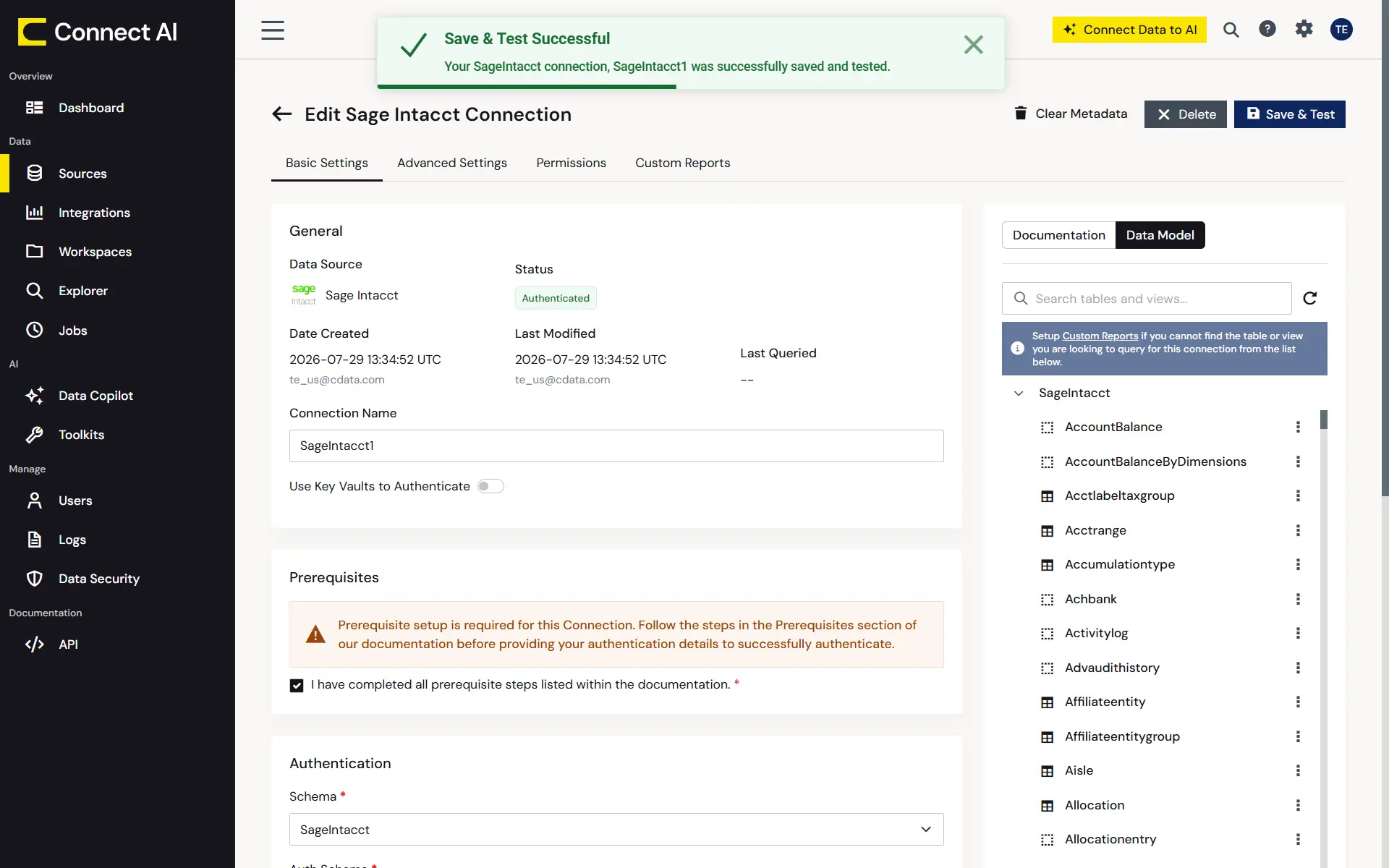
Adding and configuring the Sage Intacct connection in Connect AI
Step 2: Connect your AI tool to Connect AI
Then, point your AI tool of choice at Connect AI through its MCP Server, with native support in Claude, ChatGPT, Copilot Studio, and Databricks Agent Bricks. For example, in Claude, open your Settings, go to Connectors, browse for CData Connect AI, and sign in to your Connect AI account. Claude now reaches Intacct and any other data source you configured access to through Connect AI. From there, you can ask questions in natural language and, where you've allowed it, run functional operations like approving or declining a vendor as a SQL stored procedure.
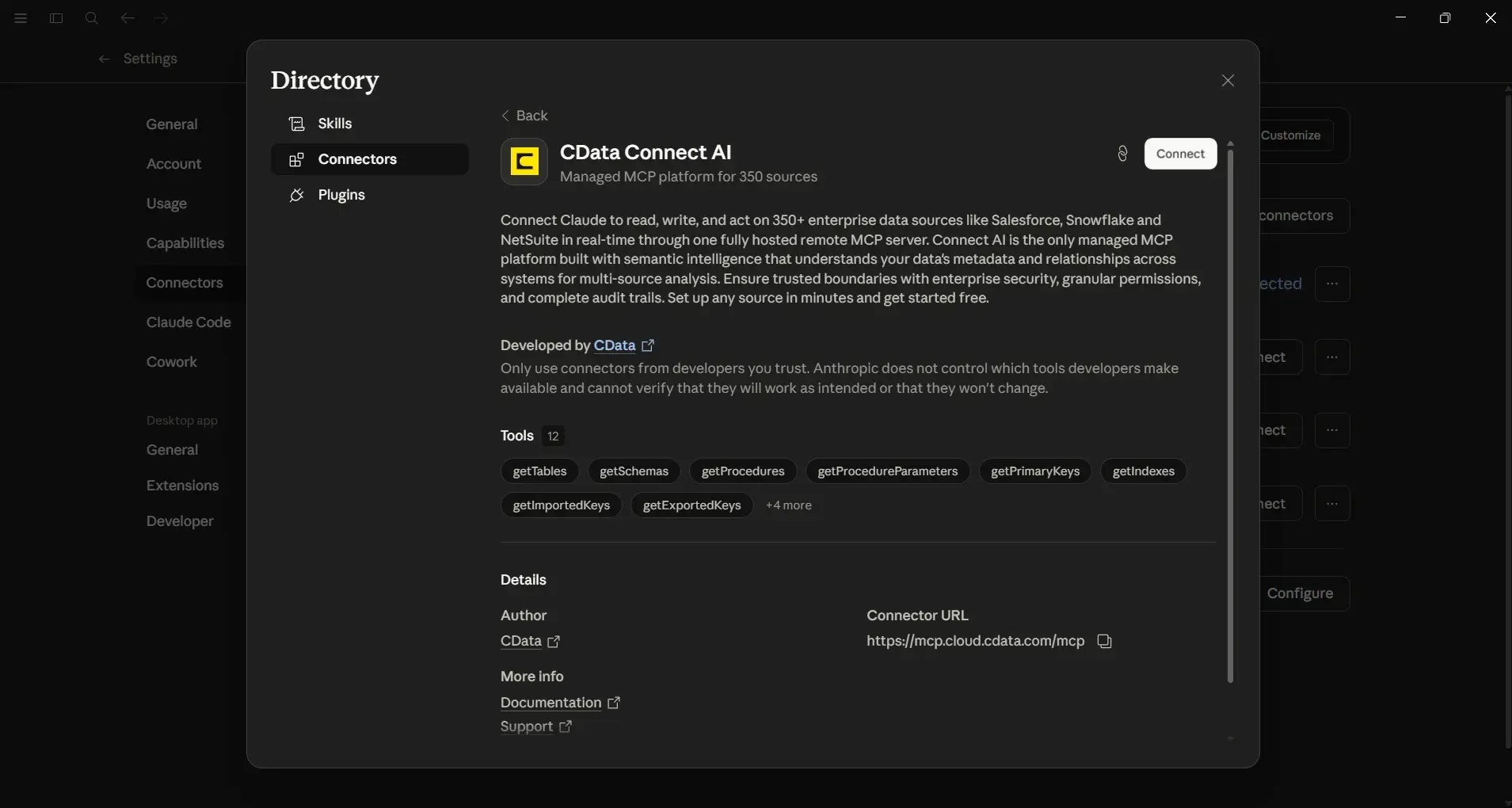
Connecting CData Connect AI in Claude's Connectors settings
For the full setup, see our step-by-step guide for connecting Sage Intacct to Claude here: Use Claude to Talk to Your Sage Intacct Data via CData Connect AI
Configure access controls and governance for AI agents
Least privilege is the governing principle, where every agent and user gets the narrowest access that still lets it do its job. You can start by aligning agent access with your existing role-based access policies and enforce identity through the standards your enterprise already uses, including OAuth, single sign-on (SSO), and a System for Cross-domain Identity Management (SCIM).
SCIM is a protocol that automatically provisions and deprovisions users across cloud systems. Access is granted when someone takes on a role and revoked the moment they leave or change one, without a manual step that's easy to forget.
From there, pair identity-first authentication with Connect AI's scoping. Workspaces limit which datasets an agent can see and Toolkits control which actions it can take, so identity establishes who the agent is and scope establishes how far it can reach.
Then close the last gap with short-lived credentials and a secret manager such as Azure Key Vault. This means no long-lived key sits waiting to be misused or expire, even if every other control holds.
Validate, audit, and approve AI interactions with Intacct
Getting an agent connected is only the start. Keeping it trustworthy once it's live is what grows confidence and survives an audit. Trust in a finance agent comes from being able to see and gate what it does. Connect AI records every agent query and write operation, which gives you the audit trail compliance reviews and incident response teams depend on.
For sensitive or write-enabled actions, keep a human in the loop. Creating a vendor or an invoice shouldn't happen on the agent's say-so alone. A reliable pattern runs like this:
The agent proposes an action based on live Intacct data.
A reviewer approves or rejects the proposal.
Connect AI executes the approved operation.
Connect AI writes the query and result to the audit trail.
Operating and iterating your AI-Intacct integration
A live integration requires maintenance, not just a set-and-forget deployment. Monitor agents with explainability checks and error-rate analysis, and update toolkits and Workspaces when business rules or datasets change. As collections logic or your chart of accounts evolves over time, the agent's allowed actions and access to data should evolve with them.
Keep your governance and access playbooks current, by updating roles and permissions as new use cases come online. It works best when you start with a phased, low-risk rollout, prove the value on a narrow use case, and then expand access and agent scope as trust builds.
Best practices for secure AI use with Sage Intacct data
Whether you sit in IT governing access or finance needing access, the same practices hold:
Inventory and classify Intacct data before any agent connects.
Scope every agent tightly with Workspaces and toolkits.
Enforce identity with role-based policies, OAuth, SSO, and SCIM.
Require human approval and full audit trails for all actions, reads and writes.
The common missteps occur when the inverse happens: granting broad access to save setup time, ignoring API monitoring, and skipping human-in-the-loop reviews. Done consistently, these practices carry you most of the way to formal compliance. The controls that make an agent safe, scoped access, enforced identity, and complete audit trails, are the same ones SOC 2, GDPR, and HIPAA ask you to demonstrate.
Dive deeper into MCP Server Best Practices for 2026 here.
Frequently asked questions
What security measures protect AI access to Sage Intacct data?
CData uses identity-first authentication, role-based access policies, SCIM, and MCP controls so each agent reaches only the data and actions its use case requires.
How can I limit AI access to sensitive Intacct datasets?
Use Connect AI Workspaces and toolkits to scope exactly which Intacct entities an agent can see or modify, which enforces least-privilege access.
What authentication methods does CData support for AI integrations?
CData supports OAuth, SSO, and SCIM for enterprise-grade access management, along with short-lived credentials and secret managers such as Azure Key Vault.
How does CData keep data accurate for AI agents?
Connect AI streams live data from Intacct instead or serving stale batches, so agents act on current records with high semantic accuracy.
Can audit trails cover AI-driven write actions?
Yes, Connect AI logs every interaction, including writes, showing what data was touched, when it was accessed, and who did it.
Connect AI to Sage Intacct securely with CData Connect AI
Secure AI in finance comes down to governed access: knowing what an agent can see, what it can do, and having a record of everything it did. CData Connect AI gives you that control over live Sage Intacct data through MCP, with the scoping, identity, and audit trails production finance workflows require. Start a free trial and connect your first agent to Intacct.




