The email arrives on a Tuesday. A major retail customer, or maybe a distributor you just signed, is moving all purchase orders (POs) to electronic data interchange (EDI) next quarter. They also expect an X12 855 purchase order acknowledgment within 24 hours of receiving each PO. You have eight weeks to get ready.
Eight weeks sounds manageable until IT scopes the work. Most ERPs are built around internal business objects, not EDI formats. They work with familiar data such as sales orders, SKUs, ship to addresses, and the other fields teams use every day.
Your trading partner speaks X12, a structured format with its own field identifiers, partner codes, and sequence rules. Connecting an ERP to EDI requires more than configuration. The two systems need an integration layer that translates and moves data between their different formats.
Most manufacturers choose from three options:
Value added network (VAN): The VAN sits between you and the trading partner and handles EDI translation, usually for a per transaction fee. It's easy to start with, but the fees add up as volume grows, and the translated data still has to get into your backend systems.
Custom integration: A developer or systems integrator writes code to parse X12 documents, map the fields to your ERP, and move the data into the right records. It works, but you own the code, so trading partner spec changes and ERP upgrades turn into new development projects.
Dedicated EDI platform: The platform handles translation, mapping, and transport while connecting directly to your ERP. This guide focuses on that approach.
We'll look at three X12 documents, 850, 856, and 810, that make up much of the manufacturing order cycle, what your systems need to do with each one, and how the full integration fits together.
The three documents that run most of the manufacturing EDI cycle
Manufacturing EDI projects tend to revolve around a small set of transaction types. For suppliers working with retailers, distributors, and large enterprise buyers, the 850, 856, and 810 are among the most common.
X12 850: the purchase order
The 850 starts the order cycle. Your trading partner creates it in their procurement system when they place an order, and the shipment notice, invoice, and payment all trace back to the information in that PO.
An 850 typically includes the PO number used on downstream documents, ship-to and bill-to addresses, line-item quantities and units of measure, the buyer's item identifiers, requested ship and cancel dates, and often a buyer-assigned vendor code. One of the first integration challenges is that the buyer's item number is rarely the same as the SKU in your ERP.
On receipt, the integration has to parse the X12 document into data your ERP can use, translate trading partner item identifiers to your internal product records, create the sales order, and send an X12 855 acknowledgment. The 855 confirms receipt and can flag lines that can't be fulfilled on the requested date.
That acknowledgment can become a problem when the process is manual. Trading partners set their own requirements, but retail supply chains commonly expect a response within 24 to 48 hours. A missed deadline can lead to a cancelled order. Automating the 850-to-855 process removes the inbox checks, downloads, and re-keying that make those deadlines harder to meet.
X12 856: the advance ship notice
The 856 is sent before the shipment reaches the receiving dock. It tells the trading partner what's on the way, including pallet and carton counts, item quantities by carton, and the serial shipping container codes (SSCCs) tied to GS1-128 labels.
Timing is especially important with the 856. Many retail vendor agreements require it before carrier pickup. The document typically includes the PO number, Bill of Lading number, carrier and SCAC code, ship date, and the shipment/order/pack/item hierarchy the buyer's receiving system uses to prepare for the delivery.
Errors here cost money directly. The retailer's receiving system compares the 856 with what arrives at the dock, and a missing or late ASN, or quantities that don't match the cartons, can trigger a chargeback. The exact rules and penalties depend on the trading partner.
Retailers and grocery chains often spell out those rules in vendor compliance guides. A missing 856 may be treated differently from a late one, and a carton count mismatch may carry its own penalty. Some buyers charge flat fees, while others deduct a percentage of invoice value. Those deductions can show up in accounts receivable weeks after the shipment closes. If you dispute one, the original transmission record becomes key evidence, so a reliable audit trail is part of the EDI process too.
The 856 also pulls from more systems than the typical PO. Carton contents, SSCC labels, weight, and dimensions may come from the warehouse management system (WMS), while PO references and item master data live in the ERP. A useful 856 automation has to bring those sources together.
X12 810: the invoice
The 810 is the electronic invoice sent after shipment. Once it reaches the trading partner, it enters their accounts payable process.
It also has to line up with the original 850. Quantities, prices, units of measure, and item identifiers need to match the PO closely enough to pass the buyer's automated matching. When they don't, the invoice can land in an exception queue for manual review, which delays payment.
Typical 810 fields include the invoice number and date, originating PO number, payment terms, line-item detail at the same granularity as the PO, and allowances or charges such as freight, fuel surcharges, or early-payment discounts.
Partial shipments, backorders, and substitutions add complexity. The 810 has to bill what actually shipped while preserving the PO line references the buyer expects. In practice, the integration needs context from both the 850 and the 856 instead of treating the invoice as an isolated ERP record.
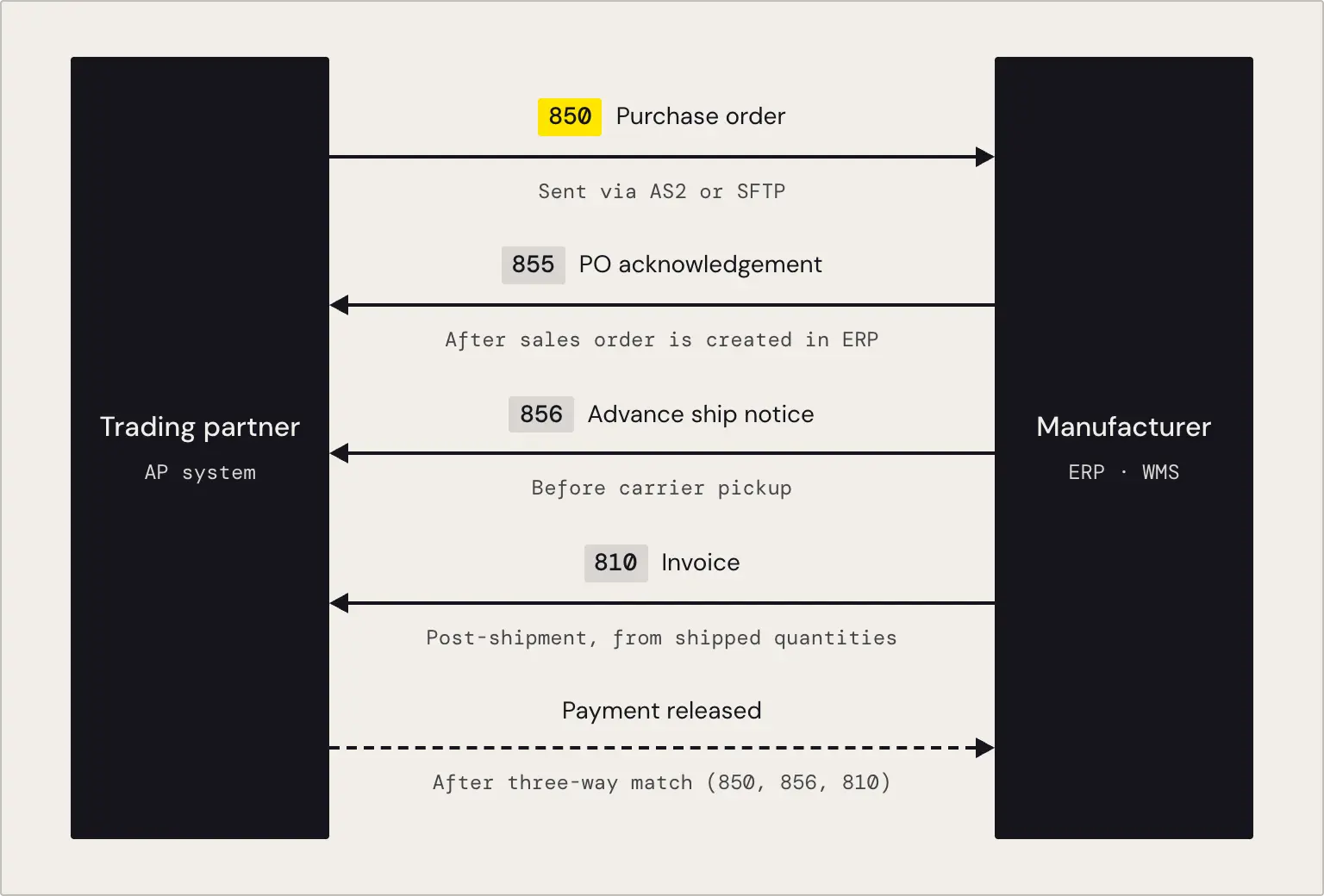
Put together, the order to payment flow looks like this. An 850 arrives over applicability statement 2 (AS2) or secure file transfer protocol (SFTP). The integration parses it, creates the ERP sales order, and sends the 855 acknowledgment. When the order is packed, warehouse and ERP data feed the 856 ASN so it goes out before carrier pickup. After shipment, the 810 uses the actual shipped quantities, maps them back to the original PO lines, and goes to the trading partner. Their AP system can then compare the PO, shipment, and invoice before releasing payment.
How CData Arc handles each document type
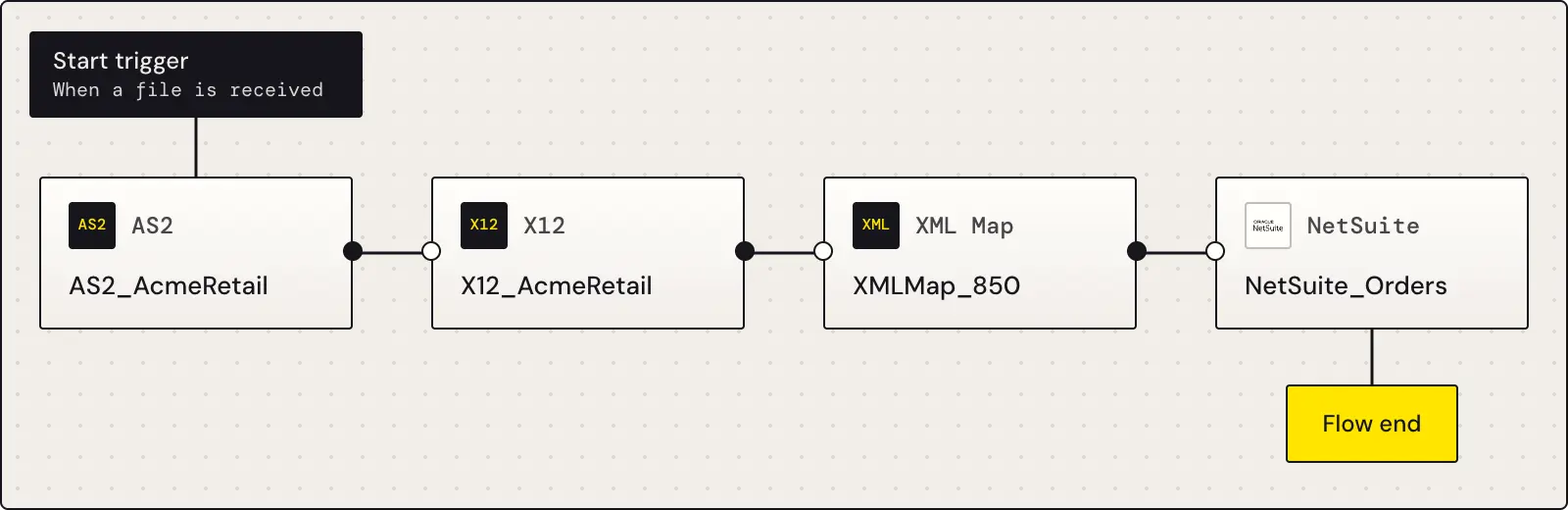
CData Arc uses a visual flow designer to connect the steps in each trading partner workflow. The 850, 856, and 810 can run as separate flows while reusing the same core components: an X12 connector for parsing and generating EDI, an XML Map connector for field-level translation, and connectors to the ERP or other back-end systems.
X12 850 automation: the trigger on PO receipt
When an 850 arrives over AS2 or SFTP, Arc can start the downstream flow automatically. Arc's AS2 transport supports passive receiving, so the workflow can begin as soon as the external document arrives instead of waiting for a polling schedule or a person to check an inbox. In the flow designer, the AS2 connector exposes a "When a file is received" trigger that can start the X12 parsing and ERP write steps.
That automation is useful when the trading partner has a short acknowledgment window. The 850 arrives, the flow runs, and the 855 can be generated without someone manually downloading and processing the PO.
Visual mapping and field translation
The XML Map connector sits between the X12 document and the ERP data model. It handles the field-level translation that keeps the documents aligned. A buyer's item number can map to your internal SKU, a requested ship date can map to the ERP's promise date, and the original PO line sequence can carry forward into the 856 and 810.
For example, suppose the buyer sends item number 00341267 while your ERP knows the product as SKU-8812. The mapping resolves that relationship when the 850 arrives so the sales order is created against the correct product. The same relationship can then be used when you generate the 856 and 810, preserving the references the trading partner needs to match the documents.
Arc's XML Map connector supports drag-and-drop XML mapping along with conditional logic, virtual nodes, looping, and filtering. Those features cover cases where the source and destination structures don't line up one-to-one. Arc also includes AI-assisted mapping that can suggest an initial set of field mappings from the source and destination schemas for an operator to review before the flow goes live.
ERP connectors
ERP integration is where many custom EDI projects get difficult. Parsing X12 is only part of the job. The resulting order, shipment, and invoice data still has to move cleanly into and out of the systems that run the business.
Arc includes prebuilt connectors for ERP and database systems such as NetSuite, Oracle, SQL Server, and MySQL. The NetSuite connector, for example, exposes business objects including customers, orders, items, and financials, with actions for selecting, looking up, and updating data. That gives an inbound 850 a path from EDI receipt to an ERP sales order without manual rekeying. Browse the full library of Arc connectors for other backends.
The outbound 856 and 810 flows work in the other direction. For an 856, Arc pulls shipment details from the ERP and warehouse systems after pick and pack, maps them into the shipment/order/pack/item structure, and transmits the ASN over AS2 or SFTP. For the 810, Arc pulls invoice quantities and amounts from the ERP, preserves the original PO line references, and generates the outbound EDI invoice.
The practical advantage is reuse. The ERP connection you configure for the inbound 850 also supports the outbound 856 and 810. You still configure separate document flows and mappings, but you don't build three independent ERP integrations.
CData also provides downloadable sample flows for 850 inbound, 856 outbound, and 810 outbound scenarios with SQL Server, Oracle, MySQL, and NetSuite back ends. They're available under Suppliers and Manufacturers and can serve as starting points for a trading-partner-specific implementation.
Arc vs. building custom EDI: what the clock looks like
A custom EDI build means owning each layer yourself. A developer or integration partner has to parse the 850, map it to the ERP, and handle the 855 response, then build matching logic for the 856 and 810. Each document has its own structure, timing rules, and exceptions. When a trading partner updates its implementation guide or you upgrade the ERP, that code may need to change too.
The draft estimates three to six months for a custom three-document manufacturing EDI implementation, depending on developer availability, ERP complexity, and trading partner exceptions. That estimate is implementation-specific, and the maintenance work continues after go-live.
With Arc, the parser, mapping layer, transport, and backend connectors already exist. The implementation work shifts toward configuring the mappings and rules that are specific to the trading partner and your ERP instead of building the underlying EDI infrastructure from scratch.
Area | Custom EDI build | CData Arc |
Initial setup | Developer builds the parser, mappings, and acknowledgment logic for each document type. | Configure prebuilt connectors and import sample flows as a starting point. |
Timeline to first transaction | 3 to 6 months typical. | 1 to 4 weeks, depending on ERP data quality and trading partner spec complexity. |
Spec changes | Developer reworks the code. | Reconfigure the mapping in the visual designer. |
ERP upgrade impact | Retest and potentially rebuild the integration layer. | CData updates the connector, and existing flow configuration carries forward. |
Transport (AS2) | Build or license separately. | Drummond Certified AS2 included. |
Ongoing maintenance | Developer time or retainer. | Configuration management within Arc. |
Procter & Gamble is one published example. P&G uses the CData Arc AS2 connector to exchange supply chain data with logistics and retail partners in China, including Global Data Synchronization Network (GDSN) and GS1 China integration. According to the case study, the implementation improved order accuracy and P&G's confidence in the data it sends to trading partners. Read the P&G case study on high volume, compliance driven B2B data exchange for the full details.
Eight weeks is still a tight deadline, but it doesn't have to mean building an EDI stack from zero. X12 standards, prebuilt connectors, and documented sample flows remove much of the infrastructure work. What remains is specific to your environment: the trading partner's implementation guide, your ERP data model, and the mappings between them. That's the work to scope first.
Start your EDI integration today
CData Arc supports the core manufacturing EDI cycle, including X12 850 purchase orders, 856 advance ship notices, and 810 invoices, with a visual flow designer, Drummond Certified AS2, and prebuilt backend connectors.
Explore EDI automation with CData Arc, review the manufacturing sample flows, or start a free trial.





