For enterprise agents, Model Context Protocol (MCP) is now becoming a default protocol for connecting enterprise AI to critical data and tools. However, adoption often outpaces security, as teams prioritize integrations and workflows while treating security as a late-stage configuration.
An audit of 17 popular MCP servers found an average security score of 34 out of 100, with every server lacking permission declarations entirely. That is not a patching problem—it is a design problem. MCP security needs to be built into implementation from day one, not retrofitted after incidents force the issue.
This blog covers six common MCP vulnerabilities, along with essential practices for hardening, access control, credential management, and continuous monitoring to sustain security after go-live.
Understanding key MCP server vulnerabilities
MCP’s client-server architecture introduces attack vectors traditional controls weren’t designed for. Sitting between AI agents and enterprise systems, it handles tool calls, data flows, and access—while AI-generated calls, dynamic schemas, and multi-agent orchestration create new injection and privilege risks that WAFs and SIEMs aren’t optimized to detect.
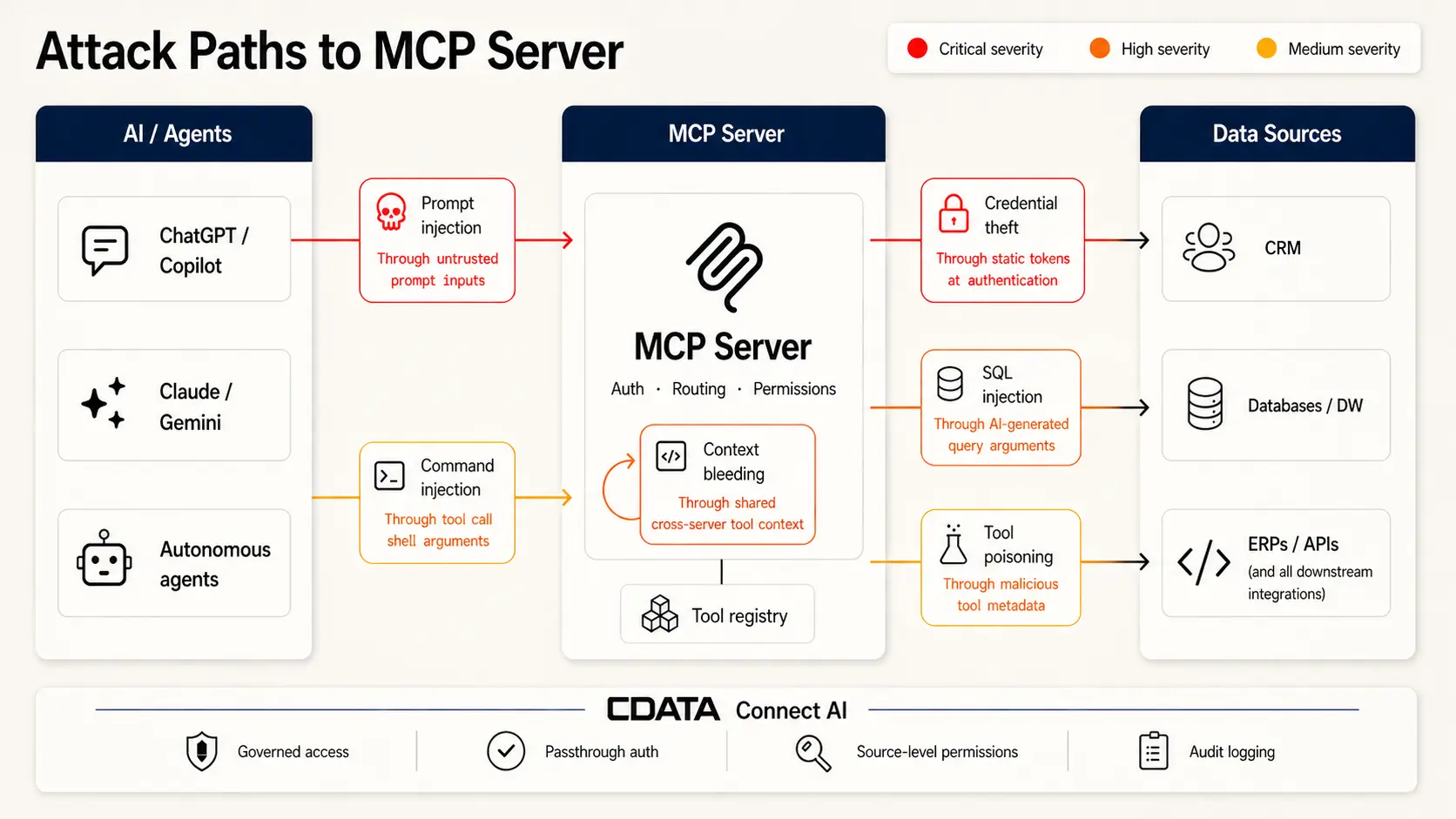
The OWASP MCP Top 10—currently in beta—formalizes a taxonomy of the most critical risk categories. Six vulnerability classes account for the majority of documented exploits.
Vulnerability | Definition | Key risk |
Prompt injection | Malicious instructions in AI inputs trigger unsafe tool calls or data leaks | Input sanitization and human-in-the-loop approval are the primary controls |
Tool poisoning / rug pull | Malicious tool descriptors inject hidden behaviors; tools can silently redefine after approval | Tool poisoning attacks succeed at 84.2% when auto-approval is enabled |
Command injection | Untrusted input interpreted as shell commands enables OS-level access | 43% of tested MCP servers were vulnerable in independent audits |
SQL injection | Manipulated queries expose or tamper with data through improper argument handling | AI-generated queries bypass the discipline of hand-authored parameterized queries |
Credential theft | Unscoped tokens and static secrets enable privilege escalation | 53% of MCP servers rely on long-lived static secrets as primary auth |
Context bleeding / cross-server shadowing | Data flows unintentionally between agents; malicious servers hijack trusted tool calls | Shared service accounts eliminate attribution and enable lateral movement |
Each vulnerability class requires a distinct mitigation approach. The sections below break them down individually.
Prompt injection and indirect injection
What it is: Adversaries embed malicious instructions in AI inputs—or in content the AI will later process—tricking the server into issuing unsafe tool calls or leaking sensitive data. Indirect injection hides payloads in documents, emails, or support tickets the agent reads on a user’s behalf, never touching the user’s prompt directly.
Example: In July 2025, researchers showed how a Cursor agent with privileged Supabase access could be hijacked by a malicious support ticket. Embedded SQL instructions caused the agent to read sensitive tokens and return them in the ticket thread, bypassing row-level security—enabled by privileged access, untrusted input, and an external output channel.
Key mitigations:
Scan and canonicalize all inputs before tool invocations execute
Enforce allowlists restricting which tools can be called and under what conditions
Require explicit human approval for any operation that writes, deletes, or accesses sensitive scopes
Treat all external content—emails, documents, web pages—as a potential injection surface
How CData Connect AI helps: Connect AI’s scoped MCP architecture uses Workspaces and Toolkits to define precisely what each agent can see and do—limiting the blast radius of any injected instruction to only the data and actions that agent is authorized to access.
Tool poisoning and rug pulls
What it is: Tool poisoning arises when malicious tool descriptors inject hidden behaviors into the agent’s context. Since tool metadata is not displayed to users, the attack is invisible at runtime. The rug pull variant is especially dangerous: a tool passes review and approval, then silently redefines its behavior days later—rerouting API keys or exfiltrating credentials without triggering re-approval.
Example: Invariant Labs demonstrated a poisoned math tool that read SSH keys and every credential in the MCP config file, encoded them into a function parameter, and delivered them to an attacker—while returning the correct arithmetic result to the user. Nothing in the interface indicated anything was wrong.
Key mitigations:
Require signed manifests and pinned version numbers for every tool integration
Configure MCP clients to alert users any time a tool description changes after initial approval
Never auto-approve tools from unverified or unofficial registries
How CData Connect AI helps: Connect AI’s Toolkit model defines exactly which tool types are available to each agent. Each Workspace-and-Toolkit combination deploys as a dedicated MCP server, ensuring agents operate only within their intended scope—preventing unauthorized tool substitution by design.
Command and OS-level injection
What it is: Command injection occurs when untrusted input is interpreted as shell commands, resulting in unauthorized system access. In MCP environments, AI agents construct tool arguments dynamically from user context—a natural injection surface that bypasses the assumptions most tool developers make about input.
Example: CVE-2025-53818, disclosed in the GitHub Kanban MCP Server, shows the pattern clearly. The add_comment tool passed user-supplied issue numbers directly to Node.js’s exec() without sanitization. An attacker could inject shell characters and execute arbitrary commands on the host running the server, escalating from the data layer to full OS access.
Key mitigations:
Never interpolate user strings into shell commands
Use safe APIs—Python’s subprocess with shell=False, Node’s execFile instead of exec
Validate all arguments against a strict schema before execution
Sandbox tool execution to contain blast radius when a bypass occurs
SQL injection and database exposure
What it is: SQL injection lets attackers manipulate queries to expose or tamper with data. In MCP environments, the injection surface is novel: agents construct queries from natural language, and argument handling is rarely as disciplined as a manually authored parameterized query. A single non-parameterized string can cascade through thousands of downstream forks.
Example: Trend Micro Research uncovered a SQL injection vulnerability in Anthropic’s reference SQLite MCP server. The flaw allowed attackers to inject malicious prompts, steal data, and hijack agent workflows. The repository had already been forked over 5,000 times before archival—with no patch planned.
Key mitigations:
Use parameterized queries exclusively—never string-concatenated queries
Restrict tool access to read-only database operations where write access is not required
Audit all tool-to-database argument mappings before production exposure
How CData Connect AI helps: Connect AI enforces source-level permissions at the connector layer. Agents query within defined access scopes—not against raw database credentials—limiting what any compromised tool or query can reach.
Credential theft and unauthorized access
What it is: Tokens and secrets are the most direct path to privilege escalation. A compromised credential with broad scope unlocks every system the agent is authorized to access. In multi-agent environments, that scope is often wider than intended—and static, long-lived secrets make the exposure permanent until manually rotated.
Example: The GitHub MCP Data Heist, documented by Invariant Labs in May 2025, succeeded because the GitHub MCP server was configured with a broad Personal Access Token covering all repositories. A malicious GitHub issue injected a prompt instructing the agent to read private repos and exfiltrate salary data and private project details as a public comment—no special access required, just an overpermissioned token.
Key mitigations:
Store all secrets outside repositories in managed vaults; never hardcode API keys or tokens
Use per-tool, per-session credentials scoped to the minimum required permissions
The June 2025 MCP specification mandates OAuth 2.1—this is now the baseline, not optional hardening
How CData Connect AI helps: Connect AI uses passthrough authentication with no static secrets stored on the platform. Credentials are never held by the managed layer, eliminating credential theft at the infrastructure level.
Context bleeding and cross-server tool shadowing
What it is: Context bleeding occurs when information flows unintentionally between agents or tools—through shared names, metadata collisions, or overlapping context windows. Cross-server shadowing is the active exploit: a malicious server injects a tool description that intercepts calls to a trusted service, silently logging parameters or modifying behavior before passing calls through.
Example: Researchers demonstrated a working cross-server shadowing attack where a malicious server registered a tool named send_email with a description crafted to outrank the legitimate email tool. The agent routed calls to the attacker’s version, which logged all email body content and recipient lists before forwarding. Users saw normal behavior throughout.
Key mitigations:
Isolate context windows per task and enforce strict permission boundaries per tool
Assign unique identities to each agent in multi-agent deployments—shared service accounts eliminate attribution
Monitor for tool name collisions in multi-server environments and alert on unexpected tool selection patterns
With the six vulnerability classes mapped, the next step is translating them into concrete controls before any server reaches production.
Preparing a pre-deployment security checklist
A rigorous pre-deployment checklist blocks the majority of MCP exploits before they reach production. The gap between what teams assume is secured and what is actually verified is where most incidents begin.
Inventory and allowlist MCP servers and tools
Enumerate all active MCP servers and tools before any integration goes live. Restrict use to vetted, allowlisted instances only. Approximately 38% of MCP servers are sourced from unofficial channels, and around 3% of unofficial servers contain hardcoded credentials designed to bait developers into connecting production keys. Enforce certificate validation on all registered endpoints and run periodic audits to catch additions that bypass the approval process.
Conduct static scans and code reviews
Run MCP-specific scanners and schema linters against server and plugin artifacts before registration. Flag tool descriptors that reference external URLs or execute shell commands. Tools like npm audit or Snyk catch known vulnerabilities in dependencies before they reach production.
Pin and sign tool versions
Require signed manifests and pinned version numbers for every tool integration. Unsigned or unpinned tools are the primary vector for rug-pull attacks—a tool that passes review today can push a malicious update tomorrow without triggering re-approval.
Sandbox testing with synthetic data
New or updated tools should run in isolated environments against synthetic data before production exposure. Sandbox testing surfaces behaviors that static code review does not catch—unexpected external calls, privilege escalation attempts, schema manipulation—without exposing live data to an unverified tool.
Scope permissions using least privilege
Apply least privilege per tool and per session. A rapid permissions review before sign-off:
Each tool has a unique credential scoped to its required resources only
No organization-wide or shared tokens are in use
Write access is explicitly justified; read-only is the default
Token expiry is configured and tested
All tool grants are documented and attributable to a specific approval
Pre-deployment controls harden the entry point. Runtime controls handle what slips through.
Implementing runtime hardening and policy enforcement
Static controls catch known vulnerabilities at deployment time. Runtime controls protect against zero-days, tool drift, and attack patterns that only appear under live conditions.
Deploy MCP gateways with guardrails
A gateway centralizes allowlisting, intercepts risky tool calls before they reach source systems, and requires explicit approvals for sensitive actions. Gateway-level rejection is the single most effective control for prompt injection and tool poisoning at scale—policy is enforced regardless of what individual tools do.
Enforce input validation and approval controls
Treat every external input as hostile until it passes validation. Canonicalize inputs, scan for injection patterns, and enforce strict argument constraints before any tool call executes. For high-impact operations—deleting records, writing to production systems, accessing sensitive scopes—require explicit human-in-the-loop approval.
Use safe APIs and execution sandboxing
Use safe APIs for all tool invocations and reject any input that cannot be validated against an allowlist. Sandbox tool executions to contain blast radius—a sandboxed process cannot escalate to OS-level access or exfiltrate data outside its permitted scope.
Monitor and detect anomalous behavior
Establish behavioral baselines for each tool and alert on deviation. Reliable early signals of active exploitation:
Tool calls with unusually long or structured inputs (prompt injection signature)
Access to tools or scopes outside established usage patterns
Auth failures spiking above baseline
Tool arguments referencing file paths, environment variables, or external URLs unexpectedly
Runtime hardening slows active attacks. The practices below prevent the most common root cause: credential mismanagement.
Practicing credential and session hygiene
Credential mismanagement is the most prevalent root cause across documented MCP incidents. Three practices address the most common failure modes.
Store secrets securely and rotate regularly
Never hardcode API keys, tokens, or credentials in configuration files or source code. Use managed secret vaults for runtime injection. Astrix Security’s open-source MCP Secret Wrapper pulls secrets from AWS Secrets Manager at startup, ensuring no static credentials exist on the host machine at any point.
Bind sessions to verified identities
Never treat a session ID as authentication in itself. Validate every session against a verified user or service account. Use short-lived sessions (15 to 30 minutes), cryptographically secure session ID generation, and immediate rotation when authentication boundaries change.
Avoid token reuse and detect replay attempts
Issue per-tool, per-session tokens scoped to the minimum necessary permissions. Avoid organization-wide tokens entirely. Monitor access logs for the same token appearing from multiple IP origins—replay attacks leave detectable patterns that automated log analysis can surface early.
Even airtight credential hygiene degrades without ongoing monitoring. The final layer is continuous observability.
Establishing continuous monitoring and incident response
Security posture degrades without ongoing monitoring. MCP server configurations drift, upstream APIs change, and new exploit techniques emerge faster than static hardening checklists update.
Enable logging and observability for MCP activity
Capture every prompt, tool call, response, and authentication event in a structured, queryable format. Unstructured or incomplete logs make post-incident analysis significantly harder and often render compliance audit requirements unmet.
Integrate SIEM and anomaly detection tools
Route MCP server telemetry to your SIEM and configure alerts for high-severity triggers:
Alert rule | What it detects |
Tool version drift | Registered vs. active version mismatch—primary rug-pull indicator |
Unusual privilege grants | Scope expansions outside approved change windows |
Auth failure spikes | Credential stuffing or replay attack attempts |
Off-hours or off-geography access | Access outside defined hours or locations |
Argument size anomalies | Tool calls with inputs significantly larger than established baseline |
Maintain vulnerability management and patch cadence
MCP servers and their tool dependencies require the same patching discipline as any production service. Establish a scheduled review cycle, verify deployments after each patch, and track CVE disclosures relevant to your stack. CVE-2025-6514 (mcp-remote, CVSS 9.6) affected over 437,000 installations—many remained unpatched weeks after public disclosure.
For a broader view of MCP security architecture, CData’s MCP security analysis covers the threat model across managed and self-hosted deployments.
Frequently asked questions
How can I recognize early signs of MCP server exploitation?
Watch for malformed SQL, unexpected tool behavior, and unauthorized commands. Prompt injection often shows up as unusually long or structured inputs in logs. Spikes in auth failures or access to inactive tools are key signals. CData Connect AI surfaces these patterns through centralized audit logging across all connected sources.
What are best practices for securing OAuth tokens in MCP environments?
Store OAuth tokens in managed vaults outside code repositories. Issue narrow-scoped tokens per tool and per session—never organization-wide. Rotate tokens on a scheduled cadence and immediately on suspected compromise. The June 2025 MCP specification mandates OAuth 2.1 compliance, including token binding as a baseline.
How does sandbox testing improve MCP server security?
Sandbox testing exposes new or updated tools to synthetic data in an isolated environment before production access is granted. This surfaces behaviors—unexpected external calls, privilege escalation attempts, schema manipulation—that static code review does not catch.
Secure your MCP deployments with CData Connect AI
Most MCP security failures share a root cause: controls bolted on after the architecture is set. CData Connect AI builds them in by default—passthrough auth, source-level permissions, audit logging, and scoped agent boundaries across 350+ enterprise sources.
Start a free trial or try a free live demo to see governed MCP connectivity in practice.




