CData offers a trusted solution for fast and reliable Salesforce data integration, helping enterprises move CRM data into PostgreSQL without fragile custom scripts or hidden costs. As organizations look to unify their systems, building a dependable pipeline between Salesforce and PostgreSQL keeps operations smooth, while controlling costs and scaling with confidence.
With features like automated incremental updates, query pushdown, and flexible scheduling, CData Sync takes the complexity out of integration while giving teams the control they need.
Why you should sync Salesforce data to PostgreSQL
Break down CRM silos for unified analytics
Salesforce data often sits isolated from other business systems, separate from ERP, finance, or product telemetry in PostgreSQL, causing barriers.
About 67% of businesses struggle with data consistency due to these isolated systems. Syncing Salesforce to PostgreSQL creates a single reliable data source for cross-department dashboards.
For example, Shopify integrates Salesforce customer data with PostgreSQL to track real-time sales and inventory across stores, optimizing restocking decisions. Similarly, Stripe unifies SaaS billing data to monitor subscriptions and customer loss patterns in real time. CData Sync’s live connectivity delivers real-time updates, far surpassing slow, error-prone CSV exports for Salesforce to PostgreSQL integration.
Reduce licensing costs with off-platform reporting
Salesforce Analytics is expensive, while PostgreSQL works with free BI tools. CData Sync keeps pricing simple by charging per connection, which makes costs predictable, and organizations see up to 34% less data cleanup.
Option | Number of users | Annual Cost | Note |
Salesforce Analytics licenses | 10 | By seat (10) | Standard approach: extra licenses required for dashboards. |
CData Sync + free BI access | Unlimited | By connection (2) | No extra fees per row or seat; connects Salesforce to PostgreSQL for off-platform reporting. |
Power AI models with current customer data
AI apps that predict customer needs or suggest products perform better with current data. With live sync, updates land in seconds instead of waiting for overnight batches. CData Sync's incremental update capabilities keep machine learning pipelines updated in under five minutes. Built-in support for Model Context Protocol (MCP) keeps AI systems future-ready. Real-time sync helps organizations react 6x faster to customer behaviour, leading to smarter decisions and better results.
What you need to start building Salesforce to PostgreSQL pipelines
Choosing the right connection method (CData Sync vs. custom code)
When choosing how to connect Salesforce to PostgreSQL, it’s important to compare no-code tools, custom scripts, and ETL platforms on speed, maintenance, and real-time capabilities.
Feature | CData Sync | Python / psycopg2 | Other ETL |
Time-to-Value | 3.8x faster | Slow | Moderate |
Maintenance | Low | High | Moderate |
CDC Support | Built-in (<5 min) | Custom needed | Partial |
Pricing | Connection-based, predictable | Variable | License-based |
Schema Drift | Auto | Manual | Partial |
Note: Custom scripts rarely adjust automatically to schema changes, whereas CData Sync handles this easily.
Prerequisites and permissions for Salesforce and PostgreSQL
1. Required Salesforce permissions
API Enabled: Allows access to Salesforce APIs for integration.
Modify All: Grants permission to modify all records.
View All Data: Enables viewing all data across objects for full access.
2. Required PostgreSQL Roles for real-time replication
CREATE: Allows creating tables, schemas, or other database objects.
CREATE ROLE replication user WITH LOGIN PASSWORD 'your_password';
GRANT REPLICATION, CONNECT ON DATABASE your_database TO replication_user;
INSERT: Allows inserting new records.
Network, security, and compliance checklist
Configure network access: Add your Sync server IPs in Salesforce Network Access and allow inbound traffic from trusted hosts in PostgreSQL firewall.
Enable secure communication: Turn on SSL in PostgreSQL and use OAuth 2.0 in Salesforce and Sync for encrypted, secure authentication.
Handle data residency and compliance: Deploy Sync in permitted regions to meet GDPR/HIPAA requirements, with self-hosted Sync keeping data under control.
Alignment with security standards: Ensure SOC 2 and ISO-27001 compliance via encryption, controlled access, and audit logging.
With the prerequisites, network, security, and compliance managed, you are ready to begin building your pipeline
Six simple steps to build the Salesforce to PostgreSQL pipeline
Step 1 – Install or launch CData Sync
Start a SaaS trial by signing up and exploring the CData Sync product through the free demo.
For self-hosting, download and install the free trial.
Step 2 – Create a secure Salesforce source connection
Launch CData Sync, click on Connections, select Add Connection, choose Salesforce as the source, and configure the basic connection properties.
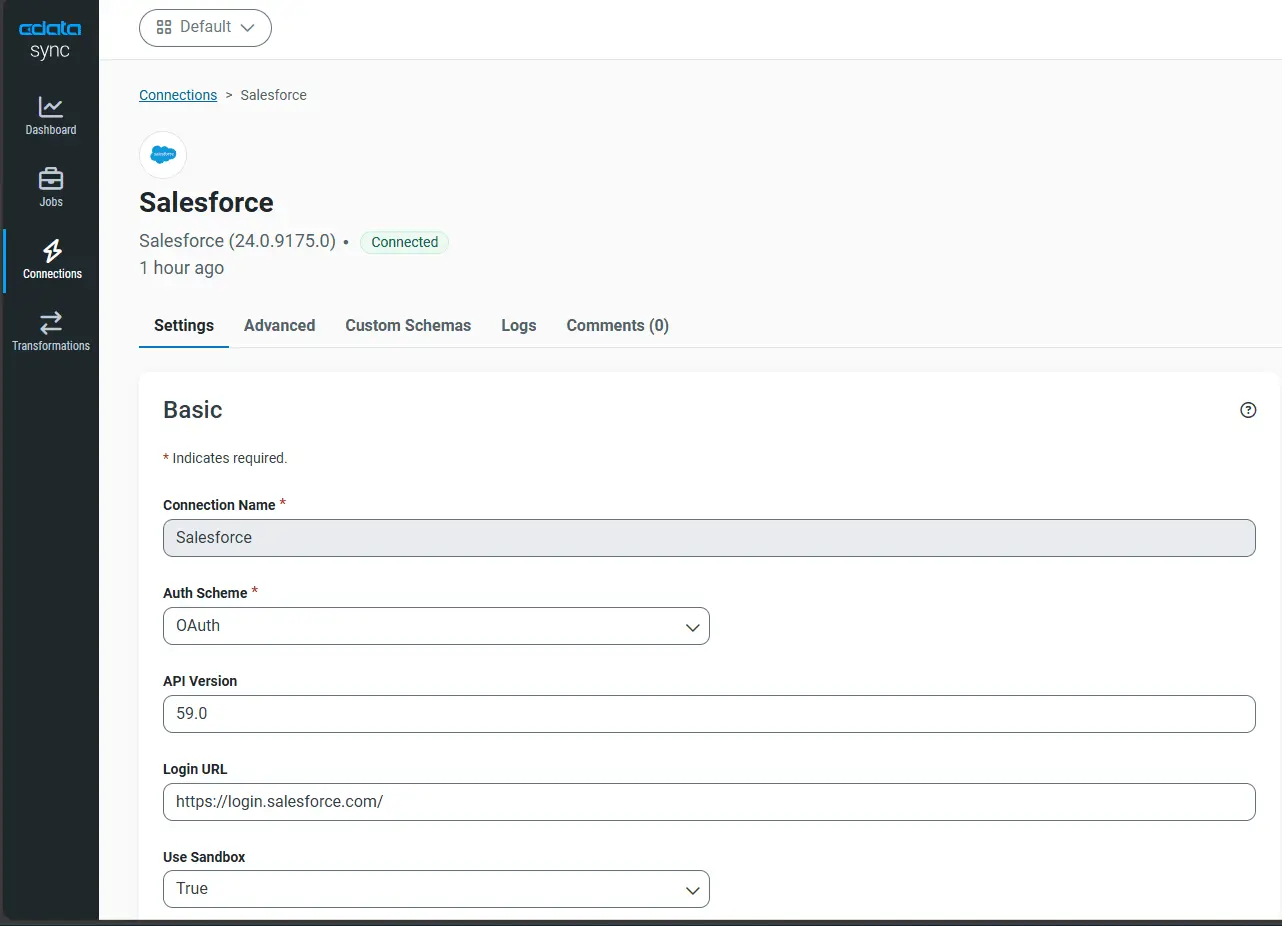
Select OAuth login to avoid storing passwords, set API version to 59.0, and optionally choose SOQL Bulk API for large datasets or REST API for standard operations. Click Connect to Salesforce.
Step 3 – Add PostgreSQL as the destination
Click on Connections, select Add Connection, choose PostgreSQL as the destination, and configure the basic connection properties. Specify Other connection property with SSL mode = verify-full.
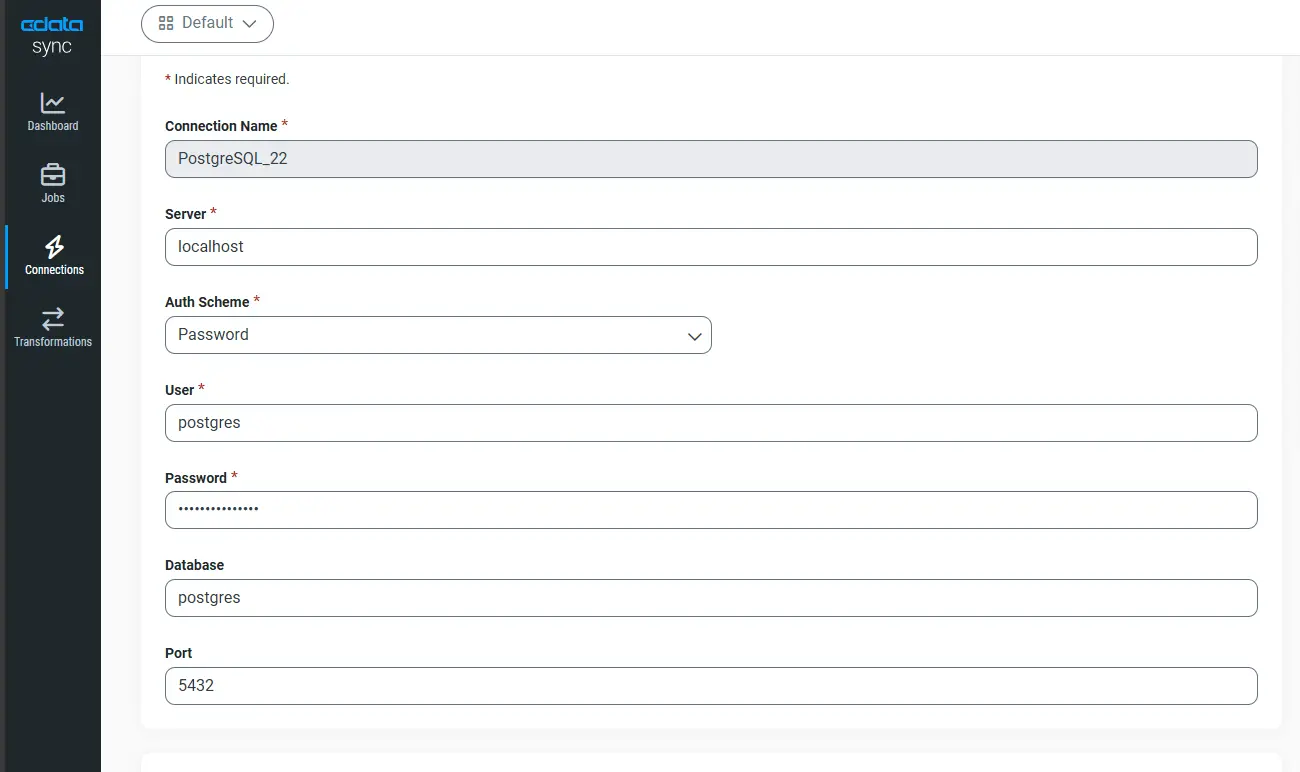
Edit the postgresql.conffile to enable logical replication and set the required parameters, then test the connection.
wal_level = logical
max_replication_slots = 5
max_wal_senders = 10
Note: CData Sync automatically stores database credentials securely in the Sync Vault.
Step 4 – Select objects and map custom fields
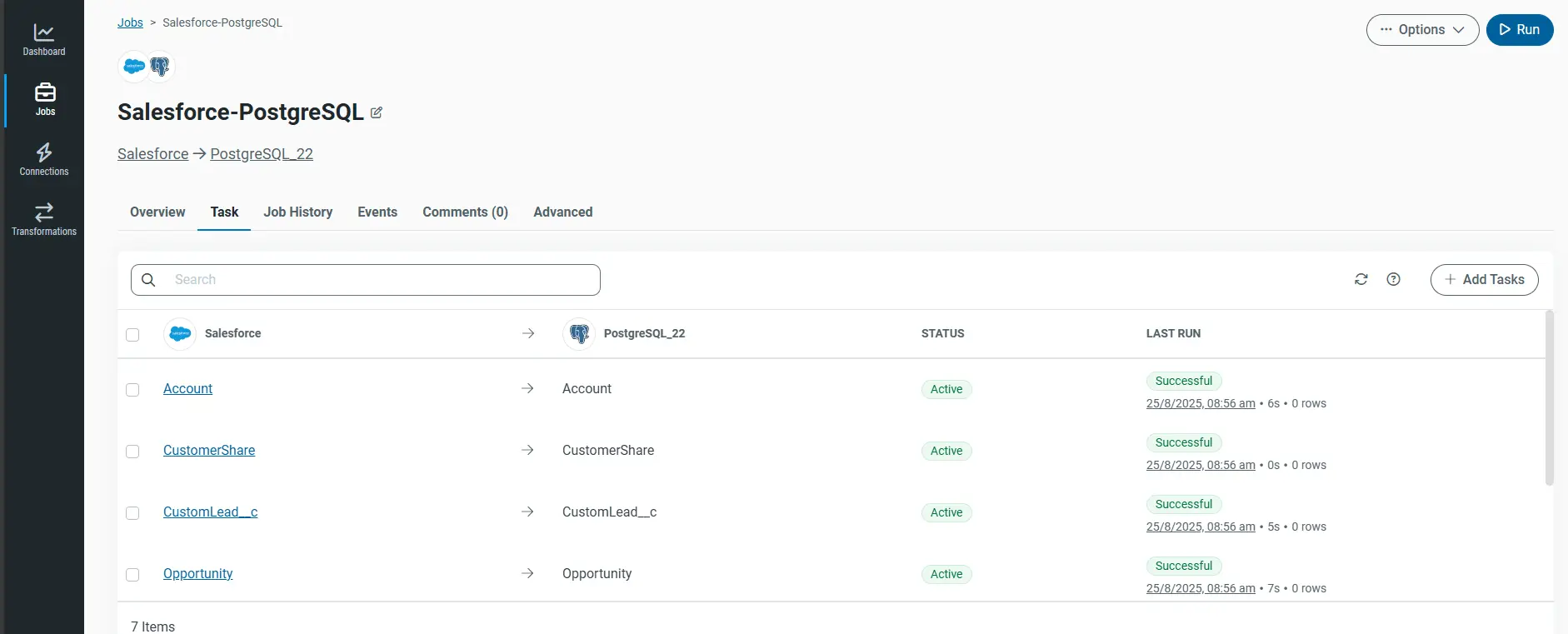
The auto-mapping feature of CData Sync intelligently matches Salesforce fields to PostgreSQL columns, streamlining setup, while manual override allows adjustments for any custom fields or special cases.
Tip: Prefix schema with “sf_” to avoid collisions.
Step 5 – Enable incremental replication and schedule updates
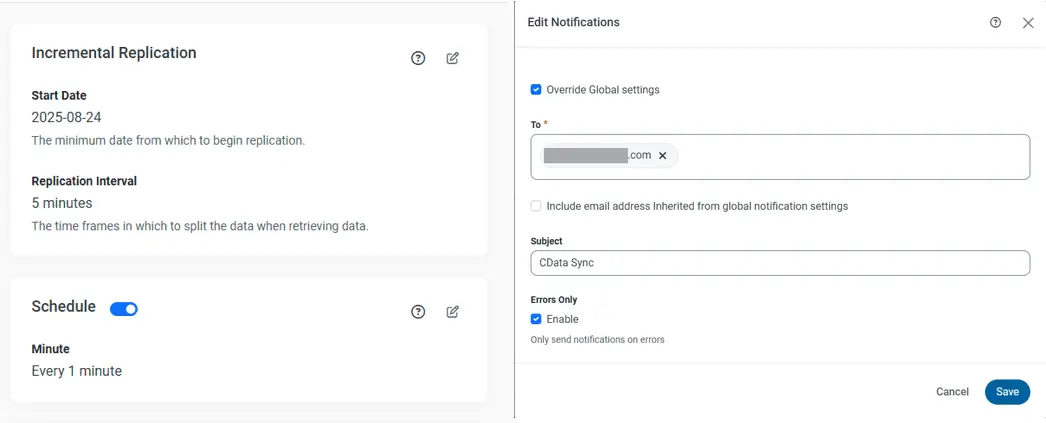
Use incremental replication in CData Sync to capture Salesforce changes efficiently without full reloads. Schedule the Job at a 5-minute interval for real-time updates and configure alerts to notify if lag exceeds 10 minutes.
Step 6 – Run the initial load and validate row counts
Run the Job in CData Sync to load Salesforce objects to PostgreSQL.
Use the Preview tab in CData Sync or SELECT COUNT (*) in PostgreSQL to validate row counts:
SELECT COUNT (*) AS pg_count FROM sf_account;
-- Compare with Salesforce: SELECT COUNT () FROM Account;
Note: Enable parallel threads for faster loads typical throughput reaches 200k rows/min.
Read a full guide: Automated Continuous Salesforce Replication to PostgreSQL
After setting up your pipeline, you can use various configuration options to optimize the pipeline.
Keep your sync fast and reliable
Monitor jobs, alerts, and retries in Sync
Monitoring integration jobs is crucial, and dashboards track the key metrics.
Success Rate: tracks how reliably job completes.
Average Duration: indicates the typical time taken for a job to complete.
Lag: reveals delays between Salesforce updates and PostgreSQL syncs.
Set up email or Slack alerts to catch failures instantly. 89% of successful integrations use automated monitoring because issues are easier to fix when caught early.
Optimize performance with query pushdown and parallel threads
Boost performance with query pushdown, which lets Salesforce handle filters and joins so less data is transferred. Improve load speed by adjusting parallel threads in Sync start with 4 and increase up to 16 as needed. For even smoother transfers, fine-tune the Bulk API batch size.
Benchmarks show that using parallel threads can reduce load times by as much as 70% .
Plan for schema changes and bidirectional workflows
Sync automatically detects schema changes and enabling the “Alter Schema” option keeps pipelines running without manual fixes.
For reverse ETL, data can be upserted back into Salesforce using external IDs to maintain consistency.
Frequently asked questions
Does CData Sync support custom Salesforce objects and fields?
Yes. Sync auto-detects standard and custom Salesforce objects, including all custom__c fields, for replication.
Can I deploy Sync on-premises for GDPR or HIPAA compliance?
Absolutely. Sync runs on Windows, Linux, Docker, and Kubernetes, keeping data in your private environment.
How does connection-based pricing compare to row-based pricing?
Connection-based pricing means costs are based on source-destination pairs, not data volume, saving 40–60% for large datasets.
What latency can I expect with incremental replication turned on?
With CData Sync incremental replication from Salesforce to PostgreSQL, data typically arrives in under five minutes.
Is reverse ETL (PostgreSQL back to Salesforce) possible in the same tool?
Yes. CData Sync supports bidirectional jobs with upsert operations to update Salesforce from PostgreSQL.
Start building your Salesforce to PostgreSQL integration with CData Sync
To modernize your Salesforce to PostgreSQL workflows, focus on real-time data updates, schema consistency, and continuous optimization. CData Sync simplifies this with a no-code platform that works across on-premises, cloud, or hybrid environments.
Sign up for a 30-day free trial and start building your Salesforce to PostgreSQL integration pipeline today.




