Customer data moves fast, and the business decisions backed by that data shouldn’t fall behind. Stop copying data that’s outdated before it lands in dashboards and build an ETL pipeline for bi-directional sync between Salesforce CRM and Snowflake’s AI Data Cloud. The latest Salesforce to Snowflake real-time integration tools deliver always-fresh insights to every team, driving faster decisions, better personalization, and real-time operational agility.
Salesforce’s zero-copy Bring Your Own Lake (BYOL) and Snowflake’s Openflow architecture have redefined what’s possible in Salesforce to Snowflake data integration. But integrating the two platforms seamlessly, especially in both directions, still demands the right approach.
CData Sync makes this bi-directional connection seamless, automating the complex ETL and reverse ETL pipeline while keeping your data up to date. Tour the product to see bi-directional sync in action.
Why unify Salesforce and Snowflake data?
Organizations connect Salesforce and Snowflake to provide real-time visibility across multiple customer touchpoints. This unity gives sales teams intelligent context, marketing teams personalized messaging at scale, and service teams access to up-to-date customer history.
The bi-directional sync is backed by modern pipelines that utilize zero-copy data sharing to read data directly without being duplicated and change data capture (CDC) to stream updates as they happen. Combined with reverse ETL to push warehouse insights back into Salesforce to be acted on, these integrations ensure that customer interactions and informed by real-time, accurate data.
Delivering real-time customer 360 across teams
“Customer 360” means having a complete, up-to-date view of every customer's journey, from the first touch to the latest ticket. Unified datasets can give teams a holistic view to inform every customer interaction.
Live data flowing between Snowflake and Salesforce means sales reps get context-rich lead data, marketers can personalize outreach on the fly, and service agents know exactly who they’re helping. Studies show that faster, data-driven campaigns drive significantly better performance.
Eliminating data silos and duplicate ETL
Legacy ETL processes that move data once a night can’t keep up with today’s fast pace, creating latency and storage bloat. Now that 86% of IT leaders say data streaming is a strategic or important priority for IT investments, the move from batch to real-time integration is in full swing. Live data patterns such as CDC (capturing only what changed) and zero‑copy integration (reading data by reference without physically moving it) are faster, cleaner, and more scalable.
Meeting AI and analytics demands
Delivering real and knowledgeable insights relies on fresh, clean data. With Salesforce and Snowflake staying in sync, AI models can act on the latest information to improve accuracy and responsiveness. Snowflake’s Snowpipe Streaming integration with Openflow now supports throughput up to 10GB per second, which is more than enough for large-scale training and inference.
Alongside a real-time ETL pipeline, Model Context Protocol (MCP) servers can let AI agents access real-time CRM data on demand. MCP Servers expose governed tools and data endpoints so AI tools can tap into live data in a controlled and secure interface
Try CData MCP Servers today to give AI agents access to real-time data.
Integration models for two-way sync
There’s no one-size-fits-all answer. Here are the three most common integration models, and when to use them:
| Zero-copy data sharing (Salesforce BYOL) | Traditional ETL/ELT pipelines | Reverse ETL pipelines |
What it is | Snowflake reads data from Salesforce by reference without creating physical copies of the data | Moves and transforms data between Salesforce and Snowflake on a schedule. | A pipeline that pushes insights from Snowflake back into Salesforce objects. |
Strengths | Complete Salesforce governance, near real-time data, no storage duplication | Provides vendor portability and full flexibility for in-flight (ETL) and post-flight (ELT) transformations | Closes the loop on data pipelines to activate analytics in daily workflows like lead scores and churn risk. |
When is it ideal | Ideal when in need of low-latency and strong governance that keeps Salesforce data policies in place. | Ideal when needing historical snapshots, transformation flexibility, and cross-platform control to avoid vendor lock-in. | Ideal for enabling sales, marketing, and support teams to act on Snowflake insights inside Salesforce. |
Common use cases | Native to the Salesforce and Snowflake ecosystem. | Tools like CData Sync, Airbyte, and Fivetran are commonly used. | CData Sync maps Snowflake results to Salesforce objects and uses CDC to send only changed data. |
Architecture blueprint for real-time, bi-directional pipelines
A modern, bi-directional pipeline typically includes:
Source and destination connectors for both Salesforce and Snowflake
A staging and transformation engine
A CDC engine that captures only changed data
Monitoring tools with error logging and alerting
Governance controls for compliance and auditing
Handling schema changes and CDC at scale
Salesforce schemas can evolve often and be updated quickly. CData Sync adapts to these changes automatically by reading Salesforce metadata, so your pipeline keeps working without manual adjustments and fixes. Combined with change data capture to ensure that only new or updated records are processed, CData Sync keeps integrations lean and fast, even across large datasets.
Managing Salesforce API limits and performance
Salesforce enforces API limits, so smart usage matters. Some best practices used by CData Sync to stay efficient while respecting these limits include:
Using the Bulk API (which handles 100,000 records per job) for large jobs
Running incremental replications via CDC
Using query push-down to Snowflake for efficient filtering
Parallel paging requests to speed queries up
Ensuring governance, security, and compliance
CData Sync is built with enterprise-grade security in mind and backed by SOC 2 and ISO 27001 certifications. That includes security features like:
OAuth and Single Sign-On (SSO) authentication for both Salesforce and Snowflake
Field-level encryption and data masking
GDPR-compliant regional hosting options
Encrypted TLS/SSL connections
User-defined credentials and role-based access control
Workspaces provide isolated environments with their own governance controls
Step-by-step guide to build and monitor your pipeline
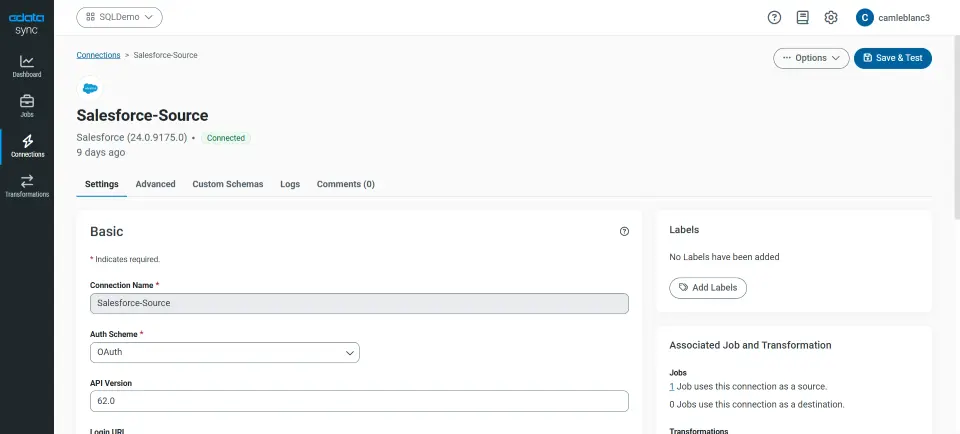
Connect and authenticate both endpoints
The CData Sync setup wizard guides you through setting up OAuth for Salesforce and key-pair authentication for Snowflake.
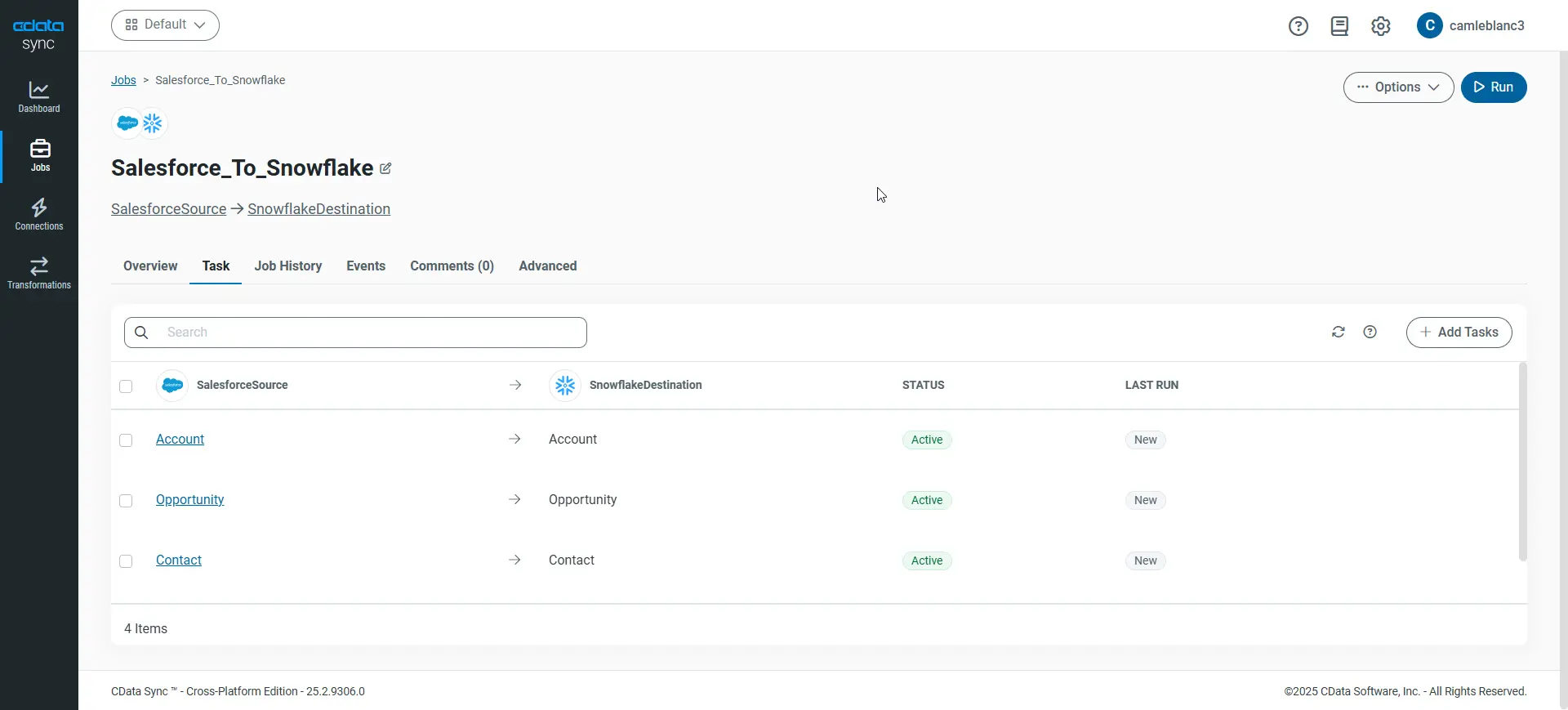
Define objects, transformations, and schedules
Choose Salesforce objects like Accounts or Opportunities and map them to Snowflake tables. Decide between full or incremental syncs and schedule your jobs to run automatically.
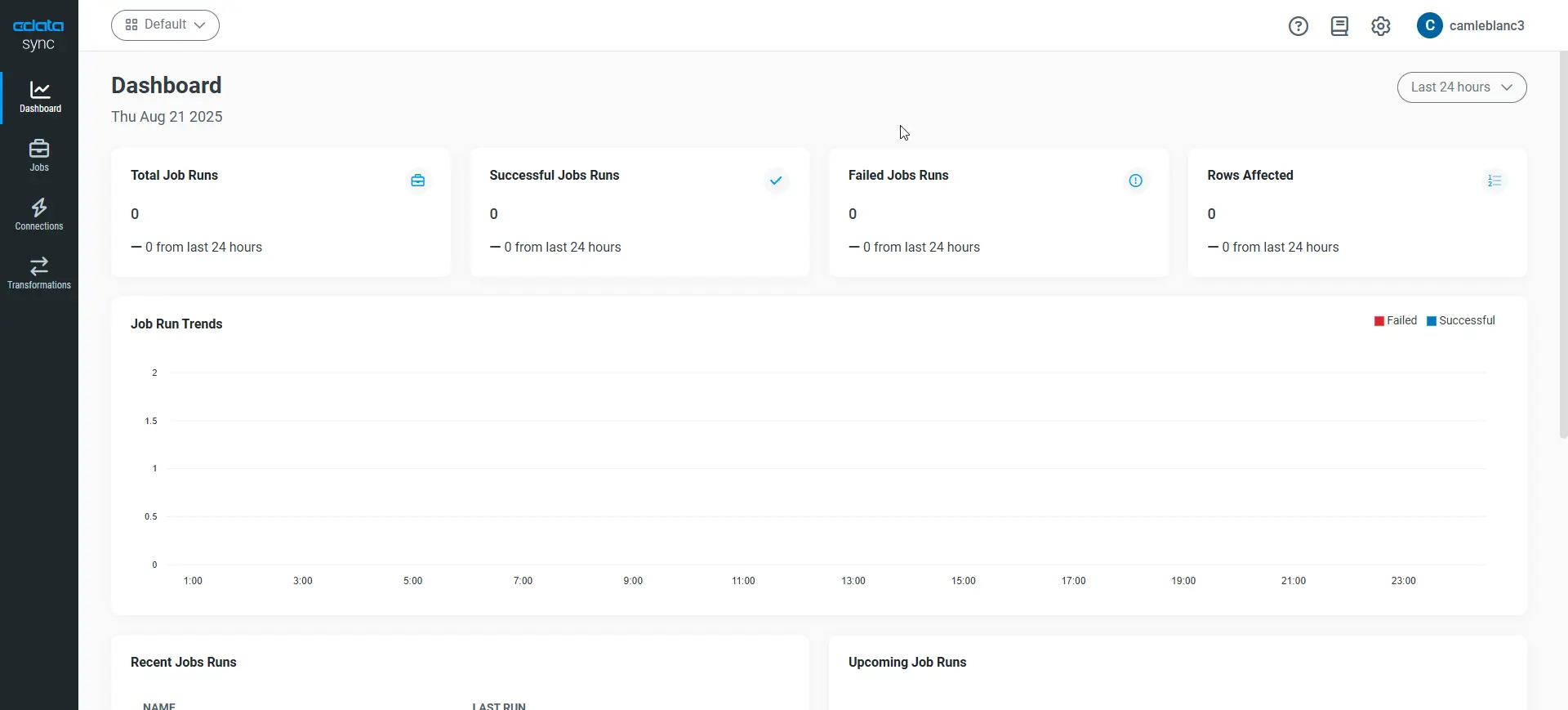
Monitor and optimize
Use the CData Sync dashboard to track latency, error rates, and throughput. Configure email alerts and job retries to avoid silent failures.
Selecting a tool: Native pipelines vs. CData Sync
Native pipelines can handle real-time Salesforce to Snowflake integration, but often lack advanced transformation options, governance flexibility, and reverse ETL. CData Sync delivers all of this and more while offering connection-based pricing, no row limits, and deployment flexibility (on-premises or SaaS).
For example, a use case with five connections typically costs under $10,000 per year with CData Sync, compared to $30,000 or more with row-based competitors.
Case study: Recordati Streamlines Global Data Operations and Achieves Revenue Growth with CData Sync
The pharmaceutical company Recordati uses CData Sync to automate the no-code extraction of 1.5 billion rows across hybrid cloud and on-premises sources, with monitoring and error handling. This resulted in operational reporting that is delivered up to seven times faster.
Read the case study
Frequently asked questions
How do I push Snowflake insights into Salesforce?
Set up reverse ETL in CData Sync to map Snowflake insights back into Salesforce, scheduling incremental updates to ensure up-to-date analytics.
What's the difference between zero copy and ETL/ELT?
Zero-copy lets you share data instantly without moving it. ETL/ELT pipelines make full copies, which is better for offline analysis or complex transformations.
Can I stay near real-time without hitting API limits?
Yes—use incremental replication, enable Bulk API mode, and throttle jobs based on dynamic limit monitoring.
Does bi-directional sync impact data governance or GDPR compliance?
No, data stays under platform-level encryption, and CData Sync enforces field-level masking and regional hosting to meet GDPR requirements.
Can I run everything on-premises?
Absolutely. CData Sync can be deployed on your own servers or private cloud to keep all data movement behind your firewall and network.
Build your bidirectional pipeline with CData
Now is the time to unify Salesforce and Snowflake with a seamless and secure bi-directional pipeline. CData can simplify your pipelines, cut costs, and provide real-time insights across your business. Sign up for a free trial of CData Sync to start unifying Salesforce and Snowflake today.




