Salesforce CRM Analytics JDBC Driver
Easily connect live Salesforce CRM Analytics data with Java-based BI, ETL, Reporting, AI/ML & Custom Apps.
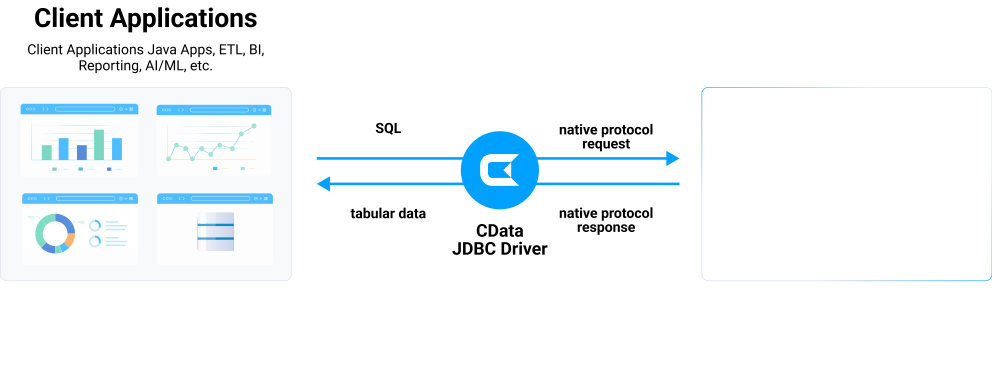
The Salesforce CRM Analytics JDBC Driver enables users to connect with live Salesforce CRM Analytics data, directly from any applications that support JDBC connectivity. Rapidly create and deploy powerful Java applications that integrate with Tableau CRM Analytics.
Salesforce CRM Analytics JDBC Connectivity Features
- SQL access to Salesforce CRM Analytics data
- Powerful metadata querying enables SQL-like access to non-database sources
- Push down query optimization pushes SQL operations down to the server whenever possible, increasing performance
- Client-side query execution engine, supports SQL-92 operations that are not available server-side
- Connect to live Salesforce CRM Analytics data, for real-time data access with the Salesforce CRM Analytics ODBC Driver
- Full support for data aggregation and complex JOINs in SQL queries
- Secure connectivity through modern cryptography, including TLS 1.2, SHA-256, ECC, etc.
- Seamless integration with leading BI, reporting, and ETL tools and with custom applications via the Salesforce CRM Analytics Connector.
Target Service, API
The driver supports Einstein Analytics (now Tableau CRM Analytics) platform. It provides access to Einstein datasets through standard SQL interfaces. The driver enables real-time data connectivity to Tableau CRM Analytics prediction services and platform data.
Schema, Data Model
The driver models Tableau CRM Analytics data as relational tables. The table definitions are dynamically retrieved from Einstein datasets. The driver supports dynamic schema detection and metadata discovery. It enables custom tables views and reports created in Tableau CRM to be used as views. The driver handles complex hierarchical data through flexible NoSQL flattening.
Key Objects
Einstein datasets, custom objects, prediction models, dashboards, lenses, recipes, dataflows. The driver provides comprehensive access to static and dynamic data and metadata from Tableau CRM Analytics.
Operations
Full CRUD with ANSI-92 SQL capability. Supports SELECT, INSERT, UPDATE, DELETE operations. Drivers support JOIN, UPSERT and complex aggregations. Stored Procedures support batch operations and data transformations. Push-down query optimization for improved performance. Client-side query execution engine for SQL-92 operations not available server-side.
Authentication
Wide variety of authentication schemes supported. Basic (API Token), OAuth, OAuth Client. Single Sign-On support including OneLogin, OKTA, ADFS. Azure AD authentication support. Salesforce connected app authentication.
Start a 30-day Free Trial Today
JDBC Access to Salesforce CRM Analytics
Full-featured and consistent SQL access to any supported data source through JDBC
-
Certified Compatibility*
Our drivers undergo extensive testing and are certified to be compatible with leading analytics and reporting applications like SAP Crystal Reports, Pentaho, Business Objects, Crystal Reports and many more.
-
Metadata Discovery
Full support for JDBC DatabaseMetaData provides extensive schema discovery capabilities. Explore tables, columns, keys, and other data constructs based on user identity.
-
Developer Friendly
Design-time support for all major Java IDEs, including Eclipse, IntelliJ, and NetBeans.
-
JDBC Remoting
Our exclusive remoting feature allows hosting the JDBC connection on a server to enable connections from various clients on any platform (Java, .NET, C++, PHP, Python), using any standards-based technology (ODBC, JDBC, etc.). JDBC Remoting is enabled using the popular MySQL wire protocol server.
-
Replication and Caching
Our replication and caching commands make it easy to copy data to local and cloud data stores such as Oracle, SQL Server, Google Cloud SQL, etc. The replication commands include many features that allow for intelligent incremental updates to cached data.
-
String, Date, Numeric SQL Functions
The driver includes a library of over 50 functions that can manipulate column values into the desired result. Popular examples include Regex, JSON, and XML processing functions.
-
Collaborative Query Processing
Our drivers enhance the data source's capabilities by additional client-side processing, when needed, to enable analytic summaries of data such as SUM, AVG, MAX, MIN, etc.
-
Easily Customizable and Configurable
The data model exposed by our JDBC Drivers can easily be customized to add or remove tables/columns, change data types, etc. without requiring a new build. These customizations are supported at runtime using human-readable schema files that are easy to edit.
-
Secure Connectivity
Includes standard Enterprise-class security features such as TLS/ SSL data encryption for all client-server communications.
See what you can do with Salesforce CRM Analytics JDBC Driver
Integrate Salesforce CRM Analytics into your systems and data warehouses through popular Java-based ETL/EAI tools. Supports both self-hosted environments and cloud service deployment.
Connect to Salesforce CRM Analytics from any JDBC-compatible BI, reporting, and data virtualization platform. Provides seamless integration using SQL as the standard query interface across all tools.
Use the Salesforce CRM Analytics JDBC Driver to rapidly deliver Java-based applications that connect with Salesforce CRM Analytics. Universal SQL-based interactivity simplifies integration and speeds time to market.
Connect to Salesforce CRM Analytics — empower every team
- CData JDBC Drivers for Salesforce CRM Analytics will act as if it is a native connector for you ETL, BI, Data Virtualization tool.
- Organizations can connect to the new services to capture full view of business, or migrate to modern data technology while maintaining the connection to existing sytems.
- Speed up your AI initiative with CData. Connect your data with the AI / ML platform of your choice.
Need to integrate your internal systems with Salesforce CRM Analytics? CData JDBC Drivers let you do it easily. Java based applications can easily connect to Salesforce CRM Analytics with SQL/JDBC — any ETL, EAI (Enterprise Application Integration), ESB (Enterpriese Service Bus) can connect to Salesforce CRM Analytics.
- Embed CData JDBC Drivers for Salesforce CRM Analytics to your product and differentiate with your connectivity
- Standard SQL access. Stop researching on different authentication, data model and query methods.
- Utilize your resource to build your product, CData takes care of your connectivity
AI-Assisted Development with CData CLI
Build Salesforce CRM Analytics integrations faster with AI that understands your schema
Supported AI Coding Tools
Schema-Aware AI
CData CLI gives AI coding tools access to your Salesforce schema. No more guessing table names or column types—AI sees the same metadata in your JDBC Drivers.
Your AI Knows SQL
How to find Table names, column names, and How to generate SQL syntax are things that AI knows well from millions of training data. No need for customization, no hallucinations. Your AI acts like a domain specialist to Salesforce.
More Accurate, More Token-Effieient
With CData CLI's queryable schema detection and highly efficient queries with filters, aggregation, joins with correct pushdown, your AI will achieve more accuracy with less token usage.
Free for development. No trial period. No credit card required.
Frequently Asked Salesforce CRM Analytics JDBC Driver Questions
Learn more about Salesforce CRM Analytics JDBC drivers for data and analytics integration
Can Salesforce CRM Analytics be used with Java?
Yes, Salesforce CRM Analytics can be used with Java . CData provides a JDBC type 4/5 driver for Salesforce CRM Analytics that allows Java applications to connect to Salesforce CRM Analytics using standard JDBC APIs. This driver enables you to execute SQL queries, manage connections, and process data stored in Salesforce CRM Analytics from Java, or any Java-based application that supports JDBC.
Does Salesforce CRM Analytics support JDBC?
Not natively. However, CData offers a JDBC driver for Salesforce CRM Analytics that allows you to connect to Salesforce CRM Analytics data from any Java-based application that supports JDBC, just like you would access a traditional database. This can be useful for tasks like:
- Accessing Salesforce CRM Analytics from applications: Connect to Salesforce CRM Analytics data in popular tools and applications including Informatica, Talend, Apache Spark, Apache NiFi, and many others.
- Real-time data: You can work with live Salesforce CRM Analytics data within these applications, enabling tasks like reporting and analysis.
- Connecting systems: Build data integrations between Salesforce CRM Analytics and other systems.
The Salesforce CRM Analytics JDBC driver is a pure Java type 4/5 driver with comprehensive ANSI SQL-92 support. This means that virtually any application that can connect to data via JDBC, can use the CData JDBC driver for real-time integration. Download a fully functional free trial of the Salesforce CRM Analytics JDBC driver today to get started.
Is there a JDBC driver for Salesforce CRM Analytics?
Yes, the CData JDBC driver for Salesforce CRM Analytics provides universal JDBC data connectivity for Salesforce CRM Analytics. The Salesforce CRM Analytics JDBC driver offers a simple SQL-based layer of abstraction that simplifies real-time data access for users and applications, enabling them to communicate with Salesforce CRM Analytics using a standardized set of functions. Virtually any application on any platform can use the CData JDBC driver for real-time integration.
How do I connect to Salesforce CRM Analytics via JDBC?
Connectivity to Salesforce CRM Analytics via JDBC is easy. First, download and install the Salesforce CRM Analytics JDBC driver.
Once the installation is complete, navigate to the JDBC driver documentation page. Here, you'll find a wealth of information about the installed driver. The step-by-step instructions for creating a DSN and using it to connect to Salesforce CRM Analytics via JDBC are just the beginning. The documentation also provides extensive configuration details for using the Salesforce CRM Analytics JDBC driver with all your favorite applications and development tools, ensuring you have all the support you need.
Where can I download a JDBC driver for Salesforce CRM Analytics?
All of the CData JDBC drivers, including the Salesforce CRM Analytics JDBC driver are available for download online. To get started, download a fully functional free trial of the Salesforce CRM Analytics JDBC driver today.
How do I install the JDBC driver for Salesforce CRM Analytics?
To install the Salesforce CRM Analytics driver, simply download one of the Salesforce CRM Analytics JDBC driver installers available online. The installers are comprehensive setup utilities that will install all the components required to use the Salesforce CRM Analytics JDBC driver on your system.
Popular JDBC Videos: