





Beyond the Backlog: Measuring What Your Linear Roadmap Actually Delivers With CData Drivers
Linear has become the system of record for how many software teams plan and ship. Issues, projects, cycles, initiatives, and customer requests all live there, and they show what a team is building, how fast it moves, and who it's for. Linear doesn't hold the proof that the plan worked. Getting that data out for reporting means writing against Linear's GraphQL application programming interface (API), with cursor pagination, a per-query complexity limit, and nested objects to flatten.
With the new CData Driver for Linear, you can query your Linear workspace as relational tables (issues, projects, initiatives, cycles, customers, comments, and history) using Structured Query Language (SQL) from any tool that speaks Java Database Connectivity (JDBC), Open Database Connectivity (ODBC), ADO.NET, or Python. The driver reads its data model from your workspace's GraphQL schema, pushes filters and joins down to Linear, and turns INSERT, UPDATE, and DELETE into Linear mutations. This article introduces the driver, then builds a Requests to Roadmap dashboard that joins Linear with Salesforce and Google BigQuery. Claude Code built the dashboard with the CData JDBC drivers and the CData command line interface (CLI).
Why the roadmap needs context from the rest of the business
Roadmap work rarely stands alone. The customer request behind an issue often lives in a customer relationship management (CRM) system, and the proof that a fix worked lives in product telemetry. Roadmap decisions depend on three kinds of context:
- Demand lives in the CRM: which customers asked, how many, and how long they've been waiting.
- Impact lives in the warehouse: whether usage holds up after a change ships, and whether the error a customer reported has stopped happening.
- Delivery lives in Linear: what the team is building, where each item sits in the workflow, and when it shipped.
Linear offers a capable GraphQL API, but reporting on Linear data still means handling cursor pagination, nested objects, and relationships before anything joins to CRM or warehouse data. That's manageable for a one-off script. It's a poor fit for a product operations analyst who wants a weekly report in a business intelligence (BI) tool, or for a team that wants the same join in a dashboard, a notebook, and a pipeline.
That's the gap the driver fills: a standard SQL interface that works in the BI tools, notebooks, and pipelines you already run.
Connect to Linear and query it with SQL
Choose how to authenticate
The driver supports a personal API key and Open Authorization (OAuth). The simplest connection uses the API key:
jdbc:linear:AuthScheme=APIKey;APIKey=<your key>;
To create the key, open Settings > Security & access > Personal API keys in Linear and choose New API key.
Note: Copy the key right away. Linear shows it only once.
The driver supports three authentication schemes:
| Auth scheme | When to use it | Properties |
|---|---|---|
| APIKey | Connecting as yourself, the simplest option | APIKey |
| OAuth | An application acting on behalf of a Linear user (authorization code grant) | OAuthClientId, OAuthClientSecret, CallbackURL, InitiateOAuth |
| OAuthClient | App-owned, machine-to-machine access with no user sign-in (client credentials grant) | OAuthClientId, OAuthClientSecret |
Both OAuth flows need a custom OAuth application registered in Linear. With InitiateOAuth=GETANDREFRESH, the driver opens the browser sign-in once, stores the tokens, and refreshes them. The client credentials flow skips the browser entirely and refreshes on its own. The optional Scope property defaults to read,write.
Query a data model built from your own workspace
The driver discovers its data model from the Linear GraphQL schema at connection time. For a requests-to-roadmap-to-usage use case, the tables fall into four groups:
| Area | Tables |
|---|---|
| Work tracking | Issue, WorkflowState, Team, User, Cycle, IssueLabel, IssueLabels, IssueRelation, Comment, Attachment |
| Roadmap | Initiative, InitiativeToProject, Project, ProjectMilestone, ProjectUpdate, Release |
| Customers | Customer, CustomerNeed, CustomerStatus, CustomerTier |
| History | IssueHistory (state, priority, assignee, estimate, and other changes over time) |
A worked example: from a vague error to a tracked roadmap item
The dashboard tracks each roadmap item linked to a customer request. It joins each item to the Salesforce cases behind it, then checks product telemetry in BigQuery after the item ships.
The example starts with a customer who reported a failed installation and a vague error message:
Verifying startup... Error: verification failed. Check Java installation and package contents.
The cause was an outdated Java runtime, and upgrading to Java 21 fixed it. The customer's case closed, but the underlying problem remained: the error never told the user why it failed. That became Linear issue GRA-5, "Show a clear error when the installed Java version is too old," with an acceptance criterion that the installer should name the minimum Java version (17) when it finds an older one.
The dashboard can track more items like this. The example workspace contains one.
What you need before you start
- A Linear workspace and a personal API key
- Access to Salesforce cases and BigQuery product telemetry
- The CData JDBC Driver for Linear, the CData JDBC Driver for Salesforce, and the CData JDBC Driver for Google BigQuery
- The CData CLI, installed with its skills
- Java 17
- Claude Code (optional)
Let a coding agent drive
The CData team didn't hand-write this app. It used Claude Code with the CData CLI skills, which teach a coding agent how to install, connect to, and query CData drivers from the command line. You can find download instructions for the CData CLI and its skills on the CData site. The build used the JDBC edition of each driver: the CData JDBC Driver for Linear, the CData JDBC Driver for Salesforce, and the CData JDBC Driver for Google BigQuery. CData's other editions include the same drivers.
The prompt was a plain-language goal:
"Build a dashboard that links customer requests in Salesforce to the roadmap items in Linear that address them, and uses product usage telemetry in BigQuery to verify fixes after they ship. Use the /cdata-cli."
From there, the agent worked through four stages:
- Discovered the installed drivers, read Linear's connection properties, and listed tables and columns.
- Read the model from the driver's metadata and documentation, then ran sample queries to confirm it.
- Validated every query at the command line: the issue-to-state-to-team join, label lookups through IssueLabels, history from IssueHistory, the Salesforce case lookup, and the BigQuery usage aggregate.
- Built and tested the app. Once the CData team chose Java for the dashboard, the agent switched to the official companion cdata-cli-java skill and reused the JDBC jars the CLI already ran. It then wrote the app, started it, called every endpoint, and reviewed screenshots of the result.
The CData team's role was to steer: choose the example, decide which customer fields the dashboard may show, and supply the Linear API key. Because the CLI and the app run the same JDBC drivers, every query the agent validated at the command line worked unchanged in the finished app.
Step 1: connect and explore with the CData CLI
The CData CLI (cdatacli) runs the JDBC drivers from a terminal. It checks a connection and exposes the schema before you write application code.
Note: Run the connection commands in your own terminal so your API keys stay private. The CLI saves each connection encrypted.
# Confirm the drivers are installed
cdatacli drivers list

# Save encrypted connections
cdatacli connection create --driver Linear --name linear \
  --connectionstring "AuthScheme=APIKey;APIKey='<your key>'"

cdatacli connection create --driver Salesforce --name salesforce \
  --connectionstring "AuthScheme=OAuth;InitiateOAuth=GETANDREFRESH"

cdatacli connection create --driver "Google BigQuery" --name bigquery \
  --connectionstring "AuthScheme=OAuth;InitiateOAuth=GETANDREFRESH;ProjectId=<project>;ReadOnly=true"

# Explore the Linear schema
cdatacli metadata tables  --connection linear
cdatacli metadata columns --connection linear --table Issue
One query returns a roadmap item, its workflow state, and its team. The number filter narrows the request at the API, and identifier picks out the exact issue:
SELECT i.[identifier], i.[title], i.[priorityLabel], s.[name] AS stateName, t.[name] AS teamName
FROM [Issue] i
INNER JOIN [WorkflowState] s ON i.[stateId] = s.[id]
INNER JOIN [Team] t ON i.[teamId] = t.[id]
WHERE i.[number] IN (5) AND i.[identifier] IN ('GRA-5')
identifier title priorityLabel stateName teamName
GRA-5 CData CLI: Show a clear error when the installed Java version Medium In Progress Graphql-test
Labels come through the junction table, and the change log comes from the child table:
SELECT l.[name]
FROM [IssueLabels] il
INNER JOIN [IssueLabel] l ON il.[issueLabelId] = l.[id]
WHERE il.[issueId] = '<issue id>'
SELECT h.[createdAt], fs.[name] AS fromState, ts.[name] AS toState
FROM [IssueHistory] h
LEFT JOIN [WorkflowState] fs ON h.[fromStateId] = fs.[id]
LEFT JOIN [WorkflowState] ts ON h.[toStateId] = ts.[id]
WHERE h.[issueId] = '<issue id>' AND h.[toStateId] IS NOT NULL
On the other side of the join, the Salesforce case and the BigQuery usage aggregate are ordinary SQL too:
-- Salesforce: the customer request
SELECT [Status], [Priority], [Type], [Origin], [IsClosed], [CreatedDate], [ClosedDate]
FROM [Case] WHERE [Id] = '<case id>'

-- BigQuery: daily product activity
SELECT CAST([Time] AS DATE) AS usageDate, SUM([QueryCount]) AS queries, COUNT(DISTINCT [NodeID]) AS installs
FROM [Telemetry].[Usage]
WHERE [Process] = 'com.cdata.product' AND [Time] >= '2026-08-06'
GROUP BY CAST([Time] AS DATE)
Step 2: build the dashboard
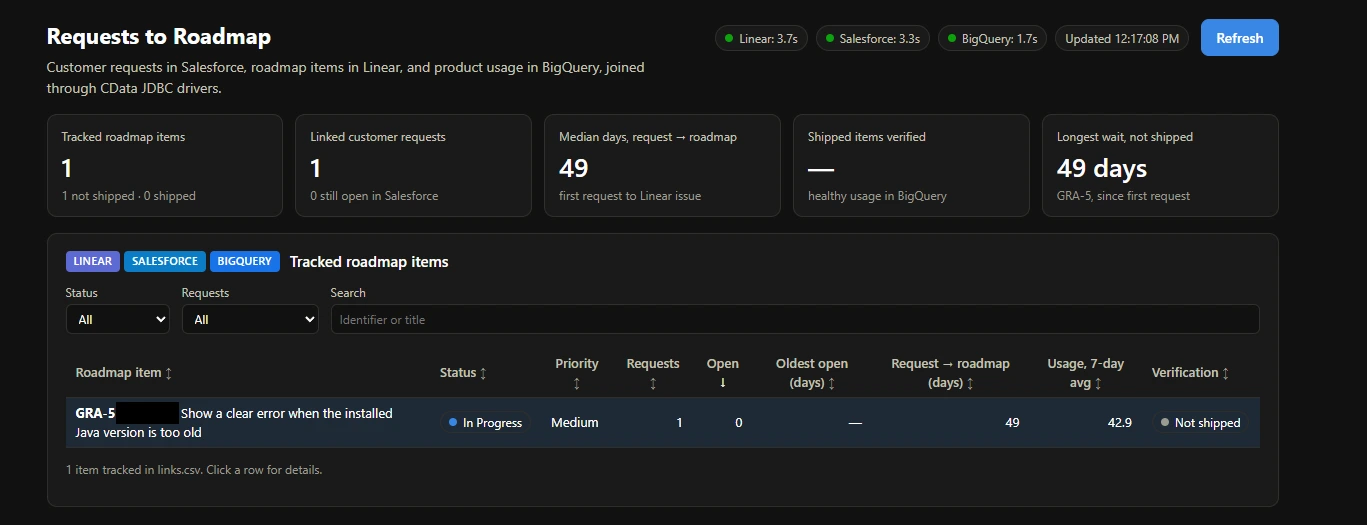
With the queries validated, the agent built the Java dashboard on the same JDBC drivers. It has five views.
The dashboard joins each Salesforce case to its Linear issue through a mapping file, links.csv.
Note: In production, store that link in Salesforce or Linear so every report can use it.
Portfolio key performance indicators (KPIs) show tracked roadmap items (shipped and not shipped), linked customer requests and how many remain open, median days from a customer's first request to the Linear issue, how many shipped items have verified usage, and the longest-waiting item that hasn't shipped.
Tracked roadmap items form a sortable, filterable table with one row per Linear issue. It shows the workflow state, priority, number of requests, open requests, the age of the oldest open request, days from request to roadmap, average daily usage over the last seven days, and a verification status. Selecting a row opens its detail view.
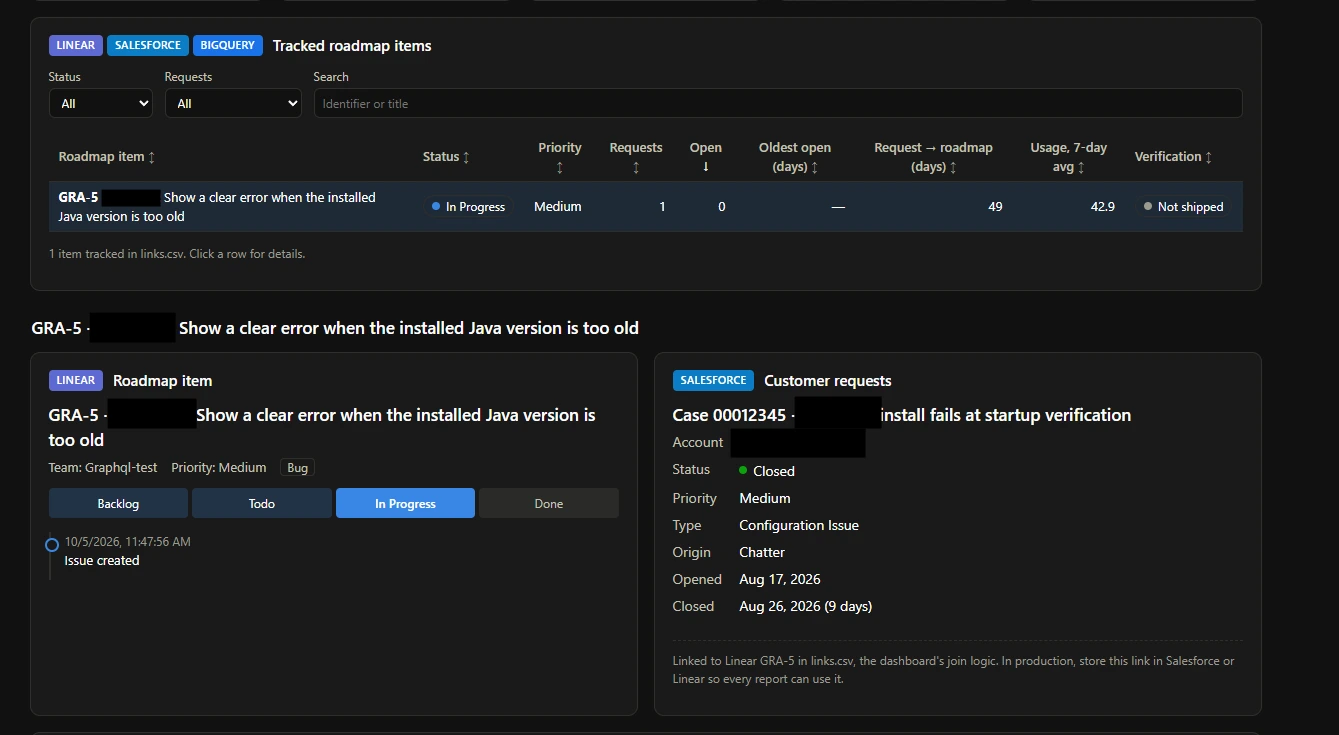
Roadmap item (Linear) shows the issue's team, priority, and labels. It also draws a pipeline from the team's WorkflowState rows in board order with the current state highlighted, and a timeline that merges IssueHistory state changes with Comment rows.
Customer requests (Salesforce) lists each linked case with its status, priority, type, origin, and when it opened and closed. The example case closed nine days after it opened, once the customer upgraded Java.
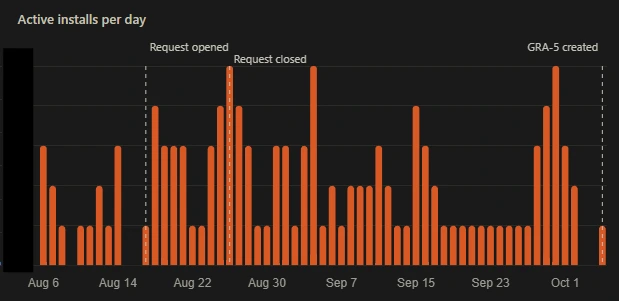
Usage verification (BigQuery) charts daily active installs from product telemetry. After the fix ships, the visualization keeps monitoring whether usage holds.
The tech stack at a glance
| Piece | What it does |
|---|---|
| CData JDBC Driver for Linear | Turns the Linear GraphQL API into SQL tables, reads roadmap items, workflow, history, and comments, and writes comments back |
| CData JDBC Driver for Salesforce | Reads the customer cases linked to each item |
| CData JDBC Driver for Google BigQuery | Reads product telemetry to verify shipped items |
| CData CLI | Tests connections, browses schemas, and tries out queries up front |
| Java 17 | Runs the app as a single source file using the built-in Hypertext Transfer Protocol (HTTP) server in the Java Development Kit (JDK), with no build tool or framework |
| Chart.js | Draws the usage charts in the browser |
The backend is a few hundred lines of Java. The drivers handle authentication, pagination, query pushdown, and the translation of SQL writes into API calls. The app runs the queries for all three sources in parallel and caches the latest results to a local JavaScript Object Notation (JSON) file, so the page loads from the cache and one failing source doesn't blank the others.
Simplify Linear roadmap reporting with CData
With the CData Driver for Linear, you connect with an API key or OAuth and run standard SQL across issues, projects, initiatives, cycles, customers, and history. The driver pushes filters, limits, and junction-table joins down to Linear, handles pagination and complexity limits, and maps INSERT, UPDATE, and DELETE to Linear's own mutations, so the connection that reads your roadmap can also write to it. Because the driver works like every other CData driver, Linear data also joins with hundreds of other sources, and you can use it from the language or BI tool your team already runs. In the example, the Linear, Salesforce, and BigQuery drivers joined a customer request, its roadmap item, and its product usage in one dashboard.
Start a free trial of the CData Driver for Linear, connect it with a Linear API key, and run your first query against Issue.