





Monitor Claude Across Your Organization With the New CData Driver for Claude Compliance
Claude has moved from something a few people experiment with to a tool that runs throughout the organization. Engineers ship code with Claude Code, analysts work in projects, operations teams hand off multi-step work to Cowork, and admins create API keys and workspaces for internal apps. With that much usage running through one platform, security, IT, and compliance teams start asking the same questions: Who is using Claude? What changed in our configuration, and who changed it? Can we prove it to an auditor?
The CData Driver for Claude Compliance answers those questions with SQL. It exposes Claude's compliance data as a set of relational views, so you can query the Activity Feed, users, groups, chats, projects, and Claude Code artifacts from any tool that speaks Java Database Connectivity (JDBC), Open Database Connectivity (ODBC), ADO.NET, or Python, with no REST client code, pagination logic, or JSON parsing.
Why compliance reporting on AI usage matters now
AI assistants now create, transform, and share company data, and regulators have noticed. Organizations are expected to reconstruct what happened in their AI tools.
Anthropic provides the raw material for all of this: an organization-wide Activity Feed plus programmatic access to users, groups, roles, chats, files, projects, and Claude Code artifacts. On its own, it's a REST API with two pagination schemes, a fan-out pattern for chats, and deeply nested, constantly evolving JSON event payloads. That's fine for one engineer writing one script. It's a poor fit for a compliance analyst who needs a weekly report in Excel, Power BI, or a security information and event management (SIEM) platform.
That gap is why we built the driver. Customers asked for a standard SQL interface to Claude compliance data that they could drop into the reporting, business intelligence (BI), and data pipelines they already run.
Introducing the CData Driver for Claude Compliance
What you need to connect
The connection is deliberately simple. There's no OAuth flow, just a Compliance Access Key:
| Property | Required | Description |
|---|---|---|
| APIKey | Yes | Your Compliance Access Key (sk-ant-api01-…) |
| OrganizationUUID | No | The organization that organization-level views read from. If you leave it empty, the driver uses the first organization returned, so set it when your key covers more than one organization. |
A Claude Enterprise primary owner or organization owner creates the key. The scopes you grant set what the driver can see: the Activity Feed, users, groups, roles, chats, files, projects, Claude Code artifacts, org settings, and delete operations.
Two setup details are easy to miss:
- Turn on the Compliance API first.
- Create the key after the API is on, and grant only the scopes you need. Scopes can't be changed once a key is created.
Note: Claude Console organizations without Enterprise can read the Activity Feed only, using an Admin API key (sk-ant-admin01-…) from Claude Console → Settings → Admin keys. That's the key we used for the example below. Create it after turning on the Compliance API, otherwise it won't get the read:compliance_activities scope.
The Activity Feed records only from the moment the Compliance API is enabled. Activity from before that point can't be backfilled, so turn it on early.
The data model
The driver exposes read-only views and stored procedures in three groups.
1. The Activity Feed
This is the organization-wide audit log, and most compliance reporting starts here.
Activities is the forward-compatible master view. The common fields (Id, CreatedAt, Type, OrganizationId, OrganizationUuid) are flat columns, and Actor and EventDetails hold the complete source objects as JSON.
Activity views cover the event types compliance teams ask about most, with the actor flattened into columns (ActorType, ActorEmailAddress, ActorUserId, ActorIpAddress, ActorUserAgent, …) plus type-specific fields:
- Content: ClaudeChatCreated, ClaudeChatViewed, ClaudeChatDeleted, ClaudeFileUploaded, ClaudeProjectCreated, ClaudeProjectDocumentUploaded, …
- Credentials: ApiKeyCreated, AdminApiKeyCreated, AdminApiKeyDeleted, ScopedApiKeyUpdated, ScopedApiKeyDeleted
- People: OrgUserInviteSent, OrgUserInviteAccepted, OrgUserDeleted, AccountDeleted
- Authentication: SsoLoginSucceeded, SsoLoginFailed, MagicLinkLoginFailed, SocialLoginSucceeded, …
- Org configuration: OrgSsoToggled, OrgSsoConnectionActivated, OrgDataExportStarted, …
- Meta-auditing: ComplianceApiAccessed (records every read of compliance data, including the driver's own)
CreateActivitySchema is a stored procedure that builds a new typed view for any activity type by sampling a real event. Run this command to get a flattened view for that event:
EXEC CreateActivitySchema ActivityType = 'platform_workspace_created'
2. Organization and content entities
| Area | Views |
|---|---|
| Organization | Organizations, OrganizationSettings, OrganizationAPIKeys |
| People and access | OrganizationUsers, ComplianceGroups, ComplianceGroupMembers, ComplianceRoles, ComplianceRolesPermissions |
| Chats | Chats, ChatMessages |
| Projects | Projects, ProjectAttachments, ProjectCollaborators, ProjectDocumentMetadata |
| Claude Code | CodeArtifacts, CodeArtifactVersions |
3. Stored procedures for actions
- Retrieve content: DownloadFile, DownloadGeneratedFile, DownloadProjectDocument, DownloadCodeArtifact, GetChatMessageFiles, …
- Enforce retention and eDiscovery: DeleteChat, DeleteFile, DeleteProject, DeleteProjectDocument, DeleteCodeArtifact
The delete procedures are the only write paths, because views are read-only by design.
The driver pushes the important filters down to the API (Type, actor and user IDs, organization, and CreatedAt ranges), and handles the rest of standard SQL itself: joins, GROUP BY, functions such as JSON_EXTRACT, and so on.
Building a Claude Compliance Monitor
To show the driver in action, we built a monitoring dashboard covering activity over time, admin and configuration changes, who is acting, and who is reading compliance data. Our test organization was a Claude Console org connected with an Admin API key, so the example focuses on the Activity Feed.
We used the CData Claude Compliance JDBC Driver with the CData CLI, but the same driver is available in CData's other editions.
Letting a coding agent drive
We didn't hand-write this app. We built it with Claude Code, using the CData CLI skills, which teach the agent how to install, connect, and query CData drivers from the command line. The whole project started from one plain-language prompt:
"I want to build a dashboard to monitor Claude activity over time: active users by team; chats, files and projects created; Claude Code and Cowork sessions; and admin and configuration changes. Use the /cdata-cli skill. Start by activating the driver and establishing a connection."
From there, the agent did the work in these steps:
- Discovery: it checked the installed driver, read its connection properties, and listed the tables and columns.
- Learning the model: it read the driver's local documentation to understand the Activity Feed design, and ran sample queries.
- Planning: it mapped each metric we asked for to specific views, and flagged which ones need a Compliance Access Key.
- Building and testing: once we chose Java to build the dashboard, it switched to the companion cdata-cli-java skill. It reused the same JDBC JAR file the CLI was already running, wrote the app, compiled it, launched it, tested every endpoint, and reviewed a screenshot of the result.
Our role was to steer: approve the plan, supply the API key (we recommend doing this in your own terminal, not by pasting it into the agent session), and click through Claude Console to generate some activity. Because the CLI and the app use the same JDBC driver, every query the agent validated at the command line worked unchanged in the finished app.
Download instructions for the CData CLI and its skills are linked here.
Step 1: Connect and explore with the CData CLI
The CData CLI (cdatacli) runs the JDBC driver from a terminal. It's the quickest way to check a connection and get to know the schema before writing any application code.
# Confirm the driver is installed
cdatacli drivers list
# Save an encrypted connection (run this in your own terminal so the key stays private)
cdatacli connection create --driver "Claude Compliance" --name claude-compliance \
  --connectionstring "APIKey='<your key>'"
# Explore the schema
cdatacli metadata tables  --connection claude-compliance
cdatacli metadata columns --connection claude-compliance --table Activities
A single aggregate query shows what's happening in the org:
SELECT [Type], COUNT(*) AS cnt
FROM [Activities]
GROUP BY [Type]
In our test org, the query returned:
admin_api_key_created                1
admin_api_key_deleted                1
compliance_api_accessed              3
org_compliance_api_settings_updated  1
org_invites_listed                   3
org_user_invite_sent                 1
org_users_listed                     5
platform_api_key_created             1
platform_api_key_updated             1
platform_workspace_created           1
Step 2: Build the dashboard
Once the agent had explored the data model and tested its queries, it built the Java dashboard. The dashboard has the following panels.
At-a-glance KPIs: total activity events, admin changes, active users, failed sign-ins, and Compliance API reads.

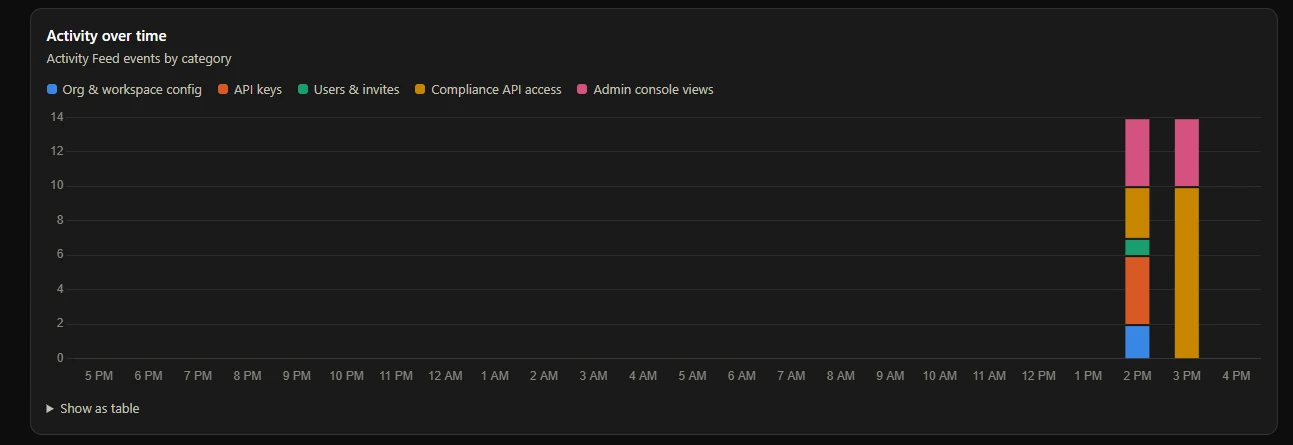
Activity over time: a stacked column chart of events by category (org and workspace configuration, API keys, users and invites, Compliance API access, and admin console views), hourly for the last 24 hours or daily for longer ranges, with a table view for accessibility.
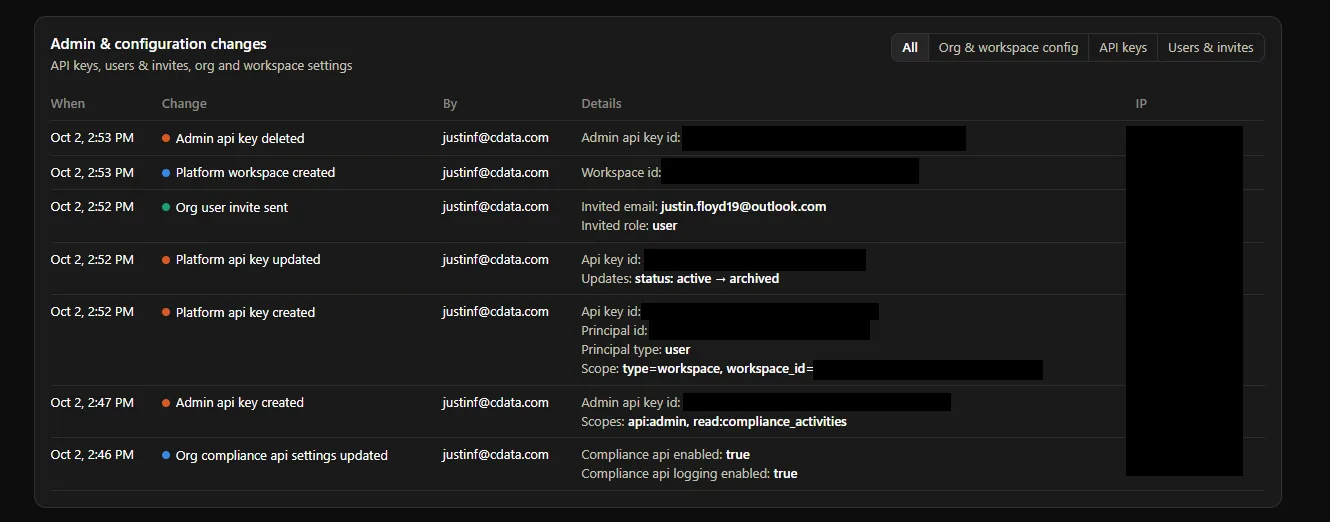
Admin and configuration changes: a filterable log of every privileged action, showing who did it, when, from which IP address, and the specifics pulled from the event payload. In our test org it showed:
- The Compliance API being enabled (compliance_api_enabled: true)
- An Admin API key created with scopes api:admin and read:compliance_activities
- A workspace-scoped API key created, and another key archived (status: active → archived)
- A new workspace created and a user invited with role user
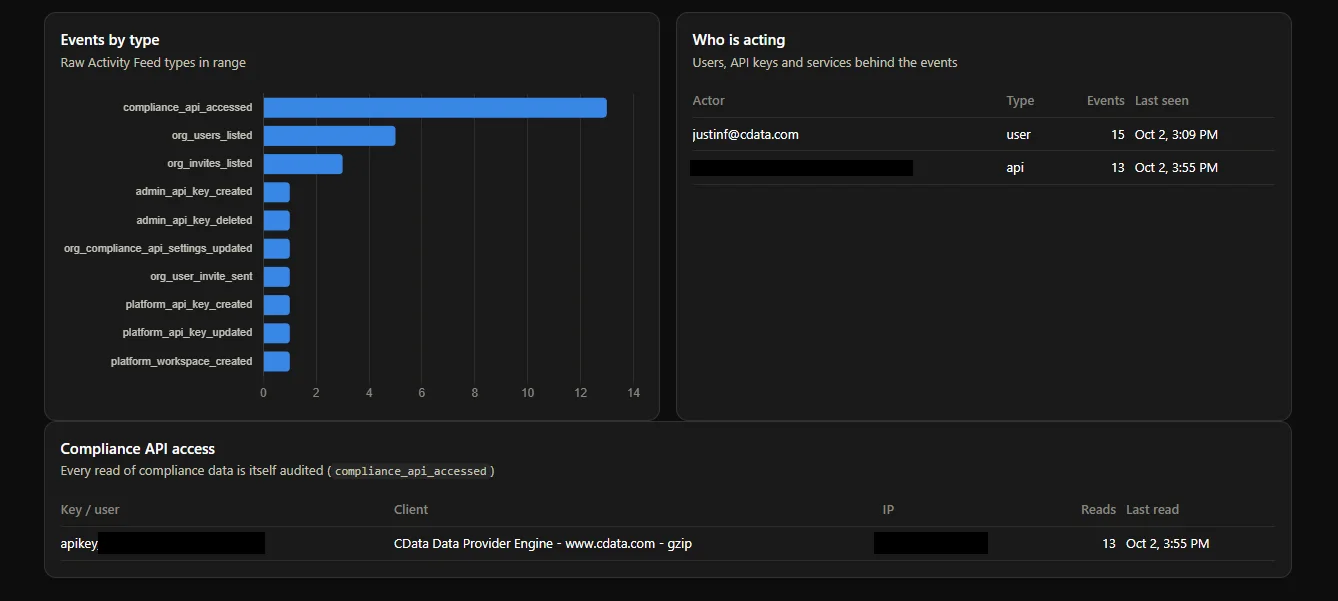
Events by type and who is acting: a ranked view of raw event types next to the users, API keys, and services behind them.
Compliance API access, or auditing the auditors: every read of compliance data is itself logged as a compliance_api_accessed event. The dashboard lists which keys and clients are reading. In our case it was the dashboard itself, identified by the user agent CData Data Provider Engine. That's exactly the kind of oversight evidence an auditor asks for.
The tech stack, in plain terms
| Piece | What it does |
|---|---|
| CData JDBC Driver for Claude Compliance | Turns the Compliance API into SQL tables. It's the only part that talks to Anthropic. |
| CData CLI | Used up front to test the connection, browse tables, and try out queries |
| Java 17 + Maven | The application runtime and build tool |
| SQLite | A small local file that caches activity, so the dashboard loads instantly |
| Javalin | A lightweight web server that turns cached data into JSON for the page |
| Chart.js | Draws the charts in the browser |
The whole app is a few hundred lines of code. The driver handles the hard parts: authentication, pagination, pushing filters down to the API, and keeping up with the changing event schema.
Start querying Claude compliance data with CData
As Claude becomes part of everyday work, being able to answer "who did what, and when" stops being optional. The CData Driver for Claude Compliance makes Anthropic's Compliance API usable for that work: one connection property, a relational model of the Activity Feed and your organization's content, filters pushed down to the API, and a forward-compatible design that keeps up as Anthropic adds new event types. Connect it with a Compliance Access Key and you get oversight of users, teams, content, and configuration changes from one connection.
We built a working compliance dashboard in a few minutes with the JDBC driver and the CData CLI. You can do the same in the language or BI tool your team already uses. To install the CLI and its skills first, see CData CLI: Use CData Drivers with Claude Code, Cursor, and Copilot.
Get started: Download the CData Driver for Claude Compliance, connect it with your Compliance Access Key, and run your first query against Activities.