






Dedicated App or In-Session Agent? Choosing How to Use the CData CLI
A series of head-to-head experiments reveals when to invest in a reusable application and when to let the agent drive the CLI live, and how to make either approach repeatable.
The experiment
With the release of the CData CLI, AI coding tools have two natural ways to put it to work. The agent can build a dedicated application that wraps the CLI into a runnable script or full GUI you can hand to a teammate, or it can drive the CLI interactively in the coding session, exploring data and reasoning over results as it goes, with the workflow captured as a skill so it can be invoked again on demand.
Both approaches work. Both produce real output. But they aren't interchangeable, and picking the wrong one will cost you either accuracy, time, or both.
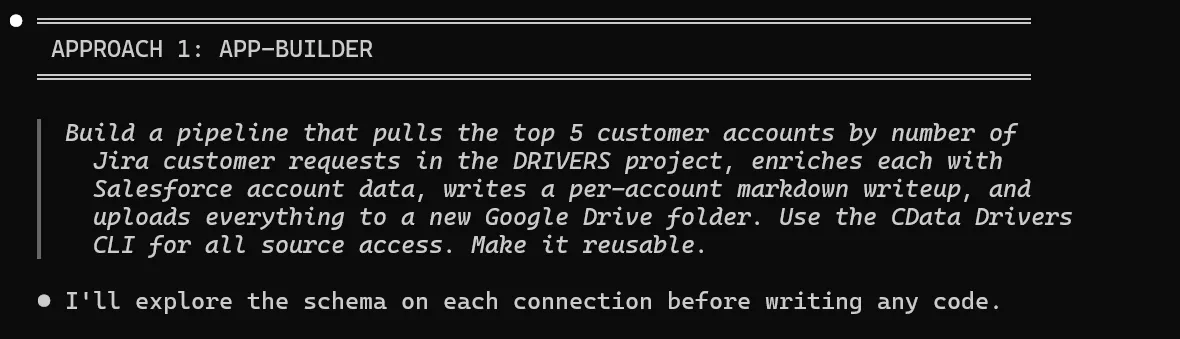
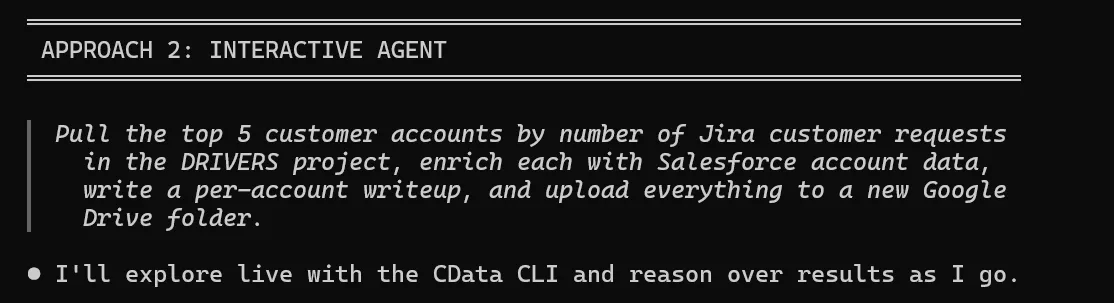
To find out where the line falls, we ran three side-by-side experiments. Same task, same data sources, two agents working in isolation: one told to build a dedicated app, one told to use the CLI interactively.
The CData CLI
Both rounds of this experiment are possible because of one piece of plumbing: the CData CLI. It gives an AI coding agent authenticated, query-ready access to hundreds of enterprise data sources, including Salesforce, Jira, Asana, Box, Google Drive, and more, without a single line of custom integration code. The agent can determine and download the appropriate data source driver, set up a connection, and start querying data, all without manual intervention from the user.
The interesting consequence is that the agent now has two equally legitimate ways to use the tool. It can build a polished application on top of it (the way an engineer would), or it can drive it conversationally in-session, treating the CLI as a live data source and reasoning over the results. Previously, only the first option was realistic. Today, the second is often faster, cheaper, and richer, provided the workflow is the right shape for it.
That choice is what the rest of this article is about.
The tasks
We picked three workflows of varying complexity, each spanning multiple systems exposed through CData connections:
- Salesforce → Google Drive: Pull the top 5 accounts by ARR and upload a report.
- Jira → Salesforce → Google Drive: Correlate Jira change requests to Salesforce accounts, then publish the breakdown.
- Asana → Box: Identify pain points in an Asana project and upload an analysis.
Simple enough. Let's see how they went.
Round 1: Build a dedicated app
In each experiment, the app-builder agent treated the task as software engineering. It explored the schema with a few CLI calls, then wrote a self-contained script that did the rest:
- Salesforce/GDrive: 311-line Java app
- Jira/SF/GDrive: 553-line Python pipeline with CLI flags
- Asana/Box: 341-line bash + embedded Python script
What went well
The artifacts are reusable by anyone. Every script accepts arguments (different project, different connection, different folder) and runs again with zero AI involvement. On run #2, the token cost is zero. The queries are codified, deterministic, and auditable.
More importantly, the app approach held accuracy as the data scaled. In the Jira experiment, the app-builder discovered the authoritative SalesForce Account Name custom field and counted 558 Google-related requests. The interactive agent, working without that field, fell back to text-mining and counted 42, a 13x undercount that would have shipped silently.
What hurt
Building costs time. The app-builder needed a debug cycle in every experiment: a wrong method name in Java, a mid-build pivot from bash to Python. Errors meant edit, recompile, rerun.
Round 2: Drive the CLI interactively, capture the workflow as a skill
In the interactive runs, the agent ran CLI commands directly in the coding session. No script, no compile step, just cdatacli calls, results returned to context, next query informed by the last. Once the workflow proved itself, we captured it as a skill: a small markdown file that tells the agent "when the user asks for the Asana pain-point analysis, run these CLI calls in this order, watch for these categories, write the output in this shape." The agent still drives the CLI live, still reasons over what it finds, still adapts to the data, but the workflow is preserved and re-invokable with a single slash command.

What went well
The agent reasoned about the data as it encountered it. In the Asana experiment, it started with the categories from the prompt (overdue, unassigned, stale) and then discovered two more from the data itself: late completions and a dependency-chain gap between blog and email tasks. It assigned severity ratings. It traced workload across assignees. The app's report had none of that.
Recovery from errors was nearly free. A failed query? Adjust the next command. No rebuild, no rerun-from-top.
Single-run token cost was lower or roughly equal in every experiment, sometimes meaningfully cheaper (~30% in the Jira run), because the agent skipped the code-writing overhead entirely.
And because the workflow lives in a skill, the second run isn't a redo, it's a re-invocation. The discovery phase is skipped; the agent picks up the proven recipe and runs it against fresh data.
What hurt
The agent's flexibility cuts the other way on large datasets. Without the discipline of codified queries, it picks heuristics that look right. The 558-vs-42 Jira gap wasn't a bug, it was the agent choosing a reasonable-looking shortcut over a structured field it never thought to look for. A skill can nudge the agent toward the right field, but it can't make the reasoning step deterministic.
Skill-driven workflows also remain agent-driven. They need an AI coding session to run. That's a feature when you want adaptive reasoning, and a limitation when you want to schedule a job at 2 a.m. or hand the workflow to someone who doesn't use an AI Coder.
Extending the principles to apps with UIs
So far we've compared a headless script to a skill-captured agent workflow. The same calculus applies, maybe more sharply, when the dedicated app has a user interface: a Swing window, a web dashboard, an Electron tool a teammate clicks through.
A UI changes the economics in two ways:
- The audience changes. Scripts are for the person who built them. A UI is for someone who didn't write it and shouldn't have to. The reusability payoff is no longer "I run this twice instead of once", it's "twenty people across the org use this every week and never touch the agent."
- The build cost goes up. A 300-line CLI script becomes a 1,500-line application once you add forms, validation, error states, and a results view. The investment is bigger, so the threshold for choosing it should be higher.
The same three factors decide it: how often the workflow runs, how large the dataset, and whether you need structured data or qualitative insight. A UI app inherits the accuracy benefits of a codified pipeline because it is one underneath, and it can layer agent reasoning in as a product feature. A dashboard that presents structured data deterministically and includes an "analyze this" button hands the result to an agent for qualitative commentary on demand. The hybrid pattern stops being sequential and becomes a feature of the product.
The interactive agent still has a role here too: it's how you prototype the UI app before you build it. Drive the CLI in-session to validate the queries, confirm the data shape, and sketch what the screens should show. Then commit to the build, knowing the underlying queries already work.
Side-by-side comparison
|
Dimension |
Skill-Captured Agent Workflow |
CLI Script App |
UI App |
|
Initial build cost |
Minutes |
Minutes to Hours |
Hours |
|
Cost on subsequent runs |
Reduced (discovery skipped, reasoning re-runs) |
Near zero |
Near zero |
|
Reusable by |
Anyone with the AI coding tool |
CLI-comfortable users |
Anyone |
|
Runs without an AI session? |
No |
Yes |
Yes |
|
Data accuracy at scale |
Variable (heuristic-prone) |
High |
High |
|
Qualitative depth |
High |
Only what was coded |
Only what was coded |
|
Error recovery |
Free, in-session |
Edit + recompile |
Edit + redeploy |
|
Auditable output |
Conversation + skill spec |
Yes |
Yes |
|
Best for |
Recurring agent-driven analysis |
Scheduled jobs, audited pipelines |
Tools for non-technical users |
When to reach for each
The hybrid pattern
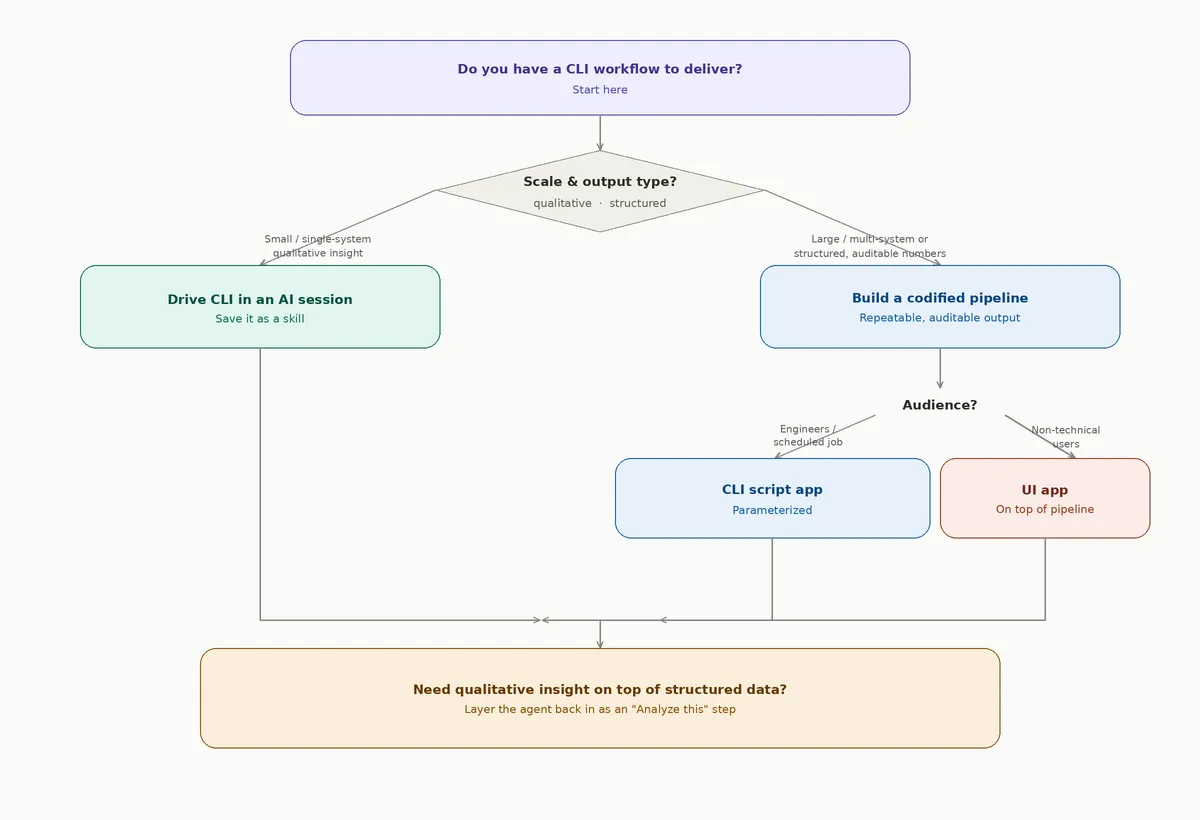
Every experiment, analyzed independently, pointed to the same answer: use both, in sequence.
- Explore interactively, capture as a skill. Use the CLI in-session to discover the schema, validate queries, and understand the shape of the data. Save the proven workflow as a skill so the discovery cost is paid once.
- Codify proven workflows into a script when accuracy or scheduling matters. Once the queries are stable and the dataset is large enough that heuristic shortcuts would hurt, wrap them in a parameterized app.
- Wrap the script in a UI when the audience grows. Add forms, validation, and a results view when non-engineers need to run it. Optionally, expose an "analyze this" agent step inside the UI for qualitative commentary on demand.
The skill de-risks the script. The script de-risks the UI. The agent layered on top adds judgment at whatever rung you stop at. You only climb as far as the workflow warrants.
Conclusion
The CData CLI is the same tool at every tier. What changes is who's driving it, for how long, and for whom.
If you need adaptive reasoning over a small or qualitative dataset, drive the CLI in an AI session and capture the workflow as a skill. You'll get richer output, faster, for less money, and you'll keep the workflow re-invokable.
If accuracy at scale matters, or the job needs to run without an AI session in the loop, spend the tokens to build a script. You're not paying for the first run; you're paying for every run after it.
If the audience reaches beyond engineers, build a UI on top of the script, and consider layering the agent back in as a product feature for the qualitative half of the work.
The best teams won't pick one approach. They'll pick the right rung for each workflow, and re-use the agent across all of them.
What ties every rung together is the CData CLI. One interface, hundreds of enterprise data sources, full schema introspection, so the agent can spend its tokens reasoning about your data instead of figuring out how to reach it. The interesting question stops being can we build this? and becomes which shape should it take?
Get started today
Download the free CData CLI and pair it with Claude Code to build your own agent-driven workflows.
Need assistance? Contact our support team, and we'll be happy to help.