






Build a Jira + Salesforce Unified Customer View with Cursor CLI and the CData CLI
For product managers, analysts, and customer success managers, piecing together a complete picture of a customer often means toggling between multiple platforms: pulling up Salesforce to review account health, contract details, and recent interactions, then switching over to Jira to track open tickets, sprint priorities, and unresolved bugs.
This context-switching is not only time-consuming but also increases the risk of missing critical signals that only become visible when both data sets are viewed side by side. Getting a true 360-degree view of a customer has traditionally required either manual data wrangling, expensive BI tooling, or a dedicated engineering effort. None of these scale well for fast-moving teams.
That's changing rapidly with the rise of AI coding agents like Cursor, which allow non-engineers and technical practitioners alike to scaffold fully functional internal applications through natural language prompts and iterative dialogue. What once took weeks of development can now be assembled in hours, and the gap closes even further when paired with the CData CLI.
CData provides connectivity to hundreds of enterprise data sources, letting the AI coding agent establish authenticated, query-ready connections to platforms like Salesforce and Jira without manual driver configuration or custom API work. The article below walks through exactly this workflow: using Cursor CLI alongside CData CLI to build a Java application that pulls live Salesforce and Jira data into a single, unified customer view.
Prerequisites
- Cursor CLI
- CData CLI
- Official CData CLI Skill
- Licenses for the CData JDBC Driver for Jira and the CData JDBC Driver for Salesforce (trials work temporarily)
Building the application
With the prerequisites in place, the entire build process happens through a single conversation with Cursor Agent.
The CData CLI and its official skill handle the heavy lifting behind the scenes (driver discovery, licensing, authentication, and schema introspection), so the prompt you write can stay focused on what you want, not how to wire it up.
Describe the app to Cursor Agent
Kick things off with a plain-English description of the application. There's no need to specify drivers, dependencies, or connection strings; the agent will figure those out from context. Here's a sample prompt:
I want a Java app that provides a rich customer view by combining Jira and Salesforce data in a helpful UI. Use the CData CLI.
That single sentence is enough to set the entire workflow in motion.
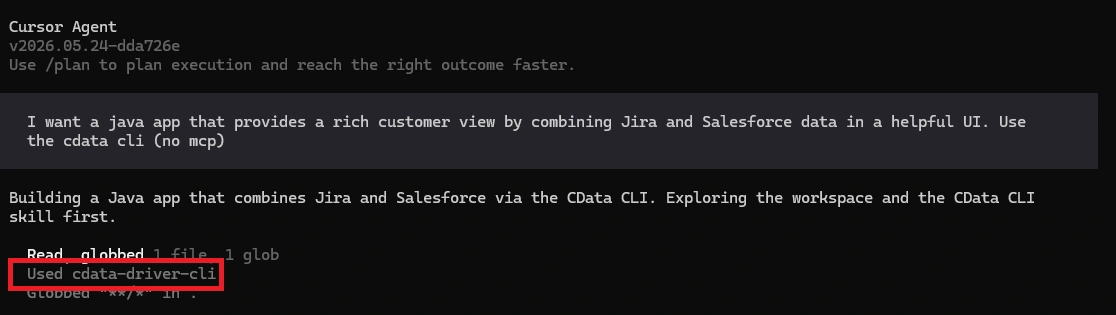
The CData CLI Skill activates
Since the prompt mentions the CData CLI, Cursor automatically pulls in the official CData CLI Skill.
This skill teaches the agent how to use the CLI properly: which commands to run, how to interpret driver metadata, and how to chain authentication and querying steps.
Driver discovery
The agent first checks for existing local CData connections, then searches Maven for the Jira and Salesforce JDBC drivers it needs.
This is where the connector library does its work. Instead of hunting through vendor documentation or writing custom REST clients, the agent just pulls in pre-built, production-grade drivers.
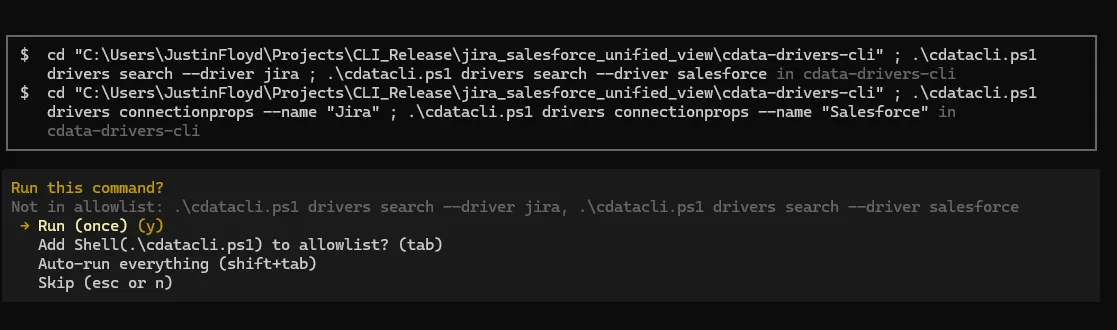
Driver download
With the right drivers identified, the agent downloads them locally and stages them for use in the Java project.

License activation
Now the CData CLI handles driver activation through a single command.
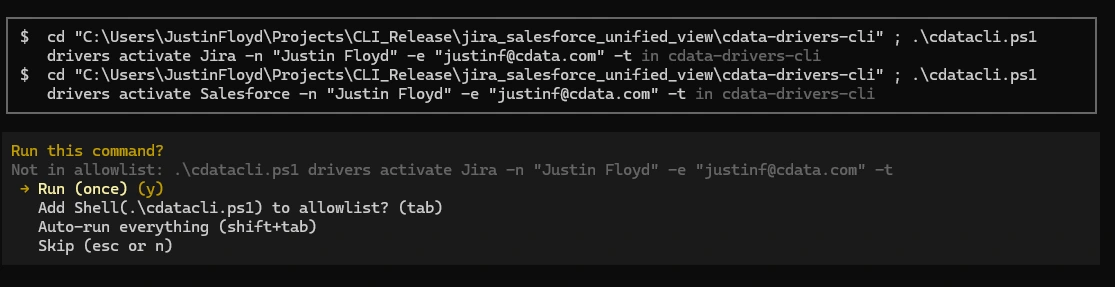
Connection authentication
Next, the agent authenticates to each source. For Salesforce and Jira, this triggers an OAuth browser flow the first time (you'll be redirected to log in and approve access).
On subsequent runs, the cached credentials are reused, so this step is silent (in this example, the Salesforce connection already exists).
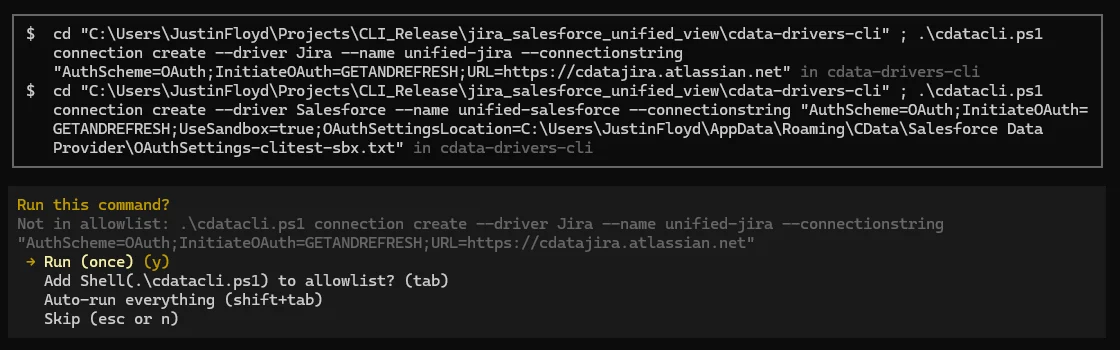
Driver-specific Skills
Driver-specific Skills guide Cursor through the schema and best practices for each driver. If these have already been created, they are invoked at this step.
If they haven't, Cursor should try the following command for each driver, and save the results to a SKILL.md file:
cdatacli drivers skill <Driver>
Sample queries to understand strategy
Before writing any application code, the agent runs a handful of exploratory queries against both sources. This is the same thing a human developer would do: poke at the schema, look at a few sample rows, and figure out which fields actually matter for the unified view.
The CData drivers expose Salesforce Objects and Jira Issues through standard SQL, so the agent can prototype joins and projections quickly.

Cursor writes the application code
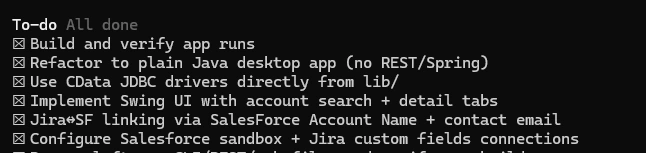
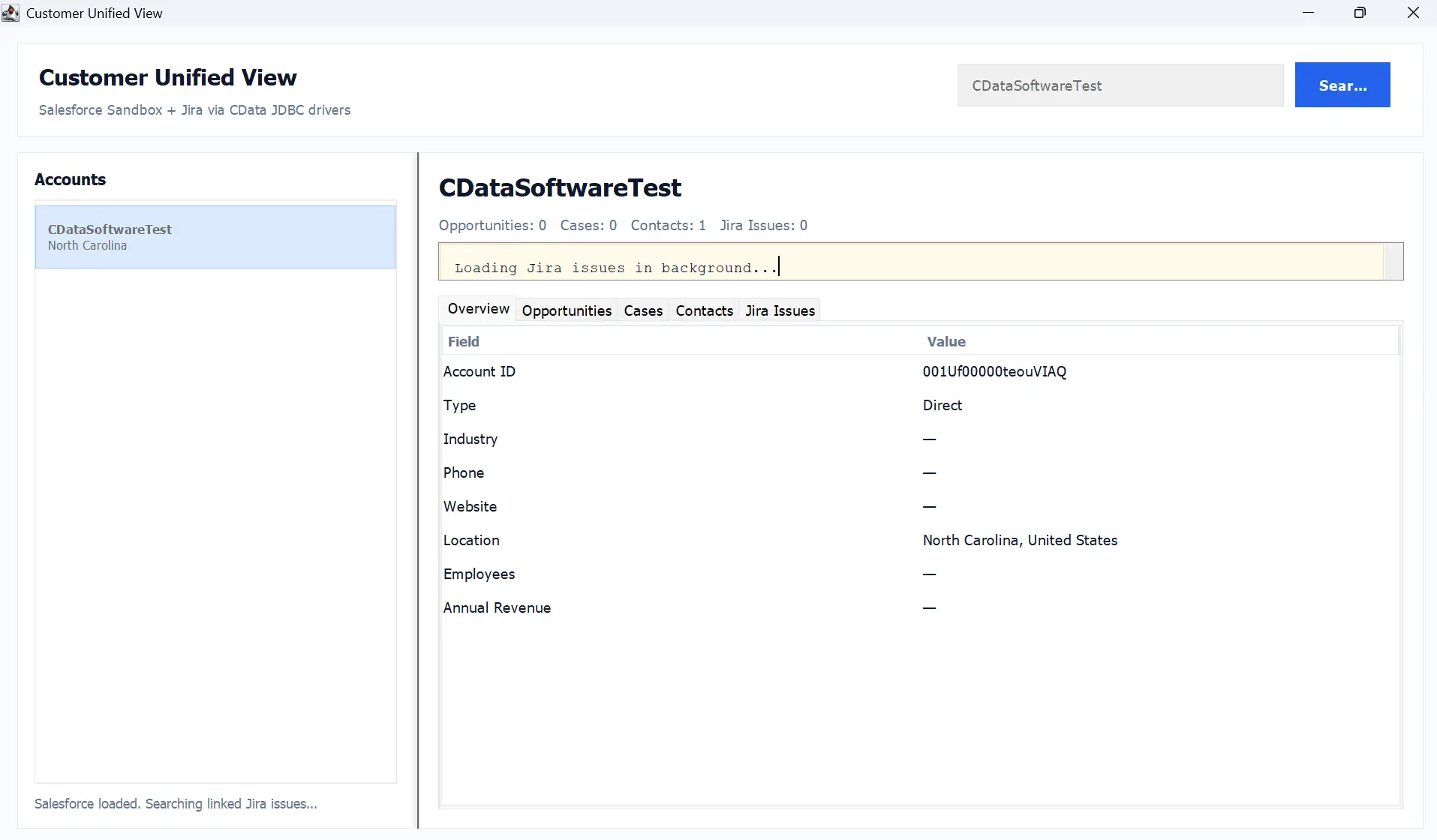
With a working understanding of the data, Cursor generates the complete Java application: JDBC connection setup, query layer, data merging logic, and the UI that brings Salesforce Account context and Jira ticket activity together in a single view.
At this point, what was a one-sentence prompt is now a running internal tool, built without a single line of hand-written integration code.
Results
The days of manually stitching together customer data from disconnected platforms are numbered. By pairing Cursor CLI with CData's extensive library of connectors through the CData CLI, teams can move from idea to working internal tool in a fraction of the time it would traditionally require.
No lengthy API integration projects, no dedicated engineering sprints. Just a clear prompt and the right connectors.
As AI coding agents continue to mature, the ability to rapidly build bespoke, data-rich internal applications will become a competitive advantage for any team that lives and dies by customer context. The unified customer view built in this article is just one example of what becomes possible when the barrier between your data and your tooling effectively disappears.
Get started with CData CLI
Ready to build your own AI-assisted internal tools? Download the free CData CLI and start free, 30-day trials of the CData JDBC Driver for Jira and the CData JDBC Driver for Salesforce to build your own unified customer view.
As always, our Support Team is available to help with any questions you may have.