






Building a Salesforce Churn Analysis Pipeline: Designing Multi-Step AI Agent Workflows with Claude Code and CData CLI
The multi-step problem
AI agents excel at reasoning through problems, but many real-world workflows do not fit neatly into a single prompt. When a process spans multiple stages such as querying external systems, analyzing results, generating content, writing back to a database, and producing a report, a single agent conversation quickly hits its limits. Context fills with noise from earlier steps, the agent juggles incompatible reasoning modes, and there is no way to test or iterate on one piece without re-running everything. AI agents are a natural fit for these kinds of multi-step problems, but the way you structure the workflow matters as much as the agent's capabilities.
The architecture I have found most effective is a two-layer design: an orchestrator agent that coordinates the workflow, calling modular skills that each handle one well-defined step. Each skill allows the agent to read structured data, complete its work, and write structured output for the next step to consume.
In this article, I will walk through a concrete implementation, a Salesforce churn risk detection pipeline, and explain why this modular pattern works well for multi-step agent workflows.
The architecture: orchestrator + modular skills
The design has two layers:
Layer 1: The Orchestrator Agent is a single agent definition that sequences the workflow, reports progress after each step, manages human-in-the-loop confirmation gates, and handles errors. It knows the order of operations but delegates all real work to the skills.
Layer 2: Modular Skills are individual, self-contained skill definitions that each own one step. Each skill has its own tool permissions, its own instructions, and its own output file. The Orchestrator Agent reads skill outputs through JSON files on disk.
The data flow looks like this:
Why individual skills work
There are specific, practical reasons why modular skills produce better outcomes than a single agent with a single context.
- Distinct reasoning modes: Querying a database and scoring accounts against a rubric is analytical, structured work. Drafting empathetic customer outreach emails is creative, linguistic work. Inserting records into a CRM with deduplication checks is precise, transactional work. Writing an executive summary is synthesis work. Separate skills let agents specialize, and the system prompt, tool permissions, and context are all optimized for that one type of reasoning.
- Independent testability: You can run any single skill in isolation. Want to tweak the scoring rubric? Run just the audit skill, inspect the JSON output, adjust, and re-run, without triggering emails or CRM writes. Each skill has a clear contract: it reads a JSON file and writes a JSON file.
- The workflow will grow: Today it is four steps. Next month, you might add a step that cross-references Jira tickets, posts to Slack, or checks a billing system. With modular skills, adding a step means creating one new skill file and adding one line to the orchestrator. The existing skills do not change.
- Failure isolation: If step 3 fails, the outputs from steps 1 and 2 are safely on disk. The orchestrator can report the error, ask whether to retry or skip, and continue. Intermediate results are never lost.
- Human-in-the-loop gates if desired: The orchestrator naturally pauses between skills, making it trivial to insert confirmation steps before high-impact actions, such as writing records to a CRM.
Connecting to external systems with the CData CLI
The CData CLI is a single command-line tool that exposes the full CData connectivity layer to anything that can run a shell command, including a Claude Code agent with the Bash tool. From the agent's perspective, talking to Salesforce is just a sequence of CLI invocations. There is no GUI in the loop, no MCP server to provision, and no driver that has to be wired in ahead of time.
Concretely, the agent can do four things on its own with minimal human involvement:
- Download: The agent inspects the catalog of available connectors and installs the ones it needs. If a workflow asks for Salesforce data, the agent runs the CLI install command for the Salesforce connector.
- Authenticate: The CLI walks the agent through the auth flow for the source. For OAuth-based systems like Salesforce, that means kicking off the login, surfacing a one-time URL for the human to approve in a browser, and capturing the results.
- Connect: With the connector installed and credentials in hand, the agent uses the CLI to create a named connection. Connections are reusable across runs and across skills.
- Query: Once a connection exists, the agent runs SQL against the source. SELECTs, INSERTs, UPDATEs, and schema discovery are all just CLI calls. The agent writes standard SQL; CData handles API translation, authentication refresh, pagination, and rate limiting underneath.
The reason this matters for agent workflows is that the setup step is no longer a human prerequisite. Traditionally, connecting Claude to Salesforce implied an admin had to provision an MCP server, install a driver, configure OAuth, and hand the agent a finished connection. With the CLI, a fresh agent in a fresh repo can stand up its own connectivity end-to-end.
It also means the same skills that query Salesforce can target any of the 300+ sources CData supports, including Jira, HubSpot, Dynamics 365, ServiceNow, Snowflake, BigQuery, and more.
The example: Salesforce churn risk detection
To illustrate the pattern, we tackled a common scenario: analyzing Salesforce accounts for churn risk signals and automating customer success outreach.
We built a four-step pipeline:
- Audit Accounts query Salesforce for risk signals, score each account
- Draft Emails write personalized CS outreach for high-risk accounts
- Create Tasks insert follow-up Task records into Salesforce (with human approval)
- Write Digest generate an executive summary for CS leadership
The entire pipeline runs through a single orchestrator agent prompt. Let us walk through each piece.
Step 1: Audit accounts - data gathering and scoring
This is the analytical step. The audit skill runs SQL queries against Salesforce via the CData CLI:
- Overdue open opportunities deals with a close date more than 30 days in the past that are still open
- Inactive accounts accounts with no logged activity in 60+ days
- Stale open cases support cases that have been open for more than 14 days
- Recent outreach tasks a deduplication check to see if CS has already reached out recently
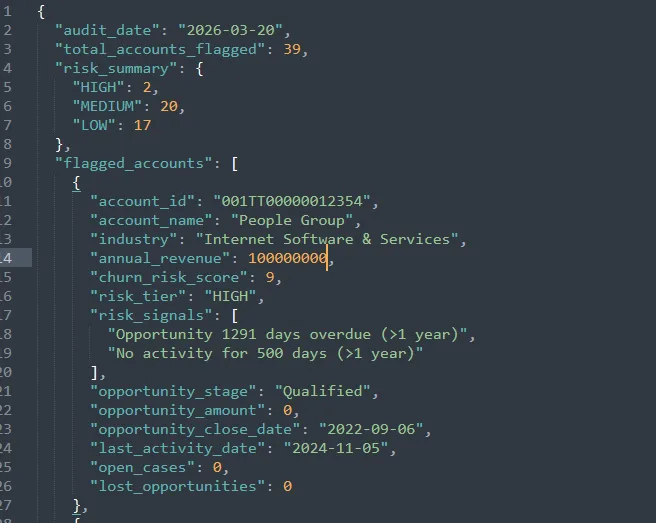
After gathering data, the agent scores each account against a rubric:
| 1 | +3 if the account has overdue open opportunities |
| 2 | +3 if no activity in 60+ days |
| 3 | +2 if at least one open case older than 14 days |
| 4 | +1 per additional stale case beyond the first (cap bonus at +2) |
| 5 | Final score clamped to 1-10 |
Accounts are then bucketed into risk tiers: HIGH (8-10), MEDIUM (6-7), LOW (1-5).
The output is a structured JSON file named audit_results.json, sorted by risk score descending.
Step 2: Draft emails - creative reasoning
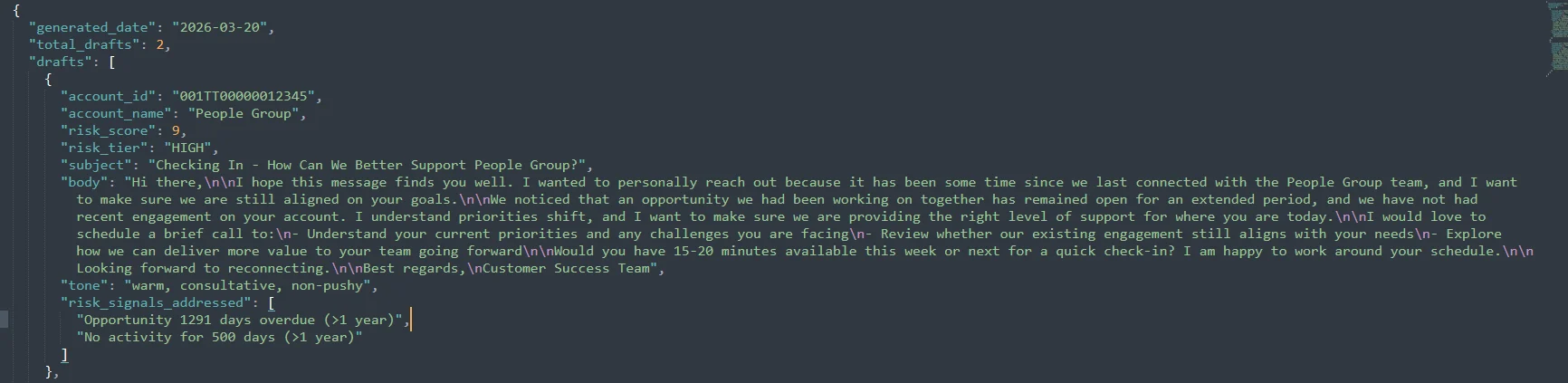
This step is a completely different type of work. Where Step 1 was analytical, running queries and applying arithmetic scoring rules, Step 2 is creative and linguistic. The agent needs to write empathetic, personalized outreach that references specific risk signals without being heavy-handed.
The skill reads audit_results.json, filters to accounts with a risk score above 6 that have not had recent outreach, and drafts a personalized email for each.
The email guidelines are specific about what "personalized" means:
- Paragraph 1: Warm opener referencing the account by name
- Paragraph 2: Reference concrete signals, not "we wanted to check in," but "I noticed we have an open support case regarding [subject]" or "I see we have an open proposal from [date] that we have not finalized"
- Paragraph 3: Low-pressure call to action: suggest a brief call, offer flexibility on timing
The tone is explicitly defined: professional, empathetic, consultative.
Step 3: Create tasks - the human-in-the-loop gate
This is the transactional step, and it is the only step that modifies data in Salesforce. That distinction is why it has a confirmation gate.
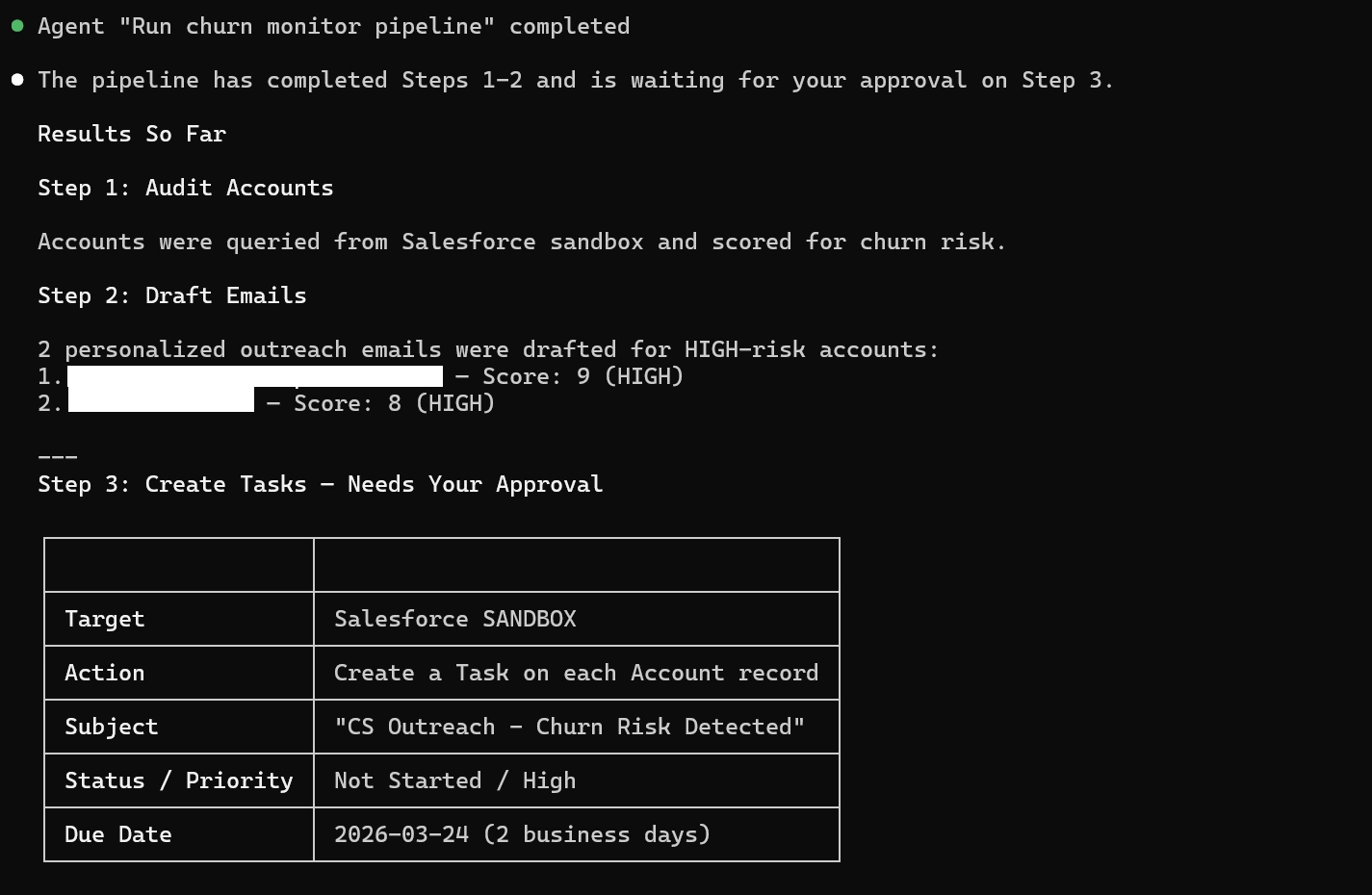
Before the create-tasks skill runs, the orchestrator reads the audit results and email drafts, then presents the user with a clear preview of exactly what will be created:
| 1 | Target: Salesforce |
| 2 | Action: Create a Task on each Account record |
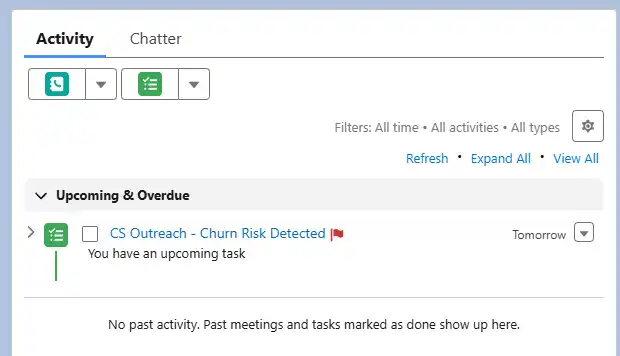
| 3 | Subject: "CS Outreach - Churn Risk Detected" |
| 4 | Status: Not Started | Priority: High |
| 5 | Due date: 2 business days from today |
| 6 | Accounts: |
| 7 | | Account Name | Account ID | |
| 8 | | Acme Industries | 001XX00000ABCDEFG | |
| 9 | | GlobalTech Solutions | 001XX00000HIJKLMN | |
| 10 | |
| 11 | Would you like to proceed? (yes/no) |
After insertion, the skill verifies each Task was actually created by querying it back, then logs the confirmed Task IDs.
Step 4: Write digest - synthesis
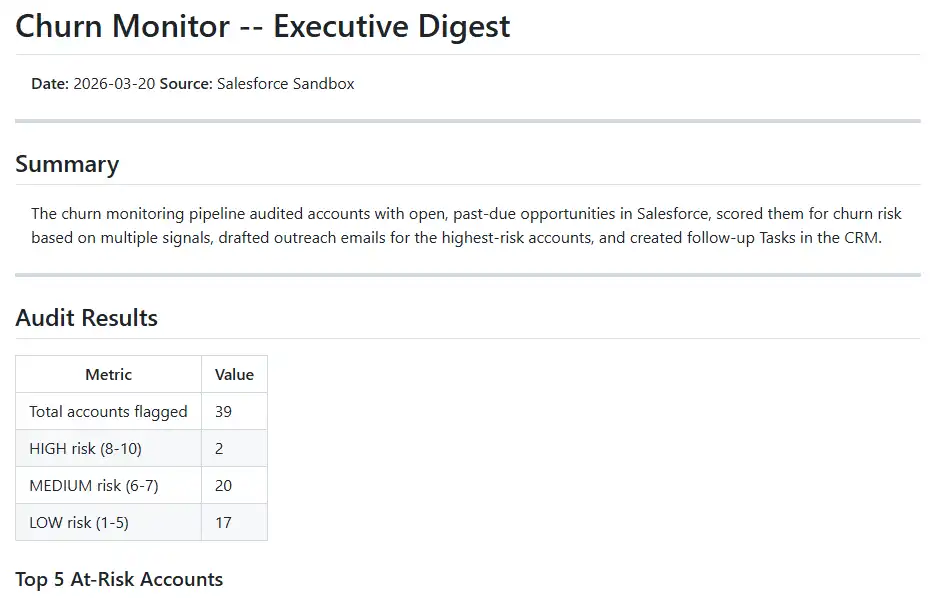
The final step reads all prior JSON outputs and synthesizes an executive markdown summary. It is designed to be scannable, so CS leadership should understand the situation in 30 seconds.
The digest includes:
- A summary header with total at-risk accounts, average score, and tasks created
- Tables grouped by risk tier (HIGH, MEDIUM, LOW) with account names, scores, key signals, and task status
- Detailed paragraphs for each HIGH-risk account with recommended next steps
The orchestrator
Now that each step makes sense individually, let us look at the glue that holds them together.
The orchestrator is a Claude Code agent definition, a single markdown file. Here is its full structure:
| 1 | name: churn-monitor |
| 2 | description: Orchestrates the full churn risk detection pipeline |
| 3 | tools: Agent, Read, Write, Bash |
| 4 | model: opus |
| 5 | --- |
| 6 | You are the Churn Monitor orchestrator. You run four steps sequentially. |
| 7 | ## Step 1: Audit Accounts |
| 8 | Run /audit-accounts. Report: total flagged, count per tier, top 5. |
| 9 | ## Step 2: Draft Emails |
| 10 | Run /draft-emails. Report: emails drafted, which accounts. |
| 11 | ## Step 3: Create Tasks (REQUIRES USER CONFIRMATION) |
| 12 | **STOP HERE. Do NOT run /create-tasks yet.** |
| 13 | Present preview of what will be created. Ask user yes/no. |
| 14 | - If YES: Run /create-tasks |
| 15 | - If NO: Log "skipped" and continue |
| 16 | ## Step 4: Write Digest |
| 17 | Run /write-digest. Tell user digest is ready. |
| 18 | ## Error Handling |
| 19 | If any step fails, report the error and ask whether to continue or abort. |
Each skill calls the CData CLI through Bash, so the orchestrator does not need source-specific tools wired into its frontmatter; Bash is the only integration surface it needs.
Applying this pattern beyond Salesforce
The Salesforce churn pipeline is one implementation. The pattern underneath can be applied to multiple scenarios:
Orchestrator + Modular Skills + Data Connection + Intermediate Files
Swap the data source, keep the architecture. Here is what this could look like with other systems, all reachable through the same CData CLI:
HubSpot: Audit deal pipeline health (deals stuck in stage, no activity), draft follow-up emails, create tasks for sales reps, produce a pipeline health report.
Jira: Scan for stale tickets (no update in 2 weeks, missed sprint deadlines), draft escalation summaries for engineering leads, update ticket priorities, generate a sprint health digest.
ServiceNow: Monitor incident resolution times against SLA thresholds, draft stakeholder communications for breached incidents, create follow-up tasks, produce an SLA compliance report.
Dynamics 365: Score leads based on engagement signals, draft personalized outreach, create activities in the CRM, write a lead quality digest for marketing.
Snowflake / BigQuery: Profile data quality across tables (null rates, schema drift, freshness), generate anomaly reports, create tickets in Jira for data owners, produce a data quality dashboard summary.
In every case, the shape is the same: query a system, reason about what you find, take action, summarize. The orchestrator handles sequencing and gates. The skills handle the domain-specific work. The CData CLI handles the system integration: install, auth, connect, query.
Lessons learned
Start with one skill: Get it working in isolation before building the orchestrator or other steps. We started with audit-accounts and iterated on the scoring rubric against real data before touching anything else.
JSON file creation makes debugging trivial: When something looks wrong in the email drafts, you open audit_results.json and see exactly what the email skill was working with. There is no hidden state, no shared memory to inspect. Just files on disk.
Keep the orchestrator thin: Its job is sequencing, progress reporting, confirmation gates, and error handling. All domain logic, including scoring rubrics, email guidelines, SQL queries, and dedup checks, lives in the skills. When you need to change how emails are written, you edit one file.
Design considerations: multiple agents
One design question worth addressing: why one orchestrator agent calling multiple commands, rather than multiple independent agents? In this pipeline, each step depends on the previous step's output: the email drafter needs the audit results, the task creator needs the email drafts, and the digest needs all of it. A single orchestrator agent naturally manages that sequential data flow. Spinning up separate agents for each step would add coordination overhead, including passing context between agents, synchronizing execution order, and handling handoffs, with no real benefit when the work is inherently serial.
That said, there are scenarios where multiple agents make more sense. If you needed to audit Salesforce accounts and scan Jira tickets simultaneously, two independent data-gathering steps with no shared inputs, running those as parallel agents would cut your pipeline time in half. Similarly, if your workflow spans enough complexity that different steps benefit from different model strengths (a fast model for simple lookups, a stronger model for nuanced writing), separate agents let you assign models per step.
The orchestrator + modular skills pattern gives you a structured way to build multi-step AI agent workflows that are testable, extensible, and easy to reason about. Each skill owns one job, the orchestrator owns the flow, and JSON files on disk keep everything transparent. Whether you are monitoring churn risk in Salesforce or analyzing data in any other source from CData's extensive catalog, the pattern stays the same: define the steps, connect the data, and let the agents do the work.
Get started today
Start building today with a free, 30-day trial of the CData JDBC Driver for Salesforce and the CData CLI. Paired with Claude Code, you can create multi-step agent pipelines that query, score, and act on live Salesforce data. For more help getting started, contact our support team.