




How to connect PolyBase to Apache Airflow

PolyBase for SQL Server allows you to query external data by using the same Transact-SQL syntax used to query a database table. When paired with the CData API Driver for ODBC, you get access to your Apache Airflow data directly alongside your SQL Server data. This article describes creating an external data source and external tables to grant access to live Apache Airflow data using T-SQL queries.
NOTE: PolyBase is only available on SQL Server 19 and above.
The CData ODBC drivers offer unmatched performance for interacting with live Apache Airflow data using PolyBase due to optimized data processing built into the driver. When you issue complex SQL queries from SQL Server to Apache Airflow, the driver pushes down supported SQL operations, like filters and aggregations, directly to Apache Airflow and utilizes the embedded SQL engine to process unsupported operations (often SQL functions and JOIN operations) client-side. And with PolyBase, you can also join SQL Server data with Apache Airflow data, using a single query to pull data from distributed sources.
Connect to Apache Airflow
If you have not already, first specify connection properties in an ODBC DSN (data source name). This is the last step of the driver installation. You can use the Microsoft ODBC Data Source Administrator to create and configure ODBC DSNs. To create an external data source in SQL Server using PolyBase, configure a System DSN (CData Apache Airflow Sys is created automatically).
Start by setting the Profile connection property to the location of the ApacheAirflow Profile on disk (e.g. C:\profiles\ApacheAirflow.apip). Next, set the ProfileSettings connection property to the connection string for ApacheAirflow (see below).
ApacheAirflow API Profile Settings
Apache Airflow 3 uses JWT Bearer tokens for API authentication. You can generate a token from the Airflow web UI under Settings or via the Airflow CLI using airflow users create and the /api/v2/auth/token endpoint. Note that this profile targets Apache Airflow 3.x using the /api/v2 REST API. The legacy /api/v1 endpoint used by Airflow 2.x is not supported.
After setting the following connection properties, you are ready to connect:
- AuthScheme: Set this to APIKey.
- APIKey: Set this to your Apache Airflow JWT Bearer token.
- Server: Set this to the base URL of your Airflow instance (e.g. http://localhost:8080).
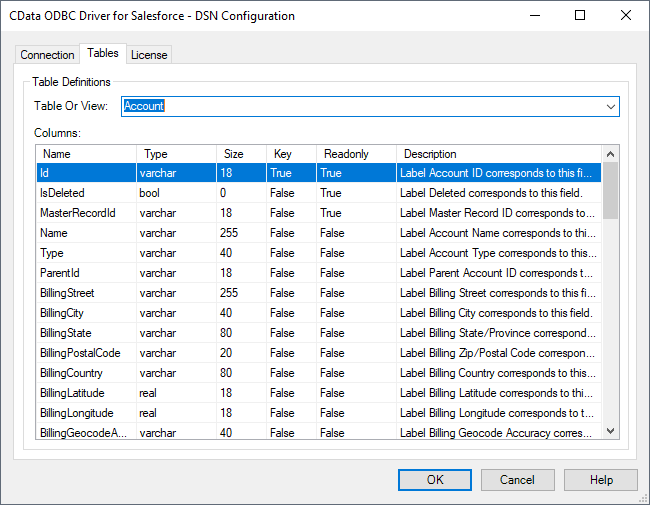
Click "Test Connection" to ensure that the DSN is connected to Apache Airflow properly. Navigate to the Tables tab to review the table definitions for Apache Airflow.
Create an External Data Source for Apache Airflow Data
After configuring the connection, you need to create a master encryption key and a credential database for the external data source.
Creating a Master Encryption Key
Execute the following SQL command to create a new master key, 'ENCRYPTION,' to encrypt the credentials for the external data source.
CREATE MASTER KEY ENCRYPTION BY PASSWORD = 'password';
Creating a Credential Database
Execute the following SQL command to create credentials for the external data source connected to Apache Airflow data.
NOTE: Since Apache Airflow does not require a User or Password to authenticate, you may use whatever values you wish for IDENTITY and SECRET.
CREATE DATABASE SCOPED CREDENTIAL api_creds
WITH IDENTITY = 'username', SECRET = 'password';
Create an External Data Source for Apache Airflow
Execute a CREATE EXTERNAL DATA SOURCE SQL command to create an external data source for Apache Airflow with PolyBase:
- Set the LOCATION parameter , using the DSN and credentials configured earlier.
PUSHDOWN is set to ON by default, meaning the ODBC Driver can leverage server-side processing for complex queries.
CREATE EXTERNAL DATA SOURCE cdata_api_source
WITH (
  LOCATION = 'odbc://SERVER_URL',
  CONNECTION_OPTIONS = 'DSN=CData Apache Airflow Sys',
  -- PUSHDOWN = ON | OFF,
  CREDENTIAL = api_creds
);
Create External Tables for Apache Airflow
After creating the external data source, use CREATE EXTERNAL TABLE statements to link to Apache Airflow data from your SQL Server instance. The table column definitions must match those exposed by the CData API Driver for ODBC. You can refer to the Tables tab of the DSN Configuration Wizard to see the table definition.
Sample CREATE TABLE Statement
The statement to create an external table based on a Apache Airflow DagRuns would look similar to the following:
CREATE EXTERNAL TABLE DagRuns(
  DagRunId [nvarchar](255) NULL,
  State [nvarchar](255) NULL,
  ...
) WITH (
  LOCATION='DagRuns',
  DATA_SOURCE=cdata_api_source
);
Having created external tables for Apache Airflow in your SQL Server instance, you are now able to query local and remote data simultaneously. Thanks to built-in query processing in the CData ODBC Driver, you know that as much query processing as possible is being pushed to Apache Airflow, freeing up local resources and computing power. Download a free, 30-day trial of the ODBC Driver for Apache Airflow and start working with live Apache Airflow data alongside your SQL Server data today.