




Import Real-Time ApprovalMax Data via JDBC in ColdFusion to Build Applications

Adobe ColdFusion is a web and mobile application development platform. It uses its own scripting language, ColdFusion Markup Language (CFML), to create data-driven websites as well as generate remote services, such as REST.
When ColdFusion is paired with the CData API Driver for JDBC, you can link your ColdFusion web and mobile applications to operational ApprovalMax data. This allows for your applications to be more robust and complete. This article details how to use the JDBC driver to create a table populated with ApprovalMax data from within a ColdFusion markup file.
With built-in optimized data processing, the CData JDBC Driver offers unmatched performance for interacting with live ApprovalMax data. When you issue complex SQL queries to ApprovalMax, the driver pushes supported SQL operations, like filters and aggregations, directly to ApprovalMax and utilizes the embedded SQL engine to process unsupported operations client-side (often SQL functions and JOIN operations). Its built-in dynamic metadata querying allows you to work with and analyze ApprovalMax data using native data types.
Configuring the Connection to ApprovalMax
You will need a JDBC connection string to establish a connection between Coldfusion and ApprovalMax.
Start by setting the Profile connection property to the location of the ApprovalMax Profile on disk (e.g. C:\profiles\ApprovalMax.apip). Next, set the ProfileSettings connection property to the connection string for ApprovalMax (see below).
ApprovalMax API Profile Settings
To authenticate to ApprovalMax and connect to your own data or to allow other users to connect to their data, the ApprovalMax Public API requires the OAuth 2.0 authorization code flow.
First, you will need to register an OAuth application with ApprovalMax. Sign in to the ApprovalMax Developer Portal (https://developer.approvalmax.com/applications) and create a new application. Your OAuth application will be assigned a Client ID and a Client Secret, and you must register at least one Redirect URI (Callback URL).
A Premium ApprovalMax subscription (or active trial) is required to use the Public API.
After setting the following connection properties, you are ready to connect:
- AuthScheme: Set this to OAuth.
- InitiateOAuth: Set this to GETANDREFRESH. You can use InitiateOAuth to manage the process to obtain the OAuthAccessToken.
- OAuthClientId: Set this to the Client ID that is shown in your application settings on the ApprovalMax Developer Portal.
- OAuthClientSecret: Set this to the Client Secret that is shown in your application settings on the ApprovalMax Developer Portal.
- CallbackURL: Set this to the Redirect URI that is registered in your application settings.
- Scope: (Optional) Override the default OAuth scopes. The default value openid offline_access https://www.approvalmax.com/scopes/public_api/read grants read-only access to all tables in this profile and enables refresh tokens. Use the principle of least privilege when narrowing this scope.
The OAuth Authorization URL is https://identity.approvalmax.com/connect/authorize and the Token URL is https://identity.approvalmax.com/connect/token. Both authorization_code and refresh_token grant types are supported.
Built-in Connection String Designer
For assistance in constructing the JDBC URL, use the connection string designer built into the ApprovalMax JDBC Driver. Either double-click the JAR file or execute the jar file from the command-line.
java -jar cdata.jdbc.api.jar

Adding a Data Source and Creating a Table
After configuring the connection, follow the steps below to add the CData JDBC Driver to ColdFusion's lib directory, add a new data source, test the connection, create a ColdFusion markup file, and, finally, make a real-time connection with ApprovalMax data and display it in a table written in the ColdFusion Markup Language, or CFML:
-
Copy the JDBC Driver for ApprovalMax and lic file from "C:\Program Files\CData\CData API Driver for JDBC\lib" to
"C:\ColdFusion2021\cfusion\wwwroot\WEB-INF\lib".
            cdata.jdbc.api.jar
            cdata.jdbc.api.lic
Note: If you do not copy the .lic file with the jar, you will see a licensing error that indicates you do not have a valid license installed. This is true for both the trial and full versions.
-
From the ColdFusion administrator interface, choose Data & Services.
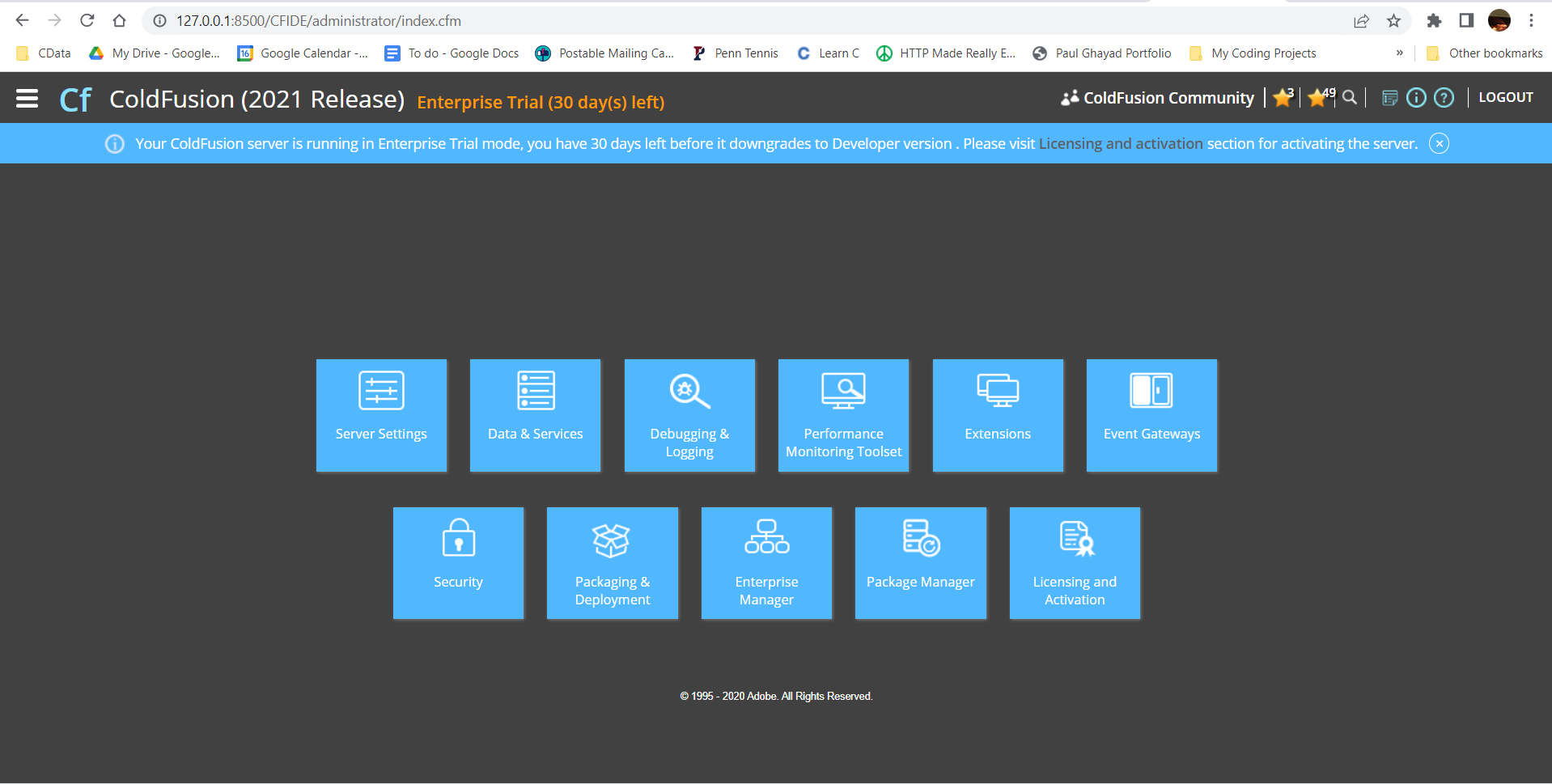
-
Here, we can "Add New Data Source". The data source name can be any name, provided it conforms to the ColdFusion
variable naming conventions. For our JDBC driver, choose "other", then click the "Add" button.
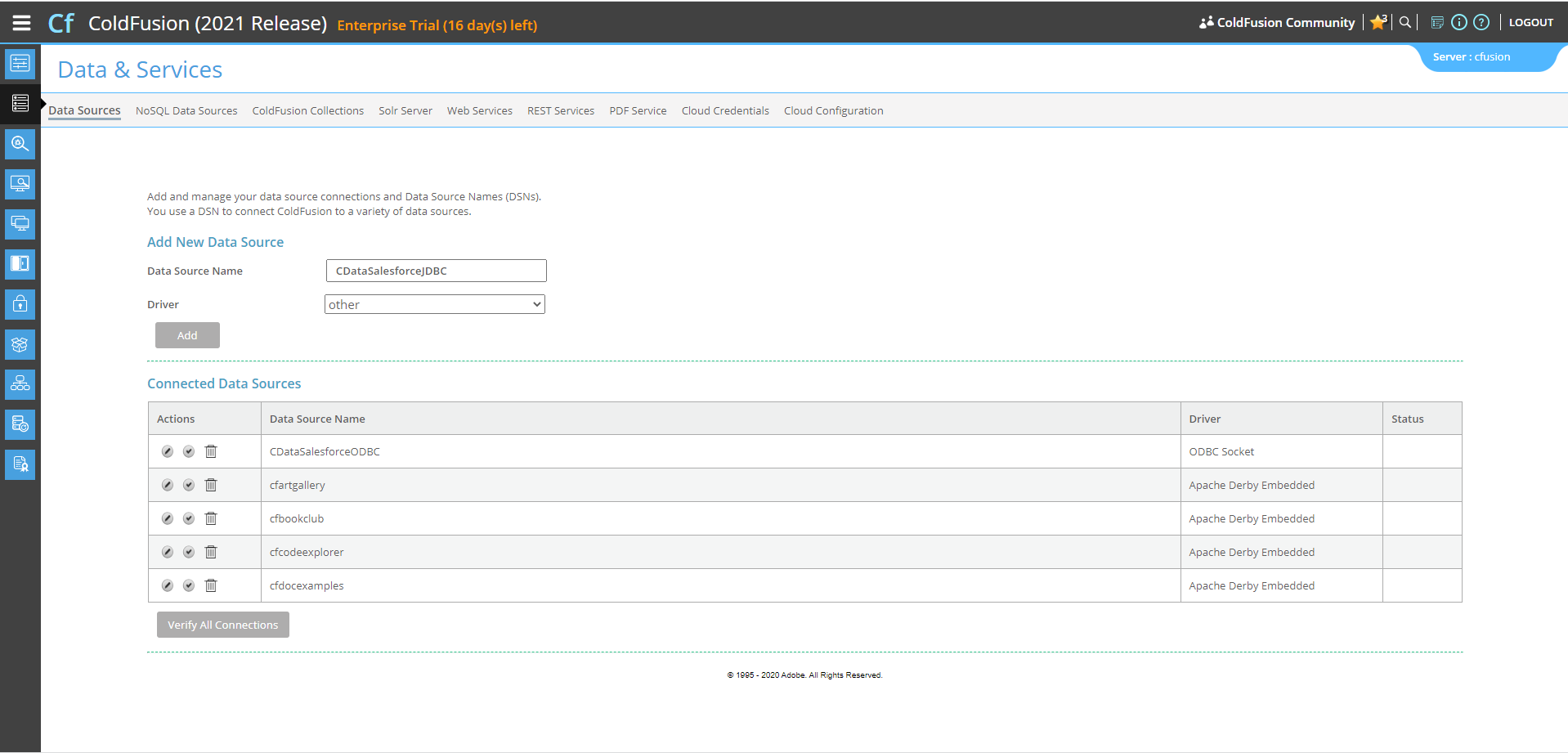
-
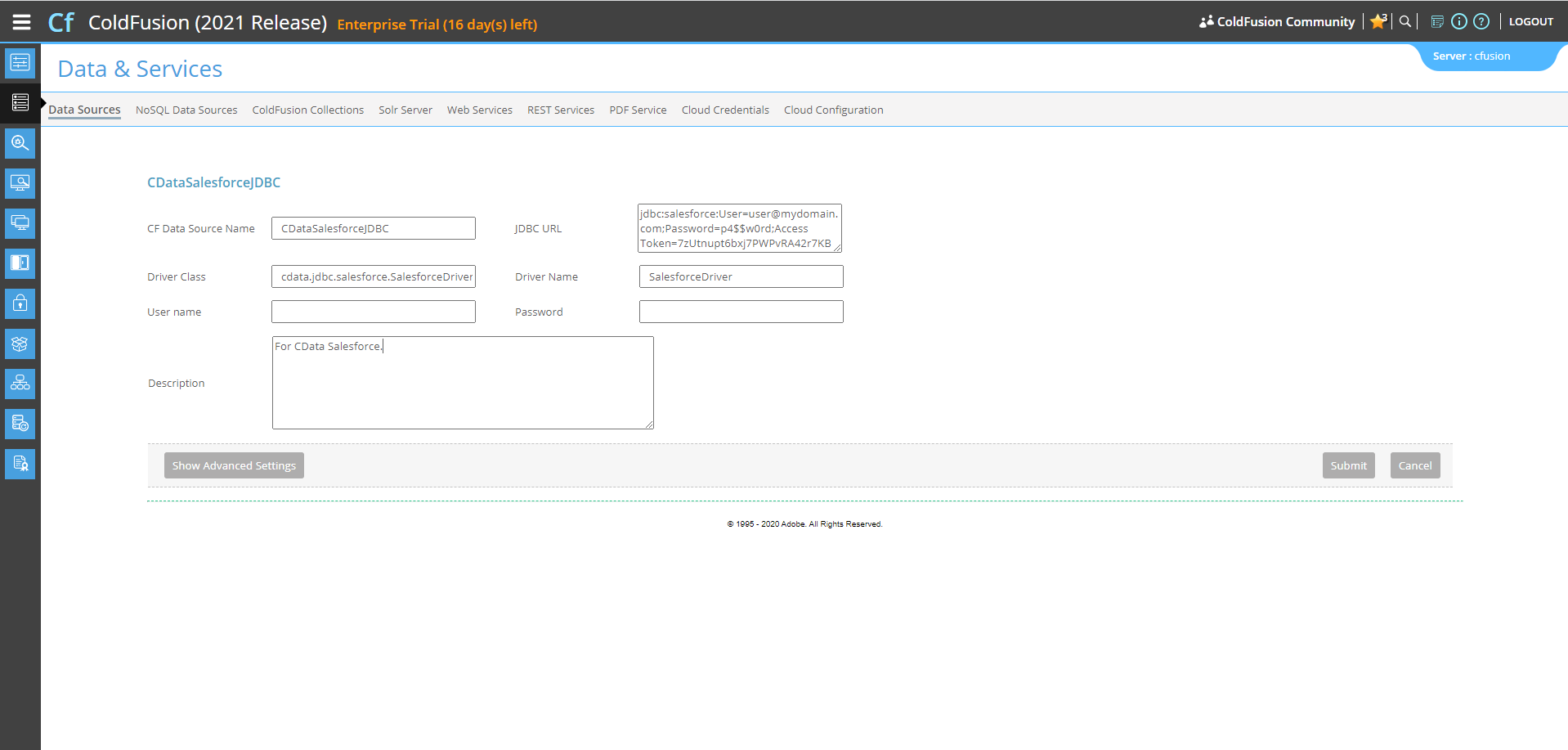
Next, populate the driver properties.
- JDBC URL will need to be in the format: jdbc:api:|connectionString|.
- A typical connection string looks like this:
jdbc:api:Profile=C:\profiles\ApprovalMax.apip;AuthScheme=OAuth;InitiateOAuth=GETANDREFRESH;OAuthClientId=your_client_id;OAuthClientSecret=your_client_secret;CallbackURL=your_callback_url;
- The Driver Class is: cdata.jdbc.api.APIDriver
- The Driver Name is arbitrary and simply used to recognize the data source in the ColdFusion administration console.
-
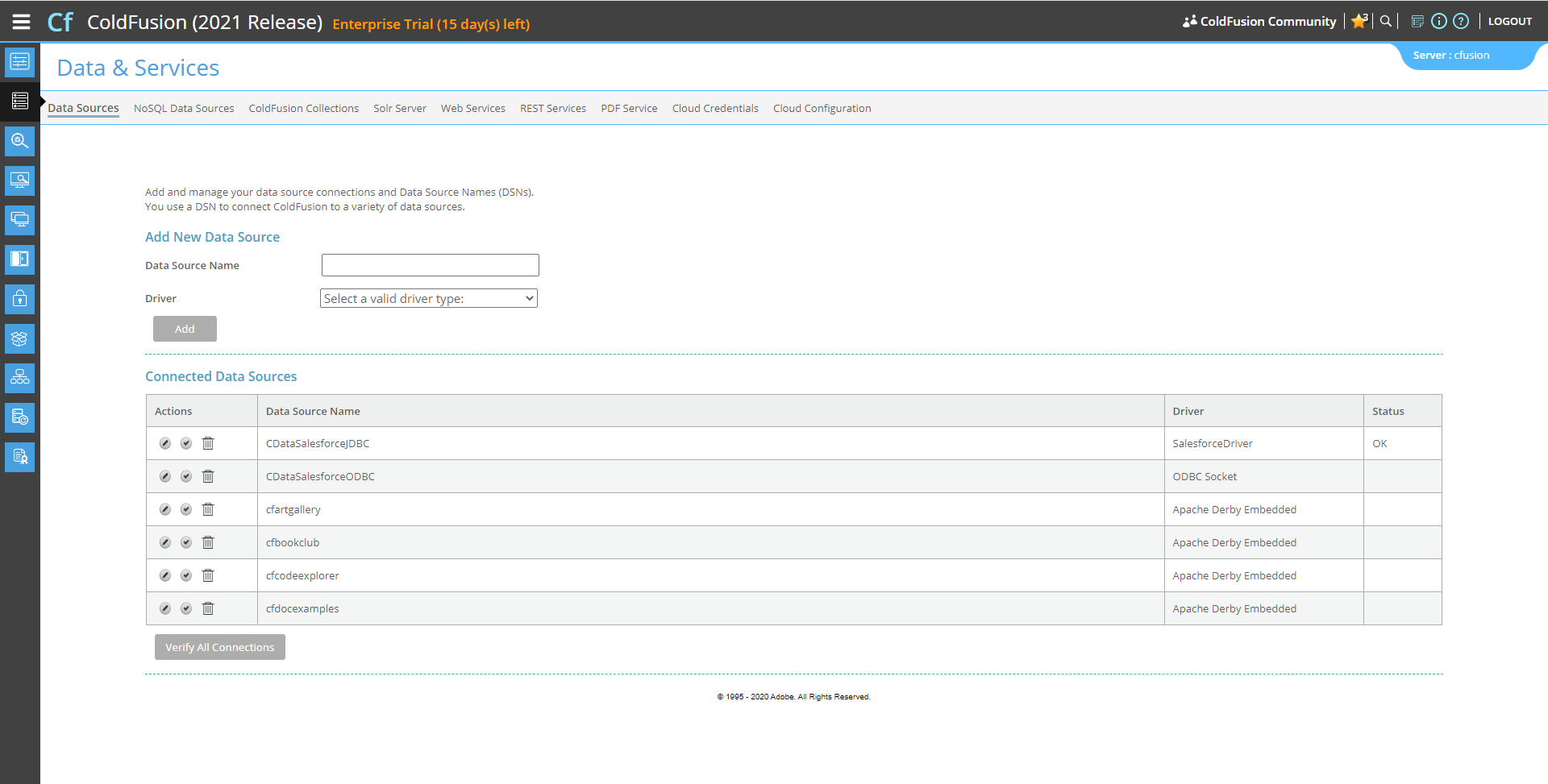
Now, test the connection by clicking the check mark to the left of the CDataApprovalMaxJDBC data source you just created.
When the data source reports an "OK" status, it is ready for use.
-
Next, create a new ColdFusion Markup file (.cfm) and place it in the wwwroot directory ("C:\ColdFusion2021\cfusion\wwwroot")
for ColdFusion.
The following code queries the data source:
        <cfquery name="ApprovalMaxQuery" dataSource="CDataApprovalMaxJDBC">
          SELECT * FROM UserProfiles
        </cfquery>
And a CFTable can be used to quickly output the table in HTML:<cftable query = "ApprovalMaxQuery" border = "1" colHeaders colSpacing = "2" headerLines = "2" HTMLTable maxRows = "500" startRow = "1"> <cfcol header="<b>UserId</b>" align="Left" width=2 text="UserId"/> <cfcol header="<b>Email</b>" align="Left" width=15 text="Email"/> ... </cftable>Full code, including the HTML portion is available below:<html> <head><title>CData Software | ApprovalMax UserProfiles Table Demo </title></head> <body> <cfoutput>#ucase("ApprovalMax UserProfiles Table Demo")#</cfoutput> <cfquery name="ApprovalMaxQuery" dataSource="CDataApprovalMaxJDBC"> SELECT * FROM UserProfiles </cfquery> <cftable query = "ApprovalMaxQuery" border = "1" colHeaders colSpacing = "2" headerLines = "2" HTMLTable maxRows = "500" startRow = "1"> <cfcol header="<b>UserId</b>" align="Left" width=2 text="UserId"/> <cfcol header="<b>Email</b>" align="Left" width=15 text="Email"/> ... </cftable> </body> </html> -
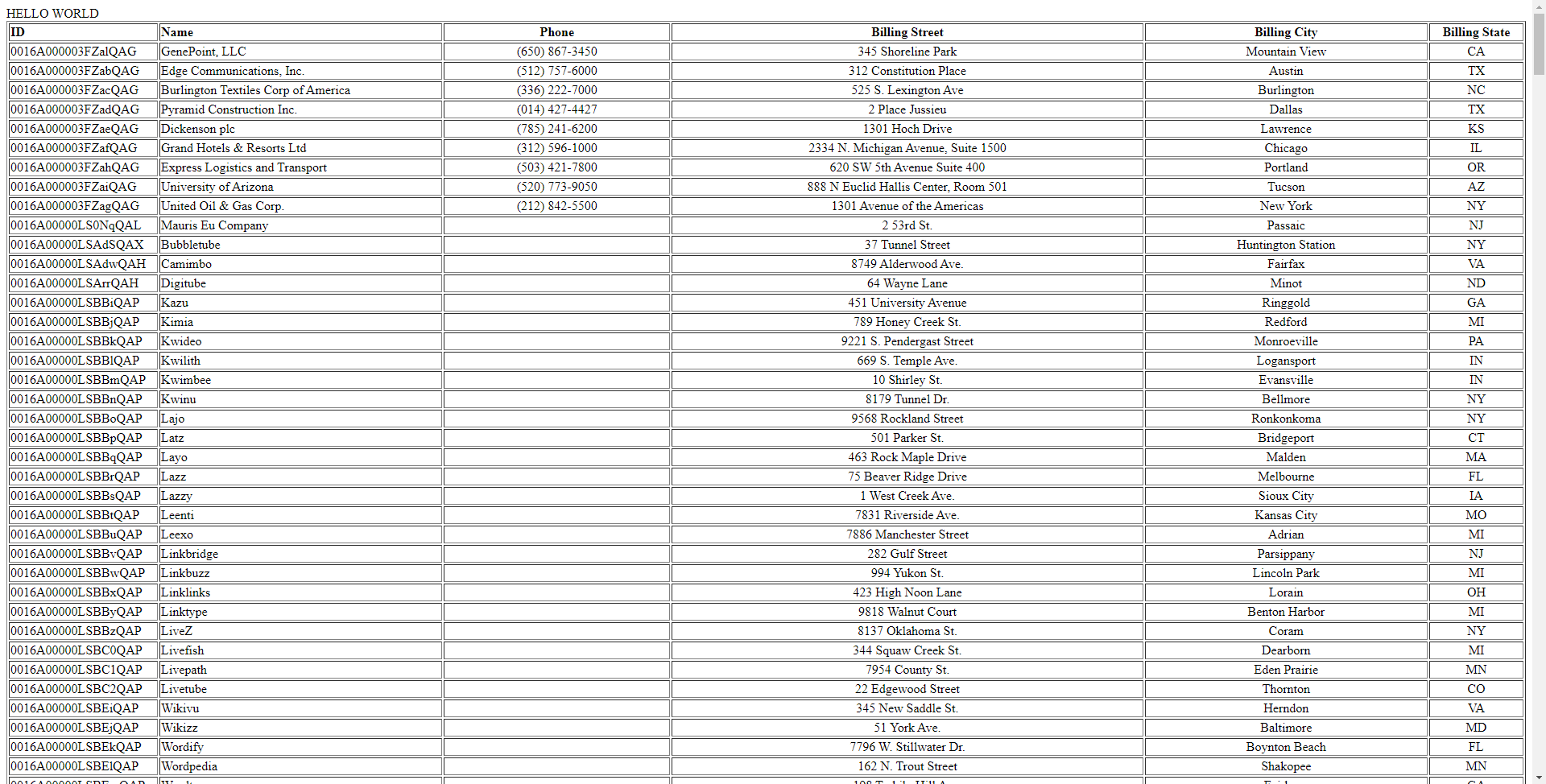
Finally, run the code locally in a browser at the default port of 8500. It produces a table populated with ApprovalMax data!
As a note, the CData JDBC Drivers also support parameterized queries using the cfqueryparam element. For example:
SELECT * FROM Account WHERE name = Get Started Today
Download a free, 30-day trial of the CData JDBC Driver for ApprovalMax and start building ApprovalMax-connected applications with Adobe ColdFusion. Reach out to our Support Team if you have any questions.