






Create a Data Access Object for CapsuleCRM Data using JDBI

JDBI is a SQL convenience library for Java that exposes two different style APIs, a fluent style and a SQL object style. The CData JDBC Driver for CapsuleCRM integrates connectivity to live CapsuleCRM data in Java applications. By pairing these technologies, you gain simple, programmatic access to CapsuleCRM data. This article explains how to build a basic Data Access Object (DAO) and the accompanying code to read CapsuleCRM data.
Create a DAO for the CapsuleCRM ActivityTypes Entity
The interface below declares the desired behavior for the SQL object to create a single method for each SQL statement to be implemented.
public interface MyActivityTypesDAO {
  //request specific data from CapsuleCRM (String type is used for simplicity)
  @SqlQuery("SELECT Name FROM ActivityTypes WHERE Name = :name")
  String findNameByName(@Bind("name") String name);

  /*
   * close with no args is used to close the connection
   */
  void close();
}
Open a Connection to CapsuleCRM
Collect the necessary connection properties and construct the appropriate JDBC URL for connecting to CapsuleCRM.
Start by setting the Profile connection property to the location of the CapsuleCRM Profile on disk (e.g. C:\profiles\Capsulecrm.apip). Next, set the ProfileSettings connection property to the connection string for CapsuleCRM (see below).
CapsuleCRM API Profile Settings
Register an OAuth application at https://developer.capsulecrm.com/signIn using your GitHub credentials to obtain a client ID and client secret.
Built-in Connection String Designer
For assistance in constructing the JDBC URL, use the connection string designer built into the CapsuleCRM JDBC Driver. Either double-click the JAR file or execute the jar file from the command-line.
java -jar cdata.jdbc.api.jar
Fill in the connection properties and copy the connection string to the clipboard.
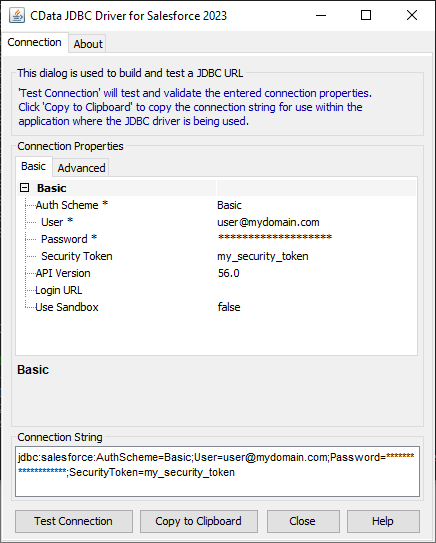
A connection string for CapsuleCRM will typically look like the following:
jdbc:api:Profile=C:\profiles\Capsulecrm.apip;Authscheme=OAuth;OAuthClientId=your_client_id;OAuthClientSecret=your_client_secret;CallbackUrl=your_callback_url;
Use the configured JDBC URL to obtain an instance of the DAO interface. The particular method shown below will open a handle bound to the instance, so the instance needs to be closed explicitly to release the handle and the bound JDBC connection.
DBI dbi = new DBI("jdbc:api:Profile=C:\profiles\Capsulecrm.apip;Authscheme=OAuth;OAuthClientId=your_client_id;OAuthClientSecret=your_client_secret;CallbackUrl=your_callback_url;");
MyActivityTypesDAO dao = dbi.open(MyActivityTypesDAO.class);

//do stuff with the DAO

dao.close();
Read CapsuleCRM Data
With the connection open to CapsuleCRM, simply call the previously defined method to retrieve data from the ActivityTypes entity in CapsuleCRM.
//disply the result of our 'find' method
String name = dao.findNameByName("Phone Call");
System.out.println(name);
Since the JDBI library is able to work with JDBC connections, you can easily produce a SQL Object API for CapsuleCRM by integrating with the CData JDBC Driver for CapsuleCRM. Download a free trial and work with live CapsuleCRM data in custom Java applications today.