




Connect to Claude Compliance Data in NetBeans

The CData JDBC Driver for Claude Compliance integrates connectivity to live Claude Compliance data in IDEs that support JDBC. The JDBC standard enables you to use built-in data access wizards and other tools supporting rapid development. This article shows how to connect to Claude Compliance data in NetBeans. You will create a connection and load Claude Compliance data in the Table Editor.
Create a JDBC Data Source for Claude Compliance in NetBeans
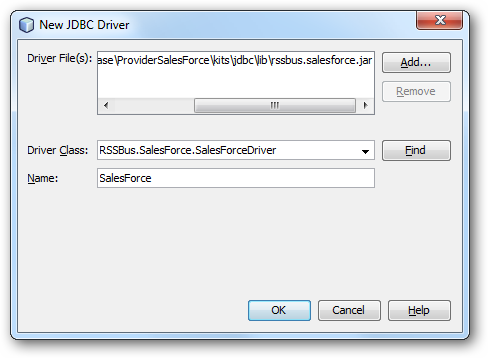
To create the JDBC data source, expand the Database node in the Service window, right-click the Drivers node, and select New Driver. In the New Driver wizard that results, enter the following information:
- Driver File(s): Click Add and, in the file explorer dialog that appears, select the cdata.jdbc.claudecompliance.jar file. The driver JAR is located in the lib subfolder of the installation directory.
- Driver Class: Click Find to search for the driver class inside the JAR. Then select cdata.jdbc.claudecompliance.ClaudeComplianceDriver from the menu.
- Name: Enter the name for the driver.
Define Connection Parameters
Follow the steps below to define required connection properties:
In the Service window, right-click the Database node and click New Connection.
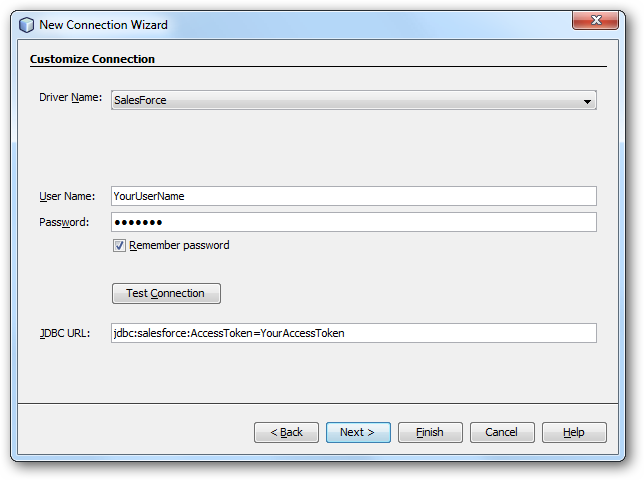
In the New Connection Wizard, enter the following connection properties:
- Driver Name: In the menu, select the CData JDBC Driver for Claude Compliance.
- User Name: Enter the username. This can also be defined in the JDBC URL.
- Password: Enter the password. This can also be defined in the JDBC URL.
JDBC URL: Specify the JDBC URL.
The driver connects to Claude Compliance using a Compliance Access Key, the only supported authentication method. Set the following connection property:
- APIKey: The Compliance Access Key you created.
Creating a Compliance Access Key
- Enable the Compliance API for your organization.
- Sign in to claude.ai as a primary owner or organization owner and open Organization settings > API > Keys.
- Select Create Key and assign only the scopes your integration needs:
- read:compliance_activities for Activities and the typed activity views.
- read:compliance_org_data for organizations, roles, groups, and settings.
- read:compliance_user_data for users, chats, files, projects, and downloads.
- delete:compliance_user_data for the explicit Delete stored procedures.
- Create the key and copy it when it appears. The key starts with sk-ant-api01- and is shown only once.
Optionally, set OrganizationUUID to limit organization-scoped views (such as OrganizationUsers and ComplianceRoles) to a single linked organization. If it is left empty, those views default to the first available organization and do not include data from all linked organizations.
Built-in Connection String Designer
For assistance in constructing the JDBC URL, use the connection string designer built into the Claude Compliance JDBC Driver. Either double-click the JAR file or execute the jar file from the command-line.
java -jar cdata.jdbc.claudecompliance.jarFill in the connection properties and copy the connection string to the clipboard.

A typical JDBC URL is the following:
jdbc:claudecompliance:APIKey=your_compliance_access_key;
Query Claude Compliance Data
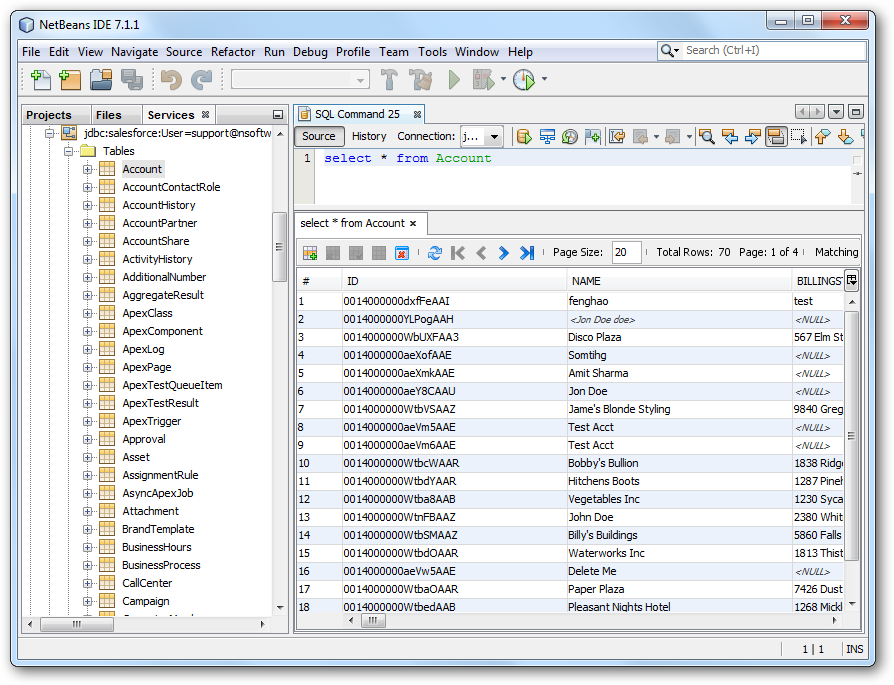
To connect to Claude Compliance data, right-click the connection in the Database node and click Connect. After the connection is established, you can expand it to discover schema information.
To load a table in the Data Views window, right-click the table and then click View Data..
Ready to get started?
Download a free trial of the Claude Compliance Driver to get started:
Download NowLearn more:
 Claude Compliance JDBC Driver
Rapidly create and deploy powerful Java applications that integrate with Claude Compliance data including Activities, Chats, ChatMessages, CodeArtifacts, ComplianceRoles, Organizations, OrganizationUsers, Projects, and more!