






How to work with Cloudflare Data in Apache Spark using SQL

Apache Spark is a fast and general engine for large-scale data processing. When paired with the CData JDBC Driver for Cloudflare, Spark can work with live Cloudflare data. This article describes how to connect to and query Cloudflare data from a Spark shell.
The CData JDBC Driver offers unmatched performance for interacting with live Cloudflare data due to optimized data processing built into the driver. When you issue complex SQL queries to Cloudflare, the driver pushes supported SQL operations, like filters and aggregations, directly to Cloudflare and utilizes the embedded SQL engine to process unsupported operations (often SQL functions and JOIN operations) client-side. With built-in dynamic metadata querying, you can work with and analyze Cloudflare data using native data types.
Install the CData JDBC Driver for Cloudflare
Download the CData JDBC Driver for Cloudflare installer, unzip the package, and run the JAR file to install the driver.
Start a Spark Shell and Connect to Cloudflare Data
- Open a terminal and start the Spark shell with the CData JDBC Driver for Cloudflare JAR file as the jars parameter:
$ spark-shell --jars /CData/CData JDBC Driver for Cloudflare/lib/cdata.jdbc.api.jar
- With the shell running, you can connect to Cloudflare with a JDBC URL and use the SQL Context load() function to read a table.
Start by setting the Profile connection property to the location of the Cloudflare Profile on disk (e.g. C:\profiles\Cloudflare.apip). Next, set the ProfileSettings connection property to the connection string for Cloudflare (see below).
Cloudflare API Profile Settings
Obtain your Global API Key or create an API Token from the Cloudflare dashboard under My Profile > API Tokens.
Built-in Connection String Designer
For assistance in constructing the JDBC URL, use the connection string designer built into the Cloudflare JDBC Driver. Either double-click the JAR file or execute the jar file from the command-line.
java -jar cdata.jdbc.api.jar
Fill in the connection properties and copy the connection string to the clipboard.
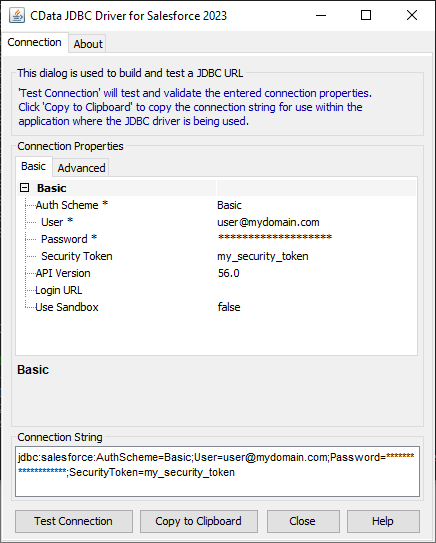
Configure the connection to Cloudflare, using the connection string generated above.
scala> val api_df = spark.sqlContext.read.format("jdbc").option("url", "jdbc:api:Profile=C:\profiles\Cloudflare.apip;ProfileSettings='APIKey=your_api_token;APIEmail=your_email';").option("dbtable","AccessApplications").option("driver","cdata.jdbc.api.APIDriver").load() - Once you connect and the data is loaded you will see the table schema displayed.
Register the Cloudflare data as a temporary table:
scala> api_df.registerTable("accessapplications")-
Perform custom SQL queries against the Data using commands like the one below:
scala> api_df.sqlContext.sql("SELECT Id, Name FROM AccessApplications WHERE Domain = app.example.com").collect.foreach(println)You will see the results displayed in the console, similar to the following:

Using the CData JDBC Driver for Cloudflare in Apache Spark, you are able to perform fast and complex analytics on Cloudflare data, combining the power and utility of Spark with your data. Download a free, 30 day trial of any of the hundreds of CData JDBC Drivers and get started today.