






How to connect PolyBase to Discourse

PolyBase for SQL Server allows you to query external data by using the same Transact-SQL syntax used to query a database table. When paired with the CData API Driver for ODBC, you get access to your Discourse data directly alongside your SQL Server data. This article describes creating an external data source and external tables to grant access to live Discourse data using T-SQL queries.
NOTE: PolyBase is only available on SQL Server 19 and above.
The CData ODBC drivers offer unmatched performance for interacting with live Discourse data using PolyBase due to optimized data processing built into the driver. When you issue complex SQL queries from SQL Server to Discourse, the driver pushes down supported SQL operations, like filters and aggregations, directly to Discourse and utilizes the embedded SQL engine to process unsupported operations (often SQL functions and JOIN operations) client-side. And with PolyBase, you can also join SQL Server data with Discourse data, using a single query to pull data from distributed sources.
Connect to Discourse
If you have not already, first specify connection properties in an ODBC DSN (data source name). This is the last step of the driver installation. You can use the Microsoft ODBC Data Source Administrator to create and configure ODBC DSNs. To create an external data source in SQL Server using PolyBase, configure a System DSN (CData Discourse Sys is created automatically).
The Discourse API uses API Key authentication.
Using API Key Authentication
Discourse requires API Key and Username for authentication. API Keys are generated in the Discourse Admin panel under the API section. You can create user-specific API keys or all-users API keys. Once you have obtained the API Key, set it along with the Domain and Username in the ProfileSettings connection property.
Example Connection string
Profile=C:\profiles\Discourse.apip;ProfileSettings='Domain=forum.example.com;APIKey=your_api_key;Username=your_username;'AuthScheme=APIKey;
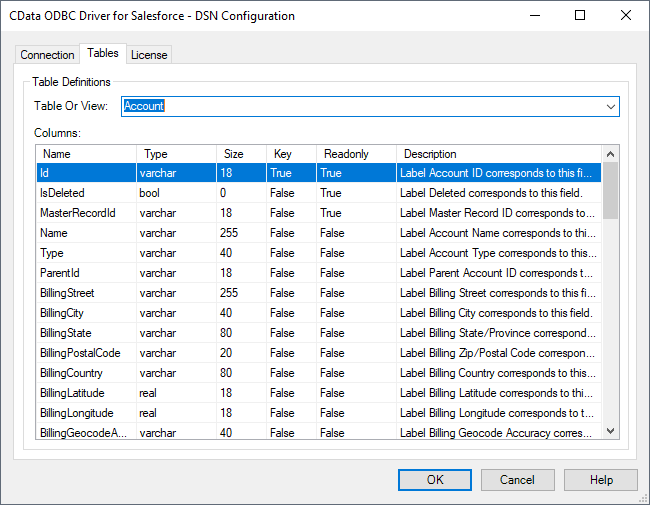
Click "Test Connection" to ensure that the DSN is connected to Discourse properly. Navigate to the Tables tab to review the table definitions for Discourse.
Create an External Data Source for Discourse Data
After configuring the connection, you need to create a master encryption key and a credential database for the external data source.
Creating a Master Encryption Key
Execute the following SQL command to create a new master key, 'ENCRYPTION,' to encrypt the credentials for the external data source.
CREATE MASTER KEY ENCRYPTION BY PASSWORD = 'password';
Creating a Credential Database
Execute the following SQL command to create credentials for the external data source connected to Discourse data.
CREATE DATABASE SCOPED CREDENTIAL api_creds
WITH IDENTITY = 'username', SECRET = 'password';
Create an External Data Source for Discourse
Execute a CREATE EXTERNAL DATA SOURCE SQL command to create an external data source for Discourse with PolyBase:
- Set the LOCATION parameter , using the DSN and credentials configured earlier.
For Discourse, set SERVERNAME to the URL or address for your server (e.g. 'localhost' or '127.0.0.1' for local servers; the remote URL for remote servers). Leave PORT empty. PUSHDOWN is set to ON by default, meaning the ODBC Driver can leverage server-side processing for complex queries.
CREATE EXTERNAL DATA SOURCE cdata_api_source
WITH (
  LOCATION = 'odbc://SERVER_URL',
  CONNECTION_OPTIONS = 'DSN=CData Discourse Sys',
  -- PUSHDOWN = ON | OFF,
  CREDENTIAL = api_creds
);
Create External Tables for Discourse
After creating the external data source, use CREATE EXTERNAL TABLE statements to link to Discourse data from your SQL Server instance. The table column definitions must match those exposed by the CData API Driver for ODBC. You can refer to the Tables tab of the DSN Configuration Wizard to see the table definition.
Sample CREATE TABLE Statement
The statement to create an external table based on a Discourse Backups would look similar to the following:
CREATE EXTERNAL TABLE Backups(
   [nvarchar](255) NULL,
   [nvarchar](255) NULL,
  ...
) WITH (
  LOCATION='Backups',
  DATA_SOURCE=cdata_api_source
);
Having created external tables for Discourse in your SQL Server instance, you are now able to query local and remote data simultaneously. Thanks to built-in query processing in the CData ODBC Driver, you know that as much query processing as possible is being pushed to Discourse, freeing up local resources and computing power. Download a free, 30-day trial of the ODBC Driver for Discourse and start working with live Discourse data alongside your SQL Server data today.