






How to Access Live Hacker News Data in Visual Studio Code via Cline

Cline is an autonomous coding agent right in your IDE, capable of creating/editing files, running commands, using the browser, and more with your permission every step of the way. When paired with CData API Driver for MCP Server, you get live access to CRM data within your IDE, enabling you to build, test, and validate data-driven features using real-time schema and records without ever leaving your development environment.
CData MCP Server provides schema-aware context to AI tools — whether you're using it for AI-assisted code generation in IDEs like Cursor and Cline, or for querying live data through chat interfaces like Claude Desktop.
This article outlines how to run CData API Driver for MCP Server on WSL (Windows Subsystem for Linux) and connect to it from the Cline extension in Visual Studio Code on Windows.
Background
MCP Server is typically designed for clients like Claude Desktop. However, when attempting to use it via the Cline extension in Windows VS Code, the following error occurred:
MCP error -32000: Connection closed
This issue is suspected to be caused by I/O handling problems in the stdio transport implementation on the Windows version of the Cline extension.
- Related GitHub Issue: https://github.com/cline/cline/issues/3464
- Additionally, environment variables such as PATH may not be inherited correctly when launching processes like Java or Node.
Prerequisites
- Visual Studio Code installed on Windows
- Cline extension installed and configured in VS Code
- Windows Subsystem for Linux (WSL) installed with a working Linux distribution (e.g., Ubuntu)
- Java 21+ JRE installed in WSL
- CData API Driver for MCP Server installed on Windows
Step 1: Authenticate with Hacker News (on Windows)
Before running MCP Server in WSL, you must complete authentication flow in a Windows environment. This ensures all necessary credentials are generated and stored properly. Find and run "CData API Driver for MCP Server" or execute the JAR file to open the configuration wizard.
java -jar "C:\Program Files\CData\CData MCP Server for Hacker News 20XX\lib\cdata.mcp.api.jar"
Connecting to Hacker News
Connecting to HackerNews
The HackerNews API (powered by Firebase) is a public API that requires no authentication. You can connect and query data immediately without any credentials.
After setting the following connection properties, you are ready to connect:
- AuthScheme: Set this to None.
Example connection string:
Profile=C:\profiles\HackerNews.apip;AuthScheme=None
Configuring MCP Server
Name your configuration (e.g. cdataapi), enter the required connection properties, and click "Connect."
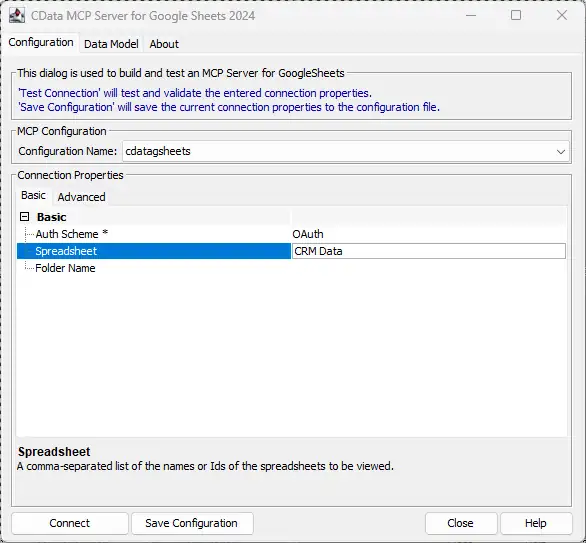
Upon successful connection, the following directory and files will be created:
C:\Users\<username>\AppData\Roaming\CData\api Provider\
 |-- cdataapi.mcp
 |-- (other supporting config files)
Step 2: Copy the MCP Server Configuration into WSL
Next, copy the entire configuration folder from Windows into your WSL environment.
mkdir -p ~/.config/CData/
cp -r /mnt/c/Users/<username>/AppData/Roaming/CData/"api Provider" ~/.config/CData/
Ensure the destination path matches exactly: ~/.config/CData/api Provider/.
Step 3: Install MCP Server on WSL
Install Java and place the MCP Server JAR in the desired location within WSL:
sudo apt update
sudo apt install openjdk-21-jre-headless
sudo mkdir -p /opt/cdata/mcp_api/lib
sudo cp /mnt/c/Program\ Files/CData/CData\ Code\ Assist\ MCP\ for\ Hacker News\ 20XX/lib/cdata.mcp.api.jar /opt/cdata/mcp_api/lib/
Step 4: Configure Cline
Now, configure the Cline extension to launch MCP Server inside WSL using the wsl command.
Create or update cline_mcp_settings.json with the following content:
{
  "mcpServers": {
    "cdataapi": {
      "autoApprove": ["*"],
      "disabled": false,
      "timeout": 60,
      "type": "stdio",
      "command": "wsl",
      "args": [
        "-d",
        "Ubuntu", // Replace with your installed WSL distro name
        "--",
        "/usr/bin/java",
        "-jar",
        "/opt/cdata/mcp_api/lib/cdata.mcp.api.jar",
        "cdataapi"
      ],
      "env": {
        "JAVA_TOOL_OPTIONS": "-Xmx2g"
      }
    }
  }
}
Note: Replace Ubuntu with your actual WSL distribution name (e.g., Ubuntu-22.04). Run wsl -l in PowerShell or CMD to confirm.
Step 5: Interact with Live Data in Cline
From within Visual Studio Code, you can now run MCP commands through the Cline extension.
cdataapi_get_tables
cdataapi_get_columns TopStories
If configured correctly, these commands will return a list of available Hacker News objects and metadata, allowing you to interact with your CRM schema in real time.
Try natural language prompts like:
- "Generate a React form to create a new Hacker News Lead."
- "Write a Python function to pull Opportunities closed this quarter."
Build with MCP Server. Deploy with CData Drivers.
Download MCP Server for free and give your AI tools schema-aware access to live Hacker News data during development. When you're ready to move to production, CData Hacker News Drivers deliver the same SQL-based access with enterprise-grade performance, security, and reliability.
Visit the CData Community to share insights, ask questions, and explore what's possible with MCP-powered AI workflows.