






Design BIRT Reports on Lakebase Data

The CData JDBC Driver for Lakebase integrates connectivity to Lakebase APIs into your data-driven Java applications. You can use the CData JDBC Driver for Lakebase with the BIRT (Business Intelligence Reporting Tools) platform to create BIRT reports that reflect changes to your data in real time.
- If you have not already done so, install the BIRT Framework plugin and the Database Development plugin for Eclipse.
- Click File -> New -> Report. The Report Design perspective is opened.
- In the Data Explorer, right-click Data Sources and click New Data Source.
- Select the Create from a Data Source Type in the Following List option and select JDBC Data Source.
- Click Manage Drivers and add the driver JAR, located in the lib subfolder of the installation folder.
- In the Database URL box, enter the JDBC URL containing the connection string.
To connect to Databricks Lakebase, start by setting the following properties:
- DatabricksInstance: The Databricks instance or server hostname, provided in the format instance-abcdef12-3456-7890-abcd-abcdef123456.database.cloud.databricks.com.
- Server: The host name or IP address of the server hosting the Lakebase database.
- Port (optional): The port of the server hosting the Lakebase database, set to 5432 by default.
- Database (optional): The database to connect to after authenticating to the Lakebase Server, set to the authenticating user's default database by default.
OAuth Client Authentication
To authenicate using OAuth client credentials, you need to configure an OAuth client in your service principal. In short, you need to do the following:
- Create and configure a new service principal
- Assign permissions to the service principal
- Create an OAuth secret for the service principal
For more information, refer to the Setting Up OAuthClient Authentication section in the Help documentation.
OAuth PKCE Authentication
To authenticate using the OAuth code type with PKCE (Proof Key for Code Exchange), set the following properties:
- AuthScheme: OAuthPKCE.
- User: The authenticating user's user ID.
For more information, refer to the Help documentation.
Built-in Connection String Designer
For assistance in constructing the JDBC URL, use the connection string designer built into the Lakebase JDBC Driver. Either double-click the JAR file or execute the jar file from the command-line.
java -jar cdata.jdbc.lakebase.jar
Fill in the connection properties and copy the connection string to the clipboard.
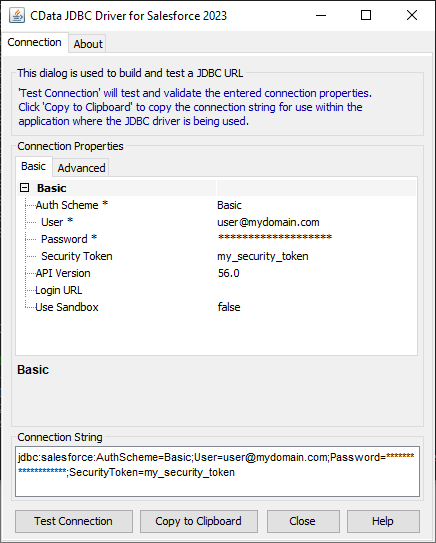
When you configure the JDBC URL, you may also want to set the Max Rows connection property. This will limit the number of rows returned, which is especially helpful for improving performance when designing reports and visualizations.
A typical JDBC URL is below:
jdbc:lakebase:DatabricksInstance=lakebase;Server=127.0.0.1;Port=5432;Database=my_database;InitiateOAuth=GETANDREFRESH;
- Right-click the Data Sets folder and select the JDBC data source for Lakebase.
- In the resulting dialog, build the SELECT query to be used to retrieve the data for the report. This article uses the following query:
SELECT ShipName, ShipCity FROM Orders WHERE ShipCountry = 'USA'
- In the Palette, drag a Chart onto the editor. The chart wizard is displayed.
- After selecting the chart type, drag columns onto the chart fields on the Select Data tab.
- Click Run -> View Report -> In Web Viewer to view the report.
Your BIRT reports can now pick up any updates to Lakebase data.
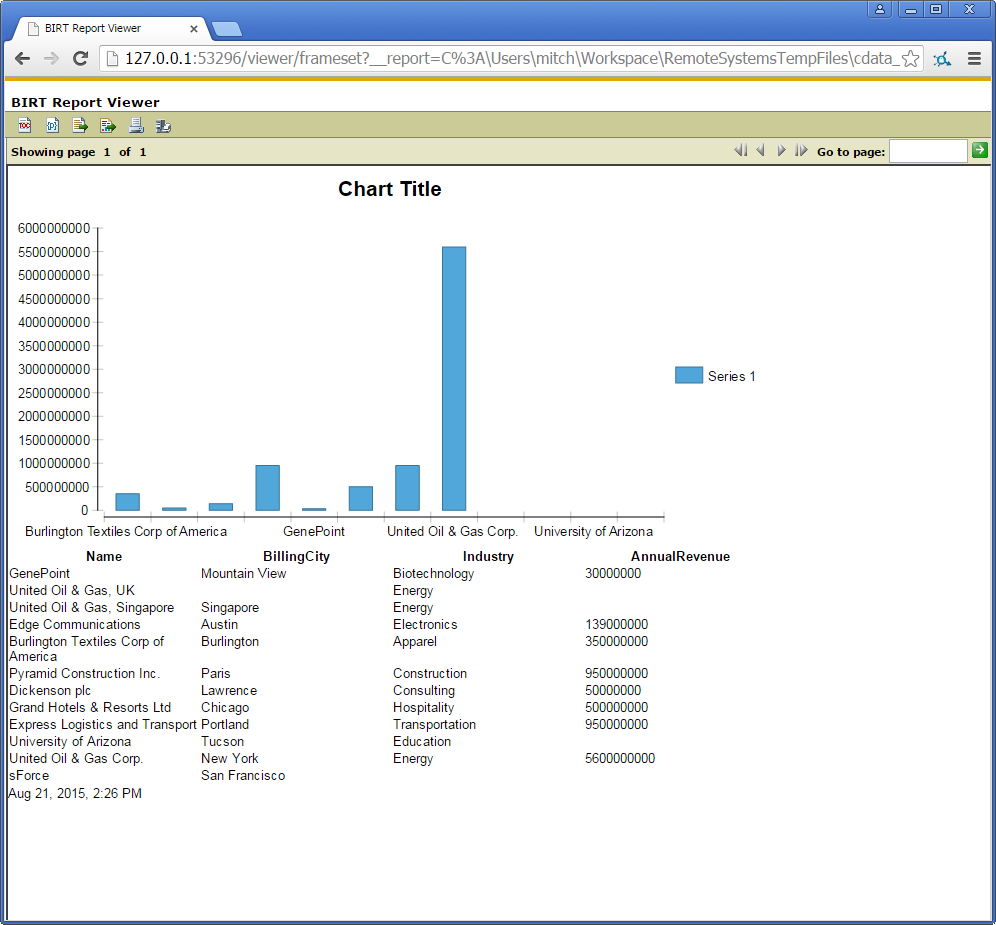
To publish the report to your application server, add the driver JAR to the BIRT Viewer's classpath. For more information, see the CData KB for guides to deploying the JDBC Driver on Java application servers.
Ready to get started?
Download a free trial of the Lakebase Driver to get started:
Download NowLearn more:
 Lakebase JDBC Driver
Rapidly create and deploy powerful Java applications that integrate with Lakebase.
