






Connect to Lakebase Data in CloverDX (formerly CloverETL)

The CData JDBC Driver for Lakebase enables you to use the data transformation components in CloverDX (formerly CloverETL) to work with Lakebase as sources and destinations. In this article, you will use the JDBC Driver for Lakebase to set up a simple transfer into a flat file. The CData JDBC Driver for Lakebase enables you to use the data transformation components in CloverDX (formerly CloverETL) to work with Lakebase as sources and destinations. In this article, you will use the JDBC Driver for Lakebase to set up a simple transfer into a flat file.
Connect to Lakebase as a JDBC Data Source
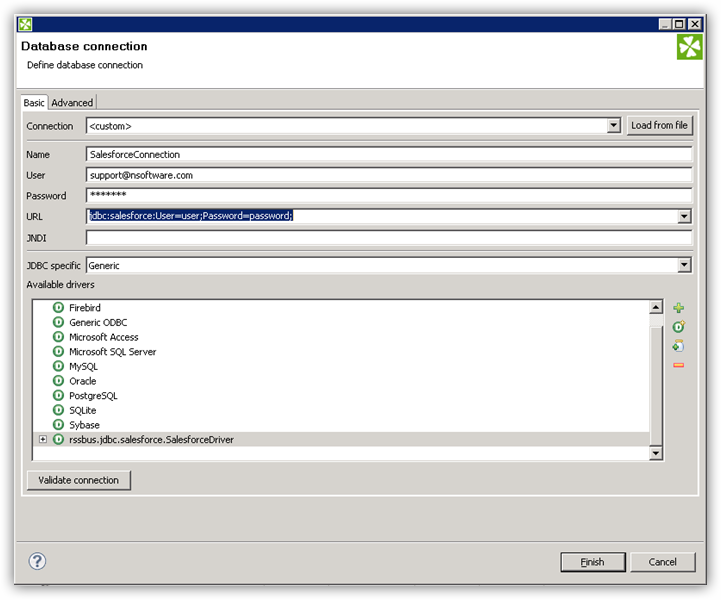
- Create the connection to Lakebase data. In a new CloverDX graph, right-click the Connections node in the Outline pane and click Connections -> Create Connection. The Database Connection wizard is displayed.
- Click the plus icon to load a driver from a JAR. Browse to the lib subfolder of the installation directory and select the cdata.jdbc.lakebase.jar file.
- Enter the JDBC URL.
To connect to Databricks Lakebase, start by setting the following properties:
- DatabricksInstance: The Databricks instance or server hostname, provided in the format instance-abcdef12-3456-7890-abcd-abcdef123456.database.cloud.databricks.com.
- Server: The host name or IP address of the server hosting the Lakebase database.
- Port (optional): The port of the server hosting the Lakebase database, set to 5432 by default.
- Database (optional): The database to connect to after authenticating to the Lakebase Server, set to the authenticating user's default database by default.
OAuth Client Authentication
To authenicate using OAuth client credentials, you need to configure an OAuth client in your service principal. In short, you need to do the following:
- Create and configure a new service principal
- Assign permissions to the service principal
- Create an OAuth secret for the service principal
For more information, refer to the Setting Up OAuthClient Authentication section in the Help documentation.
OAuth PKCE Authentication
To authenticate using the OAuth code type with PKCE (Proof Key for Code Exchange), set the following properties:
- AuthScheme: OAuthPKCE.
- User: The authenticating user's user ID.
For more information, refer to the Help documentation.
Built-in Connection String Designer
For assistance in constructing the JDBC URL, use the connection string designer built into the Lakebase JDBC Driver. Either double-click the JAR file or execute the jar file from the command-line.
java -jar cdata.jdbc.lakebase.jar
Fill in the connection properties and copy the connection string to the clipboard.
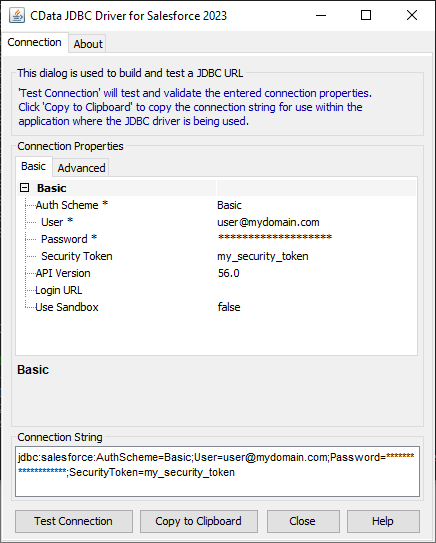
A typical JDBC URL is below:
jdbc:lakebase:DatabricksInstance=lakebase;Server=127.0.0.1;Port=5432;Database=my_database;InitiateOAuth=GETANDREFRESH;
Query Lakebase Data with the DBInputTable Component
- Drag a DBInputTable from the Readers selection of the Palette onto the job flow and double-click it to open the configuration editor.
- In the DB connection property, select the Lakebase JDBC data source from the drop-down menu.
- Enter the SQL query. For example:
SELECT ShipName, ShipCity FROM Orders WHERE ShipCountry = 'USA'
Write the Output of the Query to a UniversalDataWriter
- Drag a UniversalDataWriter from the Writers selection onto the jobflow.
- Double-click the UniversalDataWriter to open the configuration editor and add a file URL.
- Right-click the DBInputTable and then click Extract Metadata.
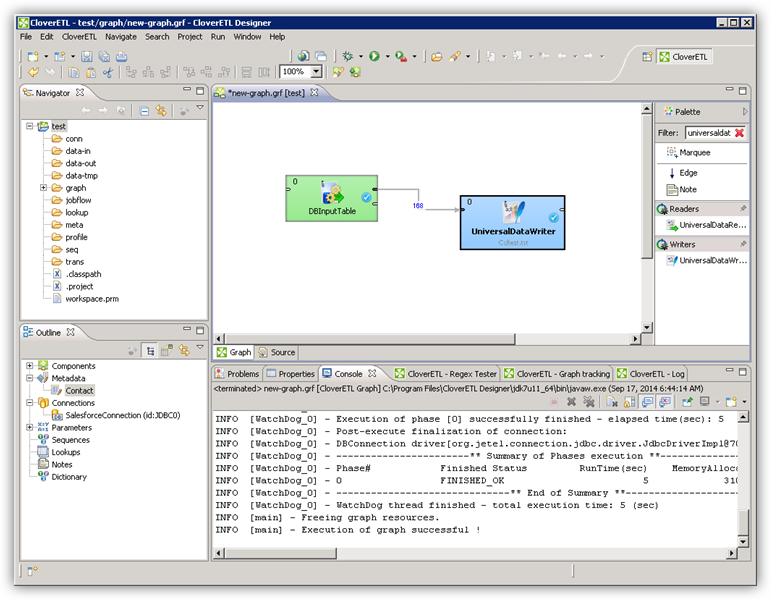
- Connect the output port of the DBInputTable to the UniversalDataWriter.
- In the resulting Select Metadata menu for the UniversalDataWriter, choose the Orders table. (You can also open this menu by right-clicking the input port for the UniversalDataWriter.)
- Click Run to write to the file.
Ready to get started?
Download a free trial of the Lakebase Driver to get started:
Download NowLearn more:
 Lakebase JDBC Driver
Rapidly create and deploy powerful Java applications that integrate with Lakebase.
