






Build a PostgreSQL Interface for Parallel Data using the CData JDBC Driver

There are a vast number of PostgreSQL clients available on the Internet. From standard Drivers to BI and Analytics tools, PostgreSQL is a popular interface for data access. Using our JDBC Drivers, you can now create PostgreSQL entry-points that you can connect to from any standard client.
To access Parallel data as a PostgreSQL database, use the CData JDBC Driver for Parallel and a JDBC foreign data wrapper (FDW). In this article, we compile the FDW, install it, and query Parallel data from PostgreSQL Server.
Connect to Parallel Data as a JDBC Data Source
To connect to Parallel as a JDBC data source, you will need the following:
- Driver JAR path: The JAR is located in the lib subfolder of the installation directory.
Driver class:
cdata.jdbc.api.APIDriver
- JDBC URL:
The URL must start with "jdbc:api:" and can include any of the connection properties in name-value pairs separated with semicolons.
The Parallel API uses API Key authentication via the x-api-key request header.
Using API Key Authentication
Your Parallel API key is required to create a connection. To obtain your API key:
- Log into your Parallel account at app.parallel.ai.
- Navigate to Settings or API Keys in your account dashboard.
- Generate or copy your API key.
After obtaining your API key, set the following connection properties:
- AuthScheme: Set this to APIKey.
- APIKey: Set this to your Parallel API key.
Example connection string:
Profile=C:\profiles\Parallel.apip;AuthScheme=APIKey;ProfileSettings='APIKey=your_api_key';
Built-in Connection String Designer
For assistance in constructing the JDBC URL, use the connection string designer built into the Parallel JDBC Driver. Either double-click the JAR file or execute the jar file from the command-line.
java -jar cdata.jdbc.api.jar
Fill in the connection properties and copy the connection string to the clipboard.
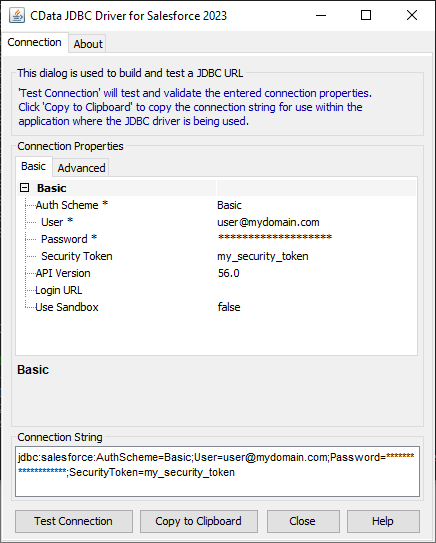
A typical JDBC URL is below:
jdbc:api:Profile=C:\profiles\Parallel.apip;AuthScheme=APIKey;ProfileSettings='APIKey=your_api_key';
Build the JDBC Foreign Data Wrapper
The Foreign Data Wrapper can be installed as an extension to PostgreSQL, without recompiling PostgreSQL. The jdbc2_fdw extension is used as an example (downloadable here).
- Add a symlink from the shared object for your version of the JRE to /usr/lib/libjvm.so. For example:
ln -s /usr/lib/jvm/java-6-openjdk/jre/lib/amd64/server/libjvm.so /usr/lib/libjvm.so
- Start the build:
make install USE_PGXS=1
Query Parallel Data as a PostgreSQL Database
After you have installed the extension, follow the steps below to start executing queries to Parallel data:
- Log into your database.
-
Load the extension for the database:
CREATE EXTENSION jdbc2_fdw;
-
Create a server object for Parallel:
CREATE SERVER API
FOREIGN DATA WRAPPER jdbc2_fdw OPTIONS (
drivername 'cdata.jdbc.api.APIDriver',
url 'jdbc:api:Profile=C:\profiles\Parallel.apip;AuthScheme=APIKey;ProfileSettings='APIKey=your_api_key';',
querytimeout '15',
jarfile '/home/MyUser/CData/CData\ JDBC\ Driver\ for\ Salesforce MyDriverEdition/lib/cdata.jdbc.api.jar');
-
Create a user mapping for the username and password of a user known to the MySQL daemon.
CREATE USER MAPPING for postgres SERVER API OPTIONS (
username 'admin',
password 'test');
-
Create a foreign table in your local database:
postgres=# CREATE FOREIGN TABLE monitorevents (
monitorevents_id text,
monitorevents_ text,
monitorevents_ numeric)
SERVER API OPTIONS (
table_name 'monitorevents');
postgres=# SELECT * FROM monitorevents;