






Connect RabbitMQ Data to Claris FileMaker via ESS using an ODBC Driver and the CData SQL Gateway

Claris FileMaker is a low-code platform that enables users to quickly create custom apps to manage and automate data workflows. Using the CData API Driver for ODBC and the CData SQL Gateway, FileMaker connects to RabbitMQ data through its ESS (External SQL Source) feature, allowing you to work with RabbitMQ records as if they were native FileMaker tables.
In this article, we configure and use the CData API Driver for ODBC and the CData SQL Gateway, along with the MySQL ODBC Driver, to connect to RabbitMQ data using the ESS functionality in FileMaker.
Create an ODBC Data Source for RabbitMQ
If you have not already, first specify connection properties in an ODBC DSN (data source name). This is the last step of the driver installation. You can use the Microsoft ODBC Data Source Administrator to create and configure ODBC DSNs.
About RabbitMQ Management HTTP API
RabbitMQ is an open-source message broker that supports multiple messaging protocols. The RabbitMQ Management HTTP API provides HTTP-based access to management and monitoring data for a RabbitMQ server. The API exposes information about virtual hosts, exchanges, queues, bindings, connections, channels, consumers, users, permissions, policies, and cluster-wide statistics.
The Management plugin must be enabled on the RabbitMQ server for the HTTP API to be available. By default, the management interface listens on port 15672.
Using Basic Authentication
RabbitMQ Management HTTP API uses HTTP Basic authentication. You must supply the username and password of a RabbitMQ management user.
To enable access to the management API:
- Ensure the RabbitMQ Management plugin is enabled on your server (rabbitmq-plugins enable rabbitmq_management).
- Use an existing management user or create one with the appropriate management tag (management, policymaker, monitoring, or administrator).
- Note the full base URL of your RabbitMQ Management HTTP API (e.g., http://localhost:15672).
After configuring your RabbitMQ server, set the following connection properties to connect:
- AuthScheme: Set this to Basic.
- URL: Set this to the base URL of your RabbitMQ Management HTTP API (e.g., http://localhost:15672).
- User: Set this to your RabbitMQ management username (e.g., guest).
- Password: Set this to your RabbitMQ management password.
Example connection string:
Profile=C:\profiles\RabbitMQ.apip;AuthScheme=Basic;URL=http://localhost:15672;User=guest;Password=guest;
Available Tables
The RabbitMQ profile provides access to the following tables:
- Overview - Cluster-wide statistics and information about the RabbitMQ node
- Nodes - Information about individual nodes in the RabbitMQ cluster
- NodeMemory - Detailed memory usage breakdown for a specific cluster node
- Connections - List of all open AMQP connections to the broker
- Channels - List of all open AMQP channels across all connections
- Consumers - List of all consumers registered across all queues
- Exchanges - List of exchanges declared across all virtual hosts
- Queues - List of queues declared across all virtual hosts
- Bindings - List of all bindings between exchanges and queues
- VirtualHosts - List of virtual hosts configured on the broker
- VhostPermissions - User permissions within a specific virtual host
- Users - List of all RabbitMQ users
- Permissions - Permission records for all users across all virtual hosts
- TopicPermissions - Topic-level permission records for all users
- Policies - List of policies applied to queues and exchanges in virtual hosts
- OperatorPolicies - List of operator policies applied to queues in virtual hosts
- Parameters - List of component parameters (e.g., federation, shovel) per virtual host
- GlobalParameters - List of global parameters that apply across all virtual hosts
- VhostLimits - Resource limits configured for specific virtual hosts
- UserLimits - Resource limits configured for specific users
- FeatureFlags - List of feature flags and their enabled/disabled state on the node
- DeprecatedFeatures - List of deprecated features and their usage state
- AuthAttempts - Authentication attempt statistics for the node
- ClusterName - The name of the RabbitMQ cluster
- WhoAmI - Information about the currently authenticated management user
- ExchangeBindingsSource - Bindings for which a specific exchange is the source
- ExchangeBindingsDestination - Bindings for which a specific exchange is the destination
- QueueBindings - Bindings for a specific queue within a virtual host
When you configure the DSN, you may also want to set the Max Rows connection property. This will limit the number of rows returned, which is especially helpful for improving performance when designing reports and visualizations.
Configuring the CData SQL Gateway
The CData SQL Gateway bridges non-SQL data sources (like SaaS applications, APIs, and NoSQL databases) with SQL-based tools (like FileMaker, MySQL clients, and BI tools).
In simple terms, it exposes any CData driver-supported source - for example, RabbitMQ - as a standard MySQL or SQL Server endpoint.
See the SQL Gateway Overview to set up RabbitMQ data connectivity as a virtual MySQL database. Set up a MySQL remoting service that listens for MySQL requests from clients, and configure the service through the SQL Gateway UI (as shown below). Save the user credentials (Username and Password) for future use.
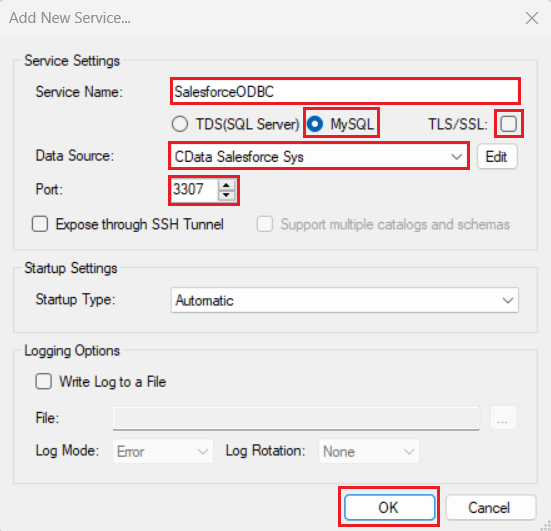
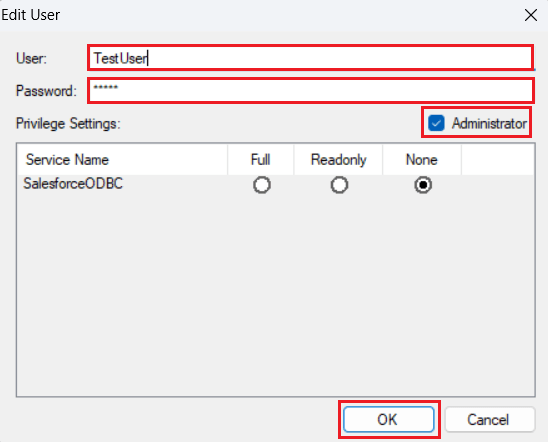
Once you establish the connection, you can use the CData SQL Gateway to access RabbitMQ data through the MySQL protocol.
Installing the MySQL ODBC Driver
Follow the steps below to install and configure the MySQL ODBC Driver:
- Download and install the latest 64-bit Windows version of the MySQL ODBC Unicode Driver from this link.
- Launch ODBC Data Sources (64-bit) from Windows search. Open the System DSN tab, click Add, select MySQL ODBC Unicode Driver from the Create New Data Source window, and click Finish.
- Enter the following connection details in the MySQL Connector/ODBC Data Source Configuration window:
- Data Source Name: Enter a DSN of your choice
- TCP/IP Server: localhost
- Port: Enter the port set in the SQL Gateway (for this procedure, use "3307")
- User: Enter the username set in the CData SQL Gateway
- Password: Enter the password set in the CData SQL Gateway
- Database: CData API Sys
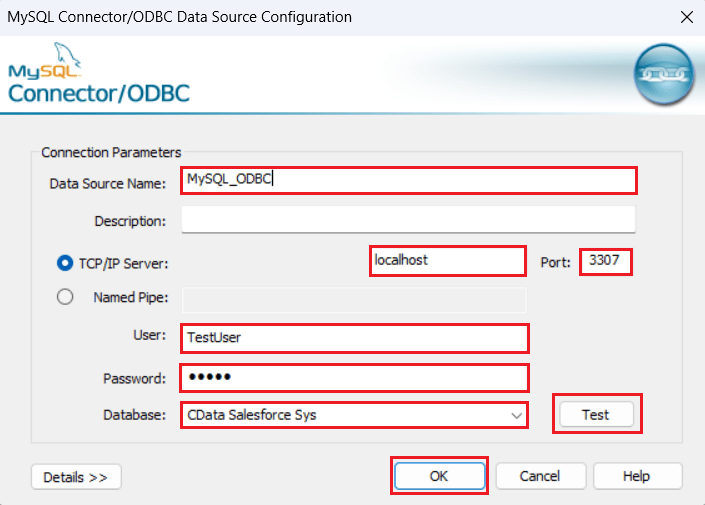
- Click Test to verify that the "Connection Successful" dialog box appears. Then click OK to save the configuration details.
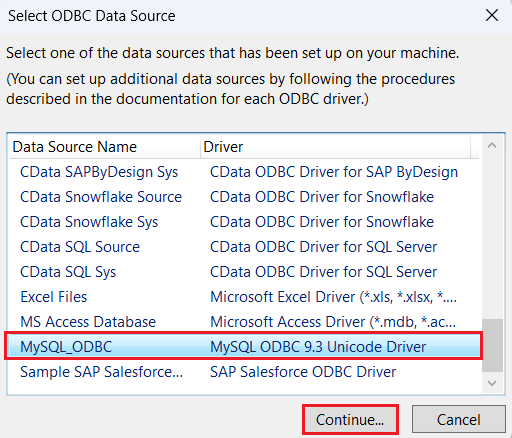
You have now successfully configured the MySQL ODBC Driver.
Use FileMaker ESS function to load RabbitMQ data
In this section, we explore how to use the ESS (External SQL Source) feature to retrieve data in the FileMaker application. Follow the given steps to complete the process:
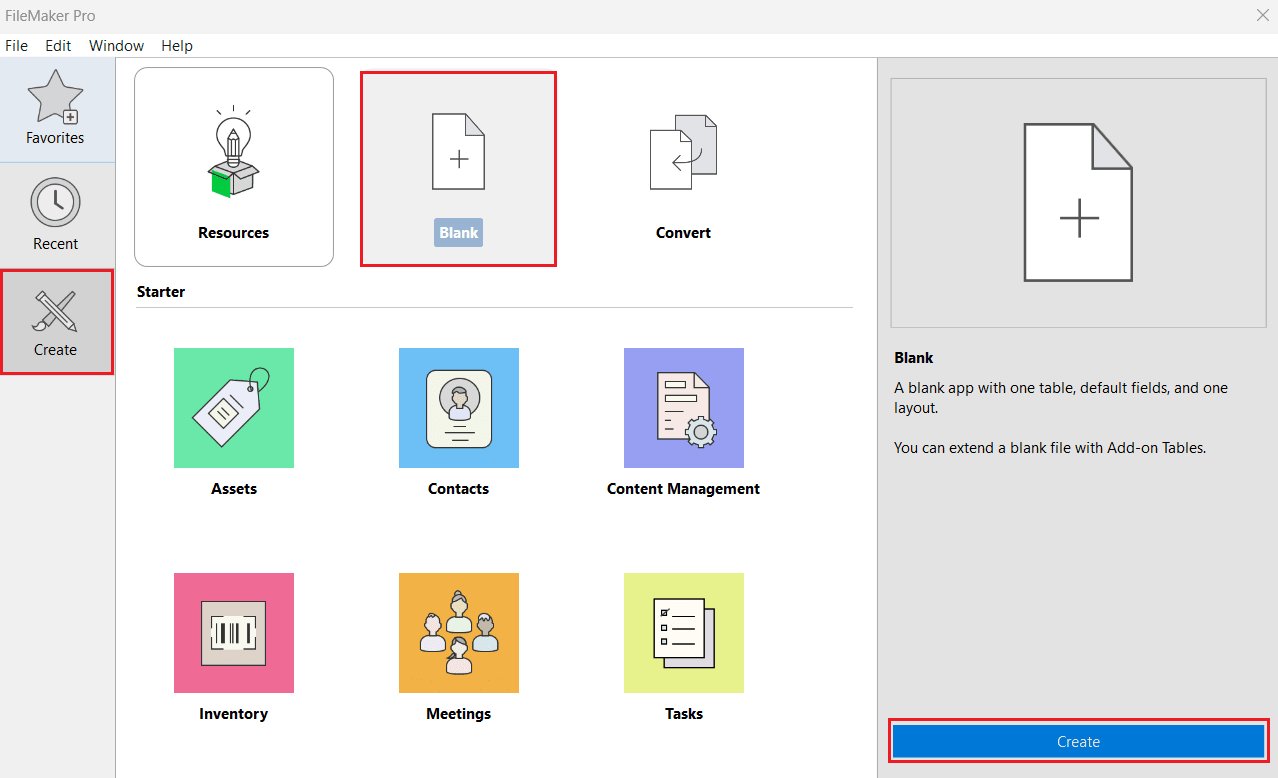
- Open FileMaker Pro. Navigate to Create from the left panel and select Blank > Create.
- Enter a desired filename and click Save.
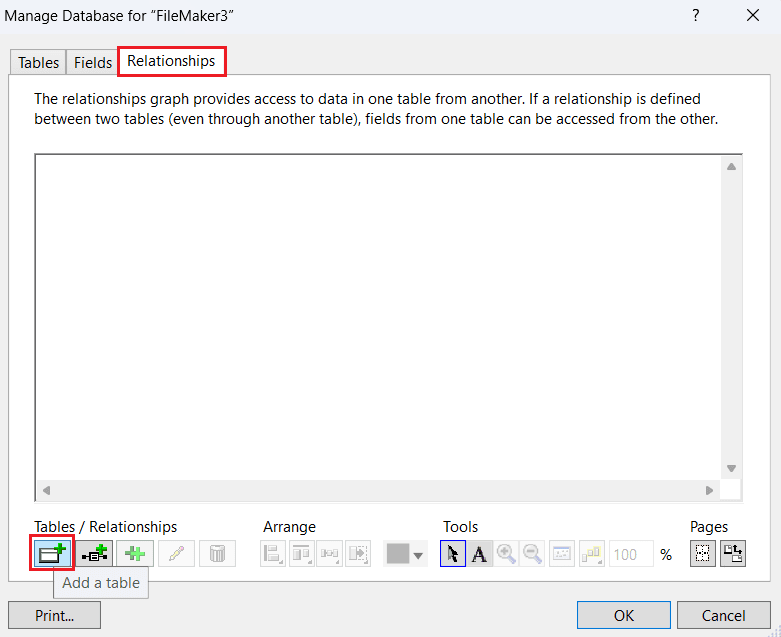
- In Manage Database, remove the Tables and Fields from the respective tabs. Select the Relationships tab and click Add Table.
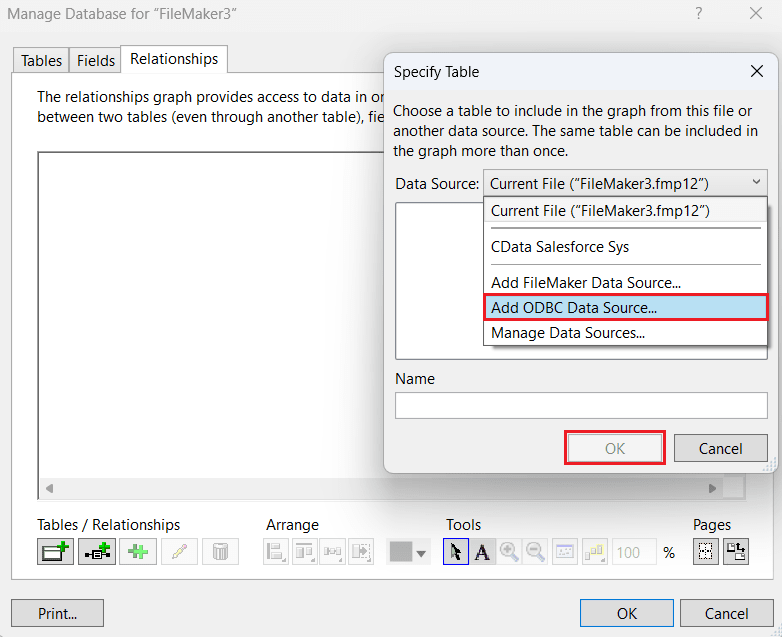
- In Specify Table, expand the Data Source dropdown menu and select Add ODBC Data Source. Click OK.
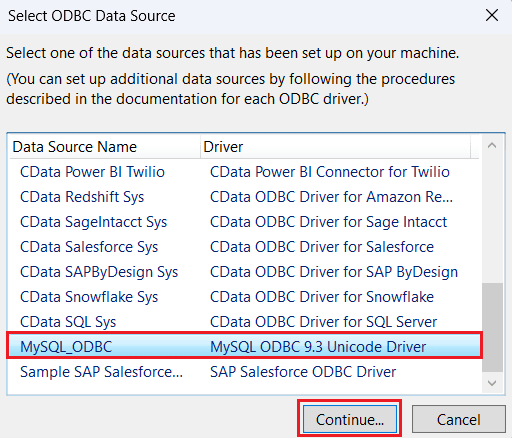
- In Select ODBC Data Source, select the previously configured MySQL ODBC driver and click Continue.
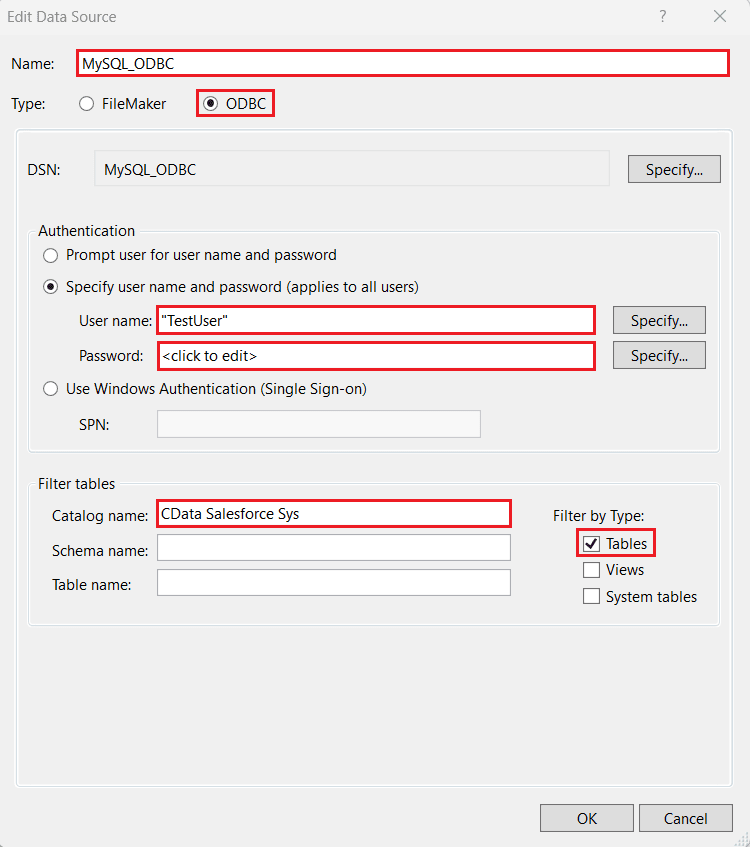
- In the Edit Data Source window, enter the following details:
- Name: This field will be auto-filled. Enter a new name of choice if necessary.
- Type: Select "ODBC".
- Under Authentication, select the Specify username and password radio button and enter the following details:
- User name: Enter the username set in the CData SQL Gateway.
- Password: Enter the password set in the CData SQL Gateway.
- Catalog Name: CData API Sys
- Click OK.
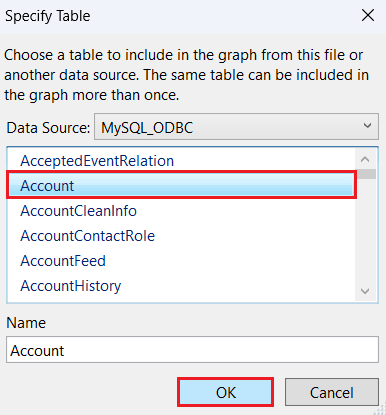
- View the tables from RabbitMQ populated under the Data Source section. Select the table of your choice and click OK.
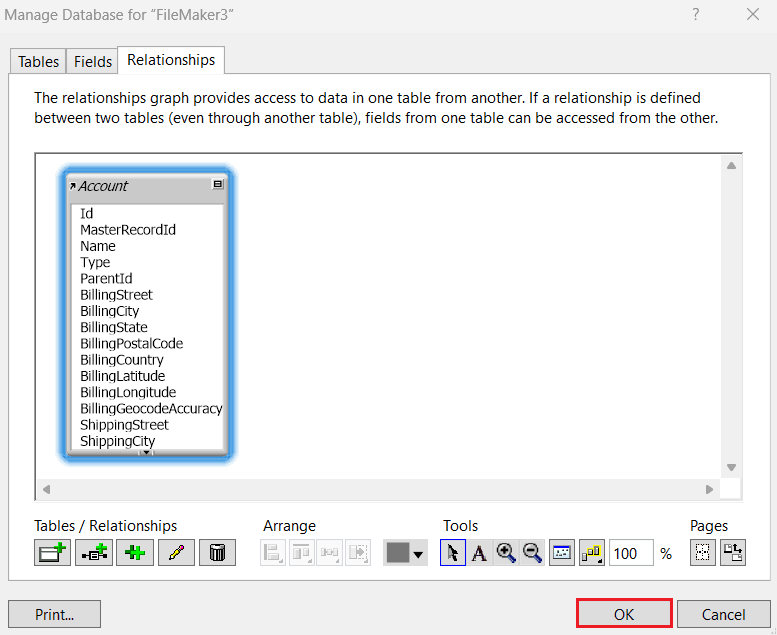
- The Relationships tab now displays the selected table and its metadata. Click OK.
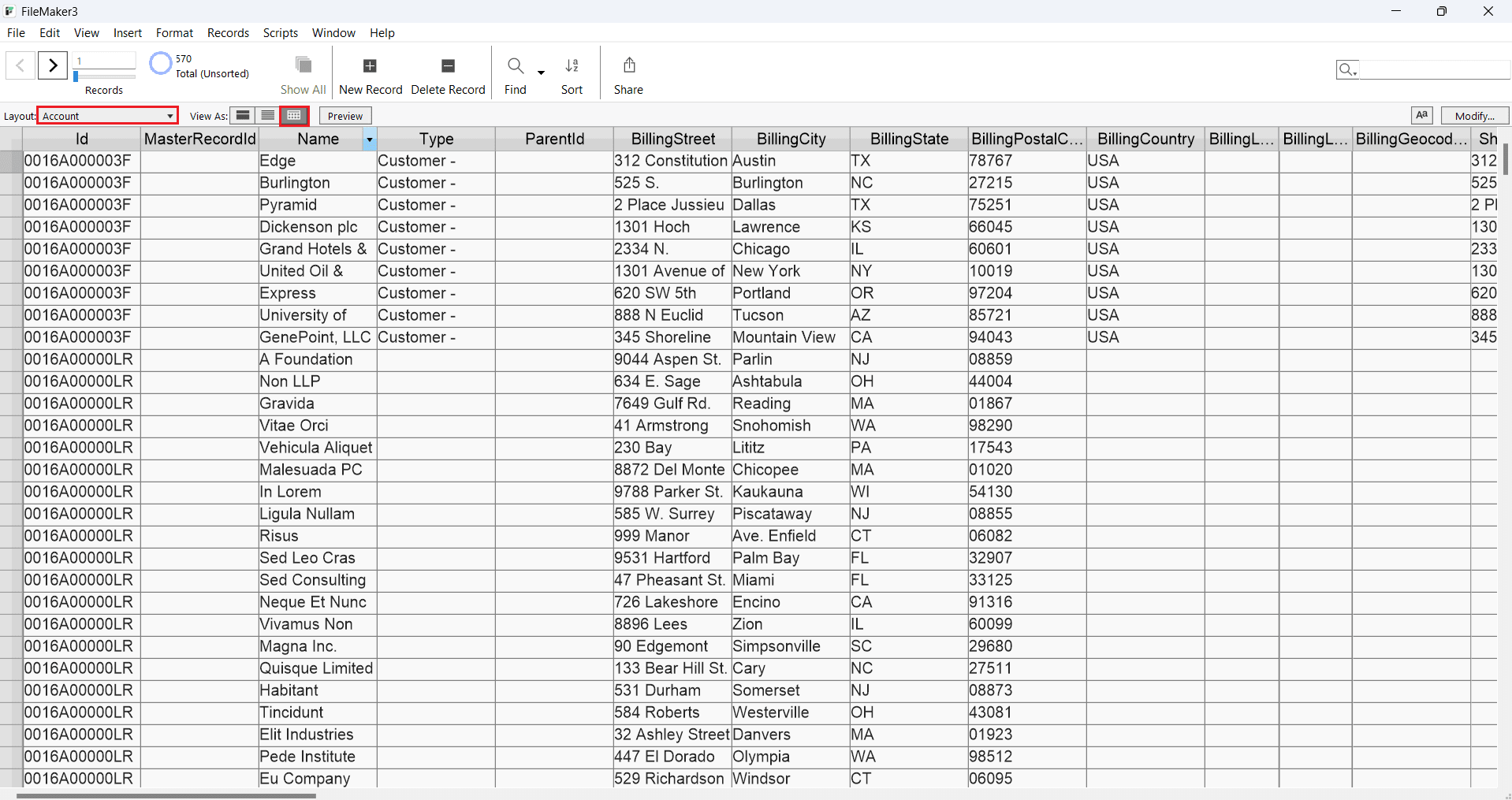
- Select the table from the Layout dropdown. The RabbitMQ table data appears on the screen. (As shown)
Get Started Today
Download a free 30-day trial of CData API Driver for ODBC to integrate RabbitMQ data into Claris FileMaker and use RabbitMQ data in your FileMaker applications.
Contact our Support Team if you have any questions.