






Getting Started with the CData ADO.NET Provider for Salesforce
This guide explains everything you need to work with the CData ADO.NET Provider for Salesforce. You will learn how to install the provider, set up a connection to your Salesforce data, and run simple commands in your .NET applications using familiar ADO.NET patterns.
Whether you are building desktop apps, web apps, or background services, the provider enables secure, high-performance connectivity to live Salesforce data without needing to manage API details manually.
About Salesforce Data Integration
Accessing and integrating live data from Salesforce has never been easier with CData. Customers rely on CData connectivity to:
- Access to custom entities and fields means Salesforce users get access to all of Salesforce.
- Create atomic and batch update operations.
- Read, write, update, and delete their Salesforce data.
- Leverage the latest Salesforce features and functionalities with support for SOAP API versions 30.0.
- See improved performance based on SOQL support to push complex queries down to Salesforce servers.
- Use SQL stored procedures to perform actions like creating, retrieving, aborting, and deleting jobs, uploading and downloading attachments and documents, and more.
Users frequently integrate Salesforce data with:
- other ERPs, marketing automation, HCMs, and more.
- preferred data tools like Power BI, Tableau, Looker, and more.
- databases and data warehouses.
For more information on how CData solutions work with Salesforce, check out our Salesforce integration page.
Getting Started
Installation and Licensing
System Requirements
- Windows: Windows 10/11 or Windows Server 2016+
- .NET Versions: .NET Framework 4.0+, .NET 6+, .NET Standard assemblies
- IDE: Visual Studio 2017 or later
Installing the ADO.NET Provider
Windows Installation
- Download the ADO.NET provider installer from your CData account or the evaluation page.
- Run the installer and follow the installation wizard to completion.
- The installer registers the provider and places all assemblies in the appropriate CData installation folders.
-
You will be prompted for your license key during installation:
XXXX-XXXX-XXXX-XXXX-XXXX- Note: If you are using a trial, select Trial Key instead.
Activating your License
Licensing behavior varies depending on whether you are developing with the .NET Framework or .NET Standard. Use the steps below to activate the provider in your environment.
.NET Framework (Windows)
On Windows using the .NET Framework, no extra action is required. The installer or NuGet package automatically installs your development license.
.NET Standard (Windows/Mac/Linux)
For .NET Standard platforms like .NET Core, Mono, or Xamarin, you must install a license manually before using the provider.
Using the Install-License Tool
The toolkit includes an install-license utility in the
lib/netstandard2.0folder for applying trial or full licenses.
To install a trial license:
dotnet ./install-license.dll
To activate a full product license:
dotnet ./install-license.dll
After running the tool, your development machine is licensed and ready to use the provider in .NET applications.
Runtime Licensing
When deploying applications, specify the Runtime Key (RTK) in your connection string to enable redistribution.
| Property | Description |
|---|---|
| RTK | Your Runtime Key used for deployed ADO.NET applications. |
Common Licensing Questions
Can I use my license on multiple machines?
Yes, depending on your subscription tier. If unsure, review your order confirmation or contact [email protected].
I lost my license key. How do I retrieve it?
Email [email protected] with your order number.
Can I transfer my license to another machine?
Submit a License Transfer Request:
https://www.cdata.com/lic/transfer/
Once approved, an activation is added to your product key and the previous installation becomes invalid.
For more licensing support, visit portal.cdata.com or email [email protected].
Connection Configuration
Once installed, the next step is to configure a connection to Salesforce. Connections are created using ADO.NET connection strings in your .NET application's code or configuration file.
Creating a connection manager
- Open Visual Studio.
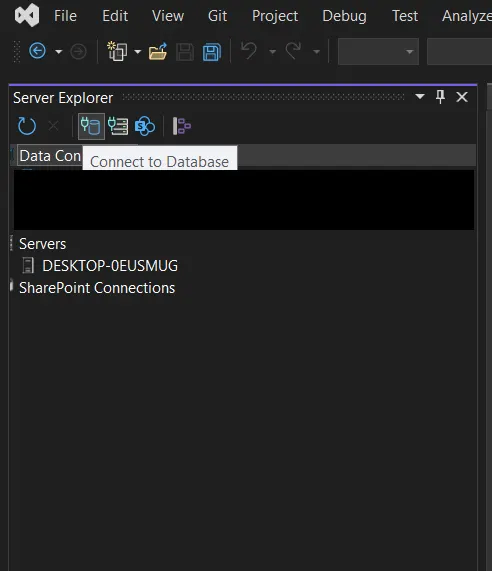
- Navigate to View, select Server Explorer.
-
Click Connect to Database from the left sidebar.
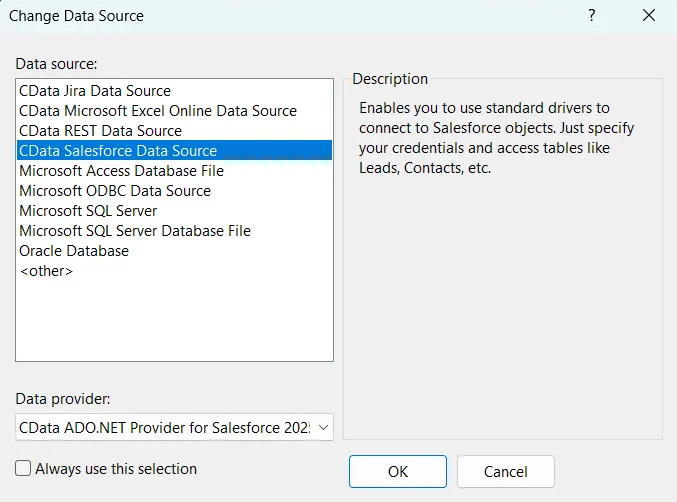
- In the Add Connection dialog, click Change.
-
Choose CData Salesforce data source, then click OK.
Configuring Connection Properties
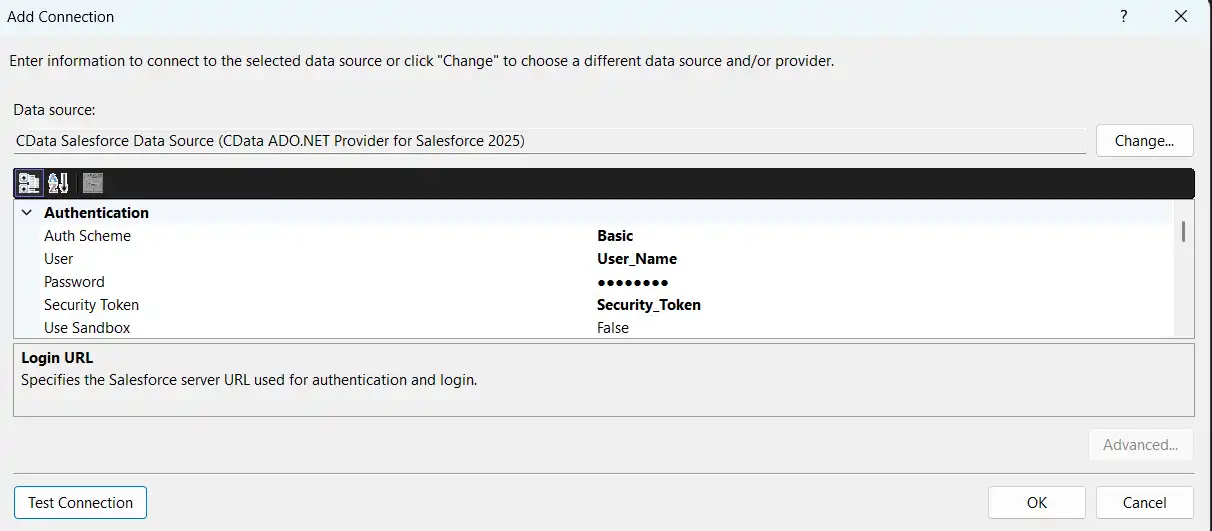
There are several authentication methods available for connecting to Salesforce: OAuth, Login (or basic), and SSO. The Login method requires you to have the username, password, and security token of the user.
OAuth Authentication (default)
The default authentication mechanism (and the one preferred by Salesforce) is OAuth. To use OAuth with CData's embedded OAuth application, leave the connection properties blank. If you have configured your own custom OAuth application with Salesforce (see the Help documentation for more information), set OAuthClientId, OAuthClientSecret, and CallbackURL to the properties for you application. Set InitiateOAuth to the desired OAuth flow ("GETANDREFRESH" will have the connector manage the entire OAuth flow).
Login (or Basic) Authentication
If you do not wish do not wish to use OAuth authentication, you can use Login (or basic) authentication. Set AuthScheme to Basic, and set the User, Password, and SecurityToken properties. You can configure your security token in Salesforce.
SSO (single sign-on) Authentication
SSO (single sign-on) can be used by setting the SSOProperties, SSOLoginUrl, and SSOExchangeURL connection properties, which allow you to authenticate to an identity provider. See the "Getting Started" chapter in the Help documentation for more information.
Test your connection
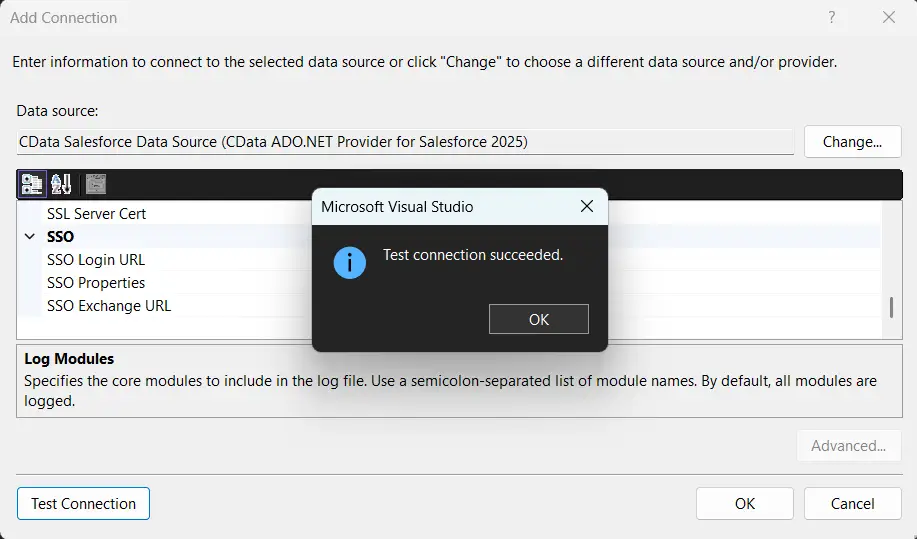
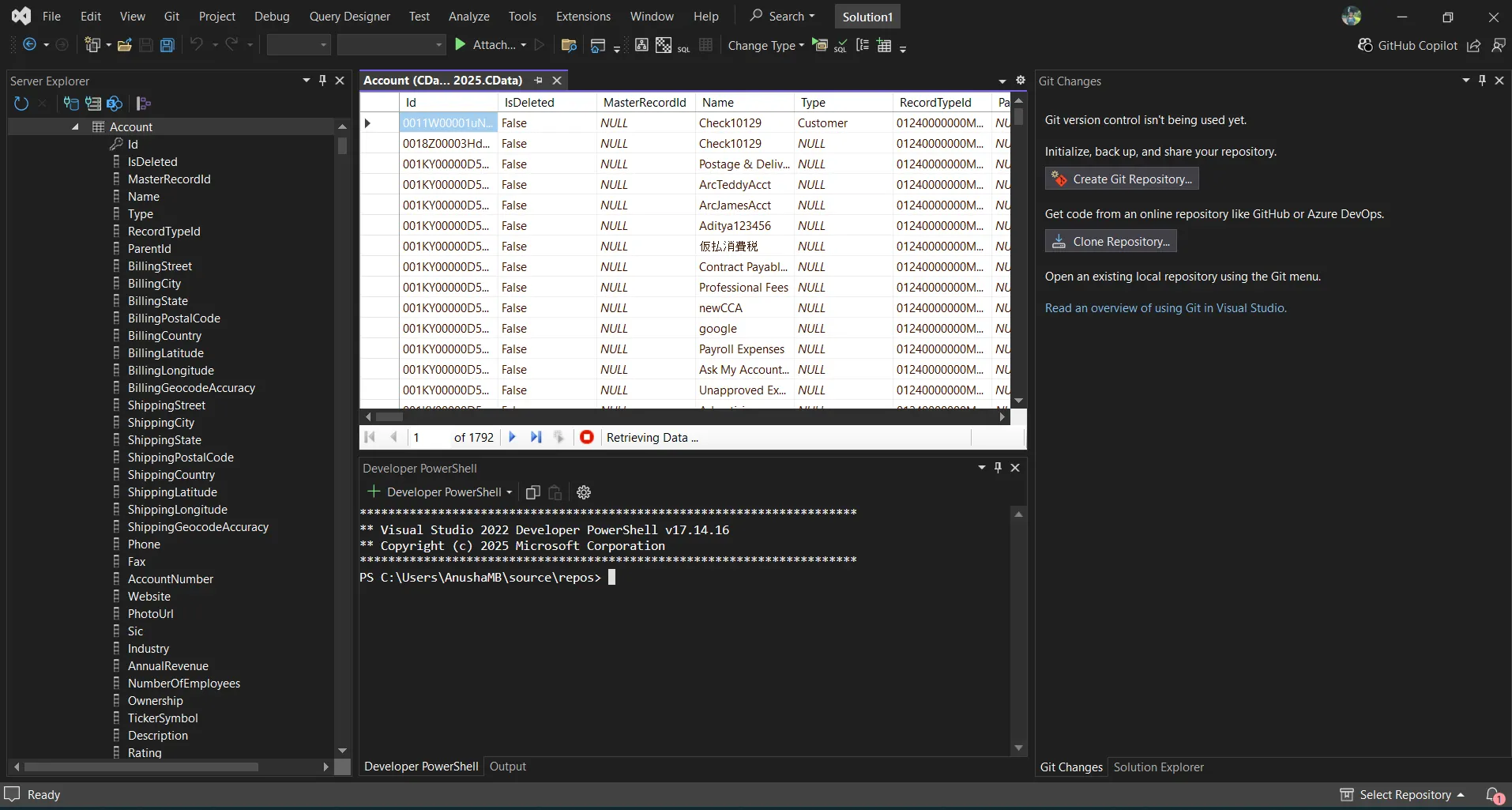
- Click Test Connection.
- Once the connection is successful, you can explore the data inside Visual Studio.
Common Connection Issues
Authentication Failed
Solution: Verify OAuth settings, client IDs, secrets, or token permissions for your Salesforce. Contact [email protected] for assistance.
Cannot Reach Server
Solution: Check firewall, proxy, and VPN configurations. Contact [email protected] for required port information.
Table Not Found
Solution: Confirm you selected the correct schema or database when querying Salesforce.
What's Next
Now that you have installed, licensed, and configured the ADO.NET provider, here are scenarios you can use to explore our ADO.NET tools:
| ADO.NET Providers | Article Title |
|---|---|
| LINQPad | Working with Salesforce in LINQPad |
| Microsoft SSAS | Build an OLAP Cube in SSAS from Salesforce |
| TIBCO Spotfire | Visualize Salesforce in TIBCO Spotfire through ADO.NET |
| .NET Charts | DataBind Charts to Salesforce |
| DevExpress | DataBind Salesforce to the DevExpress Data Grid |
| EF - Code First | Access Salesforce with Entity Framework 6 |
| EF - LINQ | LINQ to Salesforce |
| EF - MVC | Build MVC Applications with Connectivity to Salesforce |
| PowerBuilder | Connect to Salesforce from PowerBuilder |
Get Support
If you need assistance at any point:
- Technical Support: [email protected]
- Community Forum: CData Community Site
- Help Documentation: Installed locally and available online
FAQs
Installation and Licensing
-
Do I need administrator rights to install the ADO.NET Provider?
Yes, administrator rights are required to install components for use across Visual Studio. -
Do I need an RTK to deploy to Azure Data Factory?
Yes. Set the RTK property in your application's connection string before publishing.
Connecting
-
Can I use multiple Salesforce accounts?
Create separate Connection =strings for each account. -
Can I connect through a proxy?
Yes. Configure proxy settings in the Connection string. -
How do I test my connection?
Click Test Connection in the Connection Manager UI.
Performance & Troubleshooting
-
How can I improve query performance
Apply filters, limit row counts, and leverage server-side paging properties. -
How do I enable logging?
Add the following to your connection manager:- Logfile: /path/to/logfile.log
- Verbosity: 3
Be prepared to securely upload the log file upon request when reaching out to [email protected] for troubleshooting analysis.
For questions not covered in this FAQ, contact [email protected].
Ready to get started?
Download a free trial of the Salesforce Data Provider to get started:
Download NowLearn more:
 Salesforce ADO.NET Provider
Rapidly create and deploy powerful .NET applications that integrate with Salesforce account data including Leads, Contacts, Opportunities, Accounts, and more!
