






DataBind SAP Business Warehouse Data to the DevExpress Data Grid

The CData ADO.NET Provider for SAP Business Warehouse incorporates conventional ADO.NET data access components compatible with third-party controls. You can adhere to the standard ADO.NET data binding procedures to establish two-way access to real-time data through UI controls. This article will demonstrate the utilization of CData components for data binding with DevExpress UI Controls (Windows Forms and Web controls), specifically binding to a chart that visualizes live data.
To connect to SAP Business Warehouse, set the URL property to a valid SAP Business Warehouse server base URL. The driver must connect to SAP Business Warehouse instances hosted over HTTP with XMLA access.
The driver supports the following authentication schemes via the AuthScheme property:
- None: Anonymous authentication, if available on the server.
- Basic: Set User and Password and set AuthScheme to Basic.
- Kerberos: See the Using Kerberos section of the help documentation for the required Kerberos properties.
By default, the driver attempts to negotiate SSL/TLS by checking the server's certificate against the system's trusted certificate store. To specify another certificate, see the SSLServerCert property for the available formats.
Windows Forms Controls
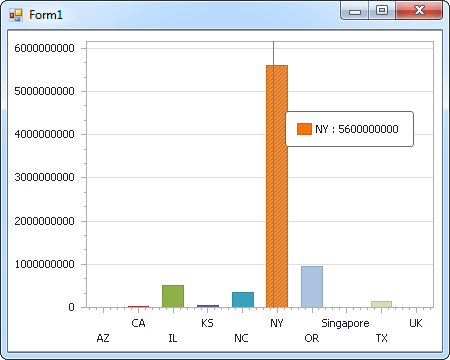
The code below shows how to populate a DevExpress chart with SAP Business Warehouse data. The SAPBusinessWarehouseDataAdapter binds to the Series property of the chart control. The Diagram property of the control defines the x- and y-axes as the column names.
using (SAPBusinessWarehouseConnection connection = new SAPBusinessWarehouseConnection(
"URL=https://mysapserver:8000;AuthScheme=Basic;User=username;Password=password;")) {
  SAPBusinessWarehouseDataAdapter dataAdapter = new SAPBusinessWarehouseDataAdapter(
  "SELECT CustomerCount, City FROM Sales WHERE Country = 'US'", connection);

  DataTable table = new DataTable();
  dataAdapter.Fill(table);
  DevExpress.XtraCharts.Series series = new DevExpress.XtraCharts.Series();
  chartControl1.Series.Add(series);
  series.DataSource = table;
  series.ValueDataMembers.AddRange(new string[] { "City" });
  series.ArgumentScaleType = DevExpress.XtraCharts.ScaleType.Qualitative;
  series.ArgumentDataMember = "CustomerCount";
  series.ValueScaleType = DevExpress.XtraCharts.ScaleType.Numerical;
  chartControl1.Legend.Visibility = DevExpress.Utils.DefaultBoolean.False;
  ((DevExpress.XtraCharts.SideBySideBarSeriesView)series.View).ColorEach = true;
}
Web Controls
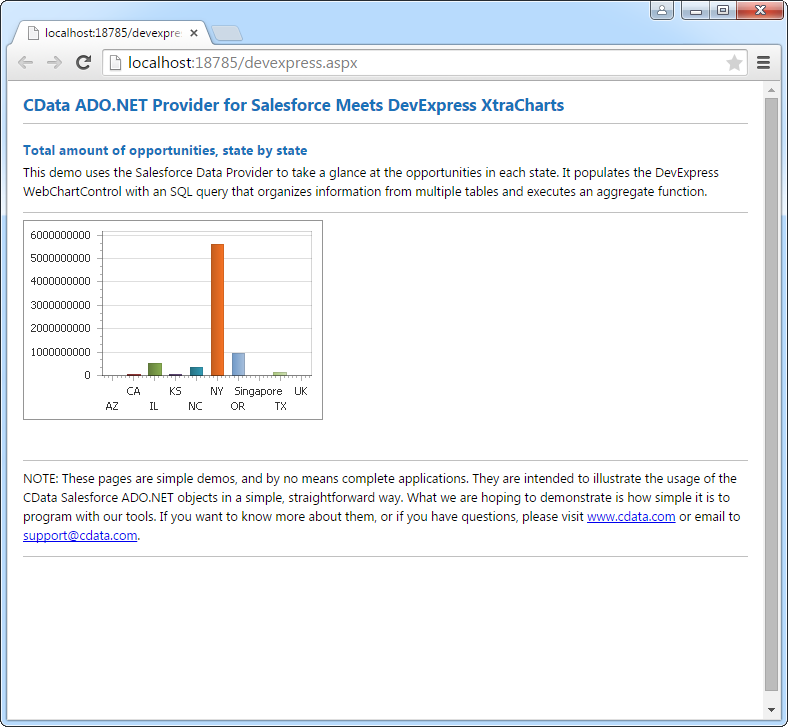
The code below shows how to populate a DevExpress Web control with SAP Business Warehouse data. The SAPBusinessWarehouseDataAdapter binds to the Series property of the chart; the Diagram property defines the x- and y-axes as the column names.
using DevExpress.XtraCharts;

using (SAPBusinessWarehouseConnection connection = new SAPBusinessWarehouseConnection(
"URL=https://mysapserver:8000;AuthScheme=Basic;User=username;Password=password;"))
{
  SAPBusinessWarehouseDataAdapter SAPBusinessWarehouseDataAdapter1 = new SAPBusinessWarehouseDataAdapter("SELECT CustomerCount, City FROM Sales WHERE Country = 'US'", connection);
  DataTable table = new DataTable();
  SAPBusinessWarehouseDataAdapter1.Fill(table);
  DevExpress.XtraCharts.Series series = new Series("Series1", ViewType.Bar);
  WebChartControl1.Series.Add(series);
  series.DataSource = table;
  series.ValueDataMembers.AddRange(new string[] { "City" });
  series.ArgumentScaleType = ScaleType.Qualitative;
  series.ArgumentDataMember = "CustomerCount";
  series.ValueScaleType = ScaleType.Numerical;
  ((DevExpress.XtraCharts.SideBySideBarSeriesView)series.View).ColorEach = true;
}
Ready to get started?
Download a free trial of the SAP Business Warehouse Data Provider to get started:
Download NowLearn more:
 SAP Business Warehouse ADO.NET Provider
Rapidly create and deploy powerful .NET applications that integrate with SAP Business Warehouse.