Analyze Scrapfly Data in R via JDBC

Access Scrapfly data with pure R script and standard SQL on any machine where R and Java can be installed. You can use the CData JDBC Driver for Scrapfly and the RJDBC package to work with remote Scrapfly data in R. By using the CData Driver, you are leveraging a driver written for industry-proven standards to access your data in the popular, open-source R language. This article shows how to use the driver to execute SQL queries to Scrapfly and visualize Scrapfly data by calling standard R functions.
Install R
You can match the driver's performance gains from multi-threading and managed code by running the multithreaded Microsoft R Open or by running open R linked with the BLAS/LAPACK libraries. This article uses Microsoft R Open 3.2.3, which is preconfigured to install packages from the Jan. 1, 2016 snapshot of the CRAN repository. This snapshot ensures reproducibility.
Load the RJDBC Package
To use the driver, download the RJDBC package. After installing the RJDBC package, the following line loads the package:
library(RJDBC)
Connect to Scrapfly as a JDBC Data Source
You will need the following information to connect to Scrapfly as a JDBC data source:
- Driver Class: Set this to cdata.jdbc.api.APIDriver
- Classpath: Set this to the location of the driver JAR. By default this is the lib subfolder of the installation folder.
The DBI functions, such as dbConnect and dbSendQuery, provide a unified interface for writing data access code in R. Use the following line to initialize a DBI driver that can make JDBC requests to the CData JDBC Driver for Scrapfly:
driver <- JDBC(driverClass = "cdata.jdbc.api.APIDriver", classPath = "MyInstallationDir\lib\cdata.jdbc.api.jar", identifier.quote = "'")
You can now use DBI functions to connect to Scrapfly and execute SQL queries. Initialize the JDBC connection with the dbConnect function.
The Scrapfly API uses API Key authentication. The API key is passed as the key query parameter on every request.
Using API Key Authentication
Your Scrapfly API key is required to create a connection. To obtain your API key:
- Log into your Scrapfly account at scrapfly.io.
- Navigate to Dashboard and select API Keys.
- Copy your API key (begins with scp-live- for production or scp-test- for the test environment).
After obtaining your API key, set the following connection properties:
- AuthScheme: Set this to APIKey.
- APIKey: Set this to your Scrapfly API key.
Example connection string:
Profile=C:\profiles\Scrapfly.apip;AuthScheme=APIKey;ProfileSettings='APIKey=your_api_key';
Built-in Connection String Designer
For assistance in constructing the JDBC URL, use the connection string designer built into the Scrapfly JDBC Driver. Either double-click the JAR file or execute the jar file from the command-line.
java -jar cdata.jdbc.api.jar
Fill in the connection properties and copy the connection string to the clipboard.
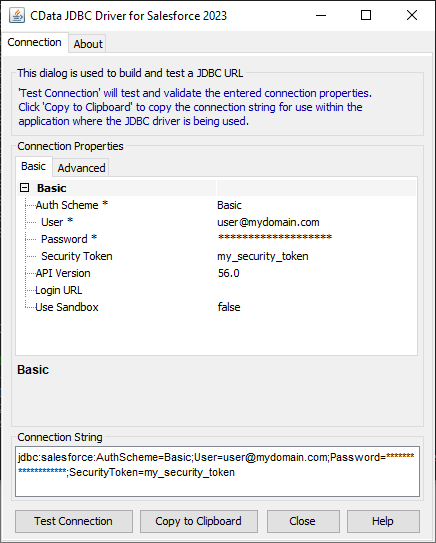
Below is a sample dbConnect call, including a typical JDBC connection string:
conn <- dbConnect(driver,"jdbc:api:Profile=C:\profiles\Scrapfly.apip;AuthScheme=APIKey;ProfileSettings='APIKey=your_api_key';")
Schema Discovery
The driver models Scrapfly APIs as relational tables, views, and stored procedures. Use the following line to retrieve the list of tables:
dbListTables(conn)
Execute SQL Queries
You can use the dbGetQuery function to execute any SQL query supported by the Scrapfly API:
account <- dbGetQuery(conn,"SELECT , FROM Account WHERE = ''")
You can view the results in a data viewer window with the following command:
View(account)
Plot Scrapfly Data
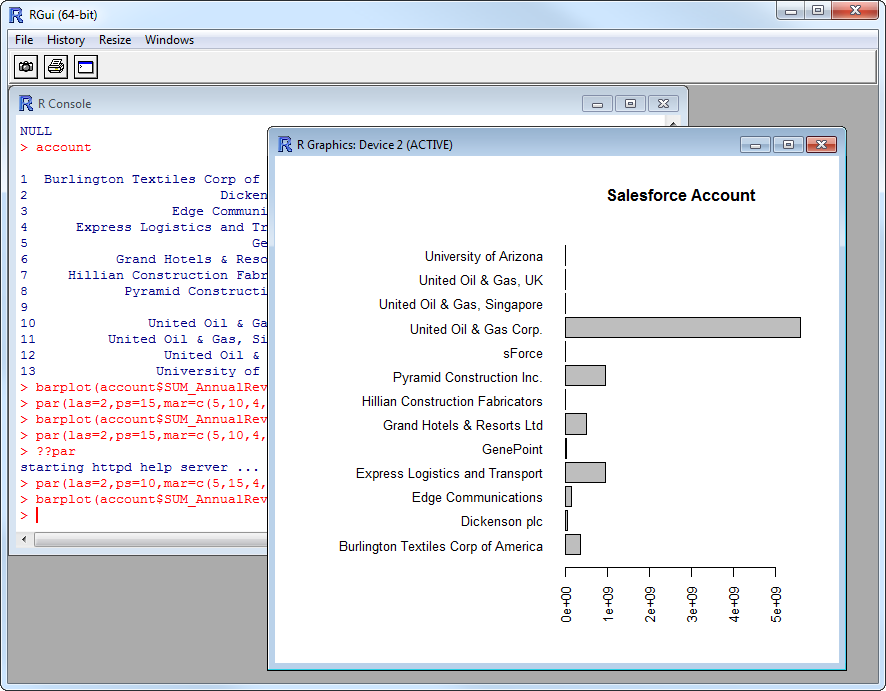
You can now analyze Scrapfly data with any of the data visualization packages available in the CRAN repository. You can create simple bar plots with the built-in bar plot function:
par(las=2,ps=10,mar=c(5,15,4,2))
barplot(account$, main="Scrapfly Account", names.arg = account$, horiz=TRUE)