






LINQ to Strava Data

This article illustrates using LINQ to access tables within the Strava via the CData ADO.NET Data Provider for Strava. To achieve this, we will use LINQ to Entity Framework, which facilitates the generation of connections and can be seamlessly employed with any CData ADO.NET Data Providers to access data through LINQ.
See the help documentation for a guide to setting up an EF 6 project to use the provider.
- In a new project in Visual Studio, right-click on the project and choose to add a new item. Add an ADO.NET Entity Data Model.
- Choose EF Designer from Database and click Next.
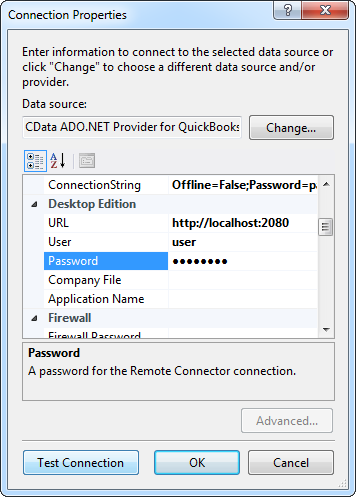
- Add a new Data Connection, and change your data source type to "CData Strava Data Source".
Enter your data source connection information.
To authenticate to Strava, and connect to your own data or to allow other users to connect to their data, you can use the OAuth standard.
Using OAuth Authentication
You must create a custom OAuth application to connect to Strava. To create a custom OAuth application:
- Log into the Strava API Settings page
- Create a new application or select an existing application
- Set the "Authorization Callback Domain" to your callback URL domain (e.g. localhost)
- Note down the Client ID and Client Secret
After setting the following connection properties, you are ready to connect:
- AuthScheme: Set this to OAuth.
- InitiateOAuth: Set this to GETANDREFRESH. You can use InitiateOAuth to manage the process to obtain the OAuthAccessToken.
- OAuthClientId: Set this to the Client ID from your Strava API application.
- OAuthClientSecret: Set this to the Client Secret from your Strava API application.
- CallbackURL: Set this to the redirect URI matching your application's callback domain.
Example connection string:
Profile=C:\profiles\Strava.apip;AuthScheme=OAuth;InitiateOAuth=GETANDREFRESH;OAuthClientId=your_client_id;OAuthClientSecret=your_client_secret;CallbackURL=http://localhost:33333;
Below is a typical connection string:
Profile=C:\profiles\Strava.apip;AuthScheme=OAuth;InitiateOAuth=GETANDREFRESH;OAuthClientId=your_client_id;OAuthClientSecret=your_client_secret;CallbackURL=http://localhost:33333;
- If saving your entity connection to App.Config, set an entity name. In this example we are setting APIEntities as our entity connection in App.Config.
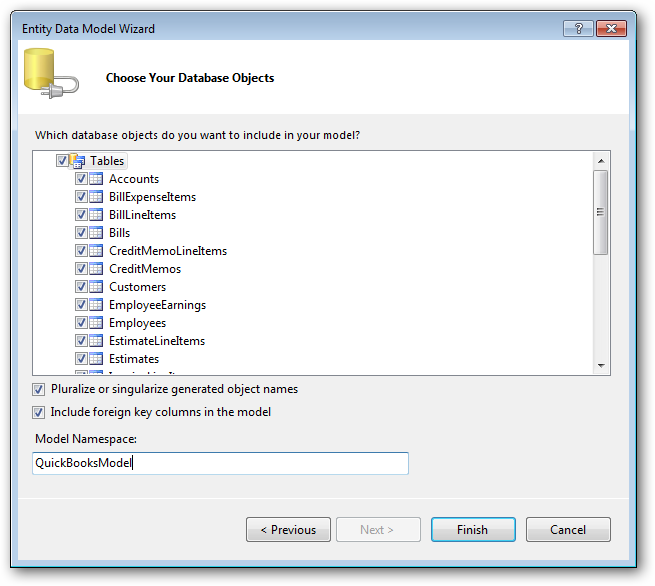
- Enter a model name and select any tables or views you would like to include in the model.
Using the entity you created, you can now perform select commands. For example:
APIEntities context = new APIEntities();

var athleteQuery = from athlete in context.Athlete
  select athlete;

foreach (var result in athleteQuery) {
  Console.WriteLine("{0} {1} ", result.Id, result.);
}
See "LINQ and Entity Framework" chapter in the help documentation for example queries of the supported LINQ.