




How to connect to Talkdesk Data from IntelliJ

The CData JDBC Driver for Talkdesk enables you to access Talkdesk as a JDBC data source, providing integration with rapid development tools in IDEs. This article shows how to use the data source configuration wizard to connect to Talkdesk data in IntelliJ.
Create a JBDC Data Source for Talkdesk
Follow the steps below to add the driver JAR and define connection properties required to connect to Talkdesk data.
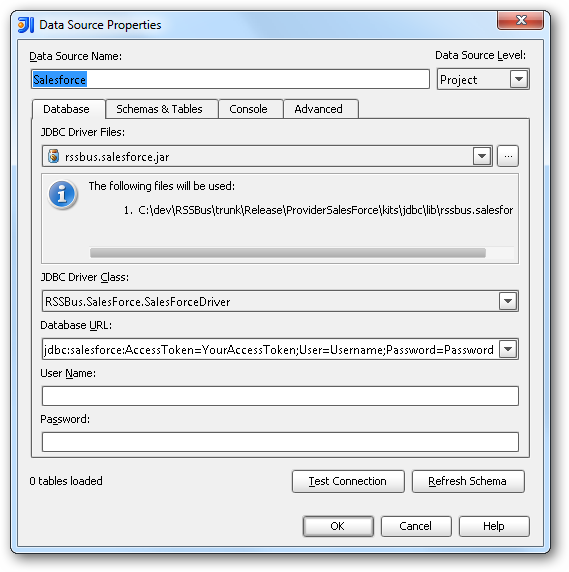
- In the Data Sources window, right-click and then click Add Data Source -> DB Data Source.
In the Data Source Properties dialog that appears, the following properties are required:
- JDBC Driver Files: Click the button next to this menu to add the JDBC Driver file cdata.jdbc.talkdesk.jar, located in the installation directory.
- JDBC Driver Class: In this menu, select cdata.jdbc.talkdesk.TalkdeskDriver from the list.
Database URL: Enter the connection URL in the JDBC URL property. The URL must start with jdbc:talkdesk: and includes connection properties separated with semicolons.
Talkdesk uses the OAuth 2.0 Client Credentials grant. There is no browser-based authorization step and no callback URL.
Set the following connection properties:
- AccountName: The name of your Talkdesk account.
- Region: The region where your Talkdesk instance is deployed. Supported values are US (default), EU, CA, AU, UK, and FedRamp.
- OAuthClientId: The Client Id assigned when you registered your custom OAuth application.
- OAuthClientSecret: The Client Secret assigned to your custom OAuth application.
Creating a Custom OAuth Application
- Log in to your Talkdesk account and select OAuth Clients from the navigation menu.
- Click Create OAuth Client and give the client a descriptive name.
- Set Grant Type to Client Credentials.
- Click Add scopes and select the scopes for the data you want to access.
- Click Create and copy the Client Id and Client Secret.
When you connect, the driver automatically requests an access token from Talkdesk, caches it, and refreshes it when it expires. Make sure the scopes selected for the application match the views you plan to query, or the token request can fail.
Built-in Connection String Designer
For assistance in constructing the JDBC URL, use the connection string designer built into the Talkdesk JDBC Driver. Either double-click the JAR file or execute the jar file from the command-line.
java -jar cdata.jdbc.talkdesk.jarFill in the connection properties and copy the connection string to the clipboard.

A typical JDBC URL is the following:
jdbc:talkdesk:AccountName=myAccount;Region=US;OAuthClientId=myClientId;OAuthClientSecret=myClientSecret;
Edit and Save Talkdesk Data
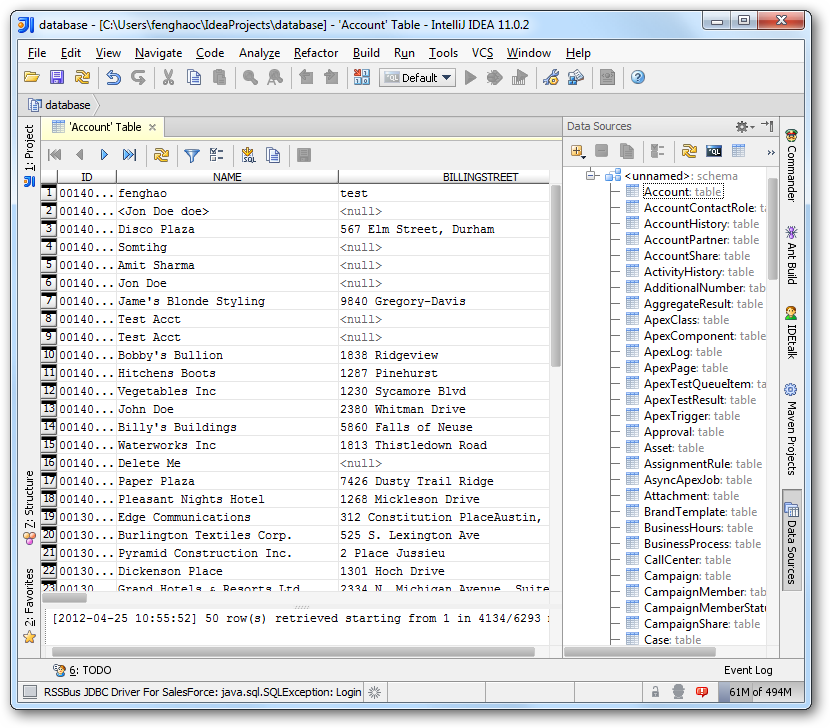
To discover schema information, right-click the data source you just created and click Refresh Tables. To query a table, right-click it and then click Open Tables Editor.
Ready to get started?
Download a free trial of the Talkdesk Driver to get started:
Download NowLearn more:
 Talkdesk JDBC Driver
Rapidly create and deploy powerful Java applications that integrate with Talkdesk data including Accounts, Attributes, BillingAccounts, Callbacks, Campaigns, Cases, Contacts, GuardianUsers, Invoices, Products, Subscriptions, Teams, Users, Wallets, and more!