




Using the CData ODBC Driver for Yotpo in PyCharm

The CData ODBC Drivers can be used in any environment that supports loading an ODBC Driver. In this tutorial we will explore using the CData ODBC Driver for Yotpo from within PyCharm. Included are steps for adding the CData ODBC Driver as a data source, as well as basic PyCharm code to query the data source and display results.
To begin, this tutorial will assume that you have already installed the CData ODBC Driver for Yotpo as well as PyCharm.
Add Pyodbc to the Project
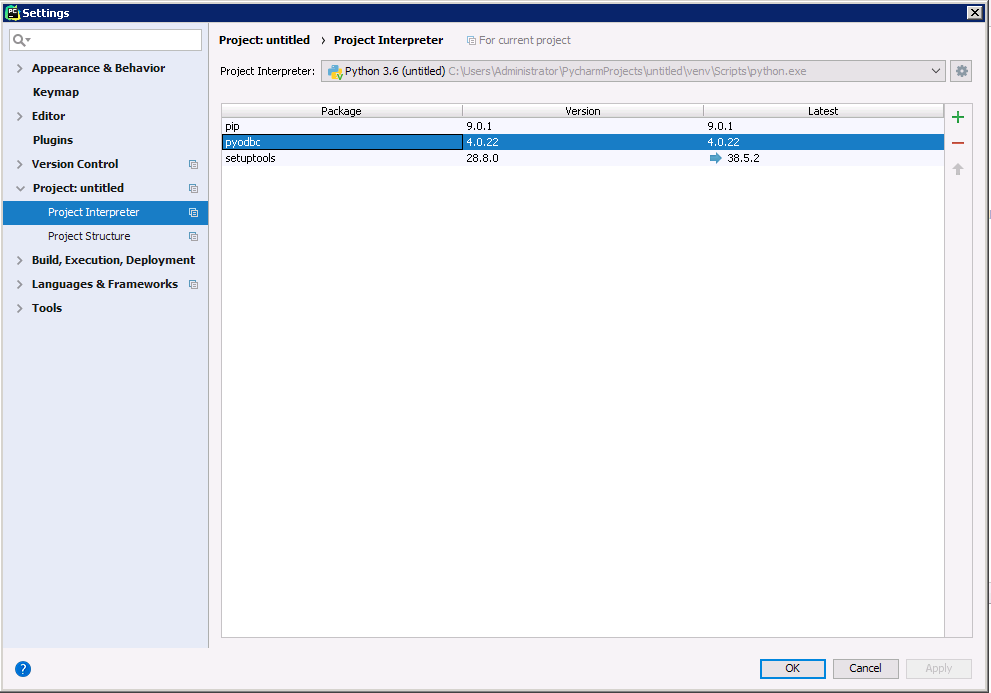
Follow the steps below to add the pyodbc module to your project.
- Click File -> Settings to open the project settings window.
- Click Project Interpreter from the Project: YourProjectName menu.
- To add pyodbc, click the + button and enter pyodbc.
- Click Install Package to install pyodbc.
Connect to Yotpo
You can now connect with an ODBC connection string or a DSN. See the Getting Started section in the CData driver documentation for a guide to creating a DSN on your OS.
Start by setting the Profile connection property to the location of the Yotpo Profile on disk (e.g. C:\profiles\Yotpo.apip). Next, set the ProfileSettings connection property to the connection string for Yotpo (see below).
Yotpo API Profile Settings
To authenticate to Yotpo, you can use the OAuth 2.0 client credentials flow with your Yotpo AppKey and AppSecret.
To use the Yotpo API, you need a Yotpo store account with an AppKey and AppSecret. You can find these credentials in the Yotpo dashboard under Account Settings > Store.
After setting the following connection properties, you are ready to connect:
- AuthScheme: Set this to OAuthClient.
- InitiateOAuth: Set this to GETANDREFRESH. You can use InitiateOAuth to manage the process to obtain the OAuthAccessToken.
- OAuthClientId: Set this to your Yotpo AppKey.
- OAuthClientSecret: Set this to your Yotpo AppSecret.
Below is the syntax for a DSN:
[CData API Source]
Driver = CData ODBC Driver for Yotpo
Description = My Description
Profile = C:\profiles\Yotpo.apip
AuthScheme = OAuthClient
InitiateOAuth = GETANDREFRESH
OAuthClientId = your_app_key
OAuthClientSecret = your_app_secret
Execute SQL to Yotpo
Instantiate a Cursor and use the execute method of the Cursor class to execute any SQL statement.
import pyodbc

cnxn = pyodbc.connect('DRIVER={CData ODBC Driver for API};Profile = C:\profiles\Yotpo.apip;AuthScheme = OAuthClient;InitiateOAuth = GETANDREFRESH;OAuthClientId = your_app_key;OAuthClientSecret = your_app_secret;')
cursor = cnxn.cursor()
cursor.execute("SELECT TotalReview, AverageScore FROM ProductBottomLine WHERE ExternalProductId = 'my-product-sku'")
rows = cursor.fetchall()
for row in rows:
  print(row.TotalReview, row.AverageScore)
After connecting to Yotpo in PyCharm using the CData ODBC Driver, you will be able to build Python apps with access to Yotpo data as if it were a standard database. If you have any questions, comments, or feedback regarding this tutorial, please contact us at [email protected].