






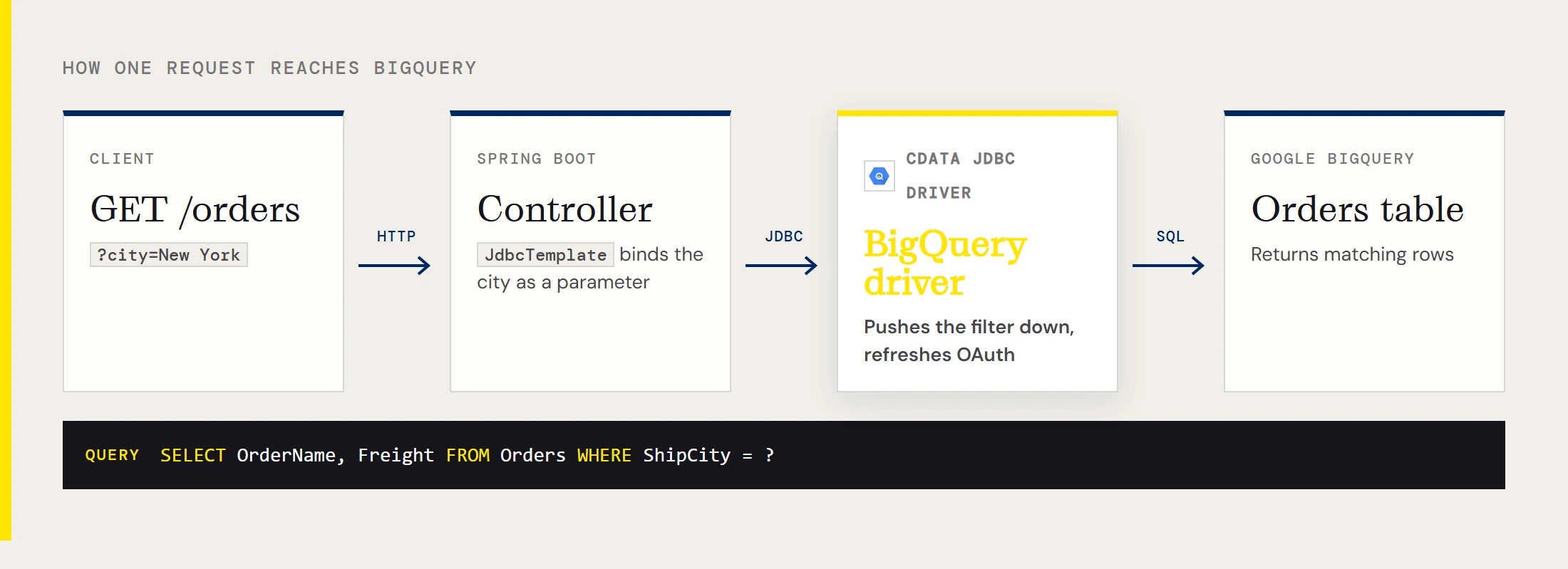
Plenty of internal tools need a small API in front of BigQuery: one URL, a JSON list of rows, no client library to learn. With the CData JDBC Driver for BigQuery on the classpath, Spring Boot treats BigQuery like any other JDBC database, so the endpoint is a controller and a JdbcTemplate. This guide builds one that answers a request for orders in a given city.
What the finished service returns
The service exposes a single GET route and runs one parameterized query against a BigQuery table. The table lists the pieces the rest of the guide wires together.
| Piece | Value |
|---|---|
| Route | GET /orders?city=New York |
| BigQuery table | Orders |
| Columns returned | OrderName, Freight |
| Filter column | ShipCity |
| Authentication | OAuth, refreshed by the driver |
Install the driver jar into Maven
The driver jar is not on Maven Central, so install it into your local repository first. It sits in the lib folder of the driver's install directory as cdata.jdbc.googlebigquery.jar. Copying it to a path without spaces makes the command easier to run, and the -Dversion value should match the driver release you installed.
mvn install:install-file -Dfile=C:\cdata\cdata.jdbc.googlebigquery.jar -DgroupId=org.cdata.connectors -DartifactId=cdata-googlebigquery-connector -Dversion=23 -Dpackaging=jarThen add the driver next to the web and JDBC starters in pom.xml.
<dependency>
    <groupId>org.springframework.boot</groupId>
    <artifactId>spring-boot-starter-web</artifactId>
</dependency>
<dependency>
    <groupId>org.springframework.boot</groupId>
    <artifactId>spring-boot-starter-jdbc</artifactId>
</dependency>
<dependency>
    <groupId>org.cdata.connectors</groupId>
    <artifactId>cdata-googlebigquery-connector</artifactId>
    <version>23</version>
</dependency>
Point the datasource at your project and dataset
Spring Boot builds the datasource from application.properties. The driver class is cdata.jdbc.googlebigquery.GoogleBigQueryDriver and the URL carries your project and dataset ids.
spring.datasource.driver-class-name=cdata.jdbc.googlebigquery.GoogleBigQueryDriver
spring.datasource.url=jdbc:googlebigquery:DataSetId=MyDataSetId;ProjectId=MyProjectId;InitiateOAuth=GETANDREFRESH;
If you'd rather not hand-write the URL, run java -jar cdata.jdbc.googlebigquery.jar and the driver opens its connection string designer. InitiateOAuth=GETANDREFRESH makes the driver run the OAuth flow and then refresh the token for you. Google uses OAuth, and you can authenticate with the driver's embedded credentials or with an OAuth app you register yourself. The first run normally needs a person and a browser, which is fine on a laptop and awkward in a container. For a server, the driver also supports service account (OAuth JWT) authentication and a headless OAuth flow. In that case the URL takes the form InitiateOAuth=REFRESH;OAuthSettingsLocation=...;OAuthVerifier=..., and the Getting Started chapter of the driver help walks through obtaining those values.
Write the controller
Spring Boot auto-configures a JdbcTemplate once it finds the datasource, so the controller needs nothing else. The ? is bound as a real parameter, which keeps the city out of the SQL text.
import java.util.List;
import java.util.Map;
import org.springframework.jdbc.core.JdbcTemplate;
import org.springframework.web.bind.annotation.GetMapping;
import org.springframework.web.bind.annotation.RequestParam;
import org.springframework.web.bind.annotation.RestController;
@RestController
public class OrderController {
    private final JdbcTemplate jdbc;
    public OrderController(JdbcTemplate jdbc) {
        this.jdbc = jdbc;
    }
    @GetMapping("/orders")
    public List<Map<String, Object>> orders(@RequestParam String city) {
        return jdbc.queryForList(
            "SELECT OrderName, Freight FROM Orders WHERE ShipCity = ?", city);
    }
}
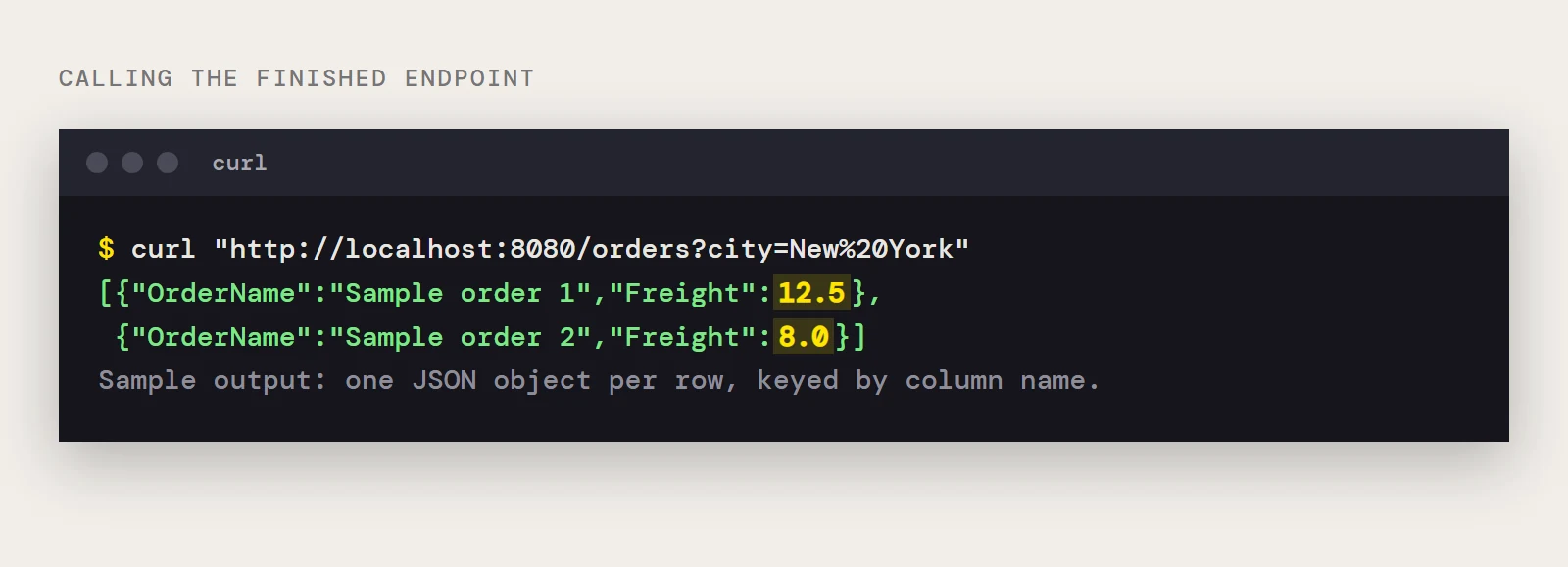
Start the app and call it with curl "http://localhost:8080/orders?city=New%20York". You get a JSON array with one object per row, keyed by column name. The driver pushes supported filters to BigQuery and handles anything BigQuery can't do, such as some SQL functions and joins, in its own SQL engine, so the WHERE clause above doesn't pull the whole table into your JVM.
When it doesn't start or doesn't answer
| What you see | Likely cause | Fix |
|---|---|---|
| ClassNotFoundException for GoogleBigQueryDriver | The jar was never installed, or the artifactId or version in pom.xml differs from the install command | Run the install command again and make both values match |
| Spring annotations or the JdbcTemplate bean can't be resolved | Maven hasn't downloaded the Spring Boot dependencies | Reload the Maven project, and in IntelliJ use File > Invalidate Caches |
| The app waits for a sign-in at startup | Interactive OAuth with no browser available | Authenticate with a service account or the headless flow |
| No tables or a not-found error | DataSetId or ProjectId is wrong | Check both against the project in the Google Cloud console |
Before you deploy, check OAuthSettingsLocation. It tells the driver where to keep its OAuth settings, so point it at a path the service account running the app can write and that survives a restart.
To build this endpoint yourself, download the CData JDBC Driver for BigQuery.
Ready to get started?
Download a free trial of the Google BigQuery Driver to get started:
Download NowLearn more:
 Google BigQuery JDBC Driver
Rapidly create and deploy powerful Java applications that integrate with BigQuery data including Dataset, Table, and more!