Your AI agents can now execute business actions in Connect AI, not just query the data behind them. As part of the Q1 2026 release, we’re excited to share a major product enhancement now available for all Connect AI users: the ability to define, build, and share custom MCP tools across an organization's departments. Instead of rebuilding the same action in every AI application, teams define it once in Connect AI and it's immediately available to every agent and user across the organization, with full governance and audit trail.
Enable your agents to take custom actions with MCP
Enterprises need AI agents that can take action tailored to their use cases and operational systems. Actions like submitting a purchase order when inventory drops below threshold, creating a support ticket from a customer conversation summary, updating a CRM record based on meeting notes, or generating a formatted report and emailing it to stakeholders.
Until now, building these capabilities meant custom code in every AI application, scattered across teams, with no central visibility into what’s running or where, and no ability to update and roll out changes across AI users.
Custom MCP tools: Expanding your AI’s toolbox
Connect AI ships with a universal set of platform-managed MCP tools that handle schema discovery, data retrieval, write-back, and action across 350+ enterprise sources.
The common approach of exposing agents to hundreds of system-specific tools consumes session context and can lead to hallucinated tool-usage. Connect AI's Universal Tools operate on a relational interface enabling agents to explore, read, and act on any of the data sources and systems they're connected to, without tool bloat.
The new Custom and Source MCP Tools features extend Connect AI's foundation with two additional tiers of tool design that give organizations precise control over what AI can do and how:
Custom Tools allow organizations to define purpose-built operations tailored to specific workflows. These tools execute pre-optimized queries with explicit data access limits — reducing token usage, improving performance, and eliminating unintended data exposure.
Source Tools expose tightly defined operations specific to each system. These tools map directly to approved system actions, allowing IT teams to enforce predictable execution, transactional safety, and auditability for production workflows.
Most MCP providers support some combination of a generic query interface and a fixed set of API-mapped operations. Connect AI is the only managed MCP platform that delivers all three tiers in a single governed layer: Universal Tools for consistent data discovery, Custom Tools for purpose-built agentic operations, and Source Tools for tightly controlled system-specific actions.
Custom Tools are purpose-built for agentic workflows, where agents execute multi-step processes and need predictable, scoped operations at every stage. With purpose-built tooling, each agentic query or action is pre-defined: scoped inputs, validated logic, and structured output. The agent doesn't reason through schema; it calls a resolved tool and moves to the next step. The result is a workflow that executes reliably across enterprise systems, with a complete audit trail and no unintended data exposure at any level.
Read more about Custom MCP Tools in our documentation.
Example: Creating a Zuora subscription from a conversation
The scenario: A finance operations team uses an AI assistant to handle subscription provisioning. When a deal closes, a rep needs to create a new subscription entry in Zuora. Today this means logging into Zuora manually and filling out a multi-step form.
Without custom tools: The AI can confirm deal details and tell the rep what fields are needed, but universal tooling limits consistency when taking critical actions like provisioning a subscription accurately. In this scenario, the rep must navigate to Zuora, locate the right account, and manually create the subscription; re-entering data the AI already has.
With custom tools: The organization creates a tool called create_zuora_subscription with the instruction: “Use only for approved subscription creation and include all required fields.” In the same conversation where the rep asks the agent to gather and confirm deal details, the rep can ask the agent to create the subscription, avoiding the time sink of signing into Zuora and manually entering the data. As internal confidence in the agent grows, the process can become fully automated, where closing an opportunity in the CRM triggers the agent to execute the entire process, letting the rep focus on the relationship-oriented aspects of their job.
Tool: create_zuora_subscription
Inputs: account_id (string), plan_id (string), start_date (date), term_months (integer)
Action: INSERT INTO [ZuoraProd].[Zuora].[Subscriptions] with validated inputs
Output: Subscription ID and confirmation of record creation
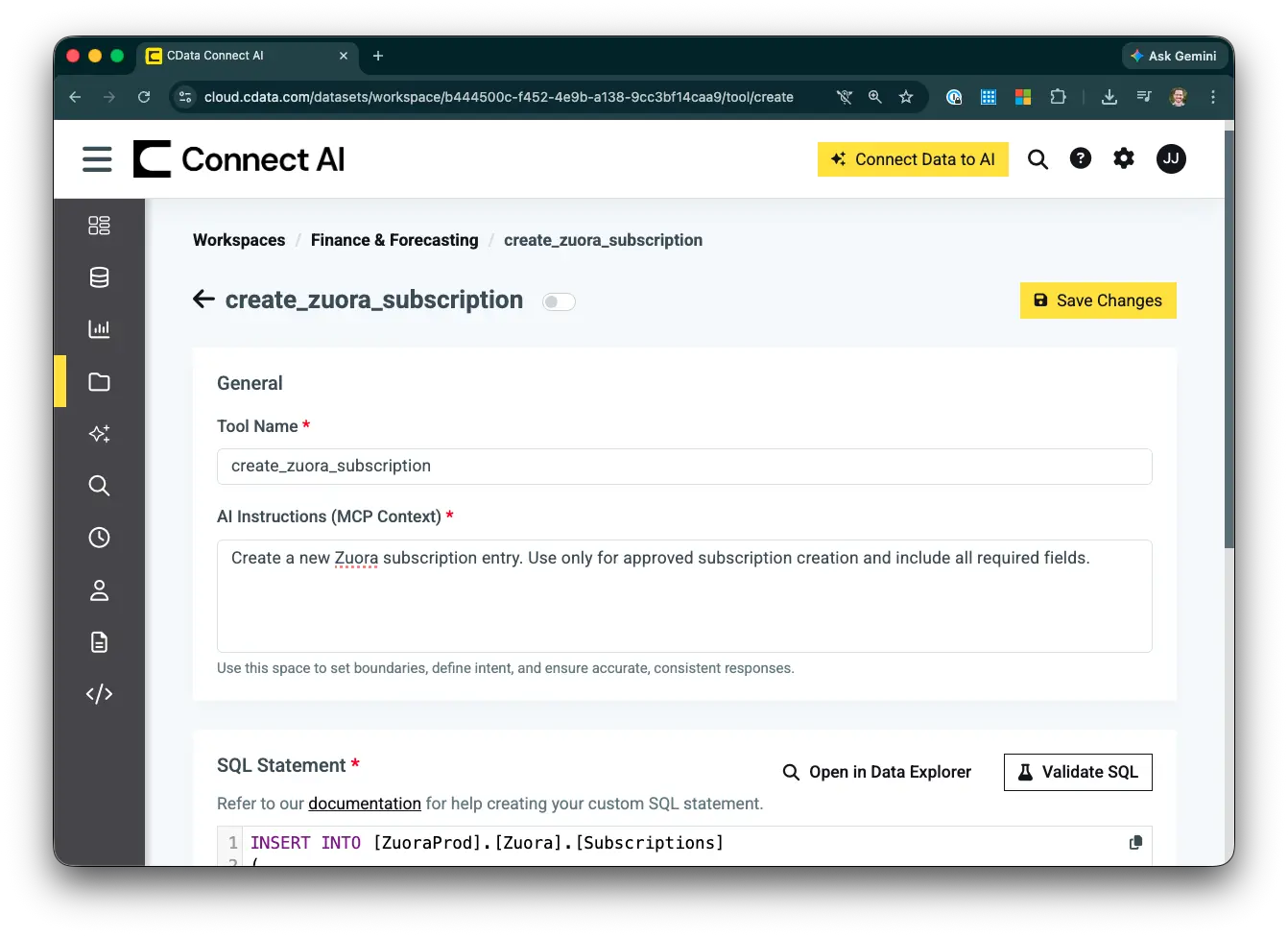
Custom MCP Tool configuration
Create and manage tools centrally
Create
Define your Custom Tool in Connect AI with a name, input parameters with types and validation rules, the underlying SQL logic, and a structured output schema. Connect AI validates SQL syntax against its engine before the tool is deployed, so you catch errors before they reach production.
Custom Tools can query any of the 350+ data sources that Connect AI supports.
Share
Access to Custom Tools is governed through Connect AI’s Workspace model, the same permission layer that controls data access in the platform. Create purpose-built workspaces by team, department, or use case:
Finance tools remain accessible only within finance workspaces
Sales tools surface only in sales environments
HR logic stays within HR, never visible to other departments
Business users access tools through whatever AI application they’re already using, whether that’s Claude, Copilot, or an internal application. They don’t need to know how the tool works or where the data lives. The AI understands and calls the appropriate tool when needed.
Monitor
Connect AI logs every query execution through its built-in audit infrastructure. For every invocation you can see which tool was called, which user called it, the query that was executed, and the data that was accessed giving IT a complete, attributable record of every AI-to-system interaction.
This visibility simply doesn't exist when teams build one-off integrations for individual users. With Connect AI, every action flows through managed infrastructure with a full audit trail.
Coming later this year: Toolkits
Later this year, Toolkits will extend the Custom Tools model further. A Toolkit bundles a curated set of Universal, Source, and Custom Tools into a single governed MCP endpoint purpose-built for a specific team or workflow. Admins define exactly which connections, tools, and logic are exposed, and publish a single MCP Server URL that AI tools connect to directly. More details are coming soon!
Build custom MCP tools in minutes with Connect AI
If you're already using Connect AI, custom MCP tools are available in your workspace today. Define a tool, validate the SQL, and deploy it across every authorized user and AI application in your organization. Built once, governed centrally, reused everywhere.
Get started with a free 14-day trial of Connect AI and start building custom MCP tools for your enterprise AI today.




