New earlier this year, Model Context Protocol (MCP) has enabled AI to use and access data like never before. As incredible as this technology is and the possibilities it unlocks with live, connected enterprise data, it has also created new concerns around security and governance if AI is given unfettered access to production databases.
MCP has enabled AI to not only view and understand connected data, but also perform user actions. For example, what if a user unintentionally asks to DROP or DELETE a production database? How can we enable users to make the most of AI connected to their data without introducing even more challenges?
In this article, we explore not only how to connect enterprise data stores and databases so users can interact with the data directly from LLMs, as well as how to implement security and governance guardrails. Building APIs for database access can be a powerful solution to serve as a gateway to control what data is connected to AI and how AI can interact with that data, while still delivering all the benefits of direct live connectivity to real-time sources of truth.
Use APIs as a critical layer for MCP when security matters
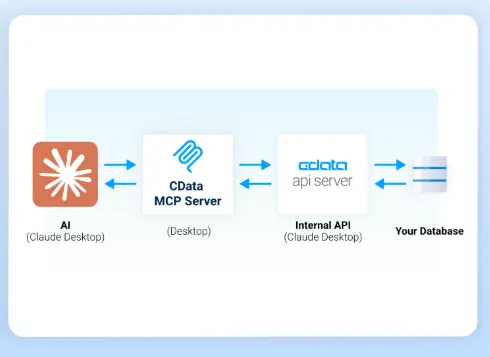
After MCP was introduced to the market, connecting from AI to enterprise data assets became easier than ever. But what about internal data in your database? Building a direct MCP connection to data stores can work – but you don’t want AI to have full CRUD (create/read/update/delete) access to entire databases which may contain sensitive customer data. Besides risking unintended destructive changes, how do you provide and track individual user credentials for each AI connection? What if the AI tries to make huge queries that rack up costs to the database? How do you track who is accessing data and how across a wider group of AI users?
Rather than granting AI platforms unlimited database access with MCP, build APIs that you then connect to AI to define a precise, curated interface through APIs. You control exactly what data is exposed, how it’s structured, and who can access it. This proxy layer helps maintain security and enforce data governance policies by acting as a secure boundary between your systems and external consumers like AI using MCP. However, building and maintaining your own APIs or MCP Server requires high-level technical expertise and costs that balloon quickly.
CData API Server + CData MCP Server provides a fast and secure solution to let AI access your database. CData API Server provides a streamlined way to build and expose live APIs directly from your internal data sources, including databases, data warehouses, and other structured systems. With specific user credentials to the data behind APIs you build in API Server, automatically inherit permissions and access controls that persist through APIs to AI access using MCP. API Server helps to enforce granular level access control at the role and object level required at any enterprise operating at scale. It implements necessary governance features such as, rate limiting, IP address control, and central logging.
This means organizations can confidently connect their AI pipelines to live enterprise data without risking unintended changes to databases or violating compliance standards.
How the integration works: Use APIs to secure and govern AI data access

Deploy API Server within your environment and connect it to the data sources you want to expose using existing credentials. Using its intuitive no/low-code UI, define specific API endpoints that reflect your business logic, filtering, and authorization rules. Specify which columns and tables should be accessible to the AI via the API and rename attributes to help AI understand the data model. These endpoints can be immediately consumed by AI MCP platforms or any LLM framework with a middleware API to MCP server, like CData’s MCP Server connectors.
The AI platform sends requests to the API Server via MCP Server, receives real-time, governed responses, and uses that data to drive its outputs—ensuring your insights are always based on the most recent and most secure information available. With CData MCP Server, a locally installed desktop MCP connector for AI, the APIs that you expose to API Server do not even have to be internet facing. Everything can be installed locally, except for the AI platforms like Claude communicating to its cloud host.
Start building APIs and connecting to AI
You can start building live, secure data APIs today with a free 30-day trial of CData API Server. Follow along in the step-by-step guide that walks you through setup through connecting your data, defining endpoints, and integrating with AI using MCP in just a few steps.
We’re also eager to hear from you! Your feedback helps us evolve API Server to meet the changing demands of AI, governance, and enterprise-scale data strategy. Try it out and let us know how it worked for your team.
Conclusion
Combining CData API Server with AI MCP enables organizations to unlock the power of AI without compromising the security, accuracy, or control of their data. With real-time connectivity, customizable endpoints, and full governance support, it’s the ideal solution for securely powering AI insights from the systems you trust most.




