AI assistants are transforming how organizations interact with CRM data. Sales, marketing, and customer service teams increasingly expect to ask natural-language questions and receive immediate, contextual answers powered by live operational systems over manually building reports or navigating dashboards.
Connecting HubSpot to ChatGPT makes this possible. With HubSpot CRM data feeding into ChatGPT's conversational interface, teams can surface pipeline risks, analyze campaign engagement, and spot customer trends in real time without routing every question through a reporting workflow.
For enterprise organizations, however, successful AI adoption requires more than a simple chatbot integration. Teams also need secure connectivity, governed access controls, centralized authentication, and the ability to connect AI platforms to multiple operational systems simultaneously.
CData Connect AI is a managed MCP server and officially listed ChatGPT app that securely connects AI assistants to live enterprise data sources, including HubSpot, Salesforce, Snowflake, NetSuite, and hundreds of additional systems. Rather than replicating CRM records into disconnected AI pipelines, CData Connect AI enables governed, real-time access directly from operational data sources.
This guide explains how to connect HubSpot to ChatGPT using CData Connect AI, how to operationalize conversational CRM analytics securely, and how to generate AI-powered customer insights from live HubSpot data.
Understanding the benefits of connecting HubSpot to ChatGPT
A HubSpot ChatGPT integration transforms CRM records into conversational, actionable intelligence. Instead of manually filtering reports or exporting datasets, teams can ask direct business questions and receive contextual answers generated from live customer data.
Sales organizations can identify stalled opportunities, analyze conversion rates, and prioritize at-risk deals more efficiently. Marketing can evaluate campaign engagement by persona, compare channel performance, and uncover emerging customer trends. Service teams can surface recurring support issues, escalation patterns, and resolution bottlenecks in real time.
One of the most valuable capabilities enabled through this architecture is Deep Research, a ChatGPT feature that performs multi-step analysis against connected enterprise data sources. Deep Research can compare cohorts, analyze operational trends, diagnose business risks, and generate detailed findings complete with reasoning trails and source citations linking directly back to CRM records.
When paired with CData Connect AI, these AI workflows run against live, governed CRM data as opposed to stale exports or replicated datasets. This helps organizations improve the accuracy, freshness, and trustworthiness of AI-generated insights.
Preparing your environment for AI-powered CRM analytics
Before connecting HubSpot to ChatGPT, organizations should ensure both their CRM environment and AI access workflows are properly prepared. A well-governed setup helps teams generate more accurate insights while maintaining security and compliance standards across customer data.
To begin, users need access to a paid ChatGPT plan that supports connectors, such as ChatGPT Plus or ChatGPT Team. Organizations should also provision access to CData Connect AI, which acts as the managed connectivity layer between ChatGPT and HubSpot.
Organizations should also review CRM data quality before enabling AI-powered analysis. Duplicate contacts, outdated opportunities, inconsistent field naming, and incomplete records can significantly reduce the quality of AI-generated recommendations and summaries.
Governance should also be evaluated early in the deployment process. CData Connect AI supports enterprise authentication and centralized governance controls, helping organizations maintain consistent access policies across users, AI assistants, and connected enterprise systems.
CData Connect AI helps organizations centralize these controls through a managed enterprise AI connectivity layer that governs how ChatGPT and other AI assistants access operational systems.
Step 1. Configure HubSpot inside CData Connect AI
The first step is configuring HubSpot as a connected enterprise data source within CData Connect AI.
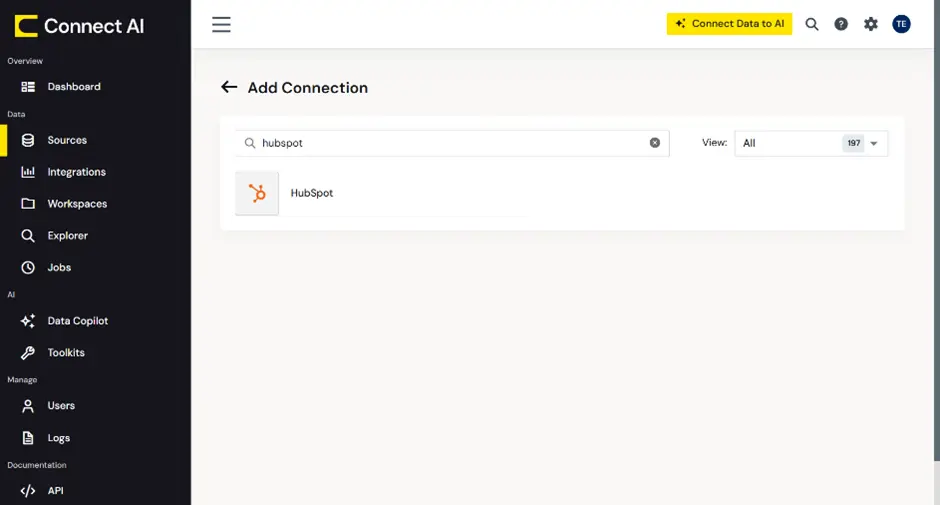
Inside the CData Connect AI administration environment, administrators can add HubSpot as a managed data source by configuring authentication credentials, defining connectivity settings, and validating CRM access permissions.
This architecture allows HubSpot access to remain centrally managed through CData Connect AI rather than exposing CRM credentials directly to individual AI applications.
Once configured, HubSpot becomes available as a governed data source accessible through the CData Connect AI MCP server.
Step 2. Connect ChatGPT to CData Connect AI
After configuring HubSpot, the next step is connecting ChatGPT to CData Connect AI.
CData Connect AI is available as an officially listed ChatGPT app, enabling you to securely connect ChatGPT to governed enterprise data through a managed MCP interface.
To integrate ChatGPT with CData Connect AI:
Open ChatGPT on the web.
Navigate to the Apps section.
Select CData Connect AI from the available apps.
Authenticate using organizational credentials.
Authorize ChatGPT to access the appropriate Connect AI environment.
Authentication ensures that AI access policies remain aligned with organizational governance and security requirements.
Because CData Connect AI acts as a centralized enterprise connectivity layer, organizations can use the same managed MCP endpoint across multiple AI platforms, including ChatGPT, Claude, Microsoft Copilot, Gemini, and additional enterprise AI tools.
Step 3. Start using conversational CRM analytics
Once ChatGPT is connected to CData Connect AI, users can begin interacting with live HubSpot data conversationally.
Business users can ask natural-language questions against HubSpot contacts, opportunities, companies, campaigns, and support records directly within ChatGPT. Including references to “HubSpot” within prompts helps ensure the AI assistant queries the appropriate connected data source.
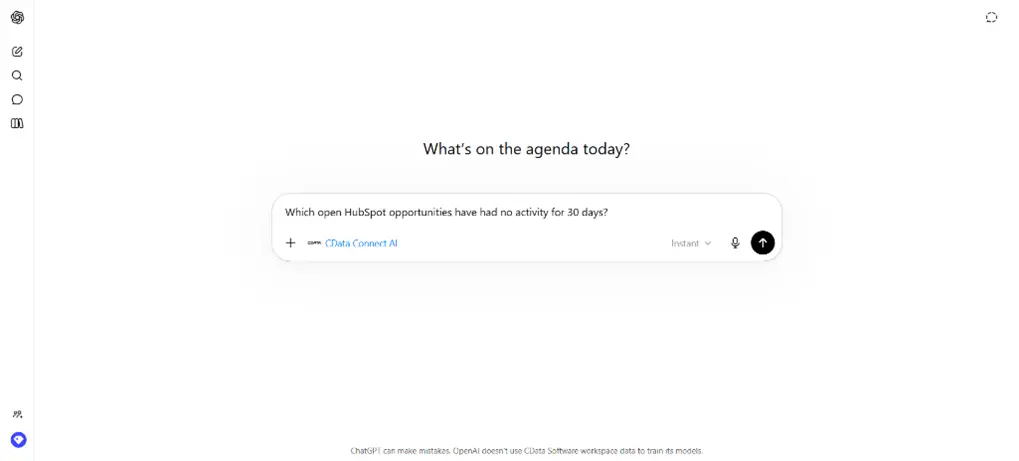
Example prompts include:
“What’s the HubSpot win rate by deal stage this quarter?”
“Which open HubSpot opportunities have had no activity for 30 days?”
“Show campaign engagement by persona from last month’s HubSpot campaigns.”
“What are the top support ticket categories this week?”
This conversational approach dramatically lowers the barrier to CRM analytics while making operational customer insights more accessible to non-technical business users.
Step 4. Use Deep Research for advanced customer insights
While conversational prompts provide fast operational answers, ChatGPT’s Deep Research feature enables much more sophisticated CRM analysis.
Deep Research performs multi-step analytical workflows using connected enterprise data sources. Users can define date ranges, business contexts, CRM objects, or analysis goals, and ChatGPT generates detailed reports complete with source citations and reasoning trails.
Sales leaders can diagnose pipeline bottlenecks across regions or teams. Marketing organizations can compare customer engagement trends across segments. Service teams can identify recurring escalation drivers and operational support risks. And unlike traditional dashboards, Deep Research enables iterative conversational analytics. Users can refine questions dynamically, investigate anomalies, and explore follow-up insights without manually rebuilding reports.
Because CData Connect AI provides live connectivity to HubSpot and other operational systems, these analyses operate against current CRM data rather than static exports or replicated AI datasets.
Why enterprise teams use CData Connect AI
As AI adoption expands across the enterprise, many organizations are looking beyond isolated point-to-point integrations and evaluating how to operationalize AI access to business data more strategically.
CData Connect AI provides a centralized enterprise connectivity layer purpose-built for AI platforms such as ChatGPT, Claude, Microsoft Copilot, and Gemini. Through a managed MCP server architecture, organizations can govern how AI assistants access operational systems while maintaining centralized authentication, visibility, and governance controls.
The platform supports live connectivity across hundreds of enterprise data sources, including HubSpot, Salesforce, NetSuite, Snowflake, and ServiceNow. This enables AI assistants to generate contextual insights across CRM, ERP, analytics, and operational systems through a single governed connectivity layer.
CData Connect AI also helps organizations centralize auditability and security oversight for AI-generated data access. As conversational analytics become more deeply embedded into business operations, many organizations are prioritizing architectures that provide consistent governance and visibility across AI workflows, operational systems, and end-user access patterns.
Best practices for reliable and secure AI connectivity
As organizations operationalize conversational CRM analytics, maintaining strong governance and operational discipline becomes increasingly important.
High-quality CRM data remains foundational to reliable AI-generated insights. Duplicate records, inconsistent properties, and outdated customer information can reduce the accuracy and usefulness of conversational analytics workflows.
Organizations should also encourage users to request source citations within Deep Research outputs whenever possible. Citation-backed analysis improves auditability and helps teams validate AI-generated findings directly against operational CRM records.
Over time, organizations should regularly review user permissions, authentication policies, connector activity logs, governance configurations, and AI access controls to ensure conversational analytics environments remain secure and compliant as adoption scales across departments.
Because CData Connect AI centralizes AI connectivity across enterprise systems, organizations can maintain more consistent governance and visibility across AI workflows while simplifying how business users access operational customer data through AI platforms.
Troubleshooting common connection issues
If CData Connect AI doesn't appear inside ChatGPT, check that you're using the web version of ChatGPT, that your plan supports apps and connectors, and that your organization has provisioned the appropriate Connect AI environment.
Authentication issues are typically related to expired credentials, insufficient HubSpot permissions, or governance restrictions configured within Connect AI.
If CRM records appear incomplete or unavailable, administrators should review HubSpot access permissions, Connect AI governance policies, user authorization settings, and source connectivity configurations.
For enterprise deployments, coordinate with your administrators for CRM governance, AI access policies, and authentication management before rolling out broadly.
Frequently asked questions
How do I connect HubSpot to ChatGPT using CData Connect AI?
Configure HubSpot as a managed data source inside CData Connect AI, then connect ChatGPT to the CData Connect AI app through ChatGPT's Apps interface. Once authenticated, users can query live HubSpot data conversationally through ChatGPT.
What types of customer insights can I generate from this integration?
You can analyze sales pipelines, campaign engagement, customer support trends, opportunity health, and operational performance using conversational prompts and Deep Research workflows powered by live HubSpot data.
Why use CData Connect AI instead of point-to-point CRM integrations?
CData Connect AI provides centralized governance, multi-source querying, centralized authentication controls, auditability, and compatibility across multiple AI platforms. This enables organizations to operationalize enterprise AI workflows more securely and at greater scale.
Is HubSpot data secure when accessed through ChatGPT?
Yes. CData Connect AI helps organizations govern how AI assistants access enterprise data through centralized connectivity, authentication, governance controls, and audit logging.
Can CData Connect AI connect ChatGPT to systems beyond HubSpot?
Yes. Connect AI supports connectivity to hundreds of enterprise systems, including Salesforce, NetSuite, Snowflake, ServiceNow, and many others. You can run AI queries across multiple sources through the same managed MCP server.





