If you have been looking for news about Model Context Protocol (MCP) – the recent trend of MCP backlash should not be a surprise. News such as Perplexity is moving off MCPs and Cloudflare releasing Code Mode which embeds a command-line interface (CLI) in the MCP server side) implies that the tech influencer group has picked up on a real pain point of MCPs – that of context bloat due to the full tool and tool schemas being injected into the agent’s large language model (LLM) context every single time.
CLIs are the being proposed as the panacea that will fix all the MCP context bloat issues, and some corners of the internet are claiming that MCP is finished as a standard.
While the identification of the tool context bloat problem is correct, the solution of dumping MCP entirely in favor of CLIs feels like an overreaction in the other direction.
Why MCP was introduced
First, a quick explainer about the context bloat problem using MCPs. At the time that Anthropic proposed MCP as a standard towards the end of 2024 – the process of connecting external data to the LLMs was fragmented:
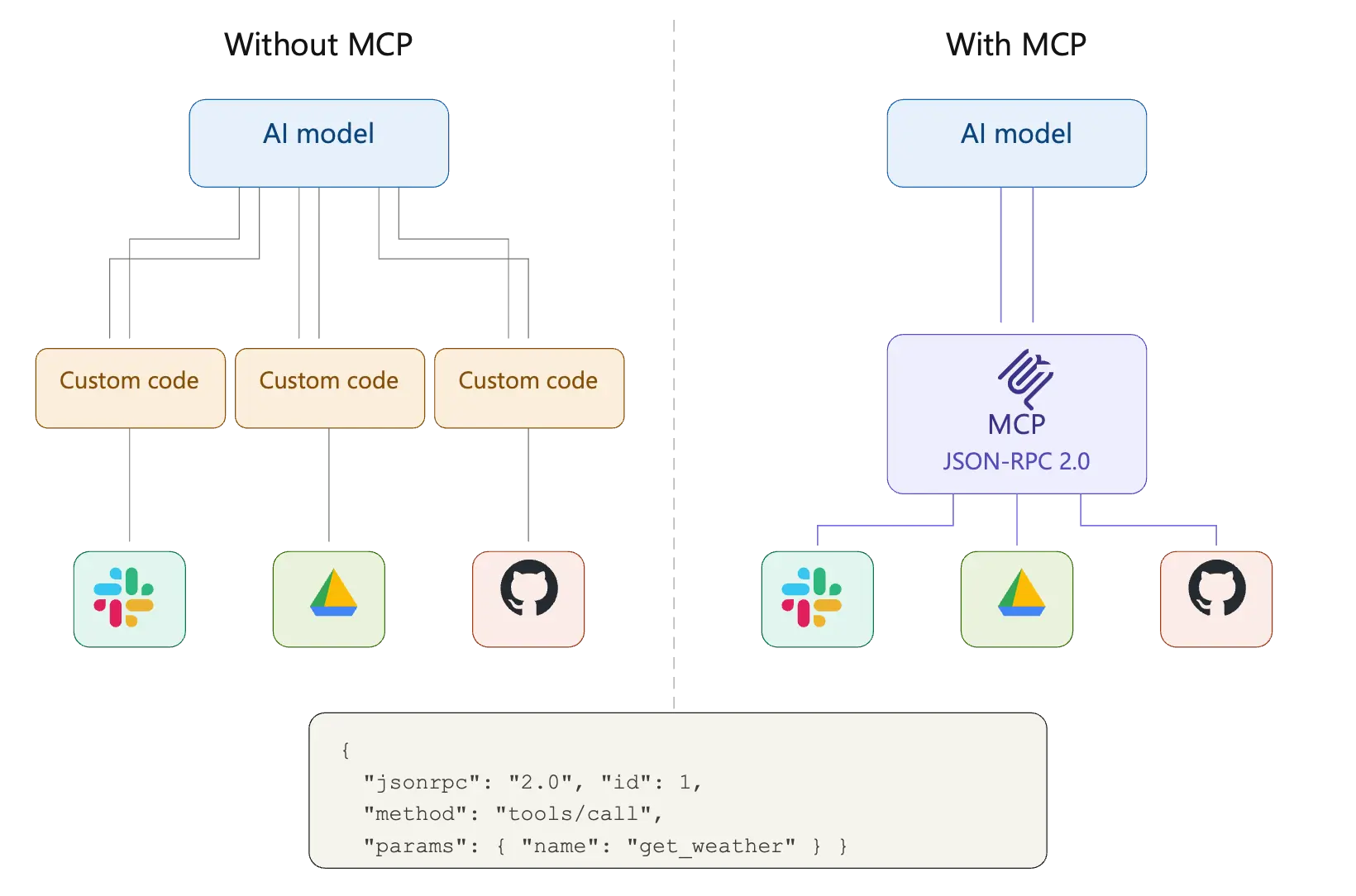
MCP aimed to standardize this fragmented ecosystem by proposing a JSON-RPC-based way of interacting and was enthusiastically adopted by many different enterprises and quickly gained quite a lot of traction in the industry. Vendors and open-source developers started releasing MCP servers to connect different products to LLMs. The MCP standard itself also went thru many significant releases, fixing multiple challenges with the earlier implementations.
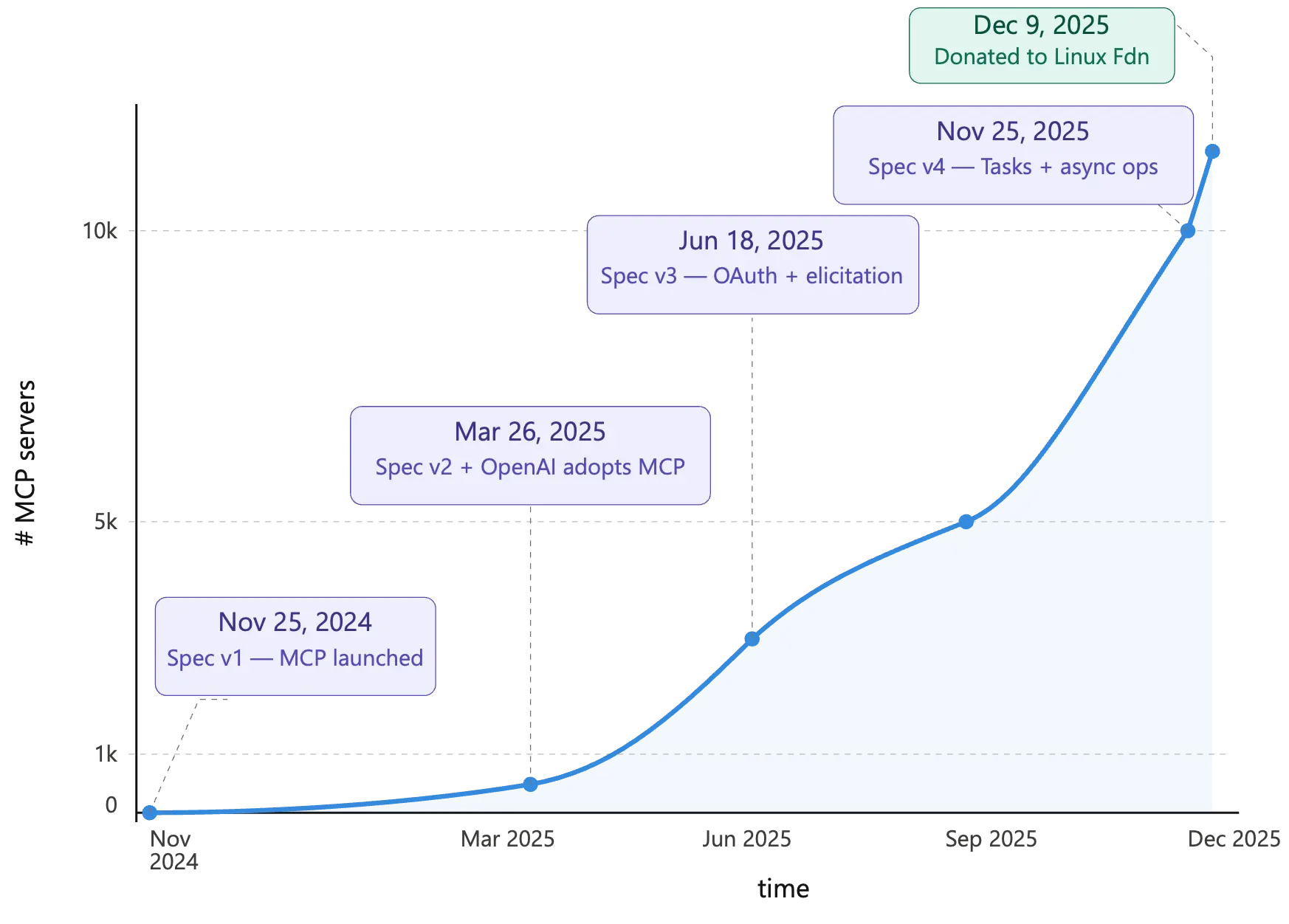
One of the biggest problems with the initial release of the MCP standard was the ability to run MCP using stdio. While this meant that you could quickly run a local process that would allow any LLM (or Agent) to talk to a MCP resource using local stdio – this introduced a whole host of security challenges. Fortunately, this method of MCP setup is now deprecated and the later MCP releases standardized on a simpler streamable-HTTP way of connecting to remote MCP servers. As long as there is an official remote MCP server published by the vendor, no local stdio-based MCP server needs to be used.
The context bloat problem with MCP
The biggest challenge now with MCP Servers (aside from security) is how the tools exposed by the MCP servers get injected into the context window of the LLM. When the MCP standard was initially introduced and various vendors started publishing MCP Servers, the typical approach was to wrap underlying APIs, already available publicly, as individual tools for LLM usage. Typically, this translation was 1:1 – one tool per API endpoint or action. This created MCP servers with tens or even hundreds of tools. This led to a context bloat problem. As soon as the MCP connection was established – all those tens (or hundreds) of tools, and their tool schema descriptions, and argument definitions were injected into the LLMs context, whether the tools were used or not.
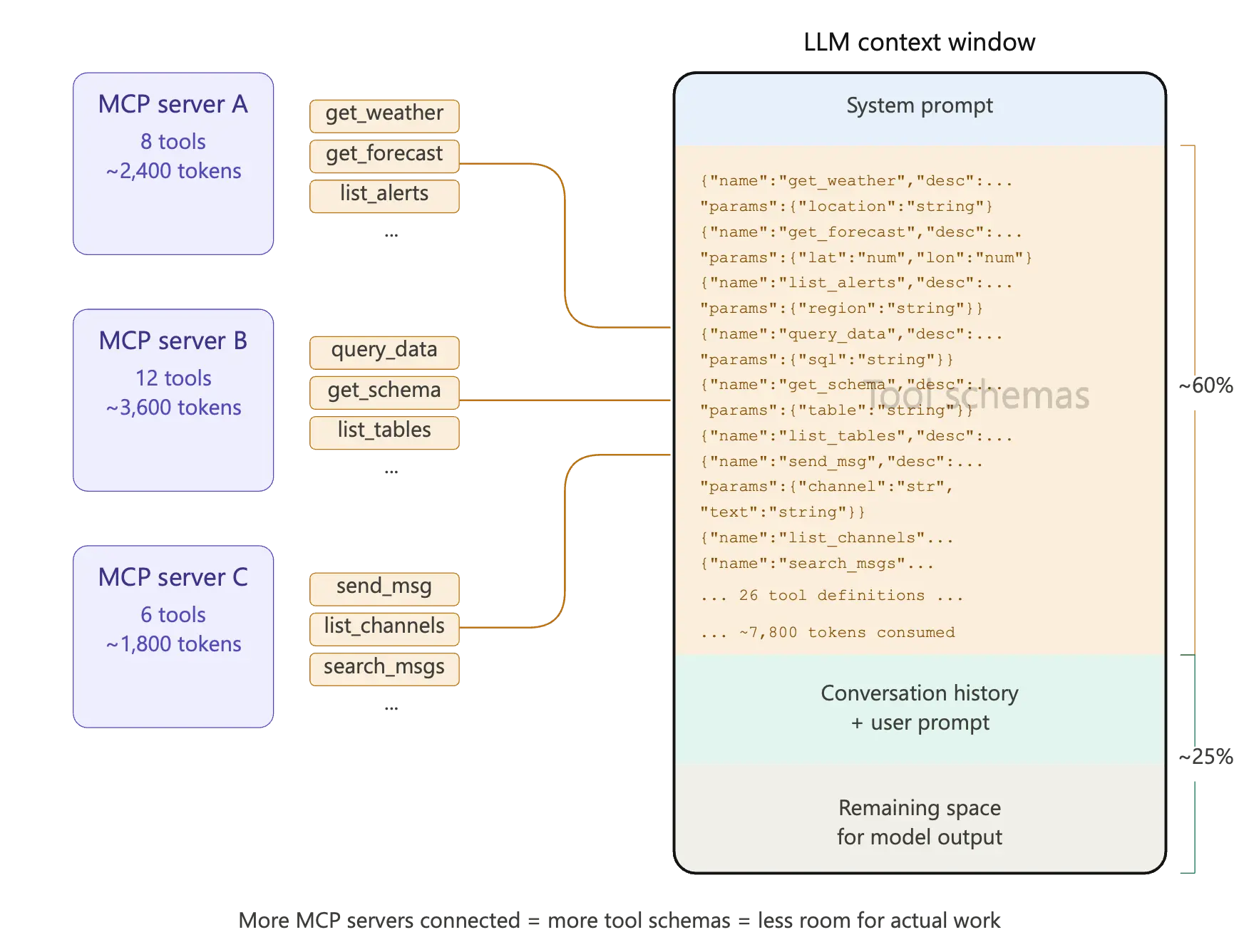
This left little space in the context for all the actual work needed to be performed by the LLM. This “context bloat” resulted in wasted tokens, increased latency and reduced accuracy of the responses.
While many different schemes were being proposed to deal with this context bloat problem of MCP, the trend of allowing LLMs to dynamically generate code started to become increasingly popular. This is where the arguments in favor of letting LLMs use CLIs to bypass MCPs completely start to make sense. The proposal is to let the LLM access a sandboxed CLI, generate the right code to dynamically use the CLI to connect to the information sources. The LLM training corpus already contains examples of code generation to effectively use command line interfaces, so just giving the LLM access to a sandboxed CLI let it generate the correct code and bypass any bloated MCP servers – or so the CLI camp argues.
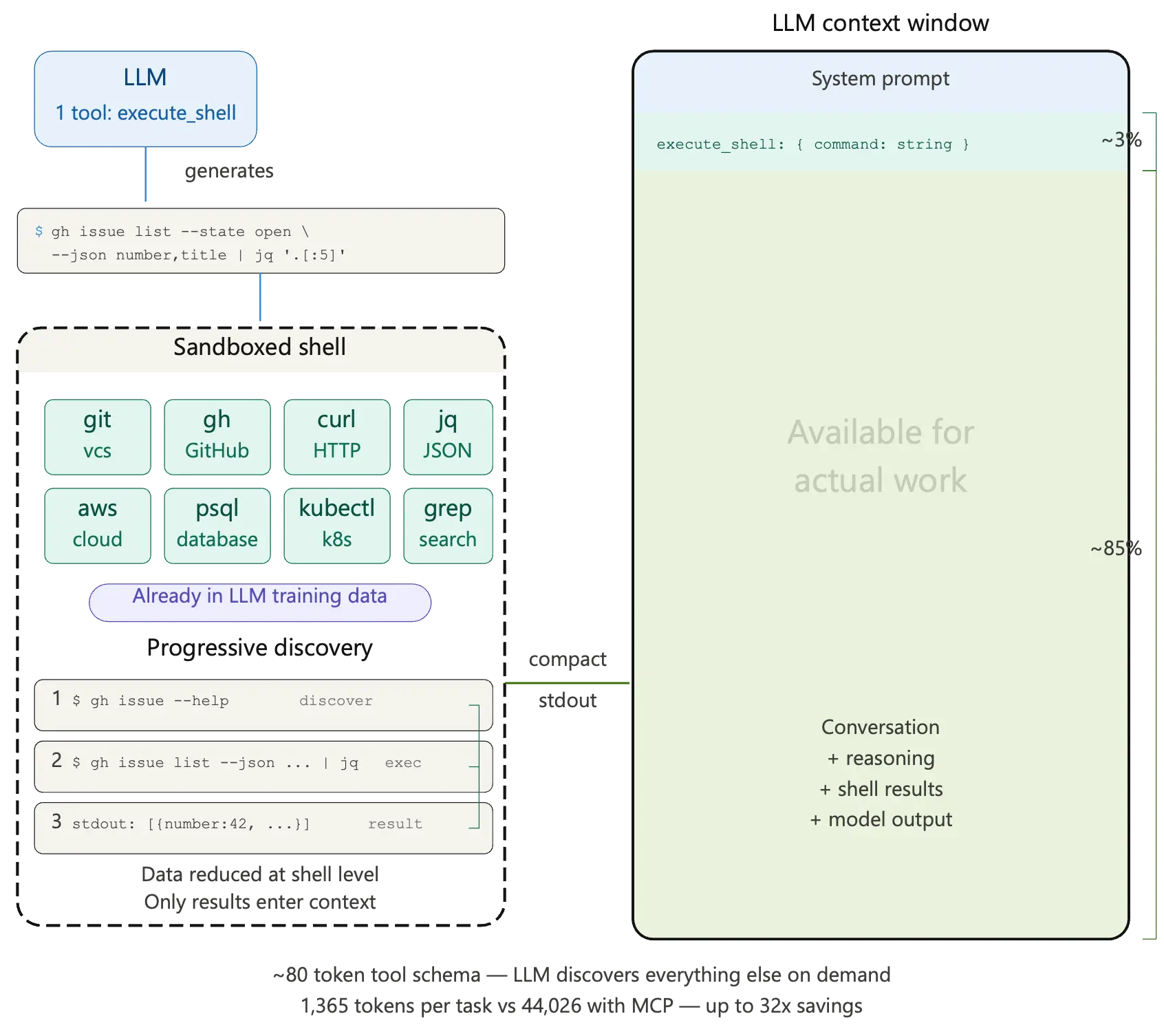
Now that we understand the core issue with using MCP servers and the CLI solutions being proposed let us look at the challenges with using CLIs.
Challenges to using CLI as an MCP-alternative
We will look at it through four specific lenses that matter in the enterprise space:
Maintainability
For every user who wants to use the sandboxed CLI, downloading the CLI during development and configuring it correctly in a sandboxed way represents a challenge. Now multiply this by hundreds or thousands of developers in an enterprise all configuring their own versions of the CLI for LLM or agentic usage and things begin to look messy and un-maintainable. Who maintains the sandboxes and the right set of permissions for the agents in the CLI? How does the enterprise ensure that all of them are running the version without vulnerabilities? Not an easy task without dedicated a operations team.
Contrast this with using remote MCP servers, everyone gets provided the same URL that they connect to. Nothing to download and configure. No need to run a complex ops flow that needs to figure out the supply chain of distributing a software component.
Security
While in the introductory part of this blog we saw the Perplexity announcement of moving away from MCPs, the Perplexity search engine deals with mostly public information. Enterprises are completely different. Security and policy-based access are a big concern in enterprise environments. For all the sources of information that an Agent would like to connect to via a CLI, the natural question is where does the Authentication information needed to connect to these sources live? Does it live in environment variables that each user needs to manage? Are the CLIs going to manage API keys and trigger the OAuth 3-Legged scheme? This gets confusing immediately:
The consent screen might be a bit confusing – are they authenticating the CLI or the agent?
Once the token comes back unless it is correctly handled the user might need further actions to ensure that it gets stored properly
Even once correctly stored, remember all you have authenticated is the User and not the Agent on-behalf-of the user
This last point is a huge issue – now only the user identity is known to the system not the actual agent that is in context
Contrast that to Remote MCPs – once you trigger the Auth flow, it is the MCP server’s responsibility to figure out how to properly authenticate the user, store their information and propagate this to the required backend.
Governance and observability
Users or agents using a CLI as a mechanism to access APIs makes for very poor governance. At which level would you apply per API access controls? How would an admin add governance to an API surface if the only way the identity passed in was via a CLI? Also imagine what logging and tracing would look like in such a scenario. Whereas with MCPs and tools every tool call is logged and traced and all of this information can be made available in a centralized fashion to be analyzed by security and governance teams. It also makes for a simpler governance model – policy enforcement can be at a per-tool level.
Ease of Use
CLIs can be hard sell if the end user does not have an IT or software development background. Outside of these departments, other users would be unwilling to go down the CLI route. Also, the developer experience with CLIs and managing them leaves a lot to be desired.
Enterprise solutions
Given the problems with CLIs in the enterprise context, let’s say we put together a system that still uses CLIs but:
Fixes the maintainability problem by using a custom harness
Creates a secure way to store credentials and manages the OAuth dance without confusing the user
Generates a system to embed governance and creates observability primitives
Creates an easy to use interface for CLIs in the Enterprise space
Congratulations – you have just re-invented MCP in a different form with a lot of extra bespoke systems engineering baggage!
CLIs might be a good solution for one-off experimentation projects where extreme speed is critical in the initial exploratory phases. However, once the project moves from exploration to productization, MCP servers become almost inevitable to use. So, are there any other alternatives to this MCP Context bloat problem? Yes!
There are currently multiple solutions being explored to fix the context bloat issue. We will talk about a few of them here.
Tool search tools
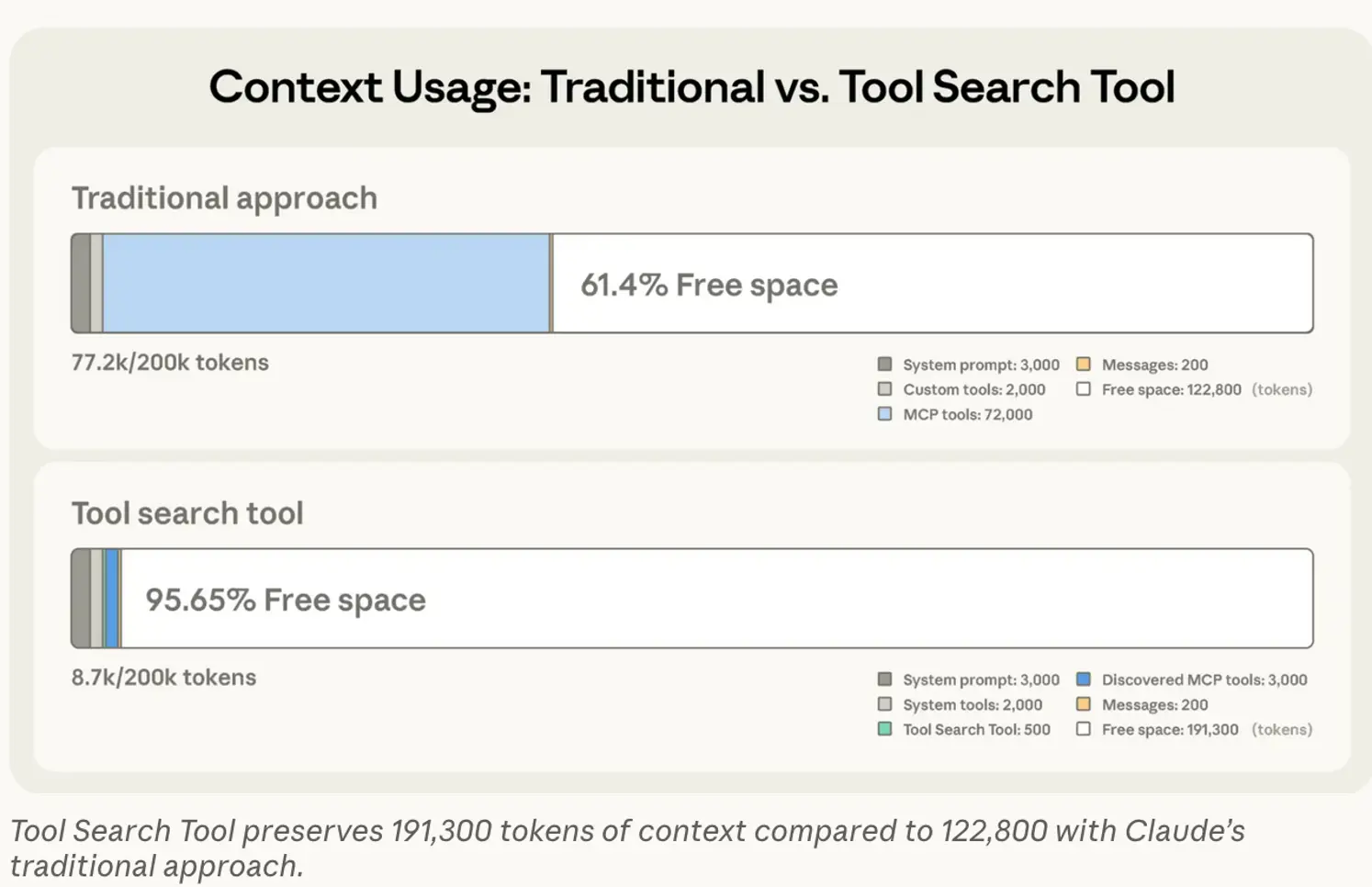
One of the solutions being proposed for reducing MCP context bloat is a tool search tool. The basics of the solution are the LLM only knows about a tool search tool MCP at the start – this is then used by the LLM to progressive load the necessary tools once it decides that it needs them. This saves a lot of the initial context bloat by only loading and discarding the tools needed in the operations. Anthropic detailed this approach in a recent blog post: Introducing advanced tool use on the Claude Developer Platform (figure below from the Anthropic blog).
Universal tools
Another approach is to have meta-tools or universal tools that look the same no matter what the underlying sources are and allow the LLM to still dynamically explore the necessary information. This is the approach that CData takes:
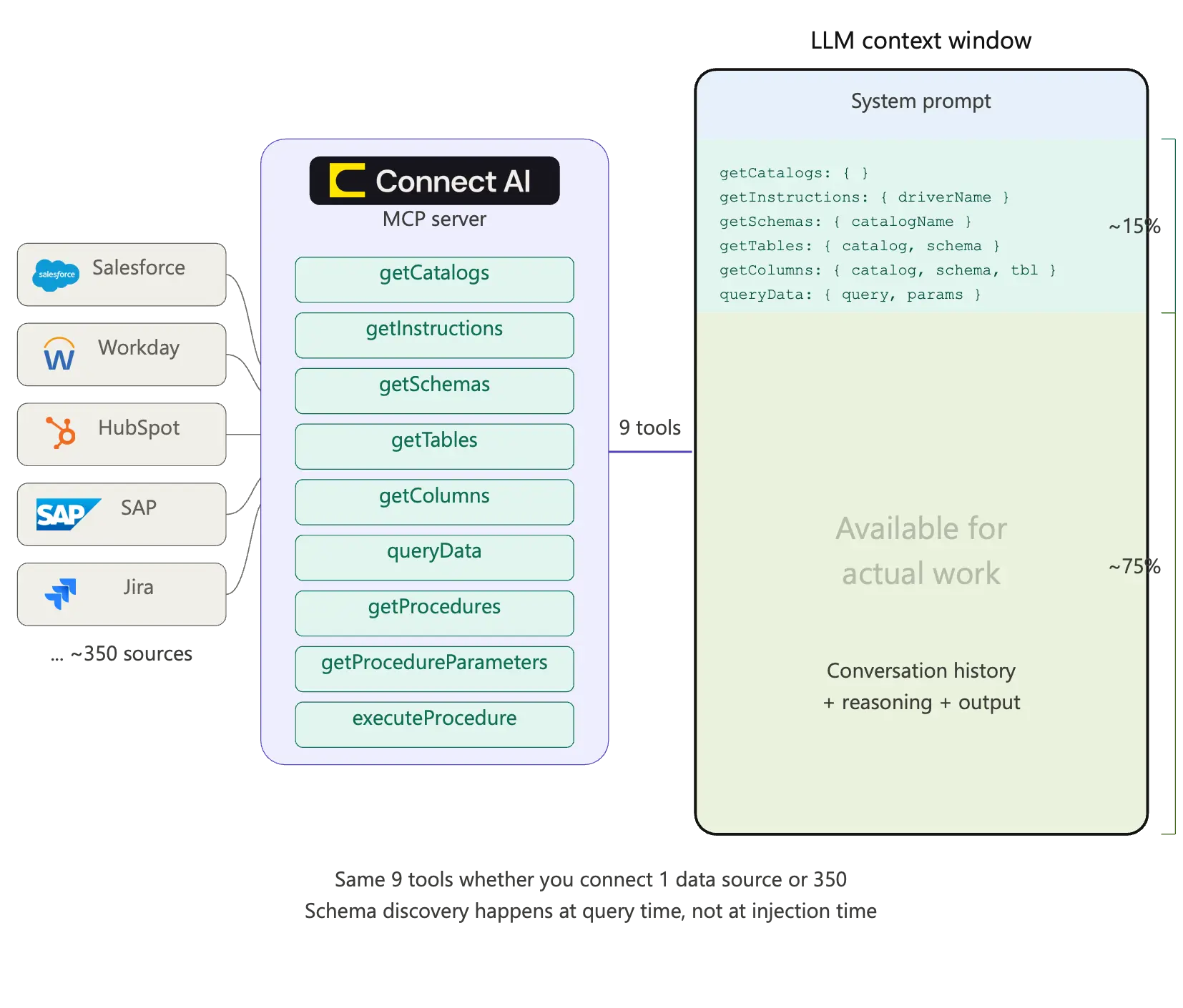
This ensures that while the LLM context does not get bloated, it can still dynamically find the contextually relevant information. If you want to know more about how this works in practice – check out CData Connect AI. The Connect AI MCP captures some of the advantages of the CLI based approach – that of easy set-up and fast onboarding while avoiding all the security and maintainability related challenges.
On Agent Skills
Agent Skills are essentially text files in markdown format that are loaded by the LLM depending on the task at hand. They may optionally contain references to scripts or other code snippets. Think of them as domain specific instructions in natural language that are contextually loaded by the LLMs. They were introduced initially by Anthropic but are being rapidly adopted by the community, OpenAI, Google, etc. all support Agent Skills. The key insight with skills is that they are minimal additions to the context that provide good ways to modify behavior. They are not direct replacements for MCP but combined together, Skills and MCP solve the context bloat. Skills provide minimal links in the context and when the Skills get loaded, the LLM knows how to navigate to MCPs.
Build confidently with Connect AI
In this article we looked at the various ways that a CLI based interface and an MCP based interface differ when it comes to providing access to information for Agents. CLIs do have a role to play in the Agentic ecosystem. They are well suited for quick PoC, single developer led use cases where enterprise concerns are not really significant. They are especially good when the interactivity provided by the command line helps quickly iterate on initial exploration. However, when enterprise scenarios dominate with non-developer personas, and it becomes critical to track secure and governed access, then MCP Servers, or a combination of Agent Skills with MCP Servers will work best.
Whichever route you choose, Connect AI provides the secure connectivity enterprises need to deploy AI confidently. Give it a try with a free, 14-day trial




