Agents are changing how software gets built, deployed, and operated.
Every layer of the software stack is being rewritten with agents in mind. Build pipelines now spawn agents to refactor code. Incident channels now spawn agents to triage alerts. Data teams spawn agents to answer ad-hoc questions against the warehouse. Customer-facing chat surfaces have quietly become agent orchestrators pretending to be chatbots.
The interesting shift is not that any single task has been automated. Plenty of individual tasks were automated long before LLMs arrived. The shift is that the glue between tasks — the reasoning, the planning, the judgment about which tool to invoke next — is now something software can do. Agents compress entire workflows that used to require human hand-offs into a single conversational loop.
That compression creates pressure everywhere. It changes what a developer's day looks like, what an operations team needs to monitor, what a security team needs to threat-model, and what a data team needs to expose. An agent architecture is not a product decision; it is a systems design and an organizational one.
In this blog series, we start by explaining the components of enterprise agentic architectures. In the next post, we explore an agentic architecture built on Google Cloud Platform, highlighting the importance of an AI-ready data layer.
Where agents run: desktop coding agents vs. cloud agents
Agents split into two broad deployment patterns, and they look almost nothing alike.
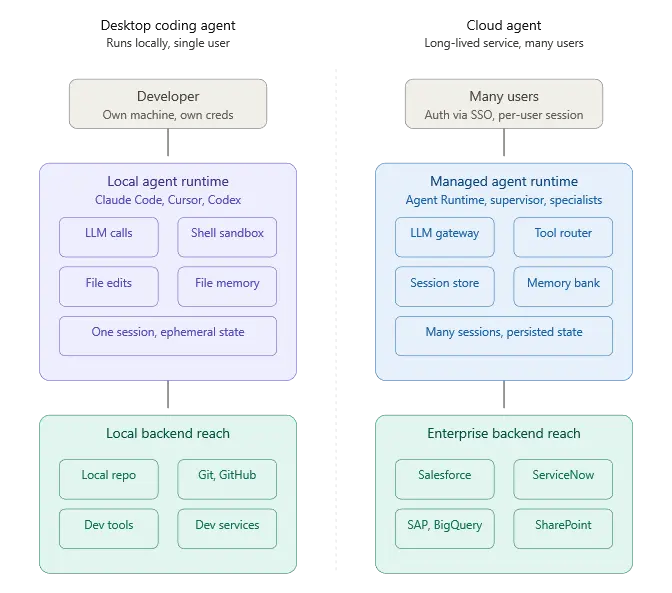
Desktop agents run locally. Claude Code, Cursor, Windsurf, Gemini CLI, Codex — these execute on the developer's machine, read the repo off the local filesystem, run shell commands in a sandboxed terminal, and use the developer's own credentials for whatever they touch. State is ephemeral or file-backed. The trust model is mostly “the developer trusts themselves.” Concurrency is one agent per developer per session, but these days some developers are even pushing the boundaries with multi-session coding agents running simultaneously. The agent's blast radius is bounded by whatever the developer's workstation can reach.
Cloud agents run as long-lived services in someone else's infrastructure. They handle traffic from many users, share pooled LLM capacity, persist memory across sessions, and reach into enterprise systems using managed service identities. State sits in managed stores. The trust model is multi-tenant by construction — agent A working for user A must never spill into agent B's session for user B. Concurrency is measured in thousands of simultaneous conversations. The blast radius is bounded by whatever IAM and network perimeters allow.
A cloud agent architecture is a distributed system problem wearing AI clothing. Most of the hard engineering is not in the prompt. It is in the systems that give the Agent the right context when needed.
The agentic harness
The harness is the runtime scaffolding that turns an LLM call into an agent. It handles session lifecycle, tool invocation, memory persistence, retry logic, streaming, guardrails, telemetry, and the orchestration of multiple specialist agents coordinating on a task. Without a harness, you have an LLM and a prompt. With one, you have something that can plan, execute, remember, and recover. The main role of the harness is to feed the right context to the LLM so that it can reason over the components in the Context and provide the right next course of action.
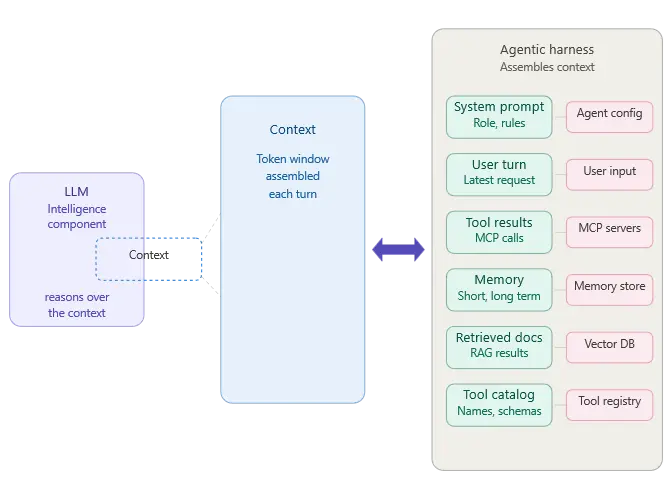
A harness is the part people underestimate when they start building agents. The LLM is the obvious centerpiece, but it is also the most commoditized piece of the stack. The harness is where the engineering decisions compound: which memory store, which tool protocol, which trace format, which identity model, which eval pipeline. Every one of those decisions has downstream consequences that surface six months into production when something breaks at 2 AM.
The harness is also the part of the infrastructure that is changing rapidly. The rapid pace of advancement of the AI ecosystem is causing churn in the components of the harness. Enterprises spend many months building the harness only to discover that many components need to be rewritten or are commoditized by the latest LLM model updates. This problem is explored in our previous post about Meta-Harnesses and how harness evolution is being mitigated.
Pre-built harnesses vs. pro-code assembly
There are two routes to get a harness in place.
Pre-built harnesses arrive mostly assembled. The vendor ships the runtime, the memory store, the orchestration, the identity model, the UI, the observability, and a set of connectors to common enterprise systems. You customize around the edges — add your own tools, define your own agents against their framework, inject your business context — but most of the harness decisions have already been made. These are SaaS products. You are a tenant inside someone else's agent platform.
Pro-code assembly means you wire the components yourself. You pick a compute runtime (Cloud Run, GKE, Agent Engine), a session store (Firestore, Memorystore), a memory strategy (RAG engine, Vertex Vector DB, your own), a tool protocol (MCP, function calling, OpenAPI), a trace system (Cloud Trace, OpenTelemetry, Datadog), and an identity model (IAM, workload identity, service accounts). You get full control and full responsibility. Frameworks like the Google Agent Development Kit (ADK), LangGraph, and CrewAI sit in this category — they give you primitives, not a finished product. Agent Engine is the managed runtime that most pro-code ADK deployments land on when they need to scale; it is a deployment target, not a harness.
The choice between the two is usually a question of how much of the stack you need to bend. Pre-built harnesses are fast to deploy but constrain what you can customize at the edges. Pro-code assembly is slower to reach production but gives you the flexibility to integrate tightly with whatever legacy infrastructure you already run — and to expose tools and data that the SaaS harness vendors have not built connectors for yet.
Examples of pre-built harnesses
A short tour of what pre-built looks like in practice:
Google Gemini Enterprise — Google's managed agent platform for enterprise users. Built on top of Vertex AI Agent Builder but packaged as a product rather than a framework. Ships with Workspace integrations, enterprise search over Google Drive, and a user-facing UI. Administrators govern which agents are available to employees; employees interact through a Gemini-branded surface.
Claude Managed Agents — Anthropic's managed agent offering. Claude handles the reasoning loop, the tool calling, the session state, and the connector layer. Customers plug in MCP servers for their data and configure agent behavior through prompts and tool definitions.
Salesforce Agentforce — a harness built around the Salesforce data model. Agents live inside the Salesforce trust boundary, reason over Salesforce objects natively, and act through the Salesforce platform's permission model. Customization happens through Flow, Apex, and prompt templates.
Microsoft 365 Copilot Agent Builder / Copilot Studio — Microsoft's harness layered on top of Microsoft Graph. Agents run inside the M365 tenant, authenticate as the user, and reach Outlook, Teams, SharePoint, and Dynamics through the graph. Custom agents are defined with a low-code tool and published into the Copilot surface.
ServiceNow AI Agents / Now Assist — harness built around the ServiceNow platform data model, aimed at IT service management and workflow automation use cases.
Each one solves the harness problem with its own opinions baked in. What they share: the vendor owns the runtime, the orchestration, the memory, the UI, and the identity model. The enterprise owns the prompts, the custom tools, and the governance policy. The split is clear and predictable, which is also exactly why pre-built harnesses are attractive to teams that want to move fast without staffing an LLMOps platform team.
What they trade away: depth of control, depth of integration beyond what the vendor's connector library supports, and the ability to run the same agent architecture across multiple clouds or on-premises. That is where pro-code assembly with something like Agent Engine + ADK becomes the right answer — which we cover in the next blog.
Governed data access for agentic architectures with Connect AI
No matter how you build your agentic architecture, our internal benchmarking shows that the right data layer can support 98.5% agent accuracy. CData Connect AI is the governed data layer for enterprise AI, resolving live data access through Ai agents through MCP across 350+ enterprise sources.
Read the next blog in this series to learn how Connect AI fits with Google Cloud Platform or start a free trial to see how it works for yourself.





