




Query Browse AI Data as a MySQL Database in Node.js

You can use the SQL Gateway from the ODBC Driver for Browse AI to query Browse AI data through a MySQL interface. Follow the procedure below to start the MySQL remoting service of the SQL Gateway and start querying using Node.js.
Connect to Browse AI Data
If you have not already done so, provide values for the required connection properties in the data source name (DSN). You can use the built-in Microsoft ODBC Data Source Administrator to configure the DSN. This is also the last step of the driver installation. See the "Getting Started" chapter in the help documentation for a guide to using the Microsoft ODBC Data Source Administrator to create and configure a DSN.
Start by setting the Profile connection property to the location of the BrowseAI Profile on disk (e.g. C:\profiles\BrowseAI.apip). Next, set the ProfileSettings connection property to the connection string for BrowseAI (see below).
BrowseAI API Profile Settings
BrowseAI is a web scraping and automation platform that allows you to train robots to extract and monitor data from websites. Authentication is performed using an API key that is sent as a Bearer token in the Authorization header.
The BrowseAI API key has the format {userId}:{apiKey}, where both parts are UUIDs separated by a colon. This full string is provided as a single value in the BrowseAI dashboard.
To obtain your API key:
- Log in to your BrowseAI account at https://app.browse.ai
- Navigate to Settings in the dashboard
- Locate the API section
- Copy the full API key string displayed (format: userId:apiKey)
After obtaining your API key, set the following connection properties:
- AuthScheme: Set this to APIKey.
Set the following in the ProfileSettings connection property:
- APIKey: Set this to your BrowseAI API key (format: userId:apiKey).
Configure the SQL Gateway
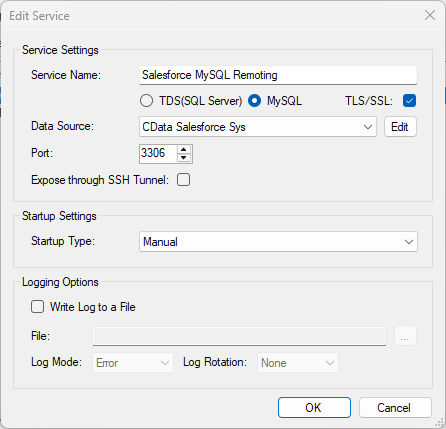
See the SQL Gateway Overview to set up connectivity to Browse AI data as a virtual MySQL database. You will configure a MySQL remoting service that listens for MySQL requests from clients. The service can be configured in the SQL Gateway UI.
Query Browse AI from Node.js
The following example shows how to define a connection and execute queries to Browse AI with the mysql module. You will need the following information:
- Host name or address, and port: The machine and port where the MySQL remoting service is listening for MySQL connections.
- Username and password: The username and password of a user you authorized on the Users tab of the SQL Gateway.
- Database name: The DSN you configured for the MySQL remoting service.
Connect to Browse AI data and start executing queries with the code below:
var mysql      = require('mysql');
var connection = mysql.createConnection({
  host     : 'localhost',
  database : 'CData API Sys',
  port	   : '3306',
  user     : 'mysql_user',
  password : 'test'
});
connection.connect();
connection.query('SELECT * FROM RobotTasks', function(err, rows, fields) {
  if (err) throw err;
  console.log(rows);
});

connection.end();