




LINQ to Canny Data

This article illustrates using LINQ to access tables within the Canny via the CData ADO.NET Data Provider for Canny. To achieve this, we will use LINQ to Entity Framework, which facilitates the generation of connections and can be seamlessly employed with any CData ADO.NET Data Providers to access data through LINQ.
See the help documentation for a guide to setting up an EF 6 project to use the provider.
- In a new project in Visual Studio, right-click on the project and choose to add a new item. Add an ADO.NET Entity Data Model.
- Choose EF Designer from Database and click Next.
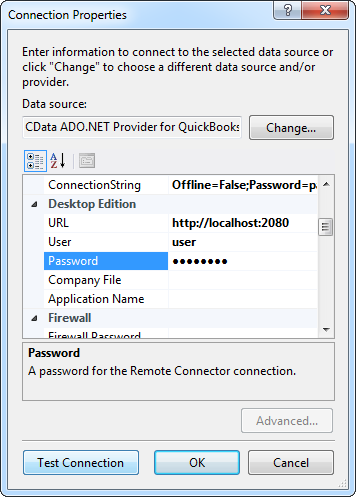
- Add a new Data Connection, and change your data source type to "CData Canny Data Source".
Enter your data source connection information.
Start by setting the Profile connection property to the location of the Canny Profile on disk (e.g. C:\profiles\Canny.apip). Next, set the ProfileSettings connection property to the connection string for Canny (see below).
Canny API Profile Settings
Canny uses a secret API key to control access to the API. The API key is sent as a JSON body parameter named 'apiKey' in every HTTP POST request to the Canny API endpoints.
To authenticate with the Canny API, you need your company-level secret API key. You can find this key in your Canny account under Settings > API.
After setting the following connection properties, you are ready to connect:
- AuthScheme: Set this to APIKey.
- APIKey: Set this to your Canny company-level secret API key from the Settings > API page in your Canny dashboard.
Below is a typical connection string:
Profile=C:\profiles\Canny.apip;ProfileSettings='APIKey=your-canny-api-key';- If saving your entity connection to App.Config, set an entity name. In this example we are setting APIEntities as our entity connection in App.Config.
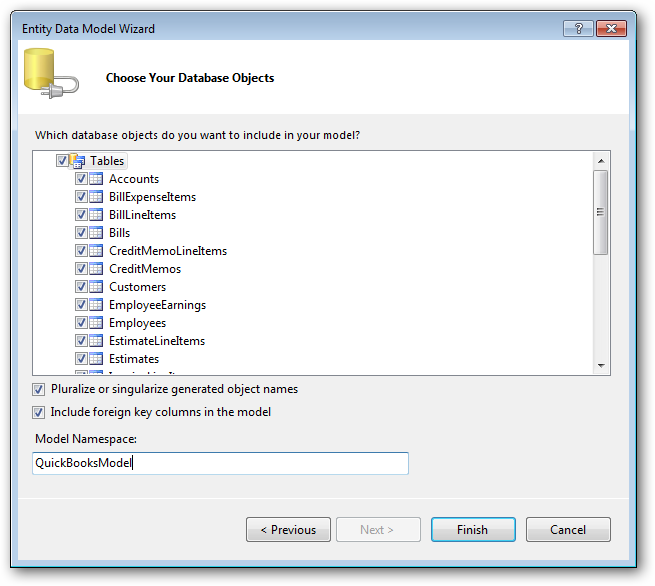
- Enter a model name and select any tables or views you would like to include in the model.
Using the entity you created, you can now perform select commands. For example:
APIEntities context = new APIEntities();

var boardsQuery = from boards in context.Boards
  select boards;

foreach (var result in boardsQuery) {
  Console.WriteLine("{0} {1} ", result.Id, result.Id);
}
See "LINQ and Entity Framework" chapter in the help documentation for example queries of the supported LINQ.