




Analyze Claude Compliance Data in R via ODBC

Access Claude Compliance data with pure R script and standard SQL. You can use the CData ODBC Driver for Claude Compliance and the RODBC package to work with remote Claude Compliance data in R. By using the CData Driver, you are leveraging a driver written for industry-proven standards to access your data in the popular, open-source R language. This article shows how to use the driver to execute SQL queries to Claude Compliance data and visualize Claude Compliance data in R.
Install R
You can complement the driver's performance gains from multi-threading and managed code by running the multithreaded Microsoft R Open or by running R linked with the BLAS/LAPACK libraries. This article uses Microsoft R Open (MRO).
Connect to Claude Compliance as an ODBC Data Source
Information for connecting to Claude Compliance follows, along with different instructions for configuring a DSN in Windows and Linux environments.
The driver connects to Claude Compliance using a Compliance Access Key, the only supported authentication method. Set the following connection property:
- APIKey: The Compliance Access Key you created.
Creating a Compliance Access Key
- Enable the Compliance API for your organization.
- Sign in to claude.ai as a primary owner or organization owner and open Organization settings > API > Keys.
- Select Create Key and assign only the scopes your integration needs:
- read:compliance_activities for Activities and the typed activity views.
- read:compliance_org_data for organizations, roles, groups, and settings.
- read:compliance_user_data for users, chats, files, projects, and downloads.
- delete:compliance_user_data for the explicit Delete stored procedures.
- Create the key and copy it when it appears. The key starts with sk-ant-api01- and is shown only once.
Optionally, set OrganizationUUID to limit organization-scoped views (such as OrganizationUsers and ComplianceRoles) to a single linked organization. If it is left empty, those views default to the first available organization and do not include data from all linked organizations.
When you configure the DSN, you may also want to set the Max Rows connection property. This will limit the number of rows returned, which is especially helpful for improving performance when designing reports and visualizations.
Windows
If you have not already, first specify connection properties in an ODBC DSN (data source name). This is the last step of the driver installation. You can use the Microsoft ODBC Data Source Administrator to create and configure ODBC DSNs.
Linux
If you are installing the CData ODBC Driver for Claude Compliance in a Linux environment, the driver installation predefines a system DSN. You can modify the DSN by editing the system data sources file (/etc/odbc.ini) and defining the required connection properties.
/etc/odbc.ini
[CData ClaudeCompliance Source]
Driver = CData ODBC Driver for Claude Compliance
Description = My Description
APIKey = your_compliance_access_key
For specific information on using these configuration files, please refer to the help documentation (installed and found online).
Load the RODBC Package
To use the driver, download the RODBC package. In RStudio, click Tools -> Install Packages and enter RODBC in the Packages box.
After installing the RODBC package, the following line loads the package:
library(RODBC)
Note: This article uses RODBC version 1.3-12. Using Microsoft R Open, you can test with the same version, using the checkpoint capabilities of Microsoft's MRAN repository. The checkpoint command enables you to install packages from a snapshot of the CRAN repository, hosted on the MRAN repository. The snapshot taken Jan. 1, 2016 contains version 1.3-12.
library(checkpoint)
checkpoint("2016-01-01")
Connect to Claude Compliance Data as an ODBC Data Source
You can connect to a DSN in R with the following line:
conn <- odbcConnect("CData ClaudeCompliance Source")
Schema Discovery
The driver models Claude Compliance APIs as relational tables, views, and stored procedures. Use the following line to retrieve the list of tables:
sqlTables(conn)
Execute SQL Queries
Use the sqlQuery function to execute any SQL query supported by the Claude Compliance API.
projects <- sqlQuery(conn, "SELECT Id, Name FROM Projects WHERE OrganizationUuid = 'abcdef01-2345-6789-abcd-ef0123456789'", believeNRows=FALSE, rows_at_time=1)
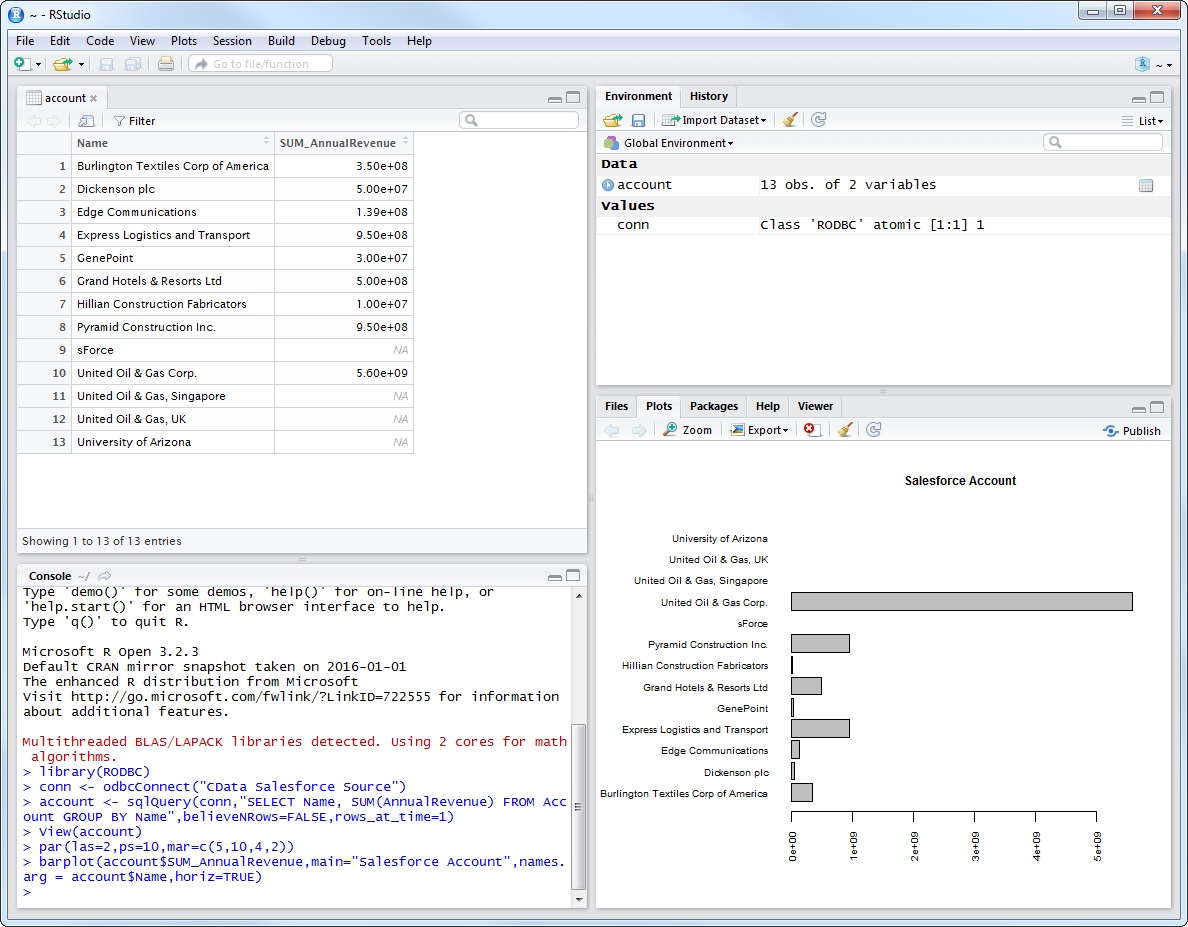
You can view the results in a data viewer window with the following command:
View(projects)
Plot Claude Compliance Data
You can now analyze Claude Compliance data with any of the data visualization packages available in the CRAN repository. You can create simple bar plots with the built-in bar plot function:
par(las=2,ps=10,mar=c(5,15,4,2))
barplot(projects$Name, main="Claude Compliance Projects", names.arg = projects$Id, horiz=TRUE)
Ready to get started?
Download a free trial of the Claude Compliance ODBC Driver to get started:
Download NowLearn more:
 Claude Compliance ODBC Driver
The Claude Compliance ODBC Driver is a powerful tool that allows you to connect with live data from Claude Compliance, directly from any applications that support ODBC connectivity.
Access Claude Compliance data like you would a database - read Claude Compliance Activities, Chats, ChatMessages, CodeArtifacts, ComplianceRoles, Organizations, OrganizationUsers, Projects, etc. through a standard ODBC Driver interface.