




How to create JD Edwards federated tables in MySQL

You can use the SQL Gateway to configure a MySQL remoting service and set up federated tables for JD Edwards data. The service is a daemon process that provides a MySQL interface to the CData ODBC Driver for JD Edwards: After you have started the service, you can create a server and tables using the FEDERATED Storage Engine in MySQL. You can then work with JD Edwards data just as you would local MySQL tables.
Connect to JD Edwards Data
If you have not already done so, provide values for the required connection properties in the data source name (DSN). You can use the built-in Microsoft ODBC Data Source Administrator to configure the DSN. This is also the last step of the driver installation. See the "Getting Started" chapter in the help documentation for a guide to using the Microsoft ODBC Data Source Administrator to create and configure a DSN.
The driver connects to JD Edwards through your Application Interface Services (AIS) Server. Set the following connection properties:
- URL: The base HTTPS URL of your AIS Server (e.g., https://jde-ais.example.com:8300).
- User: Your JD Edwards username.
- Password: Your JD Edwards password.
- Environment (optional): The JD Edwards environment to use (e.g., PD920 for production or DV920 for development). If not specified, the AIS Server's default environment is used.
- Role (optional): The JD Edwards role for the session. If not specified, the AIS Server's default role is used.
- DeviceName (optional): An identifier for the connecting device or application, used for auditing and logging on the AIS Server.
- Jasserver (optional): The specific Java Application Server (JAS) instance to route requests through, useful in clustered environments.
Choosing Which Data Is Exposed
JD Edwards organizes tables and business views by System Code, and the driver exposes each System Code as its own schema. Use these properties to control which schemas are available:
- DataModel: One or more ERP modules (comma-separated) whose System Codes are exposed as schemas, or All to expose every System Code in the connected instance. Defaults to FinancialManagement.
- SystemCodes: A comma-separated list of additional System Codes to expose alongside those from DataModel (e.g., 42,43).
When you connect, the driver sends your credentials to the AIS Server to obtain a session token and caches it. The driver requests a new token automatically before the session expires.
Configure the SQL Gateway
See the SQL Gateway Overview to set up connectivity to JD Edwards data as a virtual MySQL database. You will configure a MySQL remoting service that listens for MySQL requests from clients. The service can be configured in the SQL Gateway UI.
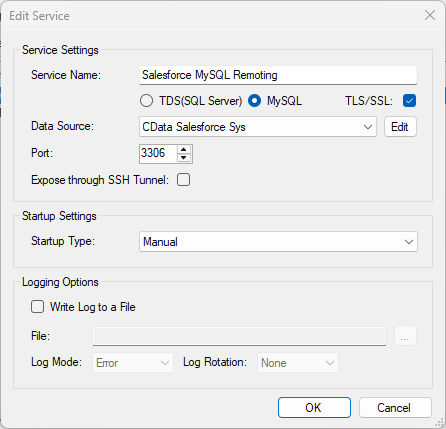
Create a FEDERATED Server and Tables for JD Edwards Data
After you have configured and started the service, create a FEDERATED server to simplify the process of creating FEDERATED tables:
Create a FEDERATED Server
The following statement will create a FEDERATED server based on the ODBC Driver for JD Edwards. Note that the username and password of the FEDERATED server must match a user account you defined on the Users tab of the SQL Gateway.
CREATE SERVER fedJDEdwards
FOREIGN DATA WRAPPER mysql
OPTIONS (USER 'sql_gateway_user', PASSWORD 'sql_gateway_passwd', HOST 'sql_gateway_host', PORT ####, DATABASE 'CData JDEdwards Sys');
Create a FEDERATED Table
To create a FEDERATED table using our newly created server, use the CONNECTION keyword and pass the name of the FEDERATED server and the remote table (AccountsPayable.AccountLedger). Refer to the following template for the statement to create a FEDERATED table:
CREATE TABLE fed_accountspayable.accountledger (
  ...,
  documentnumber  TYPE(LEN),
  amount  TYPE(LEN),
  ...,
)
ENGINE=FEDERATED
DEFAULT CHARSET=latin1
CONNECTION='fedJDEdwards/accountspayable.accountledger';
NOTE: The table schema for the FEDERATED table must match the remote table schema exactly. You can always connect directly to the MySQL remoting service using any MySQL client and run a SHOW CREATE TABLE query to get the table schema.
Execute Queries
You can now execute queries to the JD Edwards FEDERATED tables from any tool that can connect to MySQL, which is particularly useful if you need to JOIN data from a local table with data from JD Edwards. Refer to the following example:
SELECT
  fed_accountspayable.accountledger.documentnumber,
  local_table.custom_field
FROM
  local_table
JOIN
  fed_accountspayable.accountledger
ON
  local_table.foreign_documentnumber = fed_accountspayable.accountledger.documentnumber;
Ready to get started?
Download a free trial of the JD Edwards ODBC Driver to get started:
Download NowLearn more:
 JD Edwards ODBC Driver
The JD Edwards ODBC Driver is a powerful tool that allows you to connect with live data from JD Edwards, directly from any applications that support ODBC connectivity.
Access JD Edwards data like you would a database - read JD Edwards AccountLedger, ProposalofPayment, ContractRevenueSummary, EmployeeEnrollment, RentIncreaseAmounts, etc. through a standard ODBC Driver interface.