




Connect to Linear Data from PowerBuilder via JDBC

The CData JDBC driver for Linear is a standards-based control that can be used from any platform or development technology that supports JDBC, including PowerBuilder. This article shows how to use the CData JDBC Driver for Linear in PowerBuilder.
This article shows how to create a basic PowerBuilder application that uses the CData JDBC Driver for Linear to retrieve data.
Connect to Linear Data from PowerBuilder
Follow the steps below to use the Database Painter tool to create a database profile based on an JDBC URL for Linear. You can use a database profile to save connection properties. In the Database Painter, you can graphically manipulate data as well as execute SQL queries.
Add the driver JAR to the PowerBuilder classpath. Set the CLASSPATH system environment variable to the path to the driver JAR, located in the lib subfolder of the installation directory.
Note: If you are using PowerBuilder Classic, you can also add the path to the driver JAR by clicking Tools -> System Options -> Java.
- Click Tools -> Database Painter.
- Right-click the JDBC node and click New Profile.
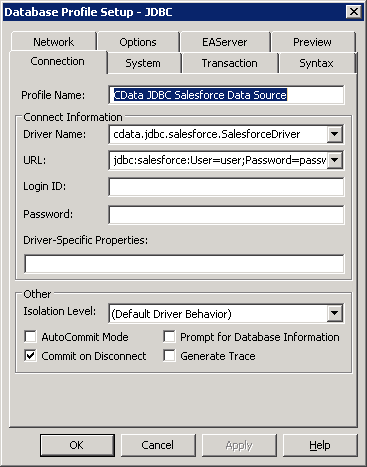
- In the Database Profile Setup dialog, enter the following:
- Profile Name: Enter a user-friendly name for the profile.
- Driver Name: Enter the class name of the driver, cdata.jdbc.linear.LinearDriver
- URL: Enter the JDBC URL.
You can authenticate to Linear with a personal API key or with OAuth 2.0. The API key is the simplest option for connecting with your own Linear account.
Authenticating with an API Key
Set the following connection properties:
- AuthScheme: Set this to APIKey.
- APIKey: A Linear personal API key.
To create a personal API key, log in to Linear, open Settings > Security & access > Personal API keys, select New API key, and create it. Copy the key immediately, because Linear shows it only once.
Authenticating with OAuth
OAuth requires a custom OAuth application registered in Linear (Settings > API > OAuth applications), which provides the OAuthClientId and OAuthClientSecret. Two flows are supported:
- Authorization code: Set AuthScheme to OAuth, InitiateOAuth to GETANDREFRESH, and provide OAuthClientId, OAuthClientSecret, and the CallbackURL defined in your application (e.g., http://localhost:33333). The driver opens Linear in your browser so you can grant access.
- Client credentials: Set AuthScheme to OAuthClient and provide OAuthClientId and OAuthClientSecret. This authenticates the application itself, with no browser interaction, and suits machine-to-machine integrations.
By default, the driver requests the read,write scopes. The driver refreshes the access token automatically when it expires.
Built-in Connection String Designer
For assistance in constructing the JDBC URL, use the connection string designer built into the Linear JDBC Driver. Either double-click the JAR file or execute the jar file from the command-line.
java -jar cdata.jdbc.linear.jarFill in the connection properties and copy the connection string to the clipboard. A typical JDBC URL is below:
jdbc:linear:AuthScheme=APIKey;APIKey=myAPIKey;
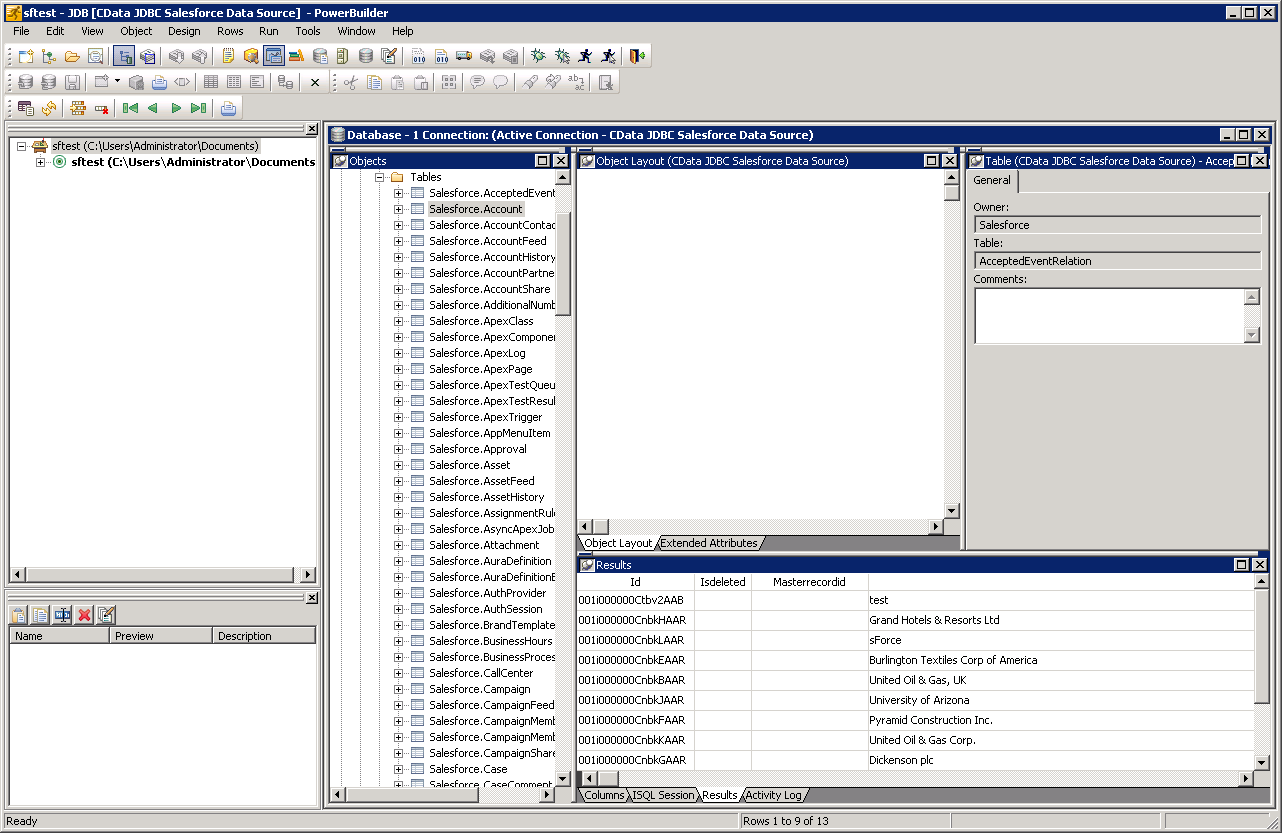
- To view and modify a table, right-click a table and then click Edit Data -> Grid.
Using Linear Data with PowerBuilder Controls
You can use standard PowerBuilder objects to connect to JDBC data sources and execute queries. The following example shows how to retrieve Linear data into a DataWindow. You can add the following code to the open method:
SQLCA.DBMS = "JDBC"
SQLCA.AutoCommit = False
SQLCA.DBParm = "Driver='cdata.jdbc.linear.LinearDriver',URL='jdbc:linear:AuthScheme=APIKey;APIKey=myAPIKey;";
CONNECT USING SQLCA;
dw_team.SetTransObject(SQLCA);
dw_team.Retrieve();
Ready to get started?
Download a free trial of the Linear Driver to get started:
Download NowLearn more:
 Linear JDBC Driver
Rapidly create and deploy powerful Java applications that integrate with Linear data including AgentSession, Comment, Customer, Cycle, Initiative, Integration, Issue, ProjectStatus, Release, Team, User, and more!