




Query Linear Data as a MySQL Database in Node.js

You can use the SQL Gateway from the ODBC Driver for Linear to query Linear data through a MySQL interface. Follow the procedure below to start the MySQL remoting service of the SQL Gateway and start querying using Node.js.
Connect to Linear Data
If you have not already done so, provide values for the required connection properties in the data source name (DSN). You can use the built-in Microsoft ODBC Data Source Administrator to configure the DSN. This is also the last step of the driver installation. See the "Getting Started" chapter in the help documentation for a guide to using the Microsoft ODBC Data Source Administrator to create and configure a DSN.
You can authenticate to Linear with a personal API key or with OAuth 2.0. The API key is the simplest option for connecting with your own Linear account.
Authenticating with an API Key
Set the following connection properties:
- AuthScheme: Set this to APIKey.
- APIKey: A Linear personal API key.
To create a personal API key, log in to Linear, open Settings > Security & access > Personal API keys, select New API key, and create it. Copy the key immediately, because Linear shows it only once.
Authenticating with OAuth
OAuth requires a custom OAuth application registered in Linear (Settings > API > OAuth applications), which provides the OAuthClientId and OAuthClientSecret. Two flows are supported:
- Authorization code: Set AuthScheme to OAuth, InitiateOAuth to GETANDREFRESH, and provide OAuthClientId, OAuthClientSecret, and the CallbackURL defined in your application (e.g., http://localhost:33333). The driver opens Linear in your browser so you can grant access.
- Client credentials: Set AuthScheme to OAuthClient and provide OAuthClientId and OAuthClientSecret. This authenticates the application itself, with no browser interaction, and suits machine-to-machine integrations.
By default, the driver requests the read,write scopes. The driver refreshes the access token automatically when it expires.
Configure the SQL Gateway
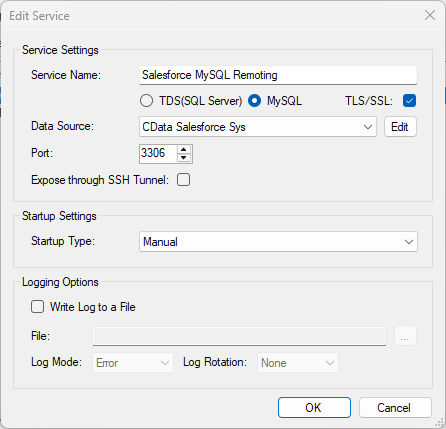
See the SQL Gateway Overview to set up connectivity to Linear data as a virtual MySQL database. You will configure a MySQL remoting service that listens for MySQL requests from clients. The service can be configured in the SQL Gateway UI.
Query Linear from Node.js
The following example shows how to define a connection and execute queries to Linear with the mysql module. You will need the following information:
- Host name or address, and port: The machine and port where the MySQL remoting service is listening for MySQL connections.
- Username and password: The username and password of a user you authorized on the Users tab of the SQL Gateway.
- Database name: The DSN you configured for the MySQL remoting service.
Connect to Linear data and start executing queries with the code below:
var mysql      = require('mysql');
var connection = mysql.createConnection({
  host     : 'localhost',
  database : 'CData Linear Sys',
  port	   : '3306',
  user     : 'mysql_user',
  password : 'test'
});
connection.connect();
connection.query('SELECT * FROM Team', function(err, rows, fields) {
  if (err) throw err;
  console.log(rows);
});

connection.end();
Ready to get started?
Download a free trial of the Linear ODBC Driver to get started:
Download NowLearn more:
 Linear ODBC Driver
The Linear ODBC Driver is a powerful tool that allows you to connect with live data from Linear, directly from any applications that support ODBC connectivity.
Access Linear data like you would a database - read Linear AgentSession, Comment, Customer, Cycle, Initiative, Integration, Issue, ProjectStatus, Release, Team, User, etc. through a standard ODBC Driver interface.