






Query Reply.io Data as a MySQL Database in Node.js

You can use the SQL Gateway from the ODBC Driver for Reply.io to query Reply.io data through a MySQL interface. Follow the procedure below to start the MySQL remoting service of the SQL Gateway and start querying using Node.js.
Connect to Reply.io Data
If you have not already done so, provide values for the required connection properties in the data source name (DSN). You can use the built-in Microsoft ODBC Data Source Administrator to configure the DSN. This is also the last step of the driver installation. See the "Getting Started" chapter in the help documentation for a guide to using the Microsoft ODBC Data Source Administrator to create and configure a DSN.
The Reply.io API uses API Key authentication via the x-api-key request header.
Using API Key Authentication
Your Reply.io API key is required to create a connection. To obtain your API key:
- Log into your Reply.io account.
- Click your profile icon and select Settings.
- Navigate to the API section.
- Copy your API Key.
After obtaining your API key, set the following connection properties:
- AuthScheme: Set this to APIKey.
- APIKey: Set this to your Reply.io API key.
- UserEmail (optional): Set this to the email address of the Reply.io user on whose behalf requests are made.
Example connection string:
Profile=C:\profiles\ReplyIO.apip;AuthScheme=APIKey;ProfileSettings='APIKey=your_api_key';
Configure the SQL Gateway
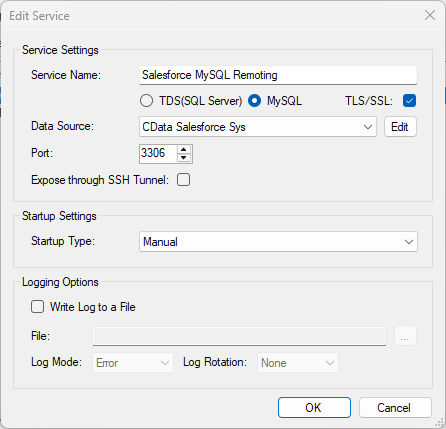
See the SQL Gateway Overview to set up connectivity to Reply.io data as a virtual MySQL database. You will configure a MySQL remoting service that listens for MySQL requests from clients. The service can be configured in the SQL Gateway UI.
Query Reply.io from Node.js
The following example shows how to define a connection and execute queries to Reply.io with the mysql module. You will need the following information:
- Host name or address, and port: The machine and port where the MySQL remoting service is listening for MySQL connections.
- Username and password: The username and password of a user you authorized on the Users tab of the SQL Gateway.
- Database name: The DSN you configured for the MySQL remoting service.
Connect to Reply.io data and start executing queries with the code below:
var mysql      = require('mysql');
var connection = mysql.createConnection({
  host     : 'localhost',
  database : 'CData API Sys',
  port	   : '3306',
  user     : 'mysql_user',
  password : 'test'
});
connection.connect();
connection.query('SELECT * FROM BillingInfo', function(err, rows, fields) {
  if (err) throw err;
  console.log(rows);
});

connection.end();